
Reducing Operational Costs: A Practical Framework for 2026
A practical framework for reducing operational costs: find cost drivers, rank quick wins, automate follow-ups and measure real ROI.
Renegotiating suppliers and cutting headcount aren't the best starting points for reducing operational costs. Before either, check what you're paying for but not using, what customers already owe you, and what your team repeatedly fixes. Those checks can release cash without weakening delivery or starting a lengthy commercial negotiation.
The harder discipline is separating money saved from time freed. An automation that clears someone's afternoon may improve the business, but it hasn't reduced payroll. Build your cost audit around that distinction, and you'll make better decisions about what to cancel, what to automate and what to leave alone.
Table of Contents
- Find Where Your Operating Money Actually Goes
- Rank Savings Opportunities and Pick Quick Wins First
- Automate Follow-Ups, CRM Updates and Weekly Reports
- Recover Cash Lost to Late Payments
- Measure Net Savings Without Counting False Wins
- Apply the Framework to Freelancers, Small Teams and Sales Stacks
- Start Your First Cost Pilot This Month
Find Where Your Operating Money Actually Goes
Start with bank transactions, supplier invoices and your team's calendars, not a list of tools you'd like to buy. Build a spreadsheet with a cost owner, billing frequency, cancellation terms, operational purpose and measurement method for each recurring expense.
Group spending into people time, software and subscriptions, energy and premises, and operational leakage. Split leakage into rework and late payment so you can distinguish money spent correcting mistakes from money tied up in unpaid invoices.
Operating cost drivers and how to measure them
| Cost driver | How to measure it | Warning sign |
|---|---|---|
| Staff time on admin | Hours per week logged for follow-ups, CRM entry and reports | The same tasks repeated daily across tools |
| Software and subscriptions | Paid seats compared with active users, reviewed monthly | Paid seats well above active users across consecutive monthly reviews |
| Energy and premises | Metered kWh and monthly bills, compared against output | Bills rising while output stays flat |
| Rework and errors | Count of corrected records, resent emails and redone reports | The same fix needed every week |
| Late payments | Average days from invoice to cash, and hours spent chasing | Invoices paid well after agreed terms, with staff chasing each week |
Don't treat every inactive software account as disposable. A backup administrator or occasional finance user may still serve a necessary purpose. Ask the owner to identify the workflow that would stop if you removed the licence, then check whether a cheaper access level would preserve it.
Measure consumption, not just expenditure
Energy deserves its own line because managers can miss it when auditing payroll and subscriptions. A higher utility bill might reflect higher prices, longer opening hours or inefficient equipment. Compare metered consumption with output before deciding which problem you're solving.
The government's Business Energy Statistical Summary describes the national ambition for businesses and industry to improve energy efficiency by at least 20% by 2030, with government modelling projecting business energy-cost reductions of up to £6 billion annually in 2030. That's a national projection, not a saving to insert into your budget.
For your own operation, record kWh alongside completed orders, occupied desk days or another useful output measure. Check timers, heating schedules and equipment left running outside working hours before considering capital expenditure.
Build a baseline you can trust
For a practical starting exercise, use a fortnight to assemble recent invoices, export CRM activity and review shared-inbox traffic. During a normal working week, ask staff to log the task, time spent, system used and whether they had to correct anything.
Keep the log simple enough that people complete it. Separate active work from waiting time: a report that takes an afternoon to arrive may require little labour but still delay a decision.
Audit test: If you can't express a cost in hours or pounds per month, it isn't yet a usable reduction target.
Rank Savings Opportunities and Pick Quick Wins First
Rank opportunities by value, effort and certainty, rather than by how impressive the proposed automation sounds. Cancelling an unnecessary subscription has a different financial effect from making an employee's reporting work faster.
For labour-heavy tasks, use this planning formula:
Annual capacity value = hours saved per week × loaded hourly cost × working weeks
Then divide annual value by setup hours to produce a rough priority score. This isn't financial payback, because its denominator is time rather than money. It's a way to compare implementation effort.
The visual shows the calculation and the inputs you'll need.
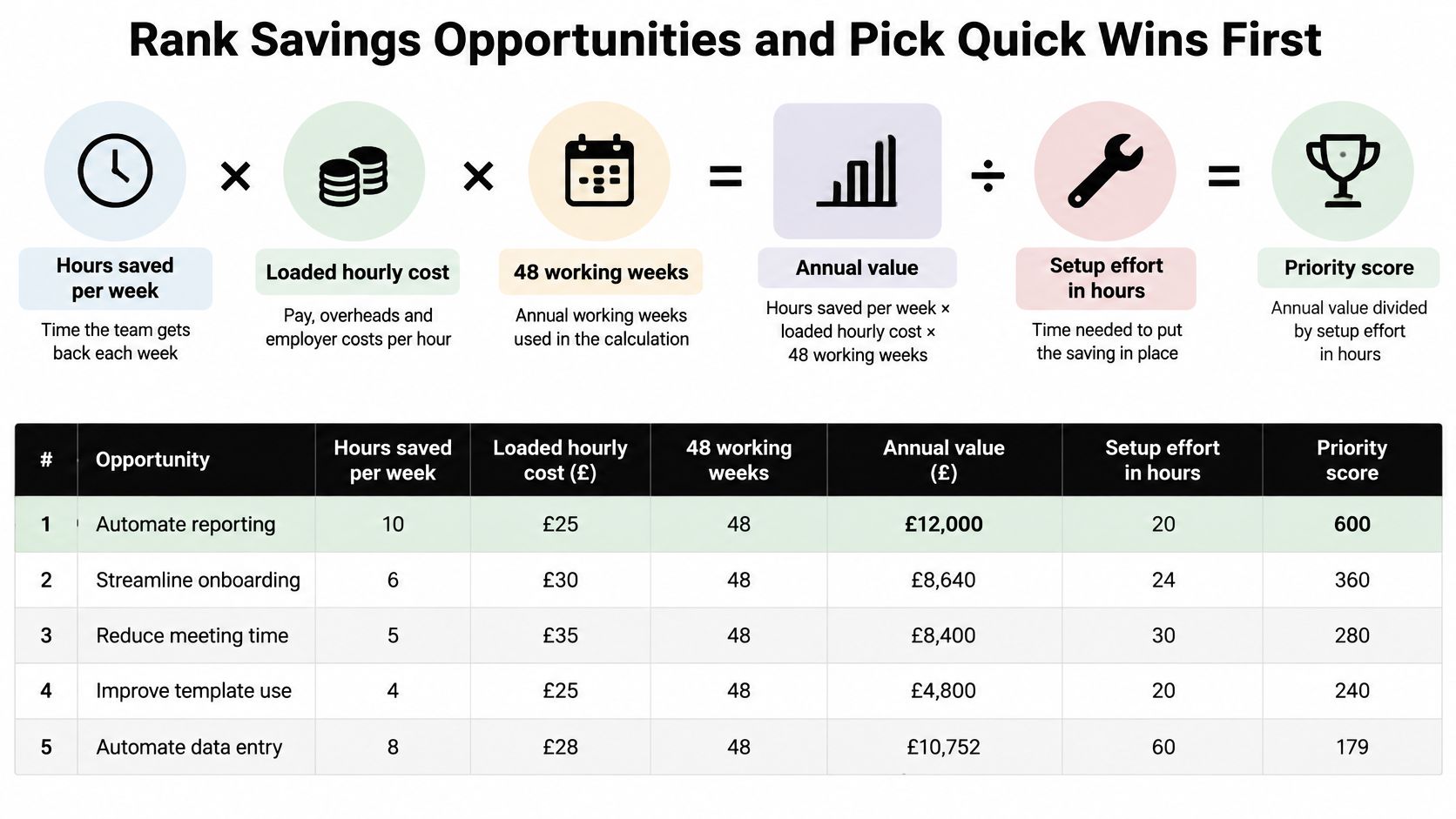
Compare opportunities on the same assumptions
The following hypothetical worked example uses a £28 loaded hourly rate and 48 working weeks. These are planning assumptions, not market benchmarks. Replace them with your payroll costs, working calendar and observed task times.
Worked example: annual value of each opportunity
| Opportunity | Hours saved per week | Loaded hourly cost (£) | Effort |
|---|---|---|---|
| Follow-up emails | 4 | 28 | Low |
| CRM record updates | 3 | 28 | Low |
| Weekly reporting | 2 | 28 | Medium |
| Duplicate data entry | 1.5 | 28 | Medium |
| Unused software seats | Not a labour saving | Use cancelled invoice value | Low |
For follow-up emails, 4 × £28 × 48 = £5,376 of annual capacity value. Using the same hypothetical assumptions, CRM updates represent £4,032, weekly reporting £2,688 and duplicate entry £2,016. Those figures describe time value before implementation costs, not guaranteed cash reductions.
Unused seats need a separate calculation: cancelled recurring charges minus replacement costs and any termination fee. Don't force subscriptions into an hourly model just to make the table look consistent.
Favour a reversible change over a complicated promise
Start with unnecessary licences and duplicate tools where removing them won't break integrations, retention requirements or customer delivery. Supplier renegotiation remains worthwhile, but it can involve notice periods, minimum commitments and concessions elsewhere in the contract.
Technology isn't an automatic cost cut. In 2025, 29% of UK businesses reported that technology adoption had reduced production or operating costs, according to the Department for Science, Innovation and Technology's UK Innovation Diffusion and Adoption Survey.
Choose frequent, stable tasks with clear inputs and an obvious owner. I'd limit the active shortlist to a pair of quick wins, so the same people aren't simultaneously testing workflows, learning tools and repairing disrupted processes.
Automate Follow-Ups, CRM Updates and Weekly Reports
Automate the hand-offs, not just the typing. A useful workflow knows which record to read, what event should trigger action and when a person must approve the result.
Zenfox.ai can run workflows across Gmail, Slack, HubSpot and Drive. Start with a narrow task and retain the source thread or document alongside each output so a reviewer can verify it.
The workflow diagram provides a starting structure; your approval rules should reflect the consequences of a mistake.
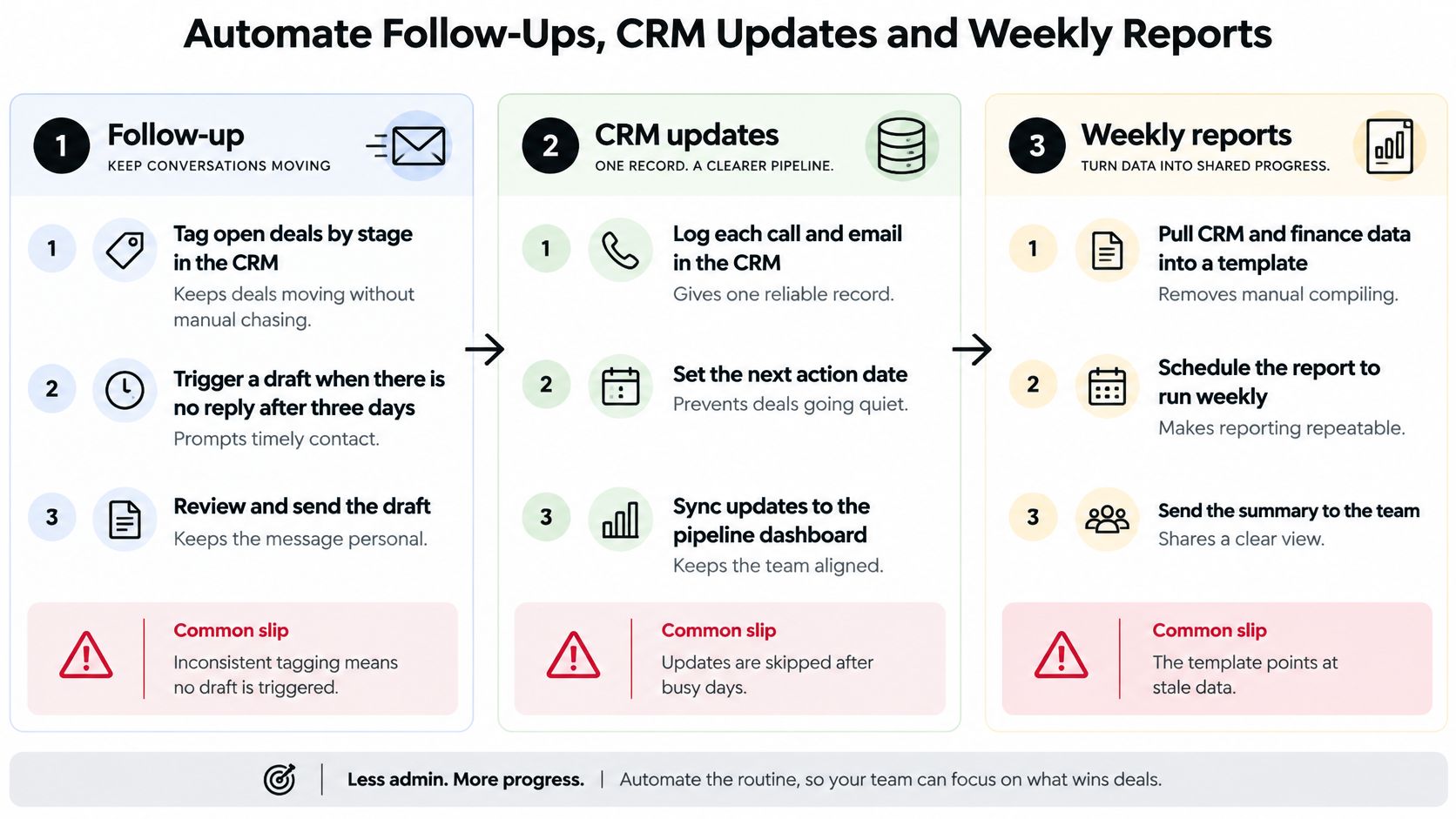
Follow-ups that use the current conversation
- Tag open deals by stage. Give proposal sent, awaiting decision and paused deals distinct treatment, so the workflow doesn't chase someone who has already declined.
- Set a draft trigger. For a hypothetical pilot, trigger after three working days without a reply, checking both the thread and CRM for newer activity.
- Draft from the latest exchange. Include the last agreed next step rather than generating a generic request for an update.
- Hold sensitive messages for approval. Price changes, contractual commitments and complaints should go to the responsible person before sending.
The failure to watch is a convincing draft built from a stale thread. If the customer has replied elsewhere, the automation needs to find that activity or flag uncertainty.
CRM updates without silent overwrites
- Capture meeting notes and action items from calendar and email records, retaining a reference to the source.
- Populate stage, next action and next-action date only when the source supports the change.
- Flag conflicting values for review instead of overwriting an existing commitment.
Match contacts on a normalised email address before creating records. Shared mailboxes and changed addresses still need exception handling, so don't assume email matching resolves every identity conflict.
Weekly reporting from fresh records
- Pull current pipeline, invoice and task counts on the agreed reporting day.
- Compare them with the previous reporting period and the team's target, using consistent definitions.
- Post a short Slack summary showing material changes, missing information and the person responsible for each unresolved issue.
A report assembled automatically from old exports is still an unreliable report. Display the extraction time and pause publication when a required connection fails.
The government's Digital and Data Benefits Framework distinguishes cashable savings that reduce budgets from wider productivity benefits. Evaluate each workflow against completed-task cost, quality and human intervention, rather than counting successful automation runs alone.
Use these practical AI automation workflows to shape a bounded pilot, not an all-at-once rollout. Messages, research, connected actions, automations and AI workers all draw on our plan capacity; frequent or complex automations consume more than occasional, simple tasks. Every run uses capacity, so check execution frequency before scaling.
Recover Cash Lost to Late Payments
Invoice chasing consumes staff attention while the unpaid balance restricts your cash. UK government and Small Business Commissioner research on the economic impact of late payments estimates that late payments cost the economy almost £11 billion annually, with affected businesses spending an average of 86 hours a year chasing payment.
Use the illustration as a prompt to account for both the unpaid invoice and the work surrounding it.
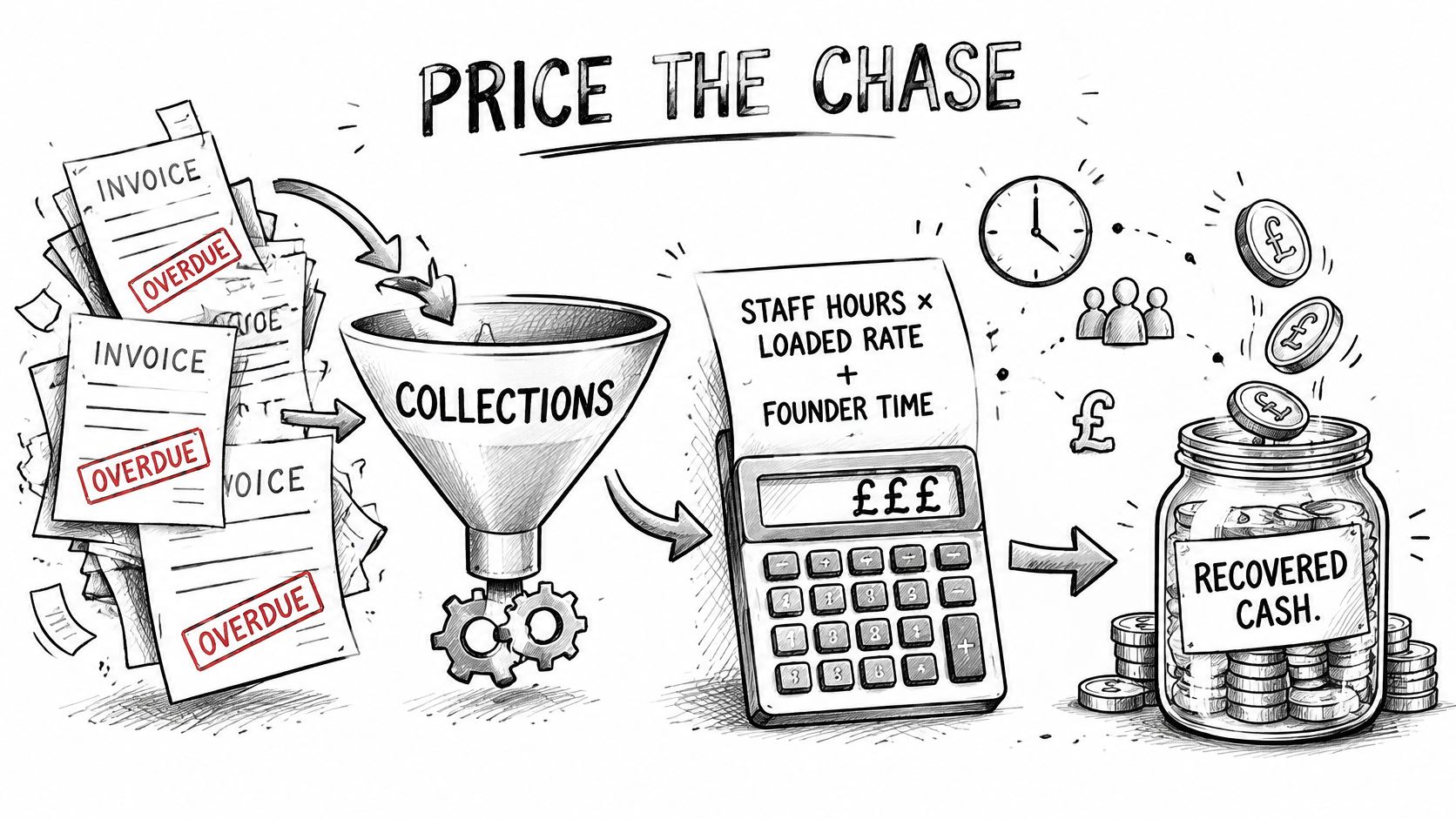
Price the chase before changing the reminders
Calculate chasing hours × loaded hourly cost, then add identifiable borrowing charges and external collection expenses. Record founder time and interrupted sales work separately so you don't count the same hour twice.
Treat delayed hiring and missed investment as consequences to investigate, not invented expenses to add to a savings total. Recovering an invoice improves cash availability; it doesn't automatically create additional revenue or reduce operating expenditure.
Give every overdue account an owner
Use this illustrative escalation schedule, adjusting it to contractual terms and customer circumstances:
- Agree terms upfront. Put the due date and payment instructions in the contract and on the invoice.
- Send a reminder three days before payment is due, checking that the invoice reached the correct recipient.
- Escalate at seven and fourteen days overdue. Ask for a specific payment date and identify any dispute.
- At 30 days, make a personal call for balances above your internally agreed threshold.
- Review payment risk. Inspect the largest three overdue accounts and assign a next action.
- Offer an early-payment discount only when its cost is justified by margin and financing needs.
Keep wording firm and factual. Threatening an otherwise reliable customer before checking for an invoice error creates avoidable friction.
For additional context on organising the collection process, watch the video below.
Connect email, CRM and invoicing records so colleagues don't chase the same client independently. An invoice automation workflow should also stop reminders when payment arrives or a dispute requires review.
Track days sales outstanding, weekly chasing hours, overdue-value concentration and monthly cash recovered. This week, sort overdue invoices by age and value, verify the oldest balance, and send its first appropriate reminder.
Measure Net Savings Without Counting False Wins
Use a net calculation before sharing any claimed benefit with the budget owner:
Net annual benefit = gross benefit − tool fees − setup and training cost − ongoing review cost
Call it a benefit, rather than a cash saving, when the gross value represents salaried time. The label matters because tool invoices are real expenditure even when released staff hours haven't changed a budget.
Work through the full cost
Consider a hypothetical follow-up automation with £4,800 of annual time value, £600 in tool fees, £400 of setup labour and an hour of monthly review at £28. Review costs £336 annually, leaving £4,800 − £600 − £400 − £336 = £3,464 in first-year net capacity benefit.
At that assumed rate, the £400 setup allowance represents about 14.3 hours. For payback, exclude setup from recurring costs: monthly recurring benefit is (£4,800 − £600 − £336) ÷ 12 = £322, giving £400 ÷ £322 ≈ 1.24 months. That's capacity-value payback unless the released time produces an actual financial change.
The distinction matches the government's AI adoption research, in which 56% of businesses using AI reported improved workforce productivity, while 24% reported operating-cost reductions.
Savings types and how to report them
| Savings type | Counts as cashable? | Evidence to keep |
|---|---|---|
| Subscription cancelled | Yes, when expenditure falls | Invoice before and after the change |
| Late payments recovered | Cash recovered, not an operating-cost saving | Bank receipts matched against the overdue list |
| Hours redeployed to sales | No, report as capacity | Pipeline or revenue change in the same period |
| Errors avoided | Partly, where actual expenditure falls | Error count before and after, multiplied by evidenced cost per fix |
| Future hire avoided | No, report as avoided cost | Signed budget decision, not a forecast |
Price flexibility as well as the subscription
Compare monthly and annual commitments only after checking usage and review effort. Our annual billing costs 10 times the monthly rate for the year, saving two months' cost, but an annual commitment isn't the right choice for an unproven workflow.
Use an AI agent pricing comparison to examine the whole workload, including connected actions and usage capacity, rather than the headline subscription alone.
Report cashable savings, recovered cash, redeployed capacity and avoided costs on separate lines. Adding them into a single savings headline hides what actually changed.
Keep false actions, duplicate records, missed deadlines and escalation volume beside the financial figures. A workflow that looks cheaper because nobody checks its mistakes hasn't passed the test.
Apply the Framework to Freelancers, Small Teams and Sales Stacks
The best starting task depends on who currently absorbs the work. A freelancer needs usable time back between client commitments; an agency needs dependable hand-offs; a sales team needs records that colleagues can trust.
The following scenarios are hypothetical calculations, not customer results or forecasts.
A freelancer's reminder workload
Say a copywriter spends three hours weekly chasing invoices and following up proposals, valuing that time at £40 an hour. If reminders and draft preparation reduce the workload to an hour, the calculation is 2 × £40 × 48 working weeks = £3,840 gross annual capacity value.
Subtract the chosen tool's fee and any review effort not already included in the remaining hour. The practical question is whether the copywriter can use the released time for billable work, timely proposals or a shorter working day.
A small agency's shared administration
Suppose a five-person agency spends six hours weekly updating HubSpot and preparing reports at an assumed loaded rate of £28. If meeting-note capture and report assembly remove four hours, the gross annual value is 4 × £28 × 48 = £5,376.
Check whose time is released. Fragments spread across several people may be harder to redeploy than a protected block for the account manager responsible for renewals.
A sales stack with conflicting records
When Gmail, HubSpot and Drive contain different versions of a contact's next step, fix identity matching and source precedence before enabling writes. Use the following field sets consistently across connected tools:
- Follow-up template: Contact, last agreed next step, date due, draft status marked approved or held.
- CRM update template: Stage, next action, next date, source thread, conflict flag.
- Weekly report template: Pipeline value, overdue invoices, tasks due, change against the previous period and target, named risk.
For each scenario, compare completed work against the recorded baseline and deduct implementation costs. Keep field names identical during the pilot so you're testing the workflow rather than repeatedly repairing its mappings.
Start Your First Cost Pilot This Month
Pick a process with enough repetition to measure and limited consequences if something goes wrong. Freelancers can start with invoice reminders or proposal drafts; small teams can choose CRM hygiene or internal reporting.
Don't begin with a workflow nobody can explain. If staff disagree about which record is authoritative or who approves an exception, settle those questions before connecting an automation.
Give the pilot explicit boundaries
- Name the process owner. That person approves the workflow, reviews exceptions and can stop it.
- Capture a baseline over a representative period. A practical pilot design can use two to four weeks, extending it if trading conditions are unusual.
- Define success before launch. Measure cost per completed task, cycle time, first-time-right rate and human exception rate.
- Run a time-boxed trial with audit logs and a documented fallback. For example, use a four-week test with external messages held for approval.
- Set a stop rule. Pause unauthorised messages, unexplained record changes or failed payment-status checks rather than allowing repeat errors.
- Expand only when quality holds and the net benefit remains worthwhile after review.
The government's AI Adoption Survey executive summary supports staged experimentation and attention to net unit economics rather than automation volume alone. Keep integration maintenance in the owner's workload, including expired permissions, changed fields and failed scheduled runs.
Keep autonomy proportional to the risk
We can prepare briefings and reminders, and our AI workers can take on ongoing tasks while you control their scope and review progress. Start with a bounded responsibility and widen permissions only when the output justifies it.
Stop condition: If nobody can identify the source of an action or reverse an incorrect change, the workflow isn't ready for broader use.
Make a specific decision this week: choose the process, name its owner and schedule baseline recording before the month ends. Reducing operational costs starts with an observable change to a real expense or workflow, not a promise attached to another subscription.
Zenfox.ai offers connected-app automations for follow-ups, CRM updates, reports and ongoing tasks, with activity logs to support review. Visit Zenfox.ai to build a narrowly scoped cost pilot around a workflow you've measured, then judge it on net benefit and output quality.