
10 AI Automation Workflows That Save 10+ Hours Per Week
Discover 10 AI automation workflows that save 10+ hours per week. Learn to connect Gmail, HubSpot, and Slack to automate sales, ops, and reporting.
Your week probably doesn't disappear in one dramatic block. It leaks away in fragments.
A sales lead lands in Gmail and sits there while someone decides who owns it. A meeting ends, then another half hour goes into notes, action items, and sending recaps. A client asks for an update, which means checking Slack, HubSpot, Drive, and a spreadsheet before replying. By Friday, the calendar looks full, but too much of that time went into moving information around rather than doing the work that creates value.
That's why AI automation matters now. The UK government's AI Opportunities Action Plan was published in January 2025, and the Department for Science, Innovation and Technology's 2024 analysis highlighted how much repetitive digital work AI could reduce. In practical terms, reclaiming 2 hours per day adds up to 10 hours per week and roughly 520 hours per year, which is a meaningful operational gain for freelancers, sales teams, and managers handling admin-heavy work (Baked With on AI workflows and time savings).
The shift isn't about collecting more standalone AI tools. It's about building connected systems that receive information, decide what matters, and complete the next actions across the apps you already use.
Table of Contents
- Stop Drowning in Admin and Reclaim Your Week with AI
- From Single Tasks to Autonomous Systems
- 10 AI Workflows to Save Over 10 Hours Weekly
- Building Your First Automation in Plain English
- Connecting AI to Your Business Hubs
- Smart Governance for Your AI Workforce
- Your First Step Towards an Automated Business
Stop Drowning in Admin and Reclaim Your Week with AI
The pattern is familiar. You start the day intending to work on pipeline, delivery, or strategy. Then the inbox fills up, a customer asks for a status check, someone needs a quick summary from yesterday's call, and a lead form comes in without enough context to act on quickly.
None of those tasks is hard. The problem is volume and repetition.
The fastest gains rarely come from one big transformation project. They come from taking the jobs that happen every day, sorting messages, logging information, drafting follow-ups, producing updates, and handing them to a system that can execute consistently. That's why teams looking for practical implementation help often start with resources such as SupportGPT for businesses, which focuses on turning repeated business interactions into structured AI-assisted processes.
Before and after the workday
Before automation, a manager touches the same piece of information several times. An email becomes a Slack message. That Slack message becomes a CRM note. The CRM note becomes part of a weekly report. Every handoff costs attention.
After automation, the flow changes:
- An incoming event triggers work: A form submission, email, booked meeting, or uploaded document starts the process.
- AI interprets the context: It identifies intent, extracts details, and decides what should happen next.
- Apps update automatically: Gmail, HubSpot, Slack, Drive, and task tools stay in sync without manual copying.
Practical rule: If a person repeatedly moves information from one system to another, that process is a candidate for automation.
This is why reclaiming a full day per week is realistic. The savings don't come from one dramatic shortcut. They come from removing dozens of low-value decisions and handoffs across the week.
What works and what doesn't
Some automations fail because teams start with tasks that are too vague. “Automate marketing” isn't a workflow. “When a lead replies positively, notify the rep in Slack, create a follow-up task, and update the CRM stage” is a workflow.
The best starting points share three traits:
- High frequency: The task happens often enough to matter.
- Clear rules: You can describe the desired outcome in plain language.
- Low downside: If the system gets it mostly right, a human can still review edge cases.
When those conditions are in place, AI stops being a novelty and starts functioning like an operational force multiplier.
From Single Tasks to Autonomous Systems
Most businesses already have some automation. A contact form creates a CRM record. A calendar booking sends a confirmation email. A new invoice gets filed into a folder.
Useful, but limited.
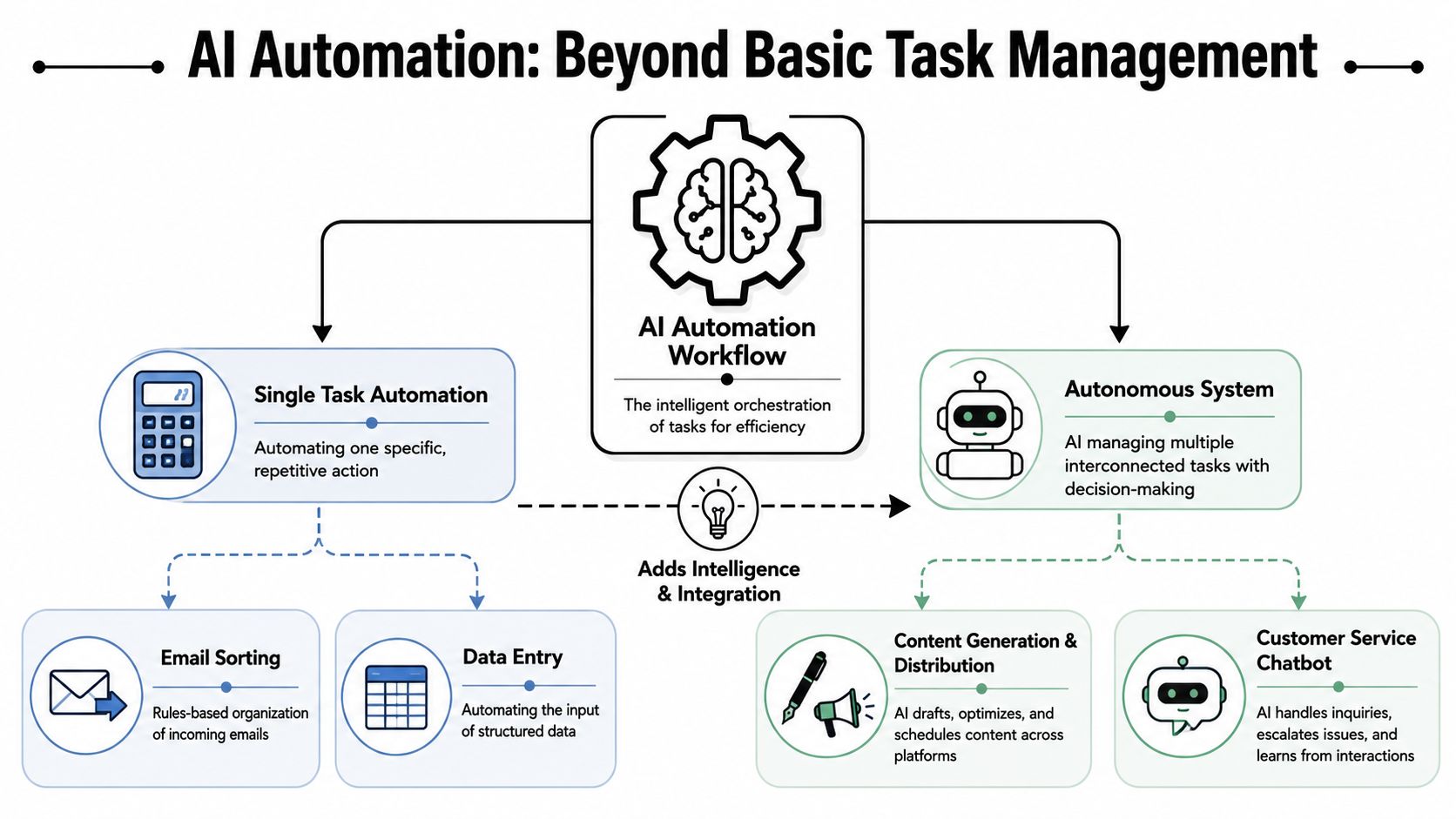
The difference between basic automation and modern AI systems is the difference between a smart plug and a smart home. A smart plug turns one lamp on at a set time. A smart home notices who's there, checks the conditions, and adjusts lights, temperature, and music together.
Why old automation hits a ceiling
Traditional automation is rigid. You define a trigger and a fixed action. If the input changes, the workflow breaks or needs another branch.
AI workflows are more adaptable because they can interpret messy inputs. They can read an email that doesn't follow a template, summarise a call, classify a request, or decide whether something belongs in sales, support, or operations.
The business case is getting stronger in the UK. The Office for National Statistics reported that 10.6% of UK businesses were using at least one AI technology in 2024, up from 8.2% in 2023 and 3.7% in 2022. The same release found adoption was highest in information and communication at 29.5% and professional, scientific and technical activities at 21.7%, sectors where email triage, reporting, and client communication are constant admin drains (Conbyt on UK AI adoption and workflows).
What an AI workflow actually contains
A good mental model has three parts:
| Element | What it does | Example |
|---|---|---|
| Trigger | Starts the workflow | New Gmail message, meeting recording, HubSpot form submission |
| Instruction | States the goal in plain English | Summarise this enquiry, identify urgency, and assign it |
| Action layer | Uses connected apps to complete work | Update HubSpot, notify Slack, file notes in Drive |
That's why integrated platforms matter more than isolated AI chat windows. A chat tool can help write a reply. An AI system connected to your stack can draft the reply, log the context, notify the owner, and create the next task automatically. One option in this category is Zenfox.ai, which connects tools like Gmail, Slack, HubSpot, and Drive and runs plain-English workflows across them.
The real time saving starts when AI stops assisting one screen and starts coordinating the whole process.
If you're evaluating automations, ask a simple question. Does this save one action, or does it complete one workflow? That distinction separates novelty from ROI.
10 AI Workflows to Save Over 10 Hours Weekly
The quickest route to saving time is choosing processes that are repetitive, rule-based, and cross multiple tools. In UK small and medium-sized businesses, one published workflow pattern, new lead → NLP classification → routing to pipeline owner, showed 60–180 minutes saved per week for AI lead triage and 45–120 minutes saved per week for instant follow-up email (True Future Media on AI workflows for small businesses).
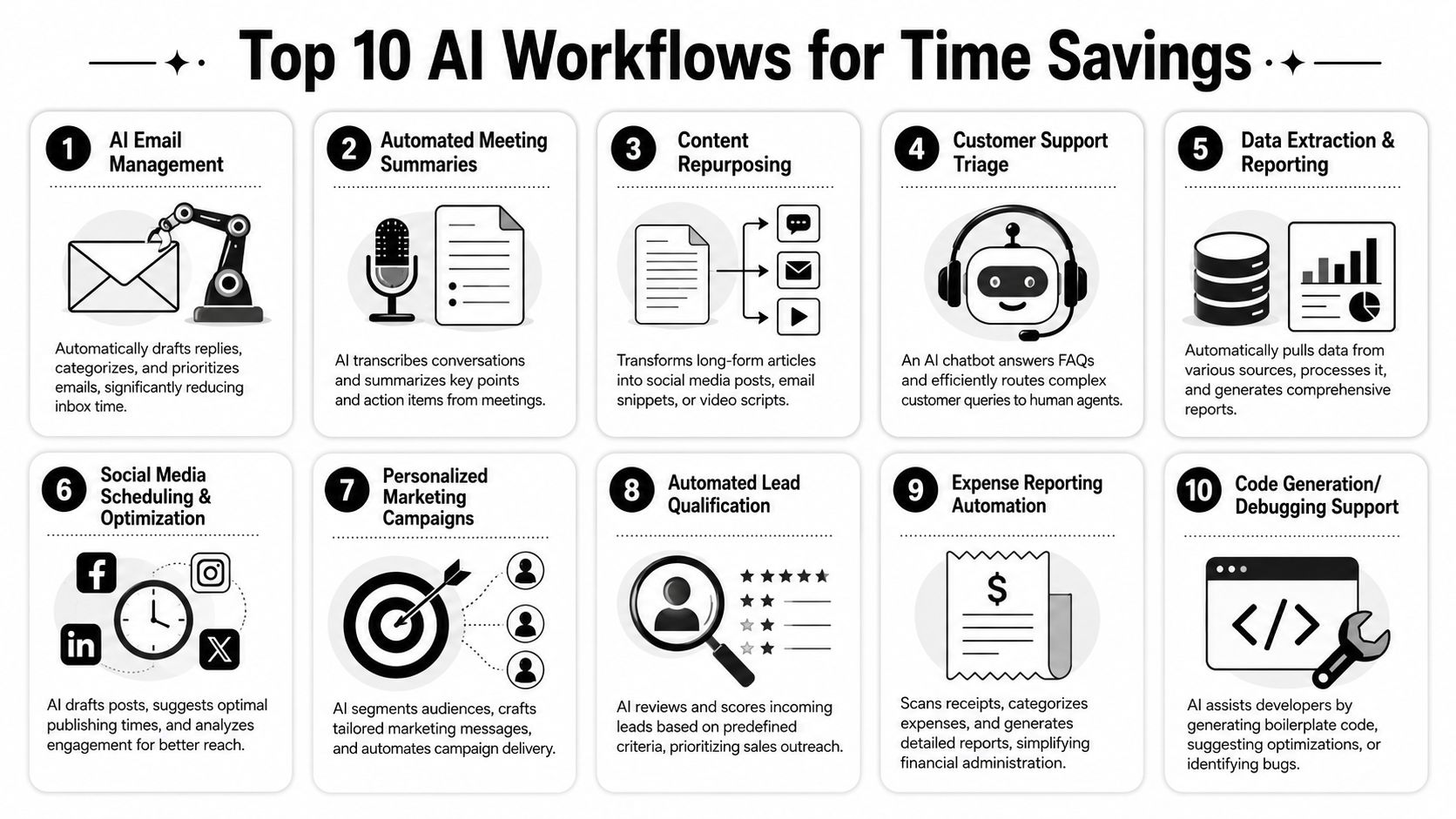
Use the list below as a shortlist, not a menu of disconnected tools.
Sales and marketing workflows
1. Autonomous lead triage and CRM entry
Problem: New leads arrive from forms, email, chat, and referrals with inconsistent information. Someone has to sort, label, assign, and log them.
Workflow: AI reads the enquiry, classifies intent, extracts company and contact details, creates or updates the CRM record, and routes the lead to the right owner.
Connected apps: Gmail, HubSpot, Slack.
This is one of the safest and highest-return starting points because the work is repetitive and the desired output is clear.
2. Instant lead follow-up
Problem: Teams lose time between lead capture and first response.
Workflow: As soon as a qualified enquiry lands, AI drafts or sends a personalized acknowledgement, adds relevant context from the original message, and alerts the responsible rep.
Connected apps: Forms, Gmail, HubSpot, Slack.
This works well when you define boundaries clearly. For example, auto-send only first-touch replies and hold nuanced sales conversations for human review.
3. Inbox qualification for sales conversations
Problem: Reps spend too much time reading emails that don't require their attention.
Workflow: AI monitors a shared inbox, tags high-intent messages, summarises what matters, and creates follow-up tasks only for replies that indicate real buying interest.
Connected apps: Gmail, HubSpot, task manager.
For teams refining this area, these email automation workflows are a useful reference point because they show how email actions become part of broader process design rather than isolated inbox rules.
4. Content repurposing and distribution
Problem: One webinar, article, or client Q&A creates useful material, but turning it into posts, summaries, and campaigns takes time.
Workflow: AI takes a source asset, extracts key points, drafts social posts, newsletter snippets, and short summaries, then routes drafts for approval.
Connected apps: Docs, Drive, social scheduler, email platform.
If your team is comparing summarisation tools before building this workflow, this roundup of best AI summarizers for 2026 can help you assess output style and review requirements.
Operations and admin workflows
A lot of weekly friction lives here. These processes don't look strategic, but they consume a surprising amount of attention.
5. Meeting summaries and action capture
Problem: Meetings end with verbal agreement and poor follow-through.
Workflow: AI transcribes the call, summarises decisions, extracts actions, assigns owners, and pushes notes to the right systems.
Connected apps: Zoom or Meet, Slack, CRM, Drive, task manager.
This works best when the summary is structured. Decisions, risks, actions, and follow-up date. Freeform summaries are harder to reuse.
6. Proposal and document intake
Problem: Contracts, invoices, statements of work, and supplier documents land in email and then sit in queues.
Workflow: AI reads the attachment, identifies the document type, extracts relevant fields, stores the file in the correct location, and notifies the owner if approval is needed.
Connected apps: Gmail, Drive, spreadsheet, Slack.
7. Customer support triage
Problem: Shared inboxes and support queues mix urgent issues with routine requests.
Workflow: AI classifies incoming messages, drafts standard responses for straightforward queries, and escalates exceptions with a concise summary.
Connected apps: Shared inbox, Slack, ticketing tool, knowledge base.
If a support workflow doesn't include clear escalation rules, it won't save time for long. It will just move confusion downstream.
8. Weekly reporting pack generation
Problem: Managers pull numbers, comments, screenshots, and updates from several tools every week.
Workflow: AI gathers source data, drafts a narrative summary, highlights anomalies or pending items, and sends the report to stakeholders.
Connected apps: CRM, spreadsheet, analytics dashboard, Slack, email.
The gain here is consistency. Reports get produced on time and in the same structure, which makes them easier to scan.
Research and strategy workflows
These aren't always the first automations teams build, but they often produce strong returns because they reduce context switching.
9. Competitive and topic monitoring
Problem: Teams want to track competitors, customer topics, and market changes without manually checking multiple sources.
Workflow: AI monitors selected sources, summarises developments, groups them by theme, and delivers a briefing on a set schedule.
Connected apps: Web sources, Slack, docs, email.
This is useful for sales enablement, product marketing, and founder-led businesses that need a fast signal without a full research session.
10. Searchable meeting knowledge base
Problem: Valuable client and internal knowledge gets buried in recordings and chat threads.
Workflow: Transcripts are ingested, meeting metadata is stored, summaries are created, and staff can retrieve past decisions without digging through folders.
Connected apps: Meeting recorder, database, Slack, CRM, Drive.
A practical implementation pattern for this is meeting transcription + searchable knowledge base + downstream summarisation, where transcript ingestion stores details like recording ID, start/end time, meeting title, and PDF artefacts so retrieval and recap generation happen automatically (YouTube example of transcript-to-knowledge-base workflow).
A quick way to prioritise
| Workflow | Function | Time Saved / Week |
|---|---|---|
| Autonomous lead triage and CRM entry | Sales | High |
| Instant lead follow-up | Sales | High |
| Inbox qualification for sales conversations | Sales | Medium to high |
| Content repurposing and distribution | Marketing | Medium to high |
| Meeting summaries and action capture | Operations | High |
| Proposal and document intake | Admin | Medium |
| Customer support triage | Support | High |
| Weekly reporting pack generation | Operations | Medium to high |
| Competitive and topic monitoring | Research | Medium |
| Searchable meeting knowledge base | Research and operations | High |
Building Your First Automation in Plain English
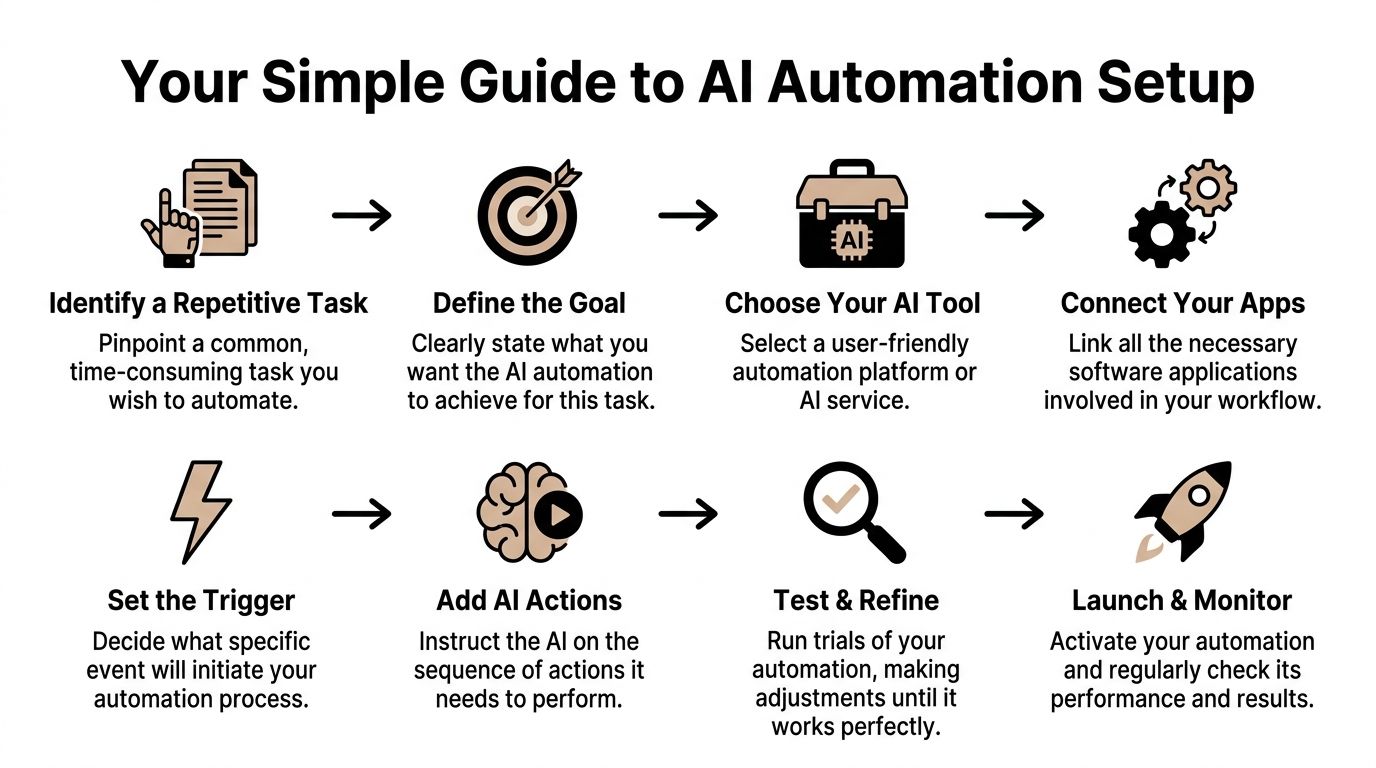
The biggest mistake non-technical teams make is assuming they need to design the perfect system upfront. They don't. They need one repetitive process, one clear outcome, and a short test cycle.
Start with the task that annoys you most
Good first automations usually come from irritation. The work that makes people say, “Why am I still doing this manually?”
Look for a task with these characteristics:
- It happens several times a week: One-off jobs are poor candidates.
- It follows a recognisable pattern: Even if the inputs vary, the output should be predictable.
- It touches multiple apps: That's where manual overhead tends to accumulate.
Examples include invoice intake, post-meeting recaps, lead assignment, and weekly reporting.
Write the workflow like an instruction to a capable assistant
Modern automation tools are far easier to configure than older rule builders. You don't need to think in code first. You need to describe the outcome clearly.
A useful plain-English prompt looks like this:
When I get an invoice in Gmail, extract the supplier name, amount, and due date, save the file to the finance folder in Google Drive, and add a row to my bills spreadsheet. If anything is missing, notify me in Slack.
That instruction includes the trigger, the fields to extract, the destinations, and the exception case. That's enough to build a reliable first version in many platforms. If you want to see how conversational setup works in practice, this guide on how to build a bot is a practical next step.
Test one path before adding complexity
Start with five or ten sample cases. Check where the workflow gets confused.
Then refine in this order:
- Fix the trigger first: Make sure the system starts at the right moment.
- Tighten the instruction: Vague language causes vague actions.
- Add exception handling last: Don't build every edge case on day one.
What usually doesn't work is trying to automate a messy process without simplifying it first. AI can improve execution. It can't rescue unclear ownership or broken approval logic.
Useful habit: Keep a short review log for the first week. Every wrong action or missed field tells you how to improve the workflow.
Connecting AI to Your Business Hubs
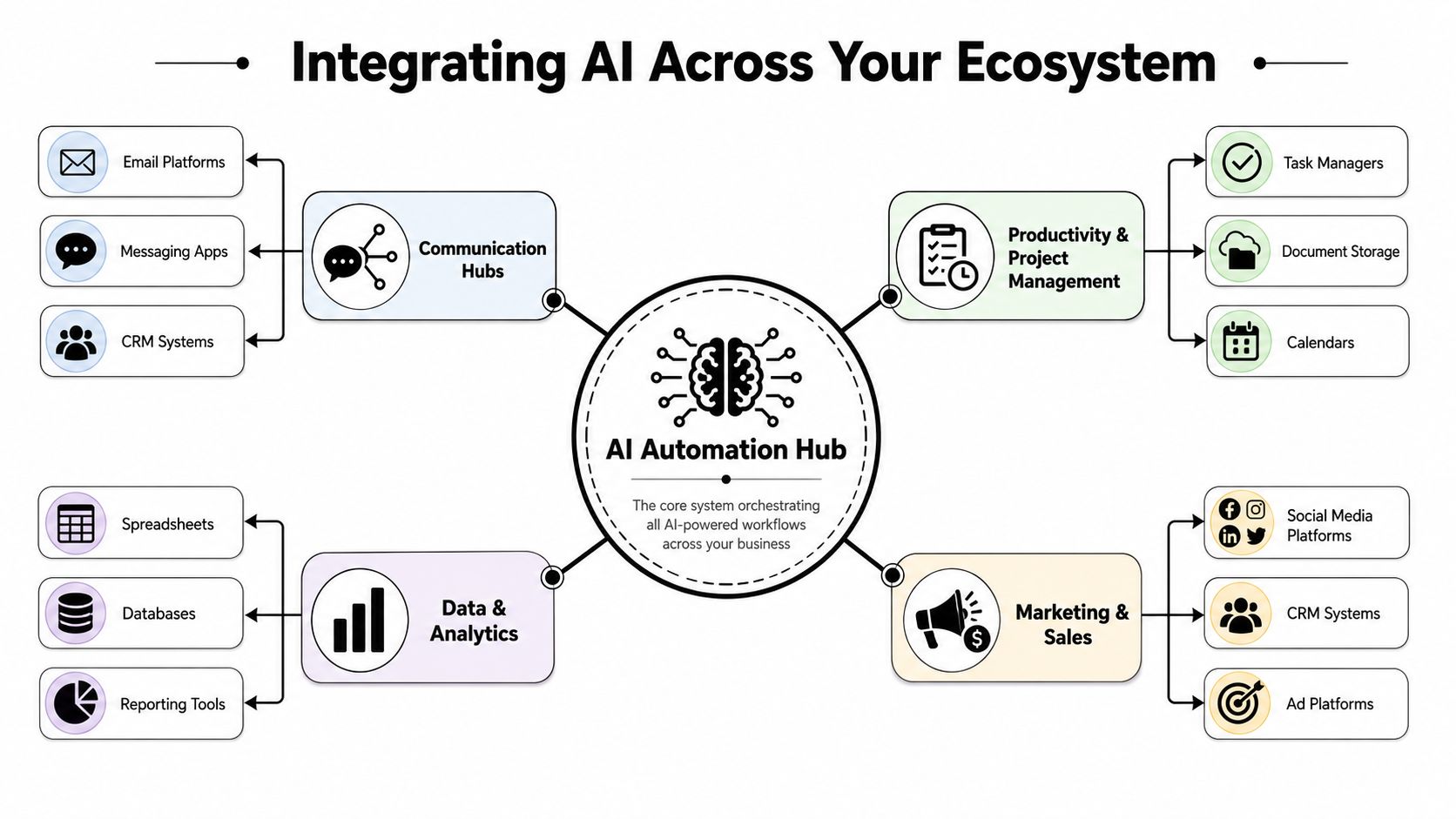
The greatest payoff shows up when automations stop living in silos. An isolated email assistant may save a few minutes. A connected system that understands your inbox, CRM, chat, files, and reporting tools changes how work moves across the business.
Where most automations break
Many teams start with a single app and hit a wall quickly. The email tool can draft replies, but it can't update deal stages. The CRM can trigger notifications, but it can't read the context in a document. The reporting tool can show the numbers, but it can't collect the underlying commentary.
That's usually an integration problem, not an AI problem.
There are two common ways to solve it:
- Native integrations: Pre-built connections for tools like Gmail, Slack, HubSpot, Google Drive, calendars, and project platforms.
- API-based connections: A way to connect less common software, internal systems, or niche tools through their documented interfaces.
If API integration is still fuzzy, this explainer on what API integration means is worth reading before you map your stack.
What a connected stack lets you do
Once an AI system can access the main business hubs, the workflow changes from “do one task” to “complete one process”.
A few examples:
| Business event | Connected response |
|---|---|
| A prospect replies positively | Summarise intent, update CRM, alert rep in Slack, create follow-up task |
| A client meeting ends | Store transcript, generate recap, attach notes to account, share actions internally |
| A weekly deadline arrives | Pull source data, draft status report, request approvals, send final version |
The practical question isn't whether AI can connect to your stack. It's whether the system has enough context to make the connection useful.
When the answer is yes, you get a central operating layer rather than a patchwork of app-specific automations. That's the shift business managers should care about.
Smart Governance for Your AI Workforce
Time savings matter, but leaders usually have two harder questions. Can we trust it, and how do we justify it?
The first answer is governance. The second is measurement.
The controls worth insisting on
If an automation platform can read email, customer records, and internal documents, security can't be treated as an afterthought.
Look for controls such as:
- Access discipline: Limit who can connect systems, approve workflows, and view sensitive outputs.
- Audit visibility: You need an activity log showing what the AI did, where it acted, and what data it touched.
- Compliance alignment: For UK and European teams, GDPR alignment matters. So do encryption and documented handling practices.
- Separation for sensitive work: Some organisations need more restricted environments for customer data, finance, or regulated operations.
Teams working in sectors with heavier data handling requirements often benefit from practical governance references such as this guide to data governance for e-commerce teams, even if their use case sits outside pure e-commerce.
A better way to think about ROI
Don't measure value only by asking, “How many hours did we save?” That matters, but it's incomplete.
A stronger ROI view includes:
- Response speed: Did leads or clients get answers faster?
- Error reduction: Did fewer records go missing or get logged incorrectly?
- Managerial consistency: Did reports, summaries, and handoffs become more reliable?
- Capacity created: Did staff spend more time on selling, advising, or solving exceptions?
The workflows that succeed are usually the ones with clear guardrails and visible business outcomes. The ones that fail are often too broad, too unsupervised, or too poorly defined.
Your First Step Towards an Automated Business
The idea behind 10 AI automation workflows that save 10+ hours per week isn't that every team needs ten new systems tomorrow. It's that most businesses already have enough repetitive work to justify building one connected workflow now.
Start with the task your team repeats most often and resents most consistently. Shared inbox sorting. Meeting recaps. Lead routing. Weekly reporting. Pick one.
Then make the process explicit. Define the trigger, the desired outcome, the apps involved, and the exceptions that still need a human. That's usually enough to move from theory to a usable first workflow.
Businesses don't reclaim a day a week by buying random AI tools. They reclaim it by turning repeated admin into reliable systems.
If you want to put that into practice, Zenfox.ai is built for exactly this kind of work. You describe the outcome in plain English, connect the tools your team already uses, and let the system handle repeatable actions across email, CRM, chat, documents, and reporting. A sensible first move is to automate one painful workflow, test it for a week, and expand only after you can see the time and process gains clearly.