Invoice Automation Solution: Your 2026 Guide
Discover how an invoice automation solution transforms your business. Our 2026 guide covers features, benefits, and how to choose the right tool.
Your invoices probably don't arrive in one neat queue.
They land in Gmail, get forwarded in Slack, sit in a shared Drive folder, attach themselves to a HubSpot deal, and then wait for someone in finance to work out what belongs where. A founder approves one from a phone. An ops manager asks if the PO exists. Someone else copies totals into Xero or QuickBooks and hopes the supplier name matches the record already in the system.
That's the problem with invoice processing for small teams and growing businesses. It isn't only the reading of the document. It's the trail of handoffs after the document is read.
A lot of software still treats “automation” as a scanning problem. But for UK teams, that framing misses the bigger issue. As UK finance modernisation guidance puts it, the underserved question is not whether a system can read invoices, but whether it can safely execute the full process with UK-grade control and traceability. That's why teams looking at invoice handling should also understand the wider procurement and payment chain. GenerateSEPA's P2P insights are useful here because they show how invoice work sits inside a broader purchase-to-pay operating model, rather than as an isolated admin task.
Table of Contents
- The End of Manual Invoice Overload
- What Is an Invoice Automation Solution Really
- The Core Features of a Modern Solution
- Strategic Benefits Beyond Just Saving Time
- An End-to-End Automated Invoice Workflow
- How to Choose and Implement Your Solution
- Measuring Success and Avoiding Common Pitfalls
The End of Manual Invoice Overload
Manual invoice work rarely looks dramatic. It looks normal, which is why teams tolerate it for too long.
A supplier emails a PDF. Someone downloads it, renames the file, checks whether there's a purchase order, messages a colleague for context, keys details into the accounting system, then chases approval in Slack or email. If the approver misses the message, the invoice stalls. If the amount doesn't match the PO, it gets parked. If VAT support is missing, someone has to go back to the supplier.
This kind of admin creates backlog without anybody formally owning the backlog. Finance calls it workflow. Everyone else calls it “just one more thing to sort”.
Manual invoice work breaks down at the handoff points, not only at the data-entry step.
That's why a proper invoice automation solution should be judged by what happens after capture. Reading a PDF matters. But routing, validation, approvals, exception handling, ERP posting, and audit history matter more once invoice volume starts to rise.
The hidden cost is process fragmentation
The teams that struggle most aren't always the largest. Often they're smaller businesses using decent tools in isolation. Gmail works. Slack works. HubSpot works. Google Drive works. The accounting package works. The problem is that nobody has connected them into one controlled process.
A founder might still approve invoices from a phone. An operations lead might still keep the “real” vendor context in HubSpot notes. Finance might still rely on one person who knows which supplier emails need extra checks.
What actually changes with a better setup
A better invoice automation solution acts less like a scanner and more like an orchestrator. It watches intake channels, identifies context, applies rules, sends the right task to the right person, and records the whole path.
That shift reduces the admin debt that builds in growing businesses. More than that, it replaces tribal knowledge with a process the team can trust.
What Is an Invoice Automation Solution Really
Many finance professionals hear “invoice automation” and think OCR. That's too narrow.
OCR is one component. It converts text in a PDF or scan into machine-readable data. Useful, yes. But if your team still has to check Gmail, compare the invoice to a PO in Drive, ask sales whether the client or project is valid, push for approval in Slack, and then post the bill manually into your accounts system, you haven't automated the process. You've only digitised the first step.
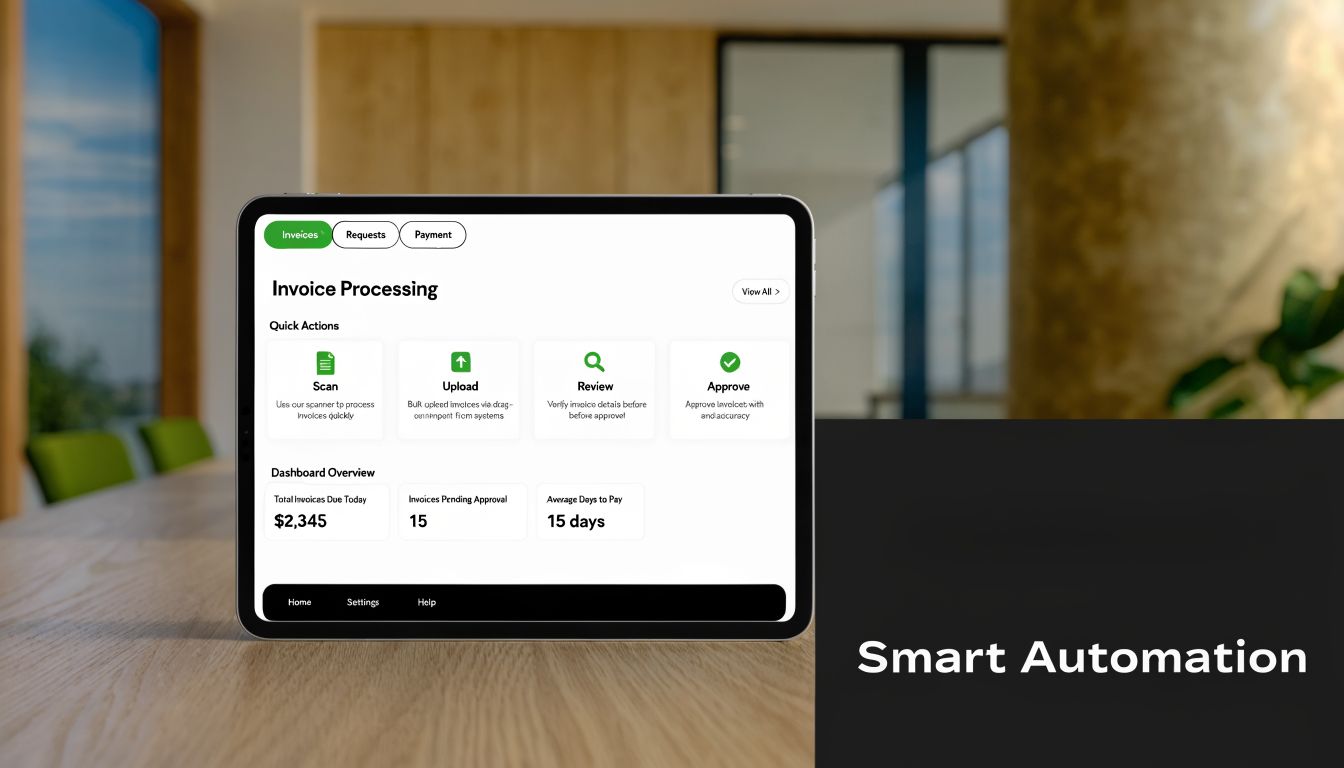
From document reading to process execution
A modern invoice automation solution is closer to a digital mailroom clerk who also does the checking, routing, filing, and system updates.
It should be able to:
- Ingest invoices from real channels such as Gmail inboxes, uploads, shared folders, and supplier submissions.
- Extract structured fields from PDFs, scans, and email attachments.
- Validate those fields against purchase orders, vendor records, goods received notes, or contract data.
- Route approvals by rule based on amount, department, vendor, or exception status.
- Write back to systems of record so accounting, ERP, and reporting stay aligned.
That's also why teams evaluating tooling should care about workflow design, not only recognition accuracy. If the product can read an invoice but can't handle the next five decisions, users still end up doing the expensive parts by hand.
Working definition: a true invoice automation solution manages the invoice lifecycle, not just the invoice file.
What the modern stack looks like
In practice, the strongest setups connect finance tools with the rest of the operating stack. That often means email for intake, Slack for approval prompts, CRM data for customer or project context, Drive or SharePoint for supporting documents, and accounting software for final posting.
If you want a useful backgrounder on how vendors frame AI and ERP invoice integration, that overview helps explain why system connectivity matters more than feature checklists. The same principle applies when thinking about broader workflow design. This guide on workflow management systems is relevant because invoice work is fundamentally a workflow problem with finance controls attached.
One practical example is Zenfox.ai, which can connect tools like Gmail, Slack, HubSpot, and cloud storage, then trigger actions across them based on context and rules. That kind of setup is useful when invoice processing depends on more than the document itself.
The Core Features of a Modern Solution
A capable invoice automation solution has to survive messy reality. Invoices arrive in different layouts. Some suppliers include PO numbers neatly. Others don't. One department buys against formal orders, another buys against contracts, and a third sends non-PO spend into finance at the last minute.
That's why good implementations are built as a chain of controls, not a single extraction engine.
Capture that handles real invoice messiness
The first layer is AI-powered capture. Older OCR tools worked best when invoice formats were consistent and templates stayed stable. Modern IDP-style capture is better suited to mixed invoice layouts, scanned documents, emailed PDFs, and the occasional low-quality attachment that would otherwise force manual rekeying.
Capture should pull out the obvious fields first. Supplier, invoice number, dates, totals, tax amounts, line items where possible. It should also flag uncertainty instead of pretending confidence where none exists.
A practical test is simple. Upload ten invoices from ten different suppliers. If the tool only works well on the cleanest three, the problem hasn't been solved.
Matching and validation as control points
At this critical juncture, many projects either evolve into finance-grade systems or remain glorified scanning tools.
A UK-ready design should treat three-way matching and ERP sync as core controls, with straight-through processing reserved for high-confidence invoices and exceptions pushed into separate queues. That approach matters for VAT recovery, duplicate-payment prevention, and approval traceability, as explained in Stripe's guide to automated invoice processing.
What that means in practice:
- PO-based invoices should be checked against the purchase order and the goods received record.
- Non-PO invoices should be routed for coding and approval using business rules.
- Duplicate checks should happen before posting, not after payment.
- Field-level confidence checks should determine whether the invoice goes straight through or into review.
If every invoice gets treated the same way, the system is either over-controlling low-risk work or under-controlling high-risk work.
Approvals routing and system sync
Approval logic matters because email forwarding is not a workflow. It's a habit.
A modern invoice automation solution should route invoices by amount, supplier, department, legal entity, or spend type. It should also handle delegation. If the budget owner is away, the workflow shouldn't sit idle in a mailbox.
The final piece is deep system sync. Approved data needs to move into your accounting platform or ERP without manual re-entry. The sync should update status, preserve references, and keep supporting documents attached to the record.
Here's the feature set I look for first:
| Capability | Why it matters |
|---|---|
| Multi-channel intake | Prevents invoices being lost across inboxes and folders |
| Data extraction with confidence handling | Lets the system escalate uncertainty instead of hiding it |
| Matching and duplicate detection | Protects against incorrect payment and weak controls |
| Configurable approval routing | Keeps invoices moving without ad hoc chasing |
| ERP or accounting sync | Eliminates rekeying and preserves a single source of truth |
| Exception queue management | Gives humans a focused worklist instead of a general backlog |
Without these components working together, teams typically end up automating only the easiest invoices and leaving the awkward ones to manual effort. Unfortunately, the awkward ones are usually where the risk sits.
Strategic Benefits Beyond Just Saving Time
The strongest case for invoice automation isn't “your team will spend fewer hours on admin”, even though that's true. The stronger case is that finance operations become more reliable under growth.
In the UK, manual invoice processing can cost around £12 per invoice and take nearly 15 days, while automation can cut processing costs by up to 80%. The same benchmark says an employee using automation can process over 23,000 invoices per year, compared with 6,000 manually, according to Quadient's AP automation benchmark roundup.
The business case is operational and financial
Those numbers matter because invoice volume rises faster than most small teams expect. New customers, more suppliers, more projects, more subscriptions, more one-off purchases. The workload expands long before a company feels “big”.
When invoice handling stays manual, teams absorb the extra work by adding more approvals in chat, more spreadsheet tracking, and more month-end cleanup. That creates hidden labour cost and weakens payment discipline.
A better invoice automation solution improves the economics in several ways:
- Lower handling cost because fewer people touch each invoice.
- Cleaner payment cycles because approvals move on schedule.
- Less corrective work because duplicates and mismatches are caught earlier.
- More stable scaling because volume can increase without redesigning the process every quarter.
What finance leaders actually gain
The strategic upside is control.
Suppliers get paid with fewer surprises. Managers can see what's waiting for approval. Finance can trace what happened and when. The business can forecast cash commitments with more confidence because open invoices aren't scattered across inboxes and side conversations.
The real return comes from replacing uncertainty with a visible, enforceable process.
That's also why mature teams stop buying invoice tooling as if it were a standalone finance widget. They buy it as part of operating infrastructure, alongside CRM, communications, document storage, and accounting.
An End-to-End Automated Invoice Workflow
The best way to assess an invoice automation solution is to follow one invoice all the way through.
Here's a realistic example. A supplier sends a PDF invoice to your accounts inbox in Gmail for work tied to an active client project. The invoice references a PO, but the project team has been discussing delivery updates in Slack, and the commercial details sit in HubSpot.
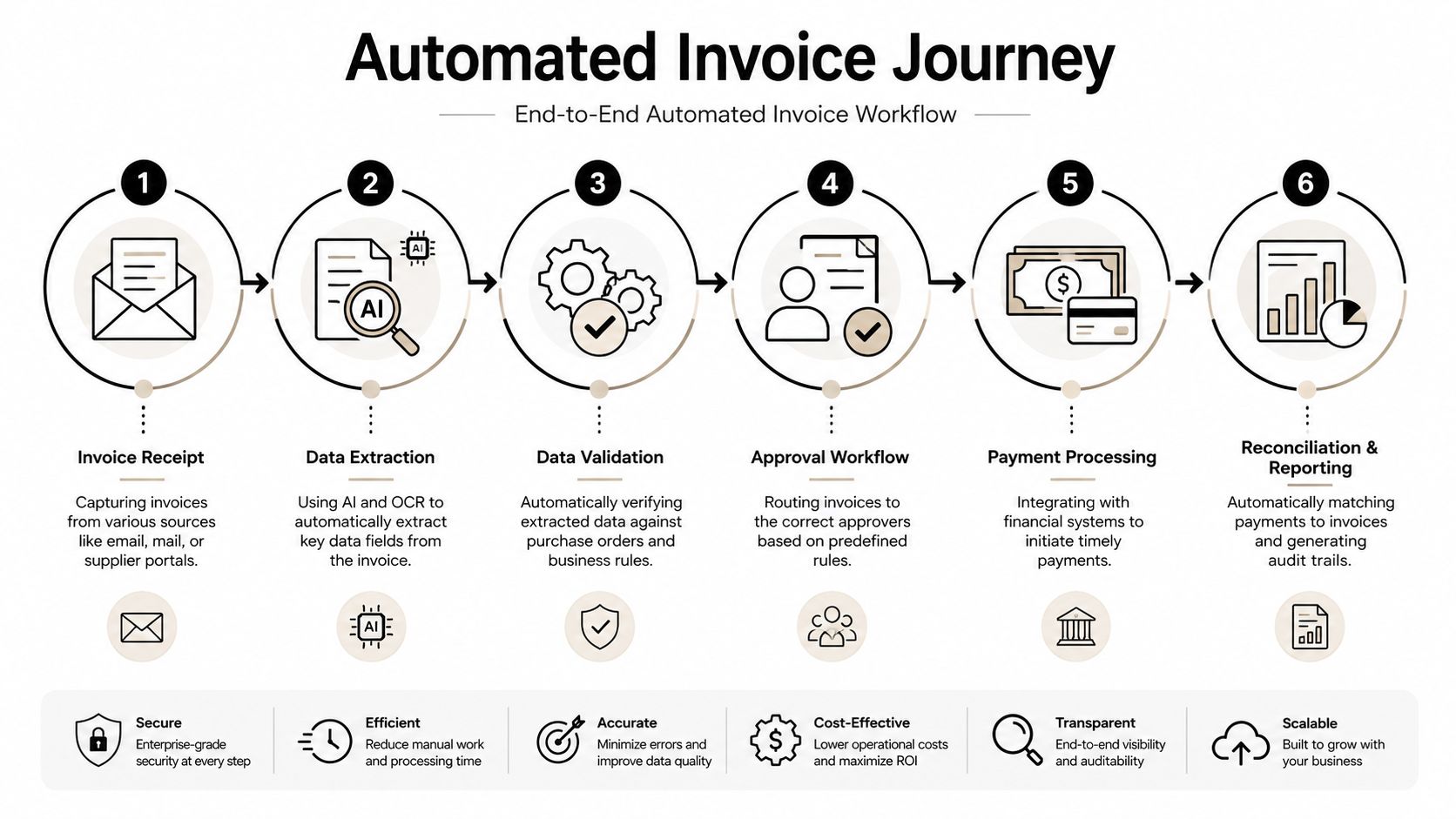
A realistic journey from Gmail to reconciliation
Step one is capture. The system monitors the Gmail inbox, detects the incoming invoice, saves the attachment, and extracts key fields. That's the easy part.
Step two is context building. The workflow checks the supplier name and client reference against the relevant records. If the supplier is linked to a specific customer project, the automation can look up the associated deal or project metadata. If you want a technical primer on the first part of that process, this article on extracting data from invoices gives a useful baseline.
Step three is document validation. The process searches Google Drive for the related purchase order or supporting file. If the amount matches expected values and the supplier record is valid, the invoice can move forward. If something is missing, the workflow creates an exception rather than letting the invoice disappear into a shared folder.
A quick video can help visualise how teams think about workflow automation in practice:
Where orchestration matters most
Step four is approval routing. Instead of forwarding the invoice around by email, the system posts a Slack message to the correct manager with the amount, supplier, and reason for approval. The approver can review the summary and act without hunting through attachments.
Step five is posting and update sync. Once approved, the invoice data is pushed into the accounting system as a bill or payable entry. At the same time, the workflow can update the related CRM record so operations or account management can see that supplier cost has been logged against the project.
Step six is archive and traceability. The final invoice, approval record, matched document references, and posting outcome are stored together so the team can retrieve them later without reconstructing events from messages.
That end-to-end path is what separates orchestration from simple OCR. Reading the PDF is one task. Coordinating Gmail, Slack, HubSpot, Drive, and accounting data into one controlled flow is the actual solution.
How to Choose and Implement Your Solution
Buying the wrong invoice automation solution usually happens when teams optimise for a demo, not for daily operations.
Demos are clean. Real finance work isn't. Suppliers send odd layouts. Approvers go on leave. Purchase orders are incomplete. Someone uploads the wrong attachment. If the product only performs well on the happy path, your team will still be stuck handling the expensive edge cases manually.
What to test before you buy
Start with integration depth. If your team lives in Gmail, Slack, HubSpot, Google Drive, Xero, QuickBooks, Sage, or an ERP, ask to see those workflows with your own examples. Not screenshots. Not a slide. Actual invoice handling across the stack you already use.
Then ask where “touchless” stops. Vendor language often promises autonomous processing, but buyers should probe what happens once an invoice hits a mismatch, missing PO, supplier dispute, or low-confidence extraction. As noted in this coverage of touchless invoice processing claims, advanced AI agents are being positioned to handle more variation, but governance still depends on knowing when human review is required.
You should also examine how the workflow is governed:
- Approval controls should be configurable by role, amount, entity, and spend type.
- Audit history should record every step clearly.
- Exception handling should create queues with ownership, not just warnings.
- Data protection should match your compliance expectations and internal policies.
- Deployment effort should be realistic for your team's technical capacity.
For broader evaluation criteria around connected operating systems, this guide to enterprise workflow software is useful because invoice processing rarely stays inside one finance app.
Invoice Automation Solution Buyer's Checklist
| Evaluation Criteria | What to Ask/Verify |
|---|---|
| Integration with your stack | Can it work with Gmail, Slack, HubSpot, Drive, and your accounting system without manual exports? |
| Capture quality | How does it handle mixed invoice layouts, scans, forwarded emails, and unclear fields? |
| Matching controls | Can it support PO checks, duplicate detection, and exception routing? |
| Approval logic | Can you define routing by amount, team, supplier, or entity, and can approvers act quickly? |
| Exception handling | Where do failed matches go, who owns them, and how are they tracked? |
| Auditability | Can finance retrieve the invoice, approval path, and posting record in one place? |
| Compliance posture | How does the system support retention, access control, and governance requirements? |
| Implementation model | What can be launched first, and what depends on later configuration work? |
Buy for exception management, not for the perfect-path demo.
A sensible implementation usually starts narrow. Pick one inbox, one entity, one approval chain, and a manageable group of suppliers. Get the routing, controls, and posting logic stable. Then expand.
Measuring Success and Avoiding Common Pitfalls
Once the workflow is live, success should be measured in process terms, not vendor terms.
Track cost per invoice, invoice cycle time, exception volume, approval turnaround, and early-payment-discount capture rate if that matters in your business. Those metrics show whether the operating model has improved or whether the team replaced one manual queue with another.
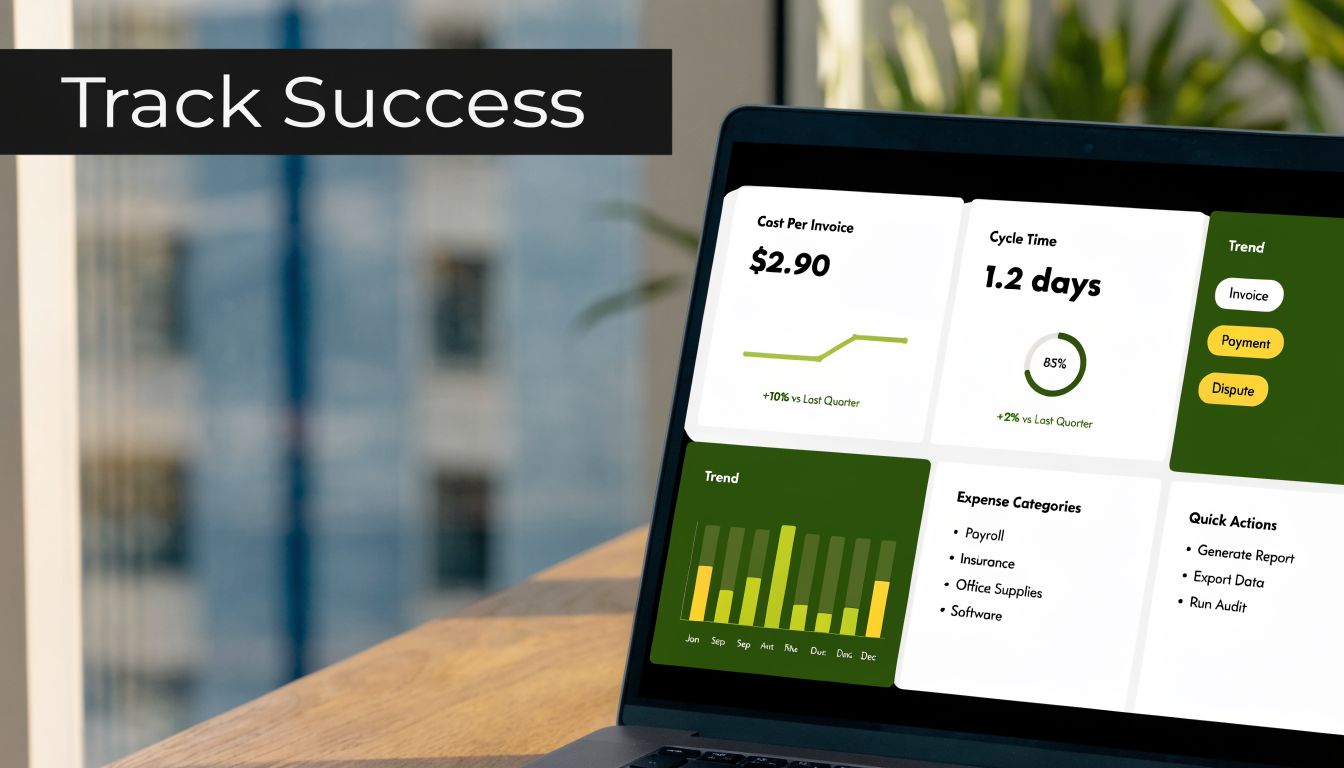
The metrics worth tracking
IBM notes that highly automated AP pipelines process invoices in about 3 days versus a 17-day average for manual systems, at less than a quarter of the cost, and that the main gain comes from shortening the exception loop so fewer invoices stall, according to IBM's overview of automated invoice processing.
That point matters because many finance teams focus too much on extraction quality and not enough on queue flow. If exceptions still bounce between inboxes, cycle time won't improve much.
The mistakes that slow teams down
The most common mistakes are easy to recognise:
- Buying for OCR alone when the primary issue is routing and control.
- Skipping change management and assuming approvers will naturally adopt a new workflow.
- Ignoring exception ownership so unmatched invoices sit untouched.
- Choosing a siloed tool that doesn't sync with the systems the business already uses.
A good invoice automation solution doesn't remove human judgement. It reserves human effort for the places where judgement matters.
If your team is still piecing together invoice work across inboxes, chat, CRM records, and accounting software, Zenfox.ai is one option to evaluate for cross-system workflow automation. It connects tools like Gmail, Slack, HubSpot, and document stores, then executes tasks with an activity log, which makes it relevant for businesses that need invoice handling to behave like an orchestrated process rather than a standalone scan-and-save step.