
Elevate Your Quarterly Business Reviews with AI
Ditch tedious QBRs. Run strategic quarterly business reviews with our playbook on planning, KPIs, and AI automation. Learn how with Zenfox.ai.

Most advice about quarterly business reviews gets one thing wrong. It assumes the problem is the meeting.
It usually isn’t.
The problem is the bloated enterprise ritual built around the meeting: too many slides, too much manual prep, too little relevance for the people doing the work. That model breaks fast when you're a solo consultant, a two-person agency, or a startup team that already lives in Gmail, Slack, HubSpot, and shared docs.
A useful QBR isn’t corporate theatre. It’s a disciplined pause to ask what moved, what stalled, what changed, and what the next quarter should look like. Done properly, it becomes one of the few routines that forces honest prioritisation. Done badly, it becomes a recap nobody wants to attend.
For small teams and solo operators, the old advice is especially unhelpful because it assumes spare time, admin support, and a clean reporting layer. Such individuals don’t have any of that. They have fragmented data, client context buried in inboxes, and a calendar that doesn’t tolerate week-long prep.
That’s why modern quarterly business reviews need a different operating model. Less ceremony. More signal. More automation. More focus on decisions than on presentation polish.
Table of Contents
- Why Most Quarterly Business Reviews Fail
- The Pre-QBR Playbook for Data Goals and Stakeholders
- Designing a High-Impact QBR Agenda and Deck
- Running the Meeting Like a Strategic Partner
- Automating QBR Prep and Follow-Up with Zenfox.ai
- Common QBR Pitfalls and How to Avoid Them
Why Most Quarterly Business Reviews Fail
Most quarterly business reviews fail because they are built as retrospective performances, not decision-making sessions.
People show up expecting a strategic conversation and get a backward-looking slide recital instead. The presenter races through charts, everyone nods politely, a few tactical complaints hijack the room, and the meeting ends without a sharp view of what should change next quarter.

The enterprise template breaks in small environments
This is even worse for solo professionals and small teams. In the UK, 4.3 million people are self-employed, and a 2025 Federation of Small Businesses survey found that 62% of freelancers lack formal quarterly performance tracking, contributing to 28% higher burnout rates compared to employed peers, as cited in McKinsey’s discussion of quarterly business reviews.
That statistic matters because it exposes a blind spot in most QBR advice. The standard playbook assumes someone has time to gather figures, reconcile spreadsheets, prepare commentary, chase stakeholders, and package everything into a polished deck. A freelancer doesn’t have that support structure. A small team often doesn’t either.
So they skip the review entirely, or they improvise one from memory. Both options are expensive. Without a recurring review, priorities drift. Work expands around urgent requests. Client work gets delivered, but the business itself stops being managed.
Practical rule: If your QBR feels like a reporting burden, you’ve designed it for spectators, not operators.
What a QBR should actually do
A good QBR has a narrower job. It should answer four questions:
- What changed: Which patterns mattered across delivery, pipeline, clients, operations, or workload.
- What deserves attention: The few issues or opportunities that should shape the next quarter.
- What needs a decision: Trade-offs around focus, resourcing, offers, process, or client mix.
- Who owns the follow-through: Clear actions, not vague agreement.
That’s why I push back on the common idea that quarterly business reviews are outdated. Bad reviews are outdated. Lean reviews still work because they create a fixed point for judgement. You stop reacting and start steering.
Small teams don’t need less structure. They need lighter structure. The answer isn’t to drop the QBR. It’s to strip it down, automate the admin, and keep the meeting centred on choices.
The Pre-QBR Playbook for Data Goals and Stakeholders
Strong quarterly business reviews are mostly won before anyone enters the meeting.
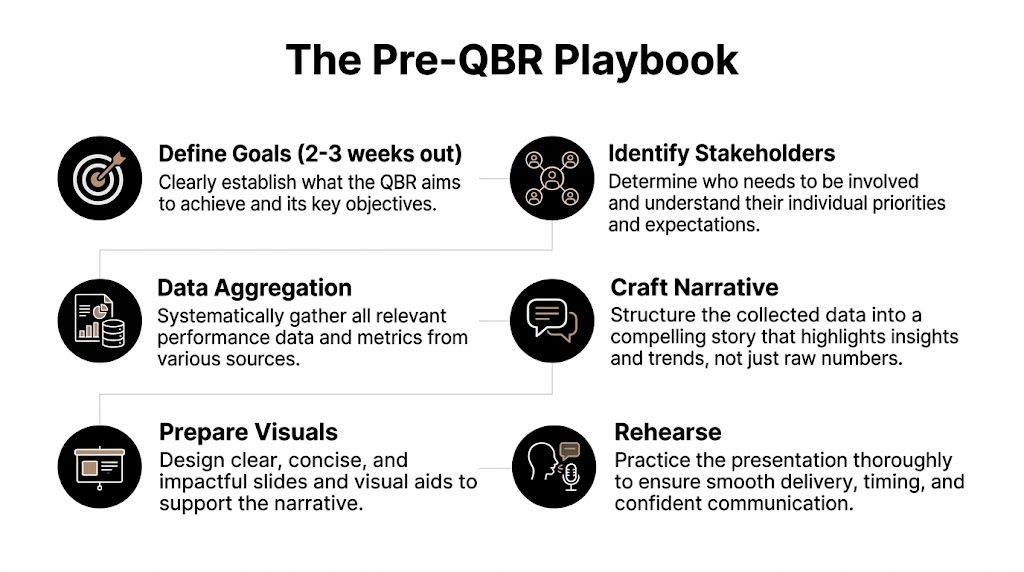
The prep window should open 2 to 3 weeks ahead, not the night before. In UK SaaS and tech firms, a 2025 UK Customer Success Benchmark Report found that a step-by-step QBR methodology boosts customer retention by 68%, while 47% of UK teams waste up to 70% of prep time by “reinventing the wheel” for each review, according to DemandFarm’s write-up on QBR dos and don’ts.
Start earlier than feels necessary
The first mistake teams make is treating prep as deck-building. It isn’t. Prep is about deciding what story the quarter tells and which evidence supports it.
Start with operating goals, not metrics. If you begin by scrolling dashboards, you’ll collect too much. If you begin with questions like “Which clients grew?”, “Where did delivery slow down?”, “What changed in pipeline quality?”, or “Which recurring tasks consumed the team?”, the data becomes easier to filter.
For solo operators, this matters even more. You don’t need an enterprise scorecard. You need a small set of indicators that tie directly to client health, workload, cash confidence, and delivery quality.
A practical prep rhythm
Use a simple rhythm that repeats every quarter.
-
Lock the review objective. Decide whether this QBR is mainly about client retention, delivery quality, pipeline strength, operational drag, or team capacity. One review can cover several themes, but one theme should dominate.
-
List the stakeholders. In a client QBR, include the people who can approve changes or remove blockers. Internally, that might be a founder, ops lead, account owner, or delivery lead. Small businesses often under-invite decision-makers and over-invite observers.
-
Aggregate source data. Pull usage and workflow signals from tools you already use, such as HubSpot, Slack, Gmail, Drive, and project trackers. Avoid collecting everything. Pull only what helps answer the quarter’s core questions.
-
Draft the narrative before the slides. Write a one-page summary in plain English. What improved. What slipped. What you learned. What should change.
-
Prepare visuals last. Charts should support decisions, not replace them.
-
Rehearse for flow. Not for polish. The goal is to make sure the review has momentum and doesn’t stall on transitions.
The fastest QBR prep teams don’t build from scratch. They update a system.
The automation layer small teams need
For most smaller operators, the struggle persists. While the process is sensible, the data lives everywhere. One way around that is to centralise business context with a tool that can learn how information is organised and retrieve it quickly. Zenfox’s article on what a knowledge manager does is useful if you're trying to reduce the time spent hunting through files, messages, and client notes before a review.
A lightweight prep stack usually works better than a heavyweight one. Shared Google Drive docs for agenda drafting. HubSpot for commercial context. Slack for team commentary. One owner to decide what matters. That’s enough.
If the prep still feels painful, that’s usually a sign that the business lacks a reusable review system, not that quarterly business reviews are cumbersome by nature.
Designing a High-Impact QBR Agenda and Deck
A high-impact QBR deck does one job well. It helps the room move from evidence to decisions.
That’s different from showing everything you know. According to a 2026 Mooncamp guide, UK best practice is to keep QBR decks to 15 to 20 slides with a 60/40 future-to-past focus. The same guidance notes that excessive data overload appears in 55% of UK QBRs and tunes out 73% of attendees, as summarised in MSSP Alert’s review of common QBR mistakes.
Build a narrative not a report dump
The deck should read like a short argument.
Start with the quarter’s headline. Then show the evidence behind it. Then move into implications and recommendations. If you reverse that order and begin with spreadsheet-style detail, people stop listening before you reach the useful part.
I’ve found the best decks usually follow this emotional arc: confidence, honesty, possibility. First, remind people what worked. Then address misses without theatre. Then redirect the conversation toward what comes next.
That structure also helps when the quarter was messy. You’re not hiding the hard parts, but you’re not letting them define the entire meeting.
Sample High-Impact QBR Agenda
| Section | Objective | Time (45 Mins) |
|---|---|---|
| Opening and business context | Reconnect the room to client or company goals and define the quarter’s headline | 5 mins |
| Key wins and progress review | Confirm what improved and why it mattered | 8 mins |
| KPI analysis | Review the few metrics that changed decisions, not every available figure | 12 mins |
| Risks and blockers | Surface friction, missed targets, and operational constraints | 8 mins |
| Next quarter strategy | Agree priorities, shifts, and success criteria for the next quarter | 9 mins |
| Commitments and close | Assign owners, deadlines, and follow-up method | 3 mins |
What belongs in the deck
A practical deck for quarterly business reviews should include these elements:
- Executive summary: One slide. If someone remembers only this slide, they should still understand the state of the account or business.
- Visual KPIs: Use charts, not dense tables. Trend lines and before-versus-now views are easier to absorb.
- Interpretation: Every chart needs a sentence that explains why it matters.
- Roadmap slides: Show what the next quarter will prioritise and what won’t make the cut.
- Decision prompts: Add explicit questions where stakeholder input is required.
If you’re reviewing revenue or pipeline planning, it also helps to align the QBR deck with the logic used in your forecasting process. This overview of sales forecasting methodology is a useful reference for tightening how commercial assumptions appear in your review materials.
Watch for this: A deck that answers every possible question usually answers none of the important ones clearly.
The cleanest deck is not the one with the least content. It’s the one where each slide earns its place.
Running the Meeting Like a Strategic Partner
The difference between a forgettable QBR and a valuable one often has nothing to do with the deck. It comes down to how the meeting is led.
A weak facilitator reads slides and defends numbers. A strong facilitator guides interpretation, names trade-offs, and keeps the discussion anchored in business choices.

How to open without sounding defensive
A strong opening sounds something like this: the goal of today’s review is to look at what changed this quarter, where that affects priorities, and what we want to commit to for the next one.
That framing does two things. It reduces the sense that the meeting is a performance review, and it tells the room this won’t be a wandering status update. If there were real misses, say so directly. People trust an honest summary more than a polished one.
I’ve seen many quarterly business reviews go wrong because the presenter rushes into evidence before establishing purpose. The room then interprets every slide through its own agenda. One person sees a service issue. Another sees a budget issue. Another sees a staffing issue. The meeting fragments early and never fully recovers.
How to handle drift and hard questions
Difficult questions are normal. The mistake is treating them like attacks.
If a stakeholder says, “Why did this slip?” don’t answer with a wall of context. Start with the cause, then the implication, then the fix. Short answers create confidence. Long justifications create suspicion.
A useful redirect sounds like this: that issue matters, and it connects to the larger pattern we’re seeing in delivery capacity. Let’s capture the detail and come back to the decision it affects. That keeps the conversation strategic without dismissing the concern.
This walkthrough is worth sharing with anyone who needs a quick sense of meeting flow before they facilitate:
When a room gets stuck in tactics, ask which decision the discussion is supposed to support.
How to close so something actually happens
Bad QBRs end with broad alignment. Good ones end with named commitments.
Before the meeting ends, restate the agreed priorities, identify owners, confirm deadlines, and define the follow-up method. If nobody knows who will send the summary or where actions will live, the meeting isn’t done.
I also prefer to close by confirming what won’t happen next quarter. That final filter often creates more clarity than the action list itself. Quarterly business reviews are as much about de-prioritisation as they are about planning.
Automating QBR Prep and Follow-Up with Zenfox.ai
QBR quality usually breaks long before anyone enters the meeting room. It breaks during the week of copy-pasting metrics, chasing updates in Slack, searching inboxes for buried commitments, and rebuilding the same summary from scratch for the fourth quarter in a row.
That pattern hits solo operators and small teams hardest. Enterprise teams can throw analysts or operations support at the problem. A founder, consultant, agency lead, or small customer success team cannot. If the review depends on manual assembly every quarter, it will slip, get shortened, or turn into a status recap with no strategic value.
A reported finding in Gong’s roundup of quarterly business review examples points to the same underlying problem: teams delay reviews when data collection is messy. That lines up with what I see in practice. The work is rarely complex. It is fragmented, repetitive, and easy to postpone.
Manual prep is the primary bottleneck
By QBR week, the inputs are scattered across CRM fields, support threads, meeting notes, spreadsheets, and half-finished messages in chat. Pulling them into one usable view often takes more time than making sense of them.
That is the first place to use automation. Not for final judgment. For collection, sorting, summarising, and follow-up.
Small teams do not need a heavy BI stack to run disciplined reviews. They need a repeatable, zero-code workflow that gathers the same business context every quarter and turns it into a briefing pack someone can review in 15 minutes instead of 3 hours.
Zero-code automation recipes for small teams
Here are the workflows I recommend first.
- Quarter-end KPI pull: Connect HubSpot and generate a summary of deal movement, stage conversion, lifecycle changes, account activity, and notable pipeline notes. Save it to a shared Google Doc or Drive folder before the deck draft starts.
- Slack decision digest: Pull messages from a few selected channels, then summarise recurring blockers, customer asks, delivery risks, and unresolved decisions into short narrative bullets.
- Inbox-to-review notes: Scan Gmail threads for priority clients or active projects, then collect complaints, approvals, promises, risks, and open questions into one review file.
- Post-QBR action logging: Turn meeting notes into tasks with owners and due dates, then sync them into the CRM or task tracker so actions survive beyond the recap email.
- Follow-up drafting: Generate a clean summary email with decisions, next steps, and deadlines while the discussion is still fresh.
Zenfox.ai fits this operating model well because it connects tools like Gmail, Slack, HubSpot, and Drive, generates reports, keeps activity logs, and lets small teams set up zero-code workflows without a long implementation cycle. Teams that want to package recurring review steps into a lightweight internal workflow can use Zenfox’s guide on how to build an instant app for recurring QBR operations.
Operator’s rule: Automate collection and follow-up first. Keep analysis human.
That trade-off matters. I would not hand account strategy, renewal risk, or prioritisation decisions to an automated workflow. I would use automation to assemble source material, prepare the first draft, assign follow-ups, and keep a record of what was agreed. That is where teams lose time, and it is also where good intentions usually fall apart.
Compliance matters in the workflow design
Automation needs guardrails, especially for UK teams handling client records, commercial data, support conversations, or internal planning notes.
Set clear rules for what gets indexed, who can access summaries, how long data is retained, and where logs are stored. A tool with GDPR-aligned controls, permission management, and activity logging is easier to use in a real operating setup than a generic assistant that treats every document like disposable input.
Good QBR automation does not replace strategic review work. It removes the admin burden that keeps small teams from doing that work consistently.
Common QBR Pitfalls and How to Avoid Them
The same QBR mistakes show up again and again, even in competent teams. Not because people don’t care, but because the review gets squeezed between delivery work and daily firefighting.
The mistakes that keep repeating
Here’s the short list of failures I see most often.
- Talking only about the past: A review that stops at recap leaves no room for decisions. Past performance should inform the next quarter, not consume the whole meeting.
- Inviting the wrong people: If decision-makers are missing, the meeting produces commentary instead of commitment.
- Dumping data without interpretation: Charts alone don’t create alignment. Someone has to say what changed and why it matters.
- Treating prep as a fresh project every quarter: Rebuilding the process each time drains energy before the meeting even starts.
- Ending without ownership: General agreement feels productive in the room and falls apart the next morning.
A final operating checklist
Use this checklist before your next review.
| Pitfall | Better approach |
|---|---|
| The deck is too long and dense | Cut anything that doesn’t support a decision |
| Stakeholders arrive with different expectations | Share a draft agenda early and align on goals before the meeting |
| Metrics are available but not useful | Choose a few business signals tied to the quarter’s main question |
| Discussion gets hijacked by side issues | Park detail, return to the decision, assign offline follow-up if needed |
| Good ideas die after the meeting | Send a written summary quickly and log actions in the working system |
The best quarterly business reviews are rarely flashy. They are clear, brief, honest, and repeatable.
That’s the standard worth aiming for. If the process feels too heavy, simplify it. If the prep takes too long, automate it. If the meeting drifts, tighten the agenda and facilitation. A QBR should help you run the business you have, not the one a large enterprise process assumes you have.
If your QBR process keeps stalling because the prep work lives across Gmail, Slack, HubSpot, Drive, and scattered notes, Zenfox.ai can help you turn that admin into repeatable automation. It’s built for people who want to describe a workflow in plain English, generate reports, track actions, and keep business context searchable without building a complex system from scratch.