How to Build an Instant App with Zenfox.ai in Minutes
Learn how to build an instant app with Zenfox.ai. This complete guide shows you how to connect tools, create zero-code workflows, and automate tasks.

You’re probably not trying to “build an instant app” because you love app builders. You’re trying to stop the same work from landing on your desk every day.
A client signs something, and someone still has to move the file, update HubSpot, notify Slack, and chase the next step. A lead replies, and someone still has to read the thread, decide what matters, and log it in the CRM. The work isn’t difficult. It’s repetitive, easy to miss, and expensive in attention.
That’s where most instant app advice falls apart. It drifts into Android modules, SDK setup, manifests, and publishing flows. Useful if you’re shipping a mobile experience. Useless if what you need is a production-ready business automation that works across Gmail, Slack, HubSpot, Drive, and the rest of your stack.
This guide takes the practical route. Instead of coding an app, you’re defining a job that software should own, then turning that into an autonomous workflow that runs immediately.
Table of Contents
- Go Beyond Simple Automation and Build an Instant App
- Lay the Groundwork for Your First Instant App
- From Plain English to Automated Action
- Unleash Autonomous Agents to Think and Act for You
- Testing Debugging and Ensuring Compliance
- Instant App Recipes for Freelancers Startups and Sales
Go Beyond Simple Automation and Build an Instant App
Many teams don’t need another dashboard. They need fewer handoffs.
The pattern is always the same. Gmail holds the conversation. Slack holds the internal chatter. HubSpot holds part of the truth. Drive holds the documents. Someone becomes the glue between them, and that “someone” is usually the busiest person on the team.

A business instant app solves that by acting like a narrow, purpose-built operator. It doesn’t try to replace your stack. It watches for a trigger, understands the next steps, and handles the routine actions across your tools.
What business teams mean by an instant app
In practice, the useful version of an instant app isn’t a mini mobile product. It’s a fast-to-deploy automation layer with a clear job description.
Examples look like this:
- Sales handoff app: when a proposal is signed, update the CRM, file the contract, notify the account team, and schedule the onboarding task.
- Client ops app: when a customer sends required documents, sort them into the right project folder, tag missing items, and ask for anything outstanding.
- Marketing intel app: monitor chosen sources, summarise relevant developments, and send a brief to Slack or email.
That’s a different category of work from classic “if this then that” automations. A good instant app doesn’t just move data. It keeps context.
Practical rule: If a task requires opening three or more tools to complete one outcome, it’s a strong candidate for an instant app.
What works and what doesn’t
What works is narrow scope with obvious business value. Start with a process that already happens often, already follows a pattern, and already creates friction when someone forgets a step.
What doesn’t work is trying to automate your whole operation in one go. Teams get excited, dump ten workflows into a builder, and end up with a brittle mess that nobody trusts.
The better approach is to treat the first app like a hire. Give it one responsibility. Make the output easy to verify. Then expand its remit once it proves reliable.
The fastest wins usually come from post-sale admin, lead follow-up, reporting, and internal notification chains. Those jobs are repetitive enough to automate and visible enough to measure qualitatively.
Lay the Groundwork for Your First Instant App
Monday morning. A signed proposal is sitting in one inbox, the client folder is still empty, HubSpot still says the deal is open, and onboarding has no task to work from. That is the kind of gap a first instant app should fix.
An instant app needs a single business outcome with a clear finish line. In Zenfox.ai, that means defining one job in plain English, connecting the right systems, and setting rules before the app starts acting on live data.

Start with one painful job
Choose a task that already has a repeatable pattern and a visible cost when it is missed. Good first builds usually sit in the gap between “easy to explain” and “annoying to do every time.”
Strong candidates include:
- Document chasing: collect missing client files, store them in the right place, and follow up on anything outstanding.
- CRM hygiene: update stages, log notes, and create next-step tasks after calls, emails, or signed documents.
- Internal reporting: pull updates from live systems and post a short summary to Slack on a schedule.
Use a simple test. If a team lead can explain the job to a new hire in three or four sentences, Zenfox can usually turn that into a workable first app.
Skip jobs that rely on unwritten judgment, conflicting ownership, or constant exceptions. If the process changes every time, the app will either stall or make bad assumptions.
Connect only the systems the job needs
A first app does not need your full stack. It needs the systems that hold the trigger, the data to check, and the final action.
That often means a small set of tools such as Gmail, Google Drive, Slack, HubSpot, a form tool, a calendar, or an e-signature platform. The trade-off is straightforward. More connected apps give you more reach, but they also create more failure points, more permissions to manage, and more edge cases to test.
Use this order:
-
Choose the trigger system Start with the app where the event happens. That might be Gmail for inbound client emails, HubSpot for pipeline movement, or a signing tool for completed proposals.
-
Add the systems of record Connect the places where the app needs to read or write trusted information, such as Drive for files or HubSpot for deal status.
-
Add the communication step Slack, email, Telegram, or SMS belongs at the end if someone needs a summary, alert, or approval request.
-
Keep permissions tight Give the app access to what it must read and update. Nothing more.
For setup specifics and supported integrations, check the Zenfox Docs for connection and configuration steps.
Set the rules before you build
Teams get faster results when they decide the exceptions early. The first version should tell the app what to do when the data is incomplete, mismatched, or risky to act on.
A planning table keeps that concrete:
| Decision area | Good default |
|---|---|
| Trigger | One event only for version one |
| Data used | Only the fields or files needed to complete the task |
| Human approval | Required for edge cases that affect customers |
| Notification | Send a completion summary to one channel |
| Failure handling | Flag exceptions instead of guessing |
Here is a real example. If the app updates HubSpot after a signed proposal, decide what happens when the company name on the document does not match the CRM record exactly. Pause for review. Match on contact email as a fallback. Create a draft update. Any of those can work, but the rule needs to be explicit.
That is the practical difference between a demo and a production app. A demo shows the happy path. A production app handles the messy path without creating cleanup work for the team.
Start with the outcome that must happen every time. Then give the app the minimum systems, permissions, and rules required to deliver it reliably.
From Plain English to Automated Action
A team lead usually sees the same pattern after the first automation attempt. The app can follow the happy path, but it stalls the moment a record is missing, a field is blank, or two systems label the same customer differently. Plain English helps only if the prompt captures those operating rules up front.
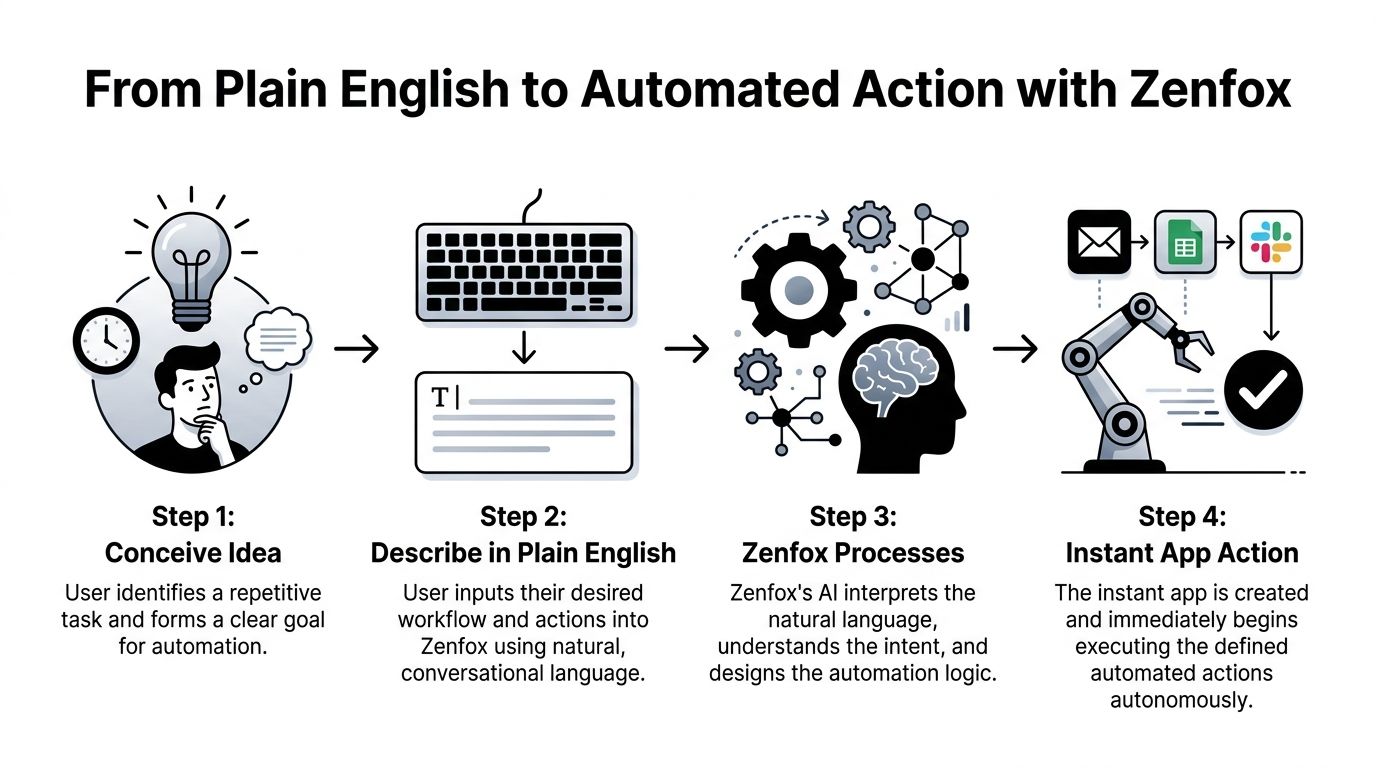
Use one real workflow
Start with a process that already happens every week and already costs someone time.
When a client signs a proposal, save the final document to that client’s Google Drive folder, update the deal in HubSpot to Won, post a short message in the sales Slack channel, and create a follow-up task for onboarding.
That is enough for Zenfox.ai to generate a first working version because the prompt names the trigger, the systems involved, the actions required, and the business result.
The first version should be usable, not perfect.
Then tighten it:
When a proposal is signed, find the matching company in HubSpot using company name and primary contact email. Save the signed file in the client’s “Contracts” Drive folder. Update the deal stage to Won only if the signed amount field is present. Post a message in #sales with company name, amount, and owner. If no matching company is found, send me a review request instead of updating the CRM.
That second prompt produces a much safer app. It tells Zenfox how to match records, when to hold back, and what to send to a human instead of guessing. That is the difference between a demo flow and a production-ready business app.
Write prompts that produce reliable actions
Good prompts read like operating instructions from the person who owns the process.
Use these standards:
-
Name the trigger precisely “When a proposal is signed” gives the app a real event to watch. “After a deal closes” leaves room for bad timing and duplicate actions.
-
Call out the exact records to update “Update the HubSpot company and deal” is better than “update the CRM” because it removes ambiguity.
-
Set the exception path Tell the app what to do if a match fails, an amount is missing, or the uploaded file is the wrong type.
-
Define the output A Slack alert can be one line, a structured summary, or a checklist. Pick one.
-
Keep version one narrow One trigger and one finished result is enough to prove value. Add branches after the core path works.
If you need to connect named systems and map actions across them, review the supported Zenfox API connections for cross-tool workflows.
Why this works better for business automation than traditional instant app development
Traditional Android Instant App development solves a different problem. It is built for mobile product delivery, with engineering work around modules, manifests, packaging, signing, and store requirements. Google’s Android developer documentation shows how much setup sits between the idea and a working release (Android developer guide to instant experiences).
For business workflows, the trade-off is different.
A sales ops lead does not need an app store artifact just to route a signed proposal, update HubSpot, file a document, and notify Slack. They need an app that can take a plain-English instruction, connect to the right systems, and act safely inside business rules.
| Approach | Best for | Main friction |
|---|---|---|
| Traditional Android Instant App build | Mobile product delivery | Engineering setup, release management, and platform-specific configuration |
| Plain-English app build with Zenfox.ai | Cross-tool business operations | Prompt quality, exception rules, and permission scoping |
I have seen teams lose more time translating a simple operational request into builder logic than they would have spent writing the policy itself. Zenfox.ai changes that path. The team states the workflow in plain English, tests it against real records, and improves the rules until the app can run the task with confidence.
That speed matters because ROI comes from shipped automations, not from planning the perfect architecture.
Unleash Autonomous Agents to Think and Act for You
A workflow is good at repetition. An agent is good at judgement within boundaries.
That distinction matters when the work stops being linear. If a task needs to compare information, choose from several next steps, or ask for clarification when data is incomplete, a fixed chain starts to creak.
Workflows follow paths, agents make decisions
Take two examples.
A basic workflow says: when a lead form arrives, create a contact, send an email, and notify Slack.
An autonomous agent handles something more like this: monitor competitor updates each morning, identify mentions related to your offer, summarise the shift, compare it with your latest positioning, and draft a response brief for marketing only when the development is relevant.
Those aren’t the same class of work. The first is routing. The second is operational thinking.
ArcGIS Instant Apps are useful for map-based publishing, and Esri UK survey data cited in the product documentation reports a 98% publish success rate in under five minutes (ArcGIS Instant Apps documentation). But that category still centres on template-driven apps. It doesn’t give you dynamic business logic across the rest of your operating stack. The same verified data notes that Zenfox agents can achieve a high task automation rate across tools including HubSpot and Gmail in this broader business context, rather than staying inside a single ecosystem.
Where agents earn their keep
Agents are most valuable when work includes one or more of these conditions:
-
Conditional logic The next step depends on what the app finds. For example, if a contact already exists in HubSpot, update it. If not, create a review item.
-
Multi-step research The app has to inspect several inputs, compare them, and produce a usable output, not just move data.
-
Context carryover An agent remembers the project, client, or thread history and uses that context in the next action.
-
Ambiguity handling If there are two possible matches or a document is incomplete, the agent can escalate instead of forcing a bad action.
That’s the difference between an automation that “runs” and one that reduces cognitive load.
For teams exploring this model, the underlying autonomy layer is described at Zenfox Autonomy Engine.
What to delegate and what to keep human
Discipline matters here. Not every task should be handed off.
Delegate the work that is frequent, rules-based, and expensive to do manually. Keep human control where reputation, negotiation, or unusual judgement is involved.
A useful split looks like this:
| Delegate to the agent | Keep with a person |
|---|---|
| Monitoring, summarising, filing, routing | Final approval on sensitive client communications |
| CRM updates from verified events | Strategic account decisions |
| Document organisation and status checks | Conflict resolution and exceptions with commercial impact |
Give the agent authority over process, not policy. It should execute the rules your team agrees on, not invent them.
Teams get the best results when the agent owns the preparation and the human owns the final call where needed. That keeps speed high without turning automation into a liability.
Testing Debugging and Ensuring Compliance
Monday morning is the wrong time to discover your instant app pushed the wrong client note into Slack, updated the wrong CRM record, and left no clear trail behind it.
This is the true test. A Zenfox.ai app built from plain English can go live fast, but speed only pays off if the workflow stays inspectable, predictable, and controlled under messy real inputs.
Test the workflow, not just the happy path
One successful run proves the prompt was understood once. It does not prove the app is ready for production.
Check the full execution trail. You should be able to see the trigger, the data pulled in, the decision the app made, the actions it took, and the point where it stopped if something failed. If that trace is missing, debugging turns into guesswork, and teams stop trusting the automation.
My standard review process is simple:
-
Start in a dry run Test with actions logged or drafted first instead of writing to live records.
-
Use known cases Feed the app examples where the right result is already clear.
-
Force the messy cases Test duplicates, missing fields, outdated attachments, partial names, and conflicting records on purpose.
-
Verify the side effects Do not stop at the success notification. Check the CRM update, the file destination, the message content, and the status change in the target system.
-
Check failure behaviour Confirm the app pauses, flags, or escalates when confidence is low instead of guessing.
Reliable automation is consistent. When it cannot proceed safely, it should say so in plain terms.
Debugging gets easier when prompts are narrow
A lot of teams make the first Zenfox app too broad. They ask for intake, qualification, routing, response drafting, file storage, and reporting in one prompt, then wonder why the failure is hard to isolate.
Split the job into stages you can inspect. For example: identify the request, validate the record, prepare the draft, then hand off or execute. That structure makes it obvious where the logic broke and which rule needs to change. It also reduces the blast radius when something goes wrong.
This is one of the main advantages of building business automation apps in Zenfox.ai instead of treating "instant app" as a mobile development exercise. The goal is not shipping an APK faster. The goal is replacing manual operational work with a prompt-driven system your team can test, correct, and trust.
Compliance starts with scope control
Compliance problems usually come from overreach, not from a lack of features.
If the app only needs a project ID, client name, and signed document status, do not give it access to the whole inbox, full drive, and every CRM field. Limit the inputs. Limit the outputs. Limit who can trigger the workflow and where the results can be stored.
Practical checks before launch:
-
Minimise data exposure Pull only the fields and files the task needs.
-
Keep sensitive outputs reviewable For contracts, payment issues, HR matters, or regulated customer messages, draft first and require approval.
-
Separate recommendation from execution In higher-risk flows, let the app prepare the update and let a person confirm it.
-
Control storage locations Make sure documents, summaries, and logs land in approved systems instead of scattered temporary folders or chat threads.
-
Review permissions regularly Remove app connections and user access that are no longer needed.
For UK teams, that discipline matters. Solo operators and small businesses often delay automation because they assume governance will add too much overhead. In practice, a tightly scoped Zenfox workflow is usually easier to review than a manual process spread across inboxes, spreadsheets, and chat.
A compliant app is restrained. It uses the minimum data needed, leaves a clear audit trail, and hands uncertain cases back to a person before damage spreads.
Instant App Recipes for Freelancers Startups and Sales
The easiest way to build an instant app is to start from a role-specific job you already understand. These prompts are deliberately plain. You can tighten them once the first version runs.
Freelancer client follow-up assistant
Best for solo consultants, designers, and service providers who lose time chasing paperwork and status updates.
Prompt
When a client emails me with a new project enquiry, create a client folder in Google Drive, save the email details as the project summary, draft a reply asking for the documents I need, and remind me in Slack if the client hasn’t responded after a few days.
Required apps
- Gmail
- Google Drive
- Slack
Outcome
The freelancer stops acting as their own project coordinator. Enquiries become organised workspaces with a documented next step.
Startup onboarding operator
Best for lean teams where founders or operations leads still stitch together onboarding by hand.
Prompt
When a deal is marked Won in HubSpot, create an onboarding checklist, post a message in the team Slack channel with the client name and owner, create the project folder in Drive, and draft the welcome email using the latest onboarding template.
Required apps
- HubSpot
- Slack
- Google Drive
Outcome
The startup reduces the lag between sale and delivery. Everyone sees the same handoff, and nothing depends on one person remembering the sequence.
Sales and marketing intelligence monitor
Best for teams that need a tighter feedback loop between market changes and outbound action.
Prompt
Monitor our selected competitor pages and content sources. If a new item mentions topics related to our offer, summarise the update, compare it with our latest messaging document, and send a short competitive brief to Slack with recommended follow-up actions.
Required apps
- Web monitoring source
- Slack
- Document knowledge base
- CRM if follow-up tasks should be logged
Outcome
Sales and marketing stop reacting late. The team gets relevant intelligence in a usable format without someone manually scanning sources all morning.
The common thread across all three is simple. Each app owns one recurring operational burden, works across the tools people already use, and produces an outcome that’s easy to verify.
If you want to turn one of these workflows into a live app without building the plumbing yourself, Zenfox.ai is built for exactly that. Connect the tools you already use, describe the job in plain English, and let the system create and run the automation for you.