
What Is a Knowledge Manager? A 2026 Role Explainer
Wondering 'what is a knowledge manager'? This guide explains the role, responsibilities, KPIs, and how AI is shaping the future of knowledge management in 2026.
You usually notice the need for a knowledge manager when work starts repeating itself.
A salesperson asks the same pricing question for the third time this month. A client onboarding step lives in one person’s head. Customer support has a polished answer in Zendesk, but the product team updates the process in Slack. Someone leaves, and the team spends weeks reconstructing how key decisions were made from email threads, shared drives, and half-finished docs.
For a growing UK business, that isn’t admin clutter. It’s operational drag. It slows projects, weakens handovers, and turns perfectly capable people into scavengers hunting for information instead of using it. If you’ve ever thought, “We already have the information, so why can’t anyone find it?”, you’re already dealing with the problem a knowledge manager solves.
Table of Contents
- The Hidden Drag on Your Business Growth
- What Is a Knowledge Manager Really
- Core Responsibilities and Daily Workflows
- How to Measure Knowledge Management Success
- Knowledge Manager Versus Adjacent Roles
- Hiring and Growing a Knowledge Manager
- The Future of Automated Knowledge Management
The Hidden Drag on Your Business Growth
A familiar pattern shows up in small teams and scaling SMEs. At first, information feels manageable because everyone knows roughly where things are. Sales notes live in HubSpot, contracts sit in Drive, meeting decisions stay in Slack, and process updates get mentioned in passing. That works until the company adds more clients, more hires, and more systems.
Then the cracks show.
A project stalls because nobody can confirm the latest version of a delivery checklist. A new hire asks five people how to log a support escalation and gets five different answers. A manager spends half a day finding a decision that was made last quarter because the context sits across email, Teams or Slack, and an old deck saved in someone’s personal folder.
What information chaos looks like in practice
It rarely announces itself as a knowledge problem. It looks like:
- Repeated questions: The same operational issues get answered over and over because the answer isn’t easy to find or trusted when found.
- Private storage habits: Teams keep critical documents in personal Drives, inboxes, or desktop folders.
- Tool sprawl: Information exists across Confluence, Notion, SharePoint, CRM notes, chats, and spreadsheets with no clear source of truth.
- Fragile handovers: Work breaks when one experienced person goes on leave or leaves the business.
- Slow decisions: People wait for clarification instead of moving because the policy, precedent, or process is buried.
That drag is bigger than most leaders assume. UK knowledge management figures collected here note that poor systematisation of institutional knowledge contributes to lost productivity estimated at £100-150 billion annually across the UK economy.
Why this hits UK SMEs especially hard
Large firms can absorb some inefficiency because they have more layers, more specialists, and usually stronger internal systems. Smaller businesses don’t have that luxury. Every hour spent searching, clarifying, or rebuilding context is an hour not spent selling, delivering, or improving operations.
Practical rule: If your team has to ask “Who knows this?” before it can ask “Where is this documented?”, you don’t have a knowledge system. You have a dependency problem.
This is also where workflow design and knowledge design start to overlap. A team can map tasks well and still fail because the instructions, decisions, and supporting context are scattered. That’s why teams thinking about process usually end up revisiting how information moves as well. The same pain shows up in work orchestration, which is why guides on what a workflow management system actually does often end up circling back to documentation quality and information access.
A knowledge manager steps into this mess and makes it operable. Not by creating more documents for the sake of it, but by deciding what knowledge matters, where it should live, who owns it, and how people can trust it when they need it.
What Is a Knowledge Manager Really
A knowledge manager is the person who makes organisational knowledge usable.
That’s the practical answer to “what is a knowledge manager”. They don’t exist to hoard information or to become the human search bar for the company. They build the conditions for people to find the right answer quickly, trust that it’s current, and reuse it without dragging someone senior into every decision.
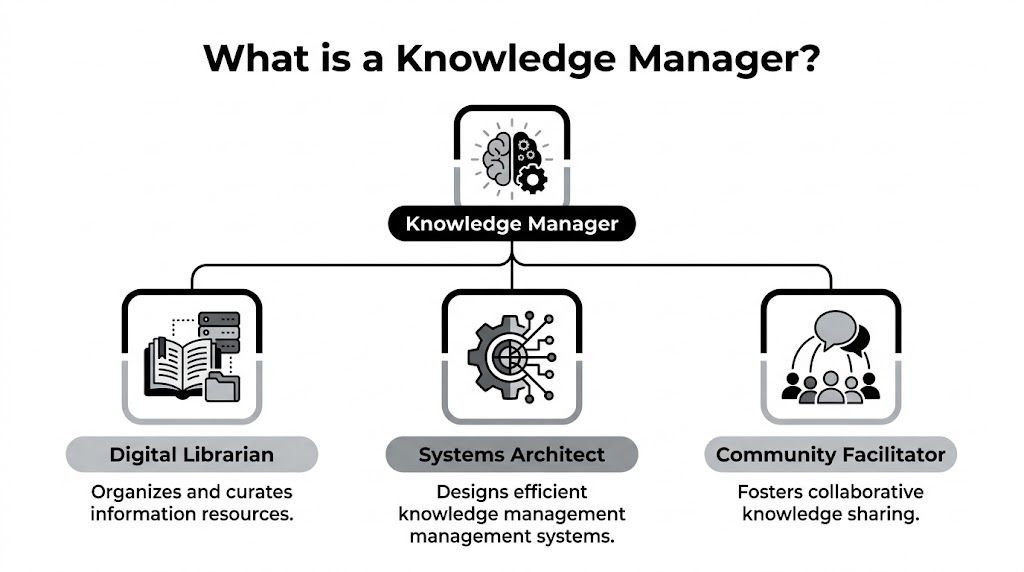
The cleanest way to think about the role is this. A knowledge manager is part digital librarian, part systems architect, and part community facilitator.
Digital librarian
They curate what matters.
That means deciding which documents, playbooks, policies, customer insights, lessons learned, and process notes deserve a home in the company’s knowledge base. They remove duplicates, archive stale material, and make sure naming, tagging, and structure help people find what they need without guessing.
This part of the role is often underestimated. The problem isn’t a lack of information. Instead, there’s too much unfiltered information.
Systems architect
They design how knowledge flows through the business.
That includes choosing where information should live, how tools connect, and how data from platforms like HubSpot, SharePoint, Confluence, Drive, or Slack should support work instead of fragmenting it. A good knowledge manager doesn’t ask for another tool by default. They first ask whether the current stack can be organised more intelligently.
A messy knowledge base isn’t usually a content problem. It’s a design problem.
Community facilitator
They make knowledge sharing normal.
This is the part that separates useful knowledge management from dead repositories. A knowledge manager works with team leads, subject matter experts, operations, support, sales, and compliance so that useful knowledge gets captured during work, not months later in a clean-up exercise nobody wants to do.
They also help teams trust the system. If staff think the wiki is outdated, they’ll go back to messaging the same reliable colleague every time.
Why the role is becoming more strategic
This isn’t a niche administrative job. It’s becoming a more visible business function. Knowledge management market figures summarised here state that the global knowledge management market was valued at US$773.6 billion in 2024 and is projected to expand at a CAGR of 16.5% through 2034. The same source notes that 55% of organisations report knowledge management gaining ground, up from 42% in 2022.
That tracks with what growing teams already feel on the ground. The more digital tools a business adopts, the more easily useful information gets buried in them. A knowledge manager turns that sprawl into an operating system people can use.
Core Responsibilities and Daily Workflows
A knowledge manager’s day usually falls into three kinds of work. They audit what exists, systematise what matters, and build habits that keep the system alive.
That mix is why the role often sits close to operations, enablement, IT, HR, and compliance without being fully owned by any of them.

Auditing what the business actually knows
Before changing tools, a good knowledge manager maps reality.
They look at where critical information lives now, who creates it, who relies on it, and where the handoffs break. In practice, that can mean reviewing onboarding materials in HR, deal notes in HubSpot, support macros in Zendesk, implementation checklists in Notion, and product decisions sitting in chat threads.
The goal isn’t a perfect inventory. It’s identifying high-risk knowledge first. Usually that means:
- Revenue-critical knowledge: Sales playbooks, proposal templates, objection handling, pricing logic, CRM hygiene rules.
- Delivery-critical knowledge: Client onboarding steps, implementation runbooks, QA checklists, escalation paths.
- People-critical knowledge: New starter guidance, role handover notes, training materials, policy interpretation.
A weak audit stays academic. A strong one identifies where business slows down because knowledge is hard to trust or impossible to find.
Building repositories people can use
Once gaps are clear, the knowledge manager starts designing systems.
That might involve a formal knowledge base in Confluence or SharePoint, a structured Notion workspace, an intranet layer, or a Service Knowledge Management System tied to enterprise data. They define content types, folder logic, tags, access permissions, review owners, and governance rules. In UK organisations, that also means making sure repositories and processes are GDPR compliant rather than treating compliance as an afterthought.
This overview of the knowledge manager role notes that knowledge managers implement technical frameworks for repositories compliant with GDPR, resulting in a 25% reduction in onboarding time. The same source says they coordinate API integrations for real-time knowledge flow across intranets and CRMs, reducing knowledge loss from employee turnover by 40%.
That matters because good knowledge management isn’t just static documentation. It’s connected documentation. If the sales process changes in the CRM, the supporting playbook can’t stay frozen in an old document nobody reviews.
For teams dealing with tool fragmentation, building lightweight internal utilities can help bridge the gap between systems and knowledge access. In some cases, that means creating purpose-built interfaces or workflows rather than adding another broad platform, which is where learning how to build an instant app for operational use becomes practical.
Making sharing part of normal work
A repository without adoption becomes digital landfill.
Knowledge managers spend a lot of time on the social side of system design. They run content reviews with team leads, create templates for repeatable documentation, set expectations for version control, and teach staff where to put information when work changes.
Operational test: If a process changes and nobody knows who updates the source of truth, ownership is missing even if the document exists.
Common recurring workflows include:
- After-action capture following a project, launch, or incident.
- Expert extraction when a specialist holds undocumented know-how.
- Quarterly cleanup to retire stale pages and confirm owners.
- New hire feedback loops to identify what onboarding materials still confuse people.
What doesn’t work is expecting people to document everything. Good knowledge managers are selective. They document the information that gets reused, reduces risk, or speeds decisions.
How to Measure Knowledge Management Success
Knowledge management gets dismissed when teams measure the wrong thing.
Page counts, upload volumes, or the size of a document library don’t tell you much. A bloated knowledge base can still fail the business if employees can’t find the right answer or don’t trust what they find. A knowledge manager should be measured by whether the company works faster and with less friction.

The KPIs that matter
A solid scorecard usually combines search performance, adoption, and business outcomes.
| KPI | What it tells you | What good practice looks like |
|---|---|---|
| Time to information | How long staff need to find a usable answer | Questions get resolved from the system, not by chasing people |
| Content utilisation | Whether published content is actually reused | High-value pages show regular use and clear ownership |
| Search accuracy | Whether users find the right result quickly | Search returns relevant, current content instead of noise |
| Feedback on accessibility | Whether employees trust the system | Staff say documentation is current, clear, and easy to navigate |
| Knowledge reuse in workflow | Whether teams apply existing knowledge in real work | Sales, support, onboarding, and delivery teams use shared assets repeatedly |
The exact dashboard will vary by company. But the logic doesn’t. If access improves, work should speed up, rework should fall, and fewer tasks should depend on one expert’s memory.
Tie metrics to operational outcomes
The strongest knowledge managers connect these indicators to business performance.
UK-oriented benchmarks discussed here report that structured knowledge management strategies led by knowledge managers can increase innovation output by 35% and reduce dependency on individual experts by 50%. The same source states that organisations with dedicated knowledge managers achieve 15-20% higher productivity in hybrid work environments.
Those figures are useful because they push the conversation away from “Do we have a wiki?” and toward “Can our team execute consistently when people are remote, busy, or new?”
If your best people spend their day answering avoidable questions, you haven’t scaled expertise. You’ve concentrated it.
What teams often get wrong
Three mistakes show up repeatedly:
- They measure activity, not usefulness: Publishing more pages isn’t the same as solving more problems.
- They ignore stale content: An outdated answer is often worse than no answer because staff act on bad information.
- They separate KM from business goals: If the knowledge manager can’t link their work to onboarding, client delivery, support quality, or decision speed, the function looks optional.
The best review meetings are simple. Which answers are people still struggling to find? Which parts of the business still rely too heavily on memory? Which documents get used, and which should be retired? That’s how knowledge management earns credibility.
Knowledge Manager Versus Adjacent Roles
A lot of businesses know they have an information problem but hire the wrong role to fix it.
They ask a project manager to “own documentation”. They expect IT to organise company knowledge because IT manages systems. They rely on a data analyst to surface business insight, even though insight and reusable operational knowledge aren’t the same thing. The result is partial coverage and a long list of orphaned documents.
Role comparison in practice
The distinction becomes clearer when you compare the primary goal of each role.
| Role | Primary Goal | Typical Tools | Key Deliverable |
|---|---|---|---|
| Knowledge Manager | Make organisational knowledge findable, reliable, and reusable | Confluence, SharePoint, Notion, Zendesk, intranets, search tools, CRM and chat integrations | Trusted knowledge systems, governance, playbooks, taxonomies, reusable documentation |
| Project Manager | Deliver a defined initiative on time and in scope | Asana, Jira, Monday.com, MS Project, status trackers | Project plans, timelines, stakeholder coordination, delivery reporting |
| Data Analyst | Turn datasets into insight for decisions | SQL tools, BI dashboards, spreadsheets, warehouse tools | Reports, dashboards, analysis, trend interpretation |
| Corporate Librarian | Curate formal information resources and reference materials | Cataloguing systems, archives, databases, reference platforms | Organised collections, metadata, research support |
| IT Systems Administrator | Maintain and secure technical systems and user access | Admin consoles, identity tools, infrastructure dashboards, endpoint tools | System uptime, permissions, configurations, technical support |
Where the confusion usually starts
A knowledge manager works across people, process, and systems.
That overlap makes the role easy to mislabel. They may support project delivery, but they’re not accountable for the full project plan. They may improve search and reporting, but they aren’t hired to perform business analysis. They may work with SharePoint or internal permissions, but they aren’t there to run infrastructure.
Useful hiring filter: If you need someone to preserve context, reduce repeated questions, and create a trusted source of truth across teams, you need knowledge management. If you mainly need delivery control, reporting, or system administration, hire for those directly.
Why bundling the role often fails
In smaller firms, it’s tempting to spread knowledge management across department heads. Sometimes that’s the right starting point. But if nobody owns standards, taxonomy, review cycles, and adoption, each function documents work in its own style and stores it in its own place.
That doesn’t create shared knowledge. It creates parallel mini-systems.
The knowledge manager’s unique value is coordination. They connect the sales playbook to the CRM, the support macros to the product updates, the onboarding docs to HR and operations, and the governance rules to compliance. Adjacent roles touch pieces of that picture. The knowledge manager owns the flow across the whole business.
Hiring and Growing a Knowledge Manager
One of the hardest parts of this field is that the role is often obvious only after the pain becomes expensive.
A founder might call it operations. A customer leader might call it enablement. An HR lead might call it onboarding and documentation. The label matters less than the mandate, but eventually someone needs clear responsibility for how knowledge is captured, organised, maintained, and used.
When a business should create the function
You don’t need to wait until you’re a large enterprise.
A dedicated knowledge manager starts making sense when your team is losing time to repeated internal questions, onboarding feels inconsistent, key processes depend on one or two experienced people, or information is spread across enough systems that nobody knows which source to trust.
For very small teams, a full-time hire may be too early. A better move is often naming a knowledge champion inside operations, enablement, or customer success with real authority to set standards and clean up the highest-value workflows first.
Good early scope includes:
- High-friction processes: Client onboarding, proposal creation, support handoffs, recurring reporting.
- Expert-dependent work: Anything that stops when one person is away.
- Cross-functional processes: Tasks that move between sales, operations, service, and finance.
- Compliance-sensitive knowledge: Policies and procedures where outdated guidance creates risk.
What to look for when hiring
The strongest candidates usually combine structured thinking with patience for messy reality.
They need enough technical confidence to work with knowledge bases, search logic, integrations, permissions, and analytics. But technical ability alone isn’t enough. They also need interviewing skill, process judgement, and the credibility to get subject matter experts to share what they know without turning every meeting into a documentation debate.
A capable knowledge manager often has roots in operations, service delivery, learning and development, technical writing, enablement, library science, or internal communications. The exact background matters less than whether they can turn scattered, informal know-how into a maintained system other people will use.
The career path is still fuzzy
That ambiguity is a real issue. This overview of the profession notes that knowledge managers often lack clear career progression pathways because responsibilities vary significantly by employer, making it harder for organisations to structure the role and for professionals to see a growth trajectory.
In practice, progression often looks like this:
- Entry point: Documentation specialist, enablement coordinator, operations analyst, junior KM specialist
- Mid-level growth: Knowledge manager with ownership of systems, governance, and adoption
- Senior scope: Head of Knowledge, Director of Knowledge and Enablement, or a broader operations and information leadership role
Because there’s no universal ladder, employers should define progression explicitly. Scope, ownership, stakeholder range, and governance responsibility should all increase with seniority.
“Someone who writes docs” is not a career path. Ownership of business-critical knowledge systems is.
For professionals growing into the role, the best move is to build a visible portfolio. Show how you improved findability, reduced duplication, clarified ownership, or made knowledge reusable across teams. That evidence travels better than a vague title.
The Future of Automated Knowledge Management
The old model of knowledge management assumed a lot of manual effort. Someone had to chase updates, clean titles, connect records, summarise meetings, and move context from one tool to another. That work still matters, but more of it can now be automated.
That changes the job. It doesn’t remove it.

What automation is actually good at
Automation is strongest at the repetitive layers of knowledge work.
It can index documents across systems, surface related records, transcribe meetings, create summaries, flag duplicates, and keep searchable context connected across tools like Gmail, Slack, Drive, HubSpot, and internal databases. That’s especially useful in businesses where operational knowledge gets created in fragments throughout the day instead of in one tidy repository.
A modern knowledge manager can use automation to reduce manual curation and spend more time on questions that require judgement. Which knowledge deserves formal governance? Which team owns a process change? Which information should be widely accessible, and which should stay restricted? Where does the business still rely too heavily on tacit knowledge?
Why AI makes the role more strategic
The biggest misunderstanding is that AI will replace the person who manages knowledge.
It won’t. It removes some of the clerical burden, but it doesn’t set policy, define trust, resolve ownership disputes, or decide what the business should preserve as reusable knowledge. Those are human decisions shaped by risk, culture, and business priorities.
That’s why the future version of this role looks more like an AI-augmented operator than a document custodian. The knowledge manager becomes the person who governs the system, sets standards, validates outputs, and ensures automation reflects how the organisation works.
A broader view of this shift appears in thinking around the future of agentic AI interfaces, where systems don’t just display information but help organise, connect, and act on it across a company’s tool stack.
Here’s a useful example of where this is heading:
What good teams will do next
The teams that get the most from automated knowledge management won’t start with “How do we automate everything?”
They’ll start with tighter operational questions:
- Where do we lose context between tools?
- Which recurring questions should be answerable without asking a person?
- What knowledge is created in meetings but never captured properly?
- Which handovers break because information isn’t portable?
Automated indexing helps. Automated clutter doesn’t.
A key win is a cleaner relationship between work and knowledge. Instead of treating documentation as a separate admin task, the system captures context as work happens. That gives the knowledge manager better raw material and gives the business faster access to answers that would otherwise stay trapped in inboxes, chats, and isolated apps.
A strong knowledge manager in 2026 won’t spend their day manually filing information. They’ll shape the rules, workflows, and safeguards that make organisational knowledge searchable, trustworthy, and useful at scale.
If your team is buried in Slack threads, scattered docs, CRM notes, and repeated internal questions, Zenfox.ai can help turn that sprawl into usable context. It connects the tools you already use, indexes knowledge across them, and automates the repetitive work so your team can find answers faster and spend less time rebuilding what it already knows.