How to Type up Meeting Minutes: 2026 Guide
Master how to type up meeting minutes with our 2026 guide. Learn formatting tips and use AI tools to automate the process for clear, actionable results.
You close the call, stare at a document full of fragments, and realise you've captured plenty of words but almost nothing you can use. There's a half sentence about budget, two bullets with question marks, and one line that says “follow up with James” without saying who will do it or when. That's the point where meeting minutes start to feel like admin punishment instead of useful work.
Effective minutes resolve that issue. They transform a rapid, disorganized discussion into a polished log of decisions, owners, deadlines, and next steps. If you want to know how to type up meeting minutes efficiently, the solution isn't “write faster”. It's building a workflow that lets you finish the meeting with most of the document already done.
Table of Contents
- Why Your Meeting Minutes Aren't Working
- Your Pre-Meeting Preparation Checklist
- Capturing What Matters During the Meeting
- Editing Raw Notes Into a Clear Record
- Automating the Workflow from Minutes to Actions
- Finalising and Distributing Your Minutes
Why Your Meeting Minutes Aren't Working
Most bad minutes fail for one reason. They try to preserve the meeting instead of helping the team move after it.
That's why you end up with bloated notes full of who said what, side comments, repeated arguments, and wording that made sense in the moment but becomes useless a day later. Raw notes are personal memory aids. Minutes are a shared working document.
According to UK-based STL Training, minute takers who switch from handwritten notes to typing directly on a laptop keyboard can save “a lot of time afterwards” by eliminating the post-meeting transcription phase, which is why I treat live typing as the baseline rather than an upgrade in any modern workflow for minutes STL Training guidance on writing more effective meeting minutes.
The old method breaks twice
Handwritten notes create two separate jobs. First, you capture the meeting. Then you decode your own scribbles later.
That second pass is where time disappears. You can't remember who agreed to what, context fades, and every unclear note forces a decision you should've made in the room.
Practical rule: If your notes require translation after the meeting, your process is too slow.
Typing directly into a structured document changes the job. You're not “taking notes”. You're drafting the final record in real time.
Minutes should answer four questions
If I'm reviewing minutes after a client call, team stand-up, or planning session, I don't want a transcript. I want fast answers:
- What was decided
- What still needs discussion
- Who owns the next action
- When that action is due
Anything that doesn't support one of those points probably doesn't belong in the final version.
That's also why many freelancers and small teams now use tools that streamline workflow with AI after the meeting. The point isn't to produce prettier notes. It's to move from conversation to execution with less friction.
What works and what doesn't
The trade-off often overlooked involves the depth of capture. Detailed note-taking feels safe during the meeting, but it usually produces slower, weaker minutes afterwards. Selective capture feels riskier in the moment, yet it creates a clearer record.
What works
- Typing live into a template: You reduce rewriting later.
- Capturing outcomes over wording: You preserve the useful part.
- Writing actions with names and dates: People know what happens next.
What doesn't
- Recording every comment: You bury the decision.
- Leaving actions vague: The team forgets them.
- Treating minutes as an archive only: Nobody uses them to work.
If your current minutes aren't helping people act, the problem isn't your typing speed alone. It's that the document is trying to be everything at once.
Your Pre-Meeting Preparation Checklist
Strong minutes are usually prepared before anyone joins the call. The less you have to think about structure in the meeting, the more attention you can give to meaning.
A typing test from UK firm Virtual Administration makes the standard clear. Candidates must listen to a 3-minute audio clip and produce detailed, structured minutes within a 15-minute window, which shows how much this task depends on preparation as well as typing and summarising skill Virtual Administration's meeting minutes typing test.
Build the document before the meeting starts
Never begin with a blank page. Start with a reusable template and fill in everything you already know.
My pre-meeting document usually includes:
- Meeting title: Client review, weekly ops, project kickoff, board update.
- Date and time: Especially important when similar meetings happen often.
- Attendees: Include expected attendees and leave room to mark absences.
- Agenda items: One section per topic, already laid out in order.
- Decision and action fields: So you can drop information in quickly.
That setup changes your role during the meeting. Instead of scrambling to build structure while people talk, you listen for what belongs in each slot.
Ask the chair or organiser three things
A two-minute check before the meeting saves far more time than people expect.
Ask:
- Which decisions are likely today
- Which agenda items need formal actions
- Who is likely to present or approve key items
Those answers help you predict where the important parts will land. You don't need perfect certainty. You just need enough context to recognise the moment when discussion turns into commitment.
If you don't know what the meeting is supposed to produce, your notes will drift toward trivia.
Prepare your shortcuts in advance
Live minute-taking gets easier when you stop typing full sentences for repeat phrases. Use simple shorthand you can recognise later.
Examples:
- Dec for decision
- Act for action
- Own for owner
- Due for deadline
- Pend for pending item
You can also pre-type recurring names, project titles, and agenda headings. In client-facing work, I often paste in the names of attendees and the core workstreams before the call begins, then tab through the document as the discussion moves.
Check your setup, not just your notes
Practical minute-takers save themselves trouble here.
Run through a quick readiness check:
- Laptop charged: Don't rely on luck.
- Correct file open: Avoid taking notes in last week's document.
- Notifications muted: A pop-up can make you miss the actual decision.
- Audio clear: If you can't hear names or deadlines, the minutes will suffer.
- Shared documents ready: If the agenda or deck is referenced, keep it open.
Keep one goal in mind
Preparation isn't about becoming formal. It's about reducing cognitive load.
When the meeting begins, your job should be to identify decisions, action items, dependencies, and unresolved issues. The template, attendee list, and agenda should already be handled. That's how you make the final typing-up stage short enough to finish while the discussion is still fresh.
Capturing What Matters During the Meeting
During the meeting, the best minute-takers do less than many realize. They don't chase every sentence. They filter aggressively.
That matters for more than style. The UK's Financial Reporting Council found that 28% of FTSE 350 firms had inadequate records in 2023, and its guidance emphasises “clear, concise minutes”. The same guidance also notes that vague action items like “team to review” cause 40% of missed deadlines in UK SMEs. Clear actions aren't just tidier. They prevent work from stalling.
Stop transcribing and start filtering
A transcript captures speech. Minutes capture meaning.
When someone speaks at length, ask yourself which of these categories the comment belongs to:
- background
- decision
- objection
- action
- open issue
- information only
Most of the time, only the last four lines of a ten-minute discussion matter in the final record. That can feel uncomfortable at first, especially if you're worried about missing nuance. But clarity comes from filtering, not volume.
Here's what to record live:
- Decisions made: What was approved, rejected, deferred, or changed.
- Actions assigned: One task, one owner, one date where possible.
- Risks or blockers: Only if they affect next steps.
- Dependencies: If one action relies on another team, approval, or document.
- Unresolved questions: Especially if they need a follow-up meeting or owner.
Use a live template, not a blank page
A structured document makes the meeting easier to track. It also turns the final write-up into an editing pass instead of a rewrite.
Here's a practical version you can copy.
| Field | Description | Example |
|---|---|---|
| Meeting details | Basic reference information | Weekly sales pipeline review, 14 January, 10:00 |
| Attendees | Who attended and who was absent | Present: A. Khan, R. Patel. Absent: J. Lewis |
| Agenda item | Topic being discussed | Q1 campaign launch |
| Key discussion | Short neutral summary of relevant points | Team reviewed launch timing and budget constraints |
| Decision | The outcome reached | Launch approved for revised date |
| Action | Specific next step | Update launch plan and circulate revised schedule |
| Owner | Person responsible | R. Patel |
| Deadline | Date or time frame | By Friday |
| Blocker or dependency | What may slow progress | Awaiting design sign-off |
| Follow-up needed | What needs checking later | Confirm final asset list in next meeting |
For teams that also want an audio record as backup, this piece on recording meetings for minutes is useful because recording can support accuracy, but it still doesn't replace judgement about what belongs in the final document.
Write actions so nobody can wriggle out of them
Weak minutes usually fail at the action line.
“Marketing to review” is not an action. “Sophie to review landing page copy and confirm approval by Thursday” is an action. It has a person, a task, and a timeframe.
Good minutes don't just say what happened. They make the next move unavoidable.
If a deadline isn't agreed in the meeting, note the action and mark the timing as to be confirmed. That's still better than inventing a date later or leaving the action loose.
Listen for the shift in tone
Most meetings have a moment where discussion changes into commitment. People stop exploring and start agreeing.
You'll hear phrases like:
- “Let's go with that”
- “Can you take this away”
- “We'll need that by next week”
- “Agreed”
- “Park that for now”
- “We need sign-off before moving”
Those phrases are your cue to stop summarising and start documenting outcome.
If you finish the meeting with decisions and actions already captured in a usable format, the job of typing up meeting minutes becomes much lighter. You're not writing from memory. You're polishing a near-final record.
Editing Raw Notes Into a Clear Record
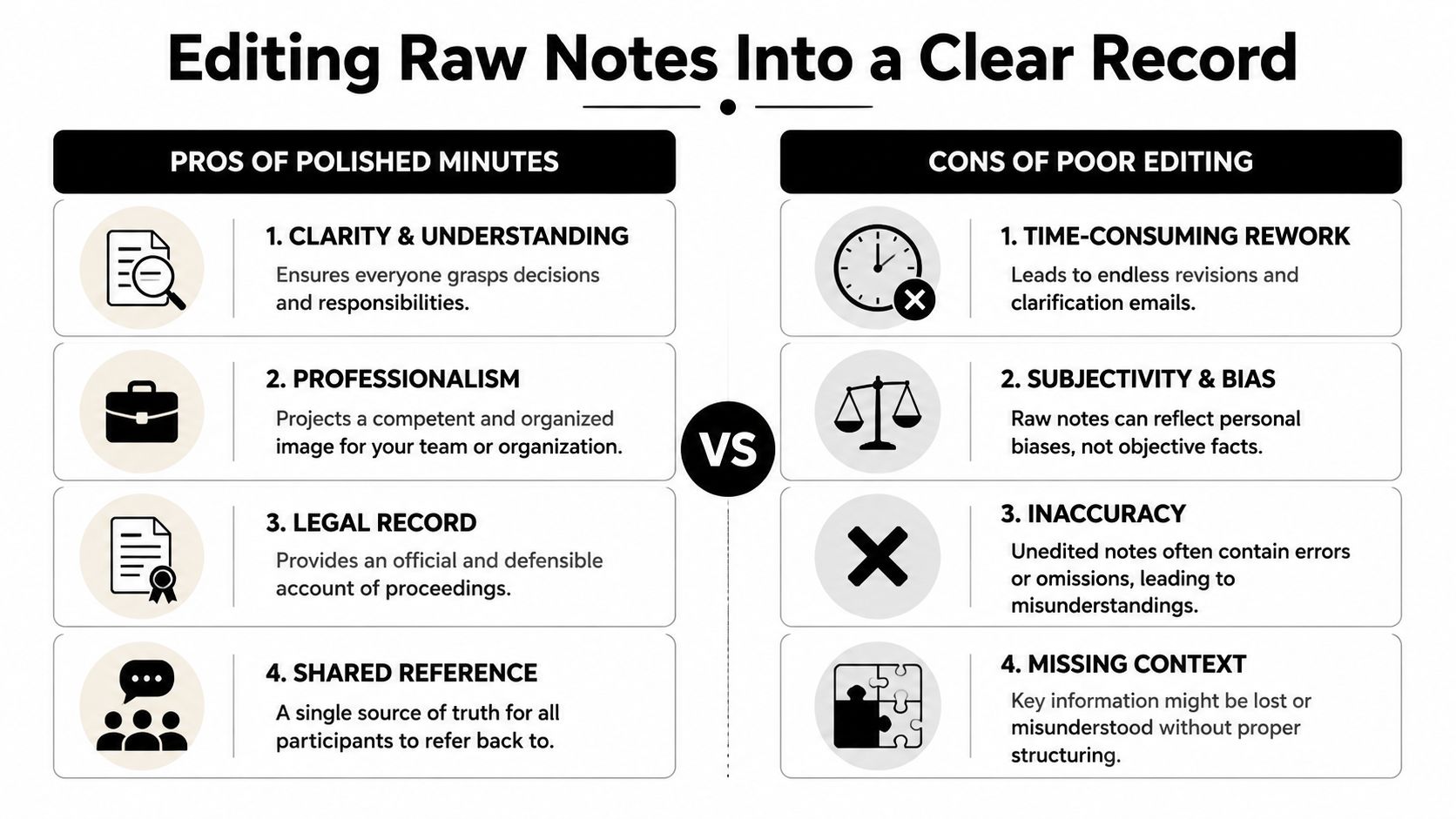
The meeting notes on your screen right after the call are not the finished product. They're raw material.
Editing is where minutes become trustworthy. That means stripping out clutter, removing opinion, tightening wording, and making sure the document reads like a neutral account rather than a stream of consciousness. If you want a solid companion resource, this guide to taking effective meeting minutes is useful for comparing formal habits against your own process.
Edit for decisions, not drama
The first pass should remove anything that only made sense in the room.
Cut:
- personal reactions
- repeated points
- side jokes
- filler language
- praise or criticism that doesn't belong in a formal record
Replace vague wording with neutral phrasing. “Tom was unhappy with the supplier response” becomes “Concerns were raised about supplier response times.” The second version is cleaner and easier to circulate.
I also recommend checking tense for consistency. Discussion summaries should read as a completed event. Decisions and action items should read as clear outcomes. The exact house style can vary, but inconsistency makes the document feel unfinished.
Run a GDPR check before you send
This part is often skipped, and it shouldn't be. A 2025 ICO survey found 68% of UK organisations face GDPR compliance challenges, which matters directly for minutes because they often include names, assigned tasks, and other personal data.
That doesn't mean minutes should avoid names entirely. It means every personal detail should have a clear purpose. If a person owns an action, include the name. If a personal aside or unnecessary detail adds nothing, remove it.
Use this quick check:
- Is this person named because they own a task or decision
- Does this detail help the team act
- Would this line still make sense if shared more widely than intended
- Am I recording more personal data than the document needs
Over-documenting feels thorough, but it can create risk as easily as it creates clarity.
Clean formatting saves review time
A polished document should be easy to scan. That usually means:
- short paragraphs
- one heading per agenda item
- separate lines for decisions and actions
- consistent names and dates
- no mixed formatting from rushed note-taking
I also separate discussion, decision, and action visually. That makes chair review faster because people can check the substance without reading everything twice.
When you're editing, think like the person who'll open this file in three weeks. They won't care how hard the meeting was to follow. They'll care whether they can find the answer in seconds.
Automating the Workflow from Minutes to Actions
Minutes become valuable when they trigger work. For freelancers and small teams, that's the primary bottleneck. The notes exist, but the follow-up doesn't happen.
According to a 2025 IPSE report, 76% of UK freelancers handle solo client meetings but 55% miss action items weekly due to manual follow-through. That's why the typing stage matters less than the handoff from minutes to tasks.
What automation should handle
Not every part of minute-taking should be automated. Judgement still matters when you decide what belongs in the record.
But once the minutes are cleaned up, automation can handle the repetitive follow-through:
- turning action lines into tasks
- sending follow-up emails
- posting reminders in Slack
- updating client notes in a CRM
- filing the final record in the right folder
If you're comparing tools for speech-to-text before that handoff, it helps to find the right transcription solution based on your workflow. A transcript can give you a strong draft, but it still needs editing before it becomes minutes.
Build a simple handoff from notes to execution
A small-team setup doesn't need to be complicated. The cleanest workflow is usually:
- Capture the meeting live in a structured template.
- Edit immediately after the meeting while context is fresh.
- Mark action lines consistently so software can identify them.
- Push actions into your working tools instead of leaving them trapped in the document.
That's where automation platforms become useful. For example, build a bot for recurring admin handoffs if you want a system to read finalised minutes, extract action items, and route them into tools like Gmail, Slack, HubSpot, or Drive. Zenfox.ai is one option for that kind of workflow because it can take plain-language instructions and execute follow-up actions across connected apps.
Here's a practical dividing line:
- Use AI transcription for speed at the input stage.
- Use workflow automation for accountability at the output stage.
Those are different jobs. One helps you capture the meeting. The other helps you finish it operationally.
A short demo helps if you want to see how the handoff can work in practice.
For solo professionals, this matters even more. If you're the one selling, delivering, following up, and invoicing, the best meeting minutes aren't the prettiest ones. They're the ones that create movement without asking you to manually re-enter the same information three more times.
Finalising and Distributing Your Minutes
The last stage is simple, but it's where trust is built. Minutes only work when people know they'll receive a clear record quickly and in a format they can find later.
Before you send anything, do one short review pass with the meeting chair or organiser. The purpose isn't to rewrite the document. It's to confirm decisions, ownership, and any sensitive wording that needs tightening.
Use a short closing checklist
- Confirm the version is final: Remove internal notes, highlights, and placeholders.
- Check actions line by line: Every action should have an owner, and timing if agreed.
- Name the file clearly: Include meeting type and date so it's searchable later.
- Send to the right people: Attendees, action owners, and anyone who needs the record.
- Store it once: Keep one agreed location rather than scattered email attachments.
Choose distribution channels that match the work
Email is fine for circulation, but it shouldn't be the only home for minutes. If the meeting drives ongoing work, store the final document somewhere the team already checks, such as a shared Drive folder, project workspace, or team knowledge base.
For teams that want the distribution step to happen automatically, email automation workflows can help route approved minutes, reminders, and follow-ups without another manual round of admin.
Fast distribution matters because actions decay when people have to rely on memory.
The best timing is simple. Send the approved version while the discussion is still fresh and before the next meeting creates a new pile of commitments. That's how minutes stop being a record of talk and start becoming a tool for progress.
If you want your meeting minutes to do more than sit in a folder, Zenfox.ai can help automate what happens next. You can use it to turn approved minutes into follow-up emails, Slack reminders, CRM updates, and organised files across the tools you already use, without building a complicated system by hand.