Build a Bot: Connect Apps & Automate with Zenfox.ai
Ready to build a bot? Use Zenfox.ai to connect apps, design workflows in plain English, and deploy autonomous agents.

If you're trying to build a bot, you're probably not starting from a blank slate. You're starting from inbox clutter, missed follow-ups, half-updated CRM records, Slack messages asking for status, and recurring tasks that somebody on the team keeps doing manually because automating them always seemed like more effort than it was worth.
That's usually the breaking point. Not when work becomes impossible, but when repetitive work starts crowding out useful work.
The good news is that building a bot no longer means stitching together scripts, maintaining brittle logic, or waiting on a developer every time a workflow changes. You can now build something far more useful than a basic chat widget. You can build an autonomous agent that reads context across your tools, makes decisions, and takes action.
Table of Contents
- Why Your Business Needs More Than Just a Chatbot
- Define Your Goal and Connect Your Data
- Teach Your Bot What to Do Using Natural Language
- From Test Environment to Live Deployment
- Manage Your Autonomous Agent with Confidence
- Scaling Your Automation with Advanced Techniques
Why Your Business Needs More Than Just a Chatbot
A lot of teams say they want to build a bot when what they really mean is they want less manual work. Those aren't the same thing.
A standard chatbot waits for a prompt, answers a question, and stops. That's useful for FAQs and first-line support. It doesn't update HubSpot after a sales reply, check Gmail for a thread, notify Slack, pull a file from Drive, and decide what happens next. An autonomous agent does.

The real bottleneck isn't messaging
Think about a typical sales or client service day. A lead comes in through a form. Somebody checks the CRM. Somebody drafts a reply. Later, somebody else remembers to nudge the contact again. Notes get added late or not at all. Internal updates live in Slack, while customer context lives in Gmail and HubSpot.
None of that work is hard. It's just fragmented.
That's why businesses are putting more of this workload onto bots. Globally, 80% of routine inquiries are now handled by bots, and business adoption grew 4.7x between 2020 and 2025, according to Chatbot.com's chatbot statistics roundup.
What works and what doesn't
What works is starting with a workflow that already exists and has clear handoffs. Follow-up sequences, lead triage, onboarding answers, internal reminders, status reporting. These are strong candidates because the rules are visible.
What usually fails is building a bot that sounds clever but can't act.
A passive chatbot might answer, “Yes, I can help you follow up with leads.” An autonomous agent should:
- Read the trigger from a form, inbox, or CRM event
- Check context across prior emails, notes, and owner history
- Take an action such as sending a message or updating a record
- Report back in the channel your team already uses
A useful bot doesn't just respond well. It removes a step from somebody's day.
That difference matters because once the bot can execute real work, it stops being a novelty and starts behaving like a digital team member. That's the mindset shift most businesses need before they build a bot that sticks.
Define Your Goal and Connect Your Data
The first build usually goes wrong for one reason. The scope is too vague.
“Help with sales” is vague. “Reply faster to new website leads” is specific. If you want your first bot to succeed, define one process, one trigger, and one outcome. Don't start with a department-wide automation strategy. Start with one job the bot can own.

Pick a first use case with a clean boundary
Good first bots usually have three traits. They happen often, they follow repeatable logic, and the cost of delay is obvious.
A solid shortlist looks like this:
- Lead follow-up. New enquiry arrives, bot checks ownership, sends the right message, and updates the CRM.
- Inbound qualification. Bot reviews the form details, tags urgency, and posts a summary to Slack.
- Weekly reporting. Bot gathers data from multiple tools and sends a digest to the team.
If you're unsure where to begin, map the workflow that people complain about most. Friction is a strong signal. So is any task that gets postponed because it's “only five minutes”. Those five-minute jobs accumulate.
Write the goal before you connect anything
Use a sentence your team could test.
| Element | Example |
|---|---|
| Trigger | New lead submitted through website form |
| Action | Send follow-up email, update CRM, notify Slack |
| Success condition | Every qualifying lead receives the correct first touch without manual chasing |
That kind of brief keeps the build grounded. It also prevents the most common failure mode, which is connecting ten apps before deciding what the bot should do.
Practical rule: if you can't explain the bot's job in one sentence, the bot isn't ready to build.
Connect the systems that hold the truth
Once the job is clear, connect the tools that contain the data and the tools where actions should happen. For most small teams, that means Gmail, Slack, HubSpot, and some document source such as Drive.
This is also where resilience matters. For UK small teams, 40% of automations were throttled by API limits in 2025, which is why isolated single-purpose connections often become a maintenance problem rather than a solution, as noted in this discussion of API reliability and UK automation constraints.
A practical connection order is:
-
Start with the trigger app
If the workflow begins with a lead form syncing into HubSpot, connect HubSpot first. If the process starts in email, begin with Gmail. -
Add the action channels
Connect Slack if the bot needs to notify people. Connect Drive if it needs to reference documents or pull approved assets. -
Check permission depth
Make sure the bot can do the work you expect. Reading inbox content is different from sending email. Viewing CRM records is different from updating them. -
Review audit and access settings Limit access to the accounts and objects the workflow needs. Broad access feels convenient during setup and becomes risky later.
For email-heavy workflows, it also helps to understand the operational side of sending at scale. Robotomail's guide to programmatic email infrastructure for bots is useful if your automation will generate consistent outbound follow-ups rather than one-off replies.
If you're using Zenfox.ai for the build, its API connections page gives you a practical view of how app connections are handled across common business tools. That matters when your bot needs to work across systems instead of living inside a single app.
Keep the first build small enough to survive contact with reality
Don't connect every app the company uses. Connect only the systems required for the first outcome.
That constraint does two things. It shortens setup time, and it makes testing easier later. A bot that touches four tools can still be debugged by a small team. A bot that touches fourteen tools usually turns into a scavenger hunt.
Teach Your Bot What to Do Using Natural Language
This is the point where users expect complexity and instead find that clarity matters more than code.
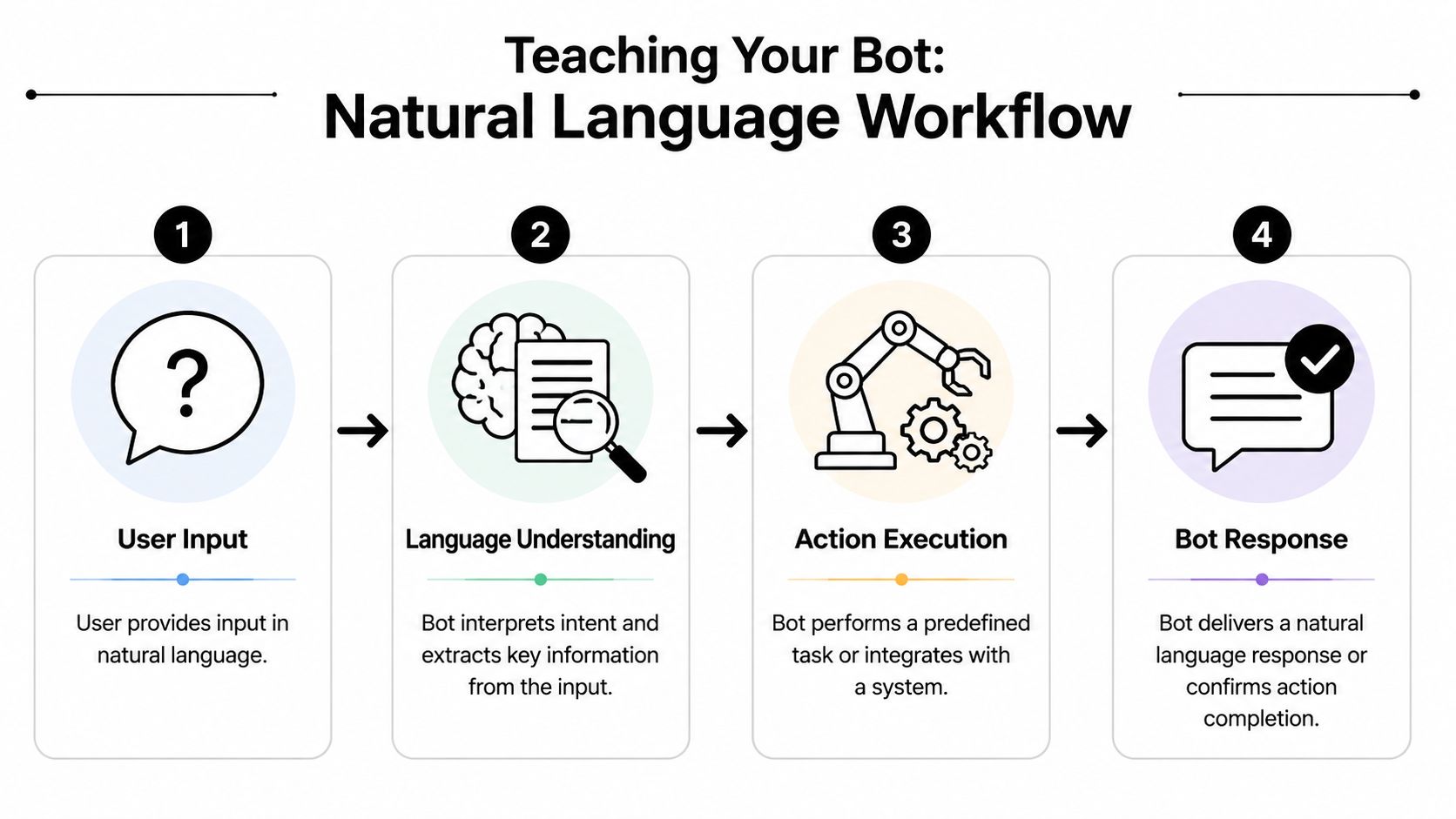
The strongest way to build a bot today is to describe the workflow in plain English, with enough operational detail that the system can infer the logic, the decision points, and the actions. The mistake isn't being non-technical. The mistake is being vague.
Start from a real workflow, not a feature list
Use one scenario from end to end. Sales follow-up is a good example because the trigger is clear, the actions are measurable, and the business value is obvious.
Here's a practical version of the instruction set:
-
Trigger When a new lead appears in HubSpot from our website contact form, review the contact record and identify the assigned owner.
-
Delay Wait for a defined period before acting, so you don't step on a manual reply from the team.
-
Check for prior response Look in Gmail for any reply from that lead in the existing thread or related conversation history.
-
Decision If there's no reply, send the approved follow-up template. If there is a reply, stop the sequence and notify the owner.
-
Internal visibility Post a message in the sales Slack channel with the contact name, company, and status.
That's already enough to build a useful automation. But the quality of the outcome depends on how specific you are.
Write instructions the way an operator would
Good natural-language prompts include business rules. Weak prompts sound like feature requests.
Compare the two:
| Weak instruction | Strong instruction |
|---|---|
| Follow up with new leads | When a new website lead is added to HubSpot, check whether anyone on our team has already replied in Gmail. If nobody has replied after the delay, send the approved intro follow-up email and post a note to Slack. |
| Tell me when someone replies | If the lead replies, stop all pending follow-ups and notify the record owner in Slack with the contact and thread summary. |
| Update the CRM | Write the latest action, timestamp, and follow-up status back to the lead record in HubSpot so the pipeline reflects what happened. |
The useful pattern is simple. State the trigger, the source of truth, the action, and the exception.
Here's the practical test I use. If a human assistant could perform the workflow using your written instruction, your bot probably can too. If the human would need to ask three clarifying questions, rewrite it.
Write the bot brief as if you're handing off the task to a new operations hire on their first day.
A lot of teams also benefit from reading examples of how others structure bot training instructions. If you want extra prompt design ideas before writing your own workflows, DocsBot's AI agent platform guide is a helpful reference for turning business knowledge into usable agent behaviour.
A short walkthrough helps here:
Add guardrails that keep the bot useful
The bot should know what not to do.
For the same sales workflow, useful guardrails include:
-
Respect ownership
Only act on leads assigned to the correct team or queue. -
Use approved content
Send only a named template or pull from a specific message library. -
Avoid duplicates
Don't send a follow-up if Gmail shows a recent human reply. -
Escalate edge cases
If the contact record is incomplete, ask for review instead of guessing.
These aren't advanced features. They're operational hygiene. Most bad bot experiences come from missing guardrails, not from missing intelligence.
Build memory through context, not guesswork
A capable bot needs context from the systems where your business history lives. For sales, that usually means:
- prior conversations in Gmail
- ownership and deal stage in HubSpot
- internal instructions or templates in Drive
- team notifications in Slack
When those sources are connected, the bot can act with more confidence and fewer false moves. Instead of sending a generic follow-up, it can use the correct template, mention the right owner, and avoid contacting someone who already replied.
The same pattern applies outside sales. UK firms using bots for HR onboarding have seen a 25% reduction in HR query time by automating tasks such as benefits FAQs and right-to-work checks, according to Forbes Tech Council's discussion of building AI agents for business workflows. Different department, same mechanics. Clear trigger, connected knowledge, controlled action.
A practical natural-language template
If you want a repeatable format, use this:
-
When this happens
Name the trigger event clearly. -
Look here first
State which system holds the deciding context. -
Then do this
Define the action in exact terms. -
Unless this is true
Add the exception or stop condition. -
Record the outcome here
Specify where the action log or status update should go.
That's the foundation for building a bot that can do more than answer questions. It can complete work across multiple tools without turning into a brittle tangle of one-off rules.
From Test Environment to Live Deployment
A bot that works in your head isn't ready. A bot that passes a clean test run might be.
Testing is where the workflow stops being an idea and starts behaving like a system. This is also where many rushed builds break, not because the logic is complex, but because nobody checked the exact inputs, message formatting, edge cases, or failure behaviour.
Test the path, then test the exceptions
A simple way to think about validation is to split it into two passes.
The first pass checks the happy path. Does the trigger fire? Does the bot read the right record? Does it send the correct email and write the update back to the CRM?
The second pass checks what happens when reality gets messy.
Use a checklist like this:
-
Trigger integrity
Confirm the bot starts only when the expected event occurs. -
Data accuracy
Check whether names, company fields, owners, and email addresses are being pulled correctly. -
Message quality
Review spacing, personalisation, subject lines, and template selection. -
Decision logic
Make sure reply detection, stop conditions, and escalation rules behave as expected. -
Write-back behaviour
Verify that HubSpot, Slack, or other systems receive the right status update after each action.
Read the logs like an operator
When a bot misbehaves, the log usually tells you why. It might show a missing field, a failed app permission, an email thread mismatch, or a condition that never matched because the rule was written too narrowly.
That's why I treat testing as a conversation with the bot. You're not only asking, “Did it run?” You're asking, “Why did it choose that action?”
A log review is usually more useful than a visual success message. You want to see:
| What to inspect | Why it matters |
|---|---|
| Input payload | Confirms the bot received the trigger data you expected |
| Decision branch | Shows which rule or condition was matched |
| Executed action | Verifies the exact step taken in Gmail, HubSpot, or Slack |
| Failure message | Reveals permission, formatting, or logic errors quickly |
Reliable deployment comes from predictable behaviour, not from a passing demo.
This matters even more because the market is crowded with bot experiences. There are over 987 million AI chatbot users globally, which means the practical advantage goes to teams whose automations behave consistently rather than merely existing, as noted earlier in the discussion around chatbot adoption.
If you want to think beyond a single workflow and into deployable interfaces, Zenfox also has a useful example of how automation can be packaged more cleanly in its guide to build an instant app.
Release in layers
Don't switch on full autonomy on day one.
A safer rollout pattern is:
-
Shadow mode
Let the bot run and log what it would have done without taking the final action. -
Assisted mode
Allow the bot to prepare drafts, summaries, or updates for human approval. -
Live mode
Turn on autonomous execution only after the decisions are stable.
That progression catches most operational mistakes before they reach a customer or a prospect. It also gives the team confidence, which matters more than people admit. A technically capable bot still fails if nobody trusts it enough to use it.
Manage Your Autonomous Agent with Confidence
Most automation mistakes happen after launch, not during setup.
A bot that can read messages, update records, and trigger actions across your stack needs supervision in the same way a new team member does. Not because it's unreliable by default, but because business rules change, edge cases appear, and compliance requirements don't care whether an error came from a person or a workflow.
Governance is part of the build
You need a clear answer to four questions:
- What can the bot access
- What can the bot change
- What gets logged
- Who reviews exceptions
That's the baseline for operating any autonomous workflow safely. If the bot sends email, updates customer data, or influences decisions, you need an audit trail. Not a rough memory of what probably happened. A record.
This is especially important in the UK. UK ICO data from 2025 shows that 35% of data breach fines were linked to automated systems, based on the source cited in AskBrian's overview of bot faults and compliance risks.
The log is not admin overhead
Teams often treat activity logs as something for security people. That's too narrow.
An activity log helps with three practical problems:
| Problem | What the log solves |
|---|---|
| Unexpected action | Shows which instruction or condition led to the action |
| Customer dispute | Confirms whether the bot sent, changed, or skipped something |
| Workflow drift | Reveals when live behaviour no longer matches the original operating rule |
That's why platforms with full execution histories matter more than flashy builders. You need to be able to inspect actions, review changes, and understand why the bot did what it did. Zenfox.ai is one example of a platform built for that operating model. It connects business tools, runs actions from plain-English workflows, and keeps activity logs with security controls such as SOC 2 alignment.
If a bot can take action in your business, it needs to leave evidence behind.
Use review habits, not blind trust
The simplest management routine is a standing review cycle.
Some teams check daily in the first week, then weekly once the workflow stabilises. The exact timing matters less than the discipline. You're looking for patterns such as repeated exceptions, unnecessary escalations, or rules that no longer fit the process.
Focus your review on:
-
Repeated failures
These usually point to a bad assumption in the original instruction. -
Unclear escalations
If the bot hands too much back to humans, the workflow may be under-specified. -
Permission creep
Access often expands over time unless someone reins it back in. -
Template drift
Outreach quality suffers when approved content changes but the bot still uses old logic.
A well-managed autonomous agent doesn't disappear into the background forever. It becomes a controlled operational layer. That's what lets you keep the speed of automation without giving up accountability.
Scaling Your Automation with Advanced Techniques
Once the first bot is stable, the next question isn't whether to build another one. It's which business process should be handed off next.
Teams either scale cleanly or create a mess. Clean scaling comes from reusing patterns that already worked. Trigger, context, action, exception, logging. Keep that shape, change the business task.
Four bot recipes worth building next
Competitive briefing bot
This bot watches specific companies, topics, or market terms, gathers relevant updates, and sends a concise summary into Slack or email. It's useful for founders, consultants, and sales teams that need ongoing market awareness without manually scanning sources all day.
The key trade-off is scope. If you track too broadly, the summaries become noise. If you track a tight list of competitors, customers, or themes, the output stays actionable.
Client report generator
This workflow pulls information from your CRM, internal notes, and shared documents, then drafts recurring account summaries. It works well for agencies, fractional operators, and customer success teams.
What works here is standardising the output. Decide the format first. If every report should include open tasks, recent activity, risks, and next steps, the bot can assemble that consistently.
Inbox triage and routing bot
This one reads incoming messages, categorises them, tags urgency, and sends them to the right place. For solo operators, that might mean creating order in a messy Gmail inbox. For teams, it might mean routing sales, support, and admin messages into separate Slack channels or queues.
The trade-off is confidence. Routing bots need a clear fallback rule for uncertain cases. If confidence is low, assign for review instead of forcing a label.
Internal knowledge responder
This bot answers recurring internal questions by pulling from documents, prior notes, policies, and process guides. It's especially useful for onboarding, operations, and cross-functional teams where the same questions get asked repeatedly.
As covered earlier, this pattern works outside sales too. The mechanism is the same. Connected context plus controlled action.
Scale by system, not by impulse
A lot of teams build five unrelated automations and then wonder why maintenance becomes painful. A better approach is to scale by function.
For example:
-
Revenue workflows
Lead capture, follow-up, CRM hygiene, proposal reminders -
Operations workflows
Status reporting, document collection, recurring checklists -
Client service workflows
Summaries, response triage, handoff alerts
That structure helps you reuse rules, permissions, templates, and review routines. It also makes it easier to decide where one bot ends and another begins.
Use templates, but don't stop at templates
Templates are good starting points. They save time on the obvious logic. They don't replace operational thinking.
Before you turn any advanced workflow live, check three things:
-
Does it have a clear owner
Somebody should be responsible for the result even if the bot executes the steps. -
Does it have a stop condition
Bots should know when not to act. -
Does it leave a trace
Every important action should be visible after the fact.
If you're ready to expand into multi-step agents that break larger jobs into smaller actions, Zenfox's autonomy engine shows the kind of architecture that supports that style of workflow.
The important shift is this. You're no longer trying to build a bot as a one-off tool. You're building an operating layer across your apps, one repeatable workflow at a time.
If you want to move from scattered automations to a bot that can read context, act across Gmail, Slack, HubSpot, and Drive, and keep a proper execution trail, take a look at Zenfox.ai. Start with one workflow you already run every week, give it a clear brief, and build from there.