
Master Email Automation Workflows Guide
Learn to design, build & optimize email automation workflows. Covers triggers, templates, testing & examples for HubSpot, Gmail & Zenfox.ai.
Many organizations don't have an email problem. They have a follow-up problem.
A lead fills in a form on Tuesday. Someone means to reply on Wednesday. By Thursday, that lead has spoken to a competitor. Meanwhile, trial users get the same generic message whether they invited their team, ignored the product, or hit the pricing page twice. The inbox stays busy, but the communication isn't organised around intent.
That's where email automation workflows stop being a nice-to-have and start acting like infrastructure. A workflow is the logic behind timely, relevant communication. It decides what should happen after a signup, a demo request, a purchase, or a period of silence. When it's designed well, it removes manual chaos without making your messaging feel mechanical.
The shift happening now is bigger than moving from manual sends to scheduled sequences. Rigid builders still force teams to think in boxes, branches, and maintenance overhead. Modern AI tools are pushing email automation workflows towards something more useful. You describe the goal, the context gets pulled in from tools like Gmail and HubSpot, and the system handles the moving parts with less friction.
Table of Contents
- Why Your Business Needs Intelligent Email Automation
- Designing Your Workflow From Goal to Blueprint
- Building Your Automation in Gmail HubSpot and Zenfox ai
- Crafting Messages That Connect and Convert
- Testing Monitoring and Optimising Your Workflows
- The Future of Your Automated Communication
Why Your Business Needs Intelligent Email Automation
Manual email follow-up breaks in predictable ways. Sales forget to chase warm leads. Marketing sends the same newsletter to everyone because segmentation takes too long. Client success teams remember to check in only when a customer is already drifting away.
That isn't a discipline issue. It's a systems issue.
Email automation workflows solve that by turning key moments into dependable actions. A form submission can trigger a welcome path. A booked demo can notify sales and start a nurture sequence. A period of inactivity can trigger a re-engagement message before the relationship goes cold. Instead of relying on memory, you rely on logic.
The commercial case is already clear. Automated emails generate 320% more revenue than traditional manual campaigns, and email automation delivers $36 for every $1 invested, according to eMercury's email automation workflow data.
Practical rule: If a message should always happen after a specific customer action, it shouldn't depend on a human remembering to send it.
What changes once you start thinking in workflows is the role email plays in the business. It stops being a batch channel and becomes an operating layer for revenue, retention, and handoffs between teams. A welcome series isn't just onboarding copy. It's the first test of whether your business can respond to intent while that intent is still fresh.
There's another shift worth paying attention to. Basic automation solved repetition. Intelligent automation solves context. That difference matters. A rigid sequence says, "send email two days later". A context-aware workflow asks whether the person opened the first email, visited the pricing page, replied, booked a call, or disappeared.
That evolution is why teams are rethinking the stack around email itself, not just the templates inside it. If you're already looking at AI-led execution across ops and marketing, this overview of AI automation services is a useful reference point for what that looks like in practice.
The real cost of staying manual
Teams usually underestimate the downside of manual communication because the failure is quiet. Nobody logs "lead lost because follow-up happened too late" as a formal process issue. It just shows up as lower conversion, patchy customer experience, and a lot of apologetic internal messages.
A good workflow fixes that in three ways:
- It creates consistency: Every lead, customer, or subscriber gets the right baseline experience.
- It protects timing: Messages go out when the action matters, not when someone remembers.
- It scales judgement: You can encode routing, urgency, and relevance into the system.
Intelligent email automation workflows don't replace people. They protect the moments where people are most likely to drop the ball.
Designing Your Workflow From Goal to Blueprint
Most broken workflows were built too early. Someone opened HubSpot, added a trigger, dragged in three emails, and called it a nurture. That's not design. That's assembly.
The planning work happens before the builder.
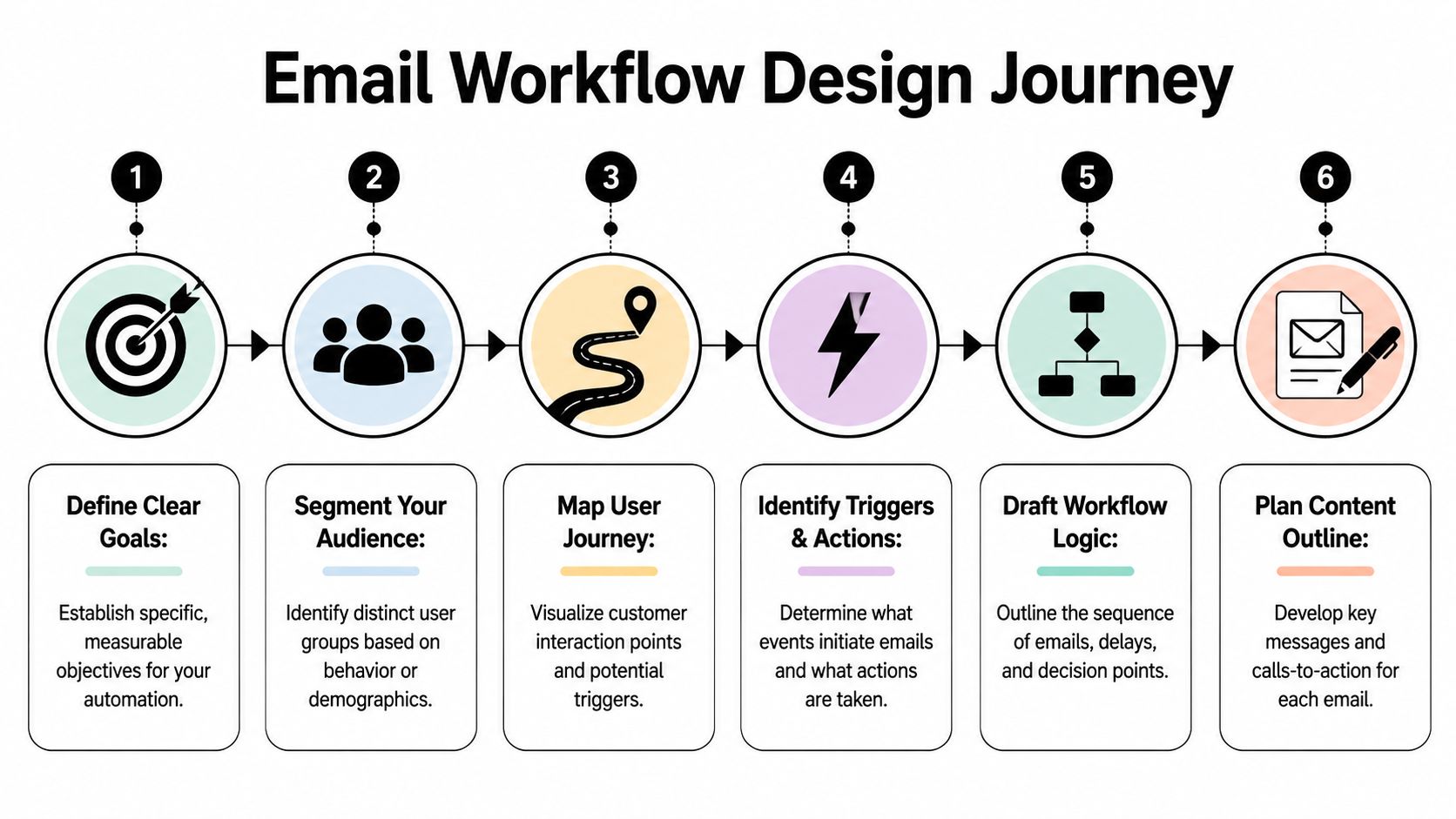
Start with one outcome
Give the workflow a single job. Not "engage leads". Not "improve lifecycle marketing". One clear business outcome.
Good examples:
- Welcome new subscribers: Move them from signup to first meaningful action.
- Nurture demo leads: Keep momentum between enquiry and sales conversation.
- Re-engage inactive users: Bring back people who were once active but have gone quiet.
If the workflow has two different jobs, split it. Mixed-purpose automations become messy fast. They also become hard to diagnose when performance drops.
I usually write the goal as a simple sentence: "When this type of contact does this action, move them towards this next step." That sentence is enough to expose fuzzy thinking.
Choose triggers that reflect intent
A trigger should match behavior that signifies intent. Time-based enrolment is easy, but behavior-based entry is almost always stronger because it captures real interest.
Landbase's email sequence statistics report that behavioural triggers deliver 152% higher click-through rates than non-triggered emails. The same dataset shows welcome email workflows averaging 82% open rates and a 58.26% click-to-conversion rate.
That lines up with what experienced operators see every day. The closer your trigger is to actual intent, the easier the rest of the workflow becomes.
Use questions like these before choosing a trigger:
- What action proves interest: Form fill, resource download, pricing page visit, account creation?
- What action changes the message: First purchase, abandoned cart, support request, inactivity?
- What action should exclude someone: Existing customer status, active deal stage, recent reply?
A useful trigger pulls the right people in. A useful suppression rule keeps the wrong people out.
Workflows perform better when the entry point is specific and the audience is narrow. Broad entry criteria create polite irrelevance at scale.
Sketch the branches before you build
Every workflow needs a path, but the useful part is the branch logic. That's where personalisation happens.
Map it in plain language first:
- Entry event: Contact submits the demo form.
- Immediate action: Send a confirmation email with the promised resource.
- Decision point: If they booked a meeting, stop the nurture.
- Alternative path: If they clicked but didn't book, send a case-study follow-up.
- Exit condition: If they reply, route them out of marketing automation.
Keep the branch count under control. Operators often add too many paths because the builder makes branching look clever. In reality, every extra branch needs testing, reporting, and content maintenance.
A practical blueprint usually includes:
- Primary trigger
- Audience filters
- Core sequence
- Branch conditions
- Exit rules
- Owner for review and maintenance
If you need a better mental model for this planning stage, a guide to workflow management systems helps frame the workflow as an operational process, not just a marketing asset.
The blueprint test
Before you open any software, ask two hard questions.
First, if a contact enters this workflow today, would every email make sense based on what they just did?
Second, if performance falls in a month, can you quickly tell whether the problem is the trigger, the timing, the audience, or the copy?
If the answer to either question is no, the blueprint isn't ready.
Building Your Automation in Gmail HubSpot and Zenfox ai
The same workflow can feel simple or painful depending on the tool.
To make that concrete, take a common example. A lead downloads a guide from your site. You want to send the asset immediately, follow up with a helpful second email if they engage, and stop the sequence if they book a call or reply. That isn't advanced automation. It's standard lead nurture. But the build experience changes a lot across Gmail, HubSpot, and AI-led tools.
The workflow example
The sequence looks like this:
- Email 1 goes out immediately with the resource.
- Email 2 follows if the lead opened or clicked and hasn't booked a call.
- Email 3 goes only to engaged leads who still haven't converted.
- Replies and booked meetings should remove the contact from the sequence.
- Sales should see the latest activity in the CRM.
This is also where segmentation starts to matter. UK benchmark data shows top email automation performers generate £13.50 revenue per recipient, using behavioural triggers with 45.38% open rates versus 40.08% for newsletters, while dynamic segmentation can boost conversions by 15%, according to Email Vendor Selection's UK marketing automation statistics.
What Gmail can do
Gmail is useful for lightweight automation, but only up to a point. You can build simple patterns with templates, filters, labels, scheduled sends, and add-ons. For a solo consultant or small team, that might be enough to standardise first-touch communication.
What works in Gmail:
- Templates for repeat replies: Good for enquiry responses and common follow-ups.
- Labels as lightweight states: Useful if you manually move contacts through a process.
- Scheduled sends: Fine for one-off nurture timing.
- Basic add-ons: Can patch in reminders or mail merge behaviour.
Where it breaks is logic. Gmail doesn't natively manage proper branching, audience suppression, CRM sync depth, or reliable workflow reporting. You can mimic a process, but you're still close to manual operations.
For simple client follow-up, that's acceptable. For real email automation workflows, it becomes fragile.
Where HubSpot earns its complexity
HubSpot is built for this job. Its workflow builder can enrol contacts based on form fills, lifecycle stages, page views, list membership, deal activity, and custom properties. You can branch on opens, clicks, CRM values, and sales actions. You can also suppress contacts who meet exit criteria and hand off cleanly to sales.
A practical HubSpot build for this nurture sequence usually includes:
| Feature | Gmail (Native/Simple Add-ons) | HubSpot (Workflow Builder) | Zenfox.ai (AI Assistant) |
|---|---|---|---|
| Trigger setup | Manual or limited via add-ons | Native behavioural and CRM triggers | Goal described in plain English and linked app context |
| Branching logic | Minimal | Robust if/then branches | Generated from goal and connected data |
| CRM sync | Weak or manual | Deep native sync | Works across connected tools including CRM and inbox |
| Reply handling | Mostly manual | Possible with workflow rules and exclusions | Can use inbox context to adjust actions |
| Build effort | Low for simple tasks, high for anything complex | Powerful but more setup-heavy | Lower manual setup when the prompt is clear |
| Best fit | Solo lightweight follow-up | Mature teams with defined processes | Teams that want cross-tool execution without building every branch by hand |
HubSpot's strength is control. Its weakness is that control has to be configured. Every branch, property, delay, suppression list, and exception adds build time. If the team doesn't maintain naming conventions and lifecycle definitions, the automation becomes hard to trust.
HubSpot rewards disciplined operators. It punishes messy data.
If your team already lives in HubSpot, the builder is often worth the effort. But you need someone who thinks in logic, not just campaigns.
Where AI changes the build process
The model's approach begins to shift. Instead of constructing every condition manually, you state the outcome and let the system translate that into actions across your tools.
With business automation software, the interesting change isn't just speed. It's that the workflow can start from the job to be done rather than the interface. In practice, that means describing something like: "When a lead downloads this guide, send the asset from Gmail, wait for engagement, create a follow-up path for engaged contacts, stop if they reply, and update HubSpot notes."
Used this way, Zenfox.ai connects tools like Gmail and HubSpot, builds zero-code workflows from plain-English goals, and executes the follow-up logic across those apps. That's different from a classic builder where you still have to wire every step by hand.
The trade-off is important. AI-led workflow creation reduces setup friction, especially for cross-tool tasks. But it still needs a clear goal, clean source data, and human review. If your process is vague, the automation will reflect that vagueness.
Which option makes sense
Use Gmail if the process is light and the stakes are low.
Use HubSpot if you need robust lifecycle automation and your team can maintain the underlying data model.
Use an AI assistant when the significant struggle isn't just sending emails. It's coordinating email, CRM updates, internal handoffs, and follow-up logic across multiple apps without building everything from scratch.
The mistake is picking a tool before you understand the workflow's complexity. The right build environment depends on how much logic you need, how often the process changes, and whether your team can maintain what it creates.
Crafting Messages That Connect and Convert
Automation fails when the copy sounds like automation.
You can have a perfect trigger, tidy branching, and clean CRM sync, then lose the contact because the email reads like it was sent to a spreadsheet. The point of email automation workflows isn't to sound efficient. It's to make timely communication feel relevant and human.

Write for the moment not the database
Most weak automated emails make the same mistake. They personalise the field, but not the context.
Using a first name is fine. Referring to the action they just took is better. If someone downloaded a pricing guide, mention the pricing guide. If they started a trial and invited no one, speak to solo setup. If they visited a services page twice, write to evaluation, not awareness.
Useful copy checks:
- Name the context: Why are they receiving this now?
- Respect their stage: Don't pitch a demo to someone who still needs orientation.
- Keep one clear action: Every email should ask for one next step.
- Sound like a person wrote it: Short sentences help. So does restraint.
A strong automated email often reads like a manual follow-up someone smart would have sent anyway.
Build a sequence with narrative movement
A sequence should progress. Too many workflows send three versions of the same email with different subject lines.
Instead, give each message a job:
- Email one: Deliver the promised value.
- Email two: Remove hesitation or add useful context.
- Email three: Ask for the next commitment.
That progression matters because contacts don't need repeated introductions. They need momentum. Each email should assume the previous one existed and move the conversation forward.
The safest email in a workflow is often the least effective one. Bland copy doesn't offend anyone, but it rarely gets action either.
A practical way to draft sequences is to write the final email first. That forces clarity on the destination. Once you know the ask, the earlier emails can earn it properly.
Here's a useful walkthrough before you revise your own emails:
Keep templates clean and adaptable
Reusable templates save time only if they're built for adaptation. That means avoiding dense layouts, too many competing calls to action, and blocks of copy that only work in one campaign.
I prefer templates with:
- A strong opening line: Grounded in the trigger or recent action.
- One body idea: Not three.
- A visible primary CTA: Button or plain-text link, depending on the brand.
- A light footer: Enough for compliance and contact context without clutter.
Brand voice matters here. The workflow should still sound like your company, whether it's a product onboarding email in HubSpot or a direct client follow-up sent from Gmail. Consistency builds trust. Robotic sameness kills it.
If a message wouldn't make sense as a one-to-one email from a competent colleague, it probably needs rewriting.
Testing Monitoring and Optimising Your Workflows
A workflow isn't finished when it's live. That's when the actual work starts.
Many teams launch email automation workflows, glance at the opens, and move on. Then three months later they realise later-stage emails are underperforming, contacts are lingering in the wrong branches, and half the logic has never been reviewed since setup.
Test the workflow before contacts enter it
Pre-launch testing should be boring and thorough. You're checking whether the workflow behaves exactly as intended, not whether the diagram looks tidy.
Run through these checks:
- Entry validation: Confirm the right contacts can enter and the wrong ones cannot.
- Branch logic: Test every meaningful if/then path with sample records.
- Exit conditions: Make sure replies, bookings, or status changes remove contacts when they should.
- Email QA: Proof subject lines, links, personalisation tokens, sender details, and mobile rendering.
- Timing review: Check delays against real buying behaviour, not arbitrary internal preferences.
The easiest way to break trust in automation is to send the right email to the wrong person. That usually happens because nobody tested suppression rules properly.
Monitor the full journey
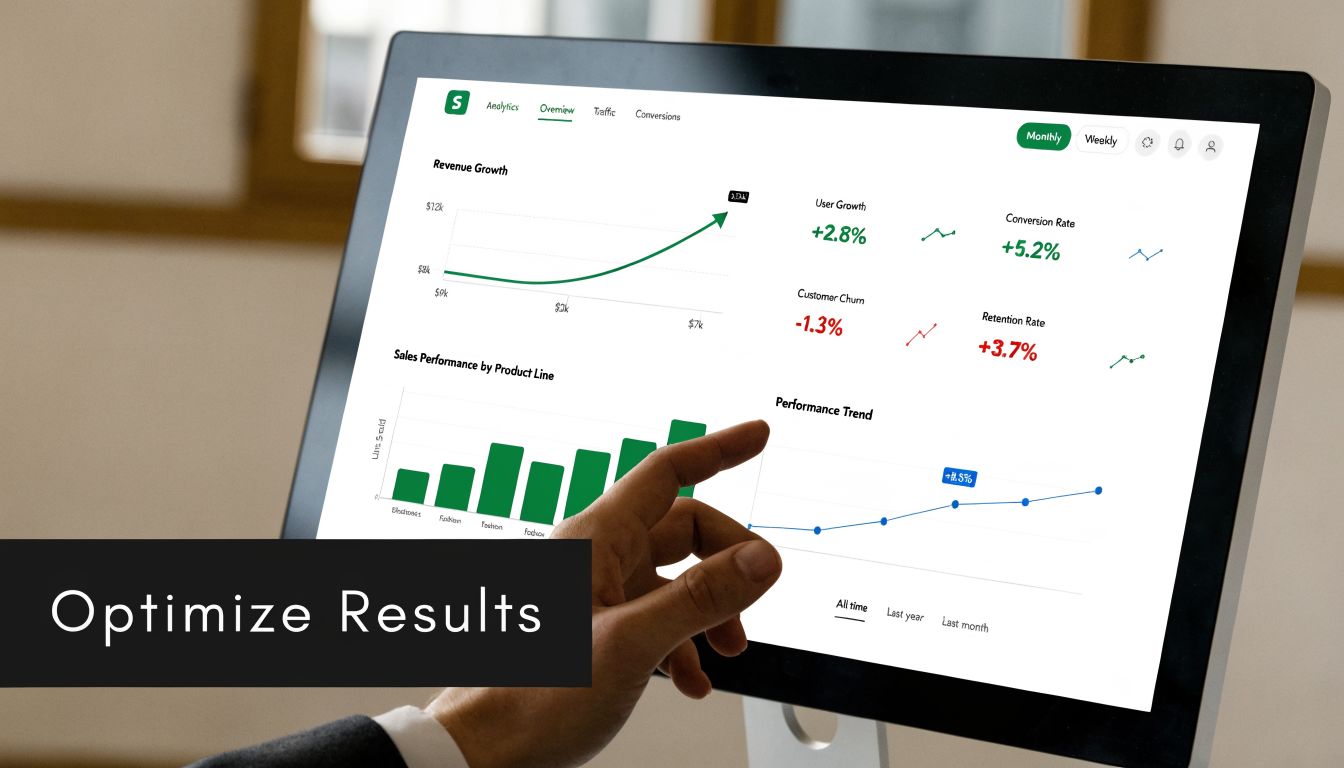
Once the workflow is live, don't stop at top-line engagement. You need to know where contacts slow down, where they disappear, and whether the sequence is moving them towards the intended business outcome.
UK workflow data highlights the risk of drift. Count's workflow automation effectiveness analysis notes that irrelevant content can drive open rates down to 12% in later emails. The same source reports that ML-enhanced timing can boost engagement by 40%, and 68.5% of UK marketers report targeting improvements.
Those figures matter because they point to a common pattern. Early emails often perform well because intent is fresh. Later emails reveal whether the workflow is relevant.
A sensible monitoring view includes:
- Entry volume: Are the right people entering?
- Step-by-step engagement: Where does interest drop?
- Goal completion: Are contacts booking, buying, replying, or activating?
- Branch distribution: Which paths are carrying most contacts?
- Unsubscribes and replies: Are messages helping or annoying?
Good optimisation starts with one question. At what exact step does this workflow stop feeling useful to the recipient?
Optimise the weak point not the whole system
When performance drops, teams often rewrite every email and rebuild the workflow. Usually that's unnecessary.
Target the weak point first.
If email one performs well and email two collapses, the issue is probably message relevance or timing in that specific step. If no one reaches the later branch, the decision rule may be too restrictive. If plenty of people engage but few convert, the CTA may not match the buyer's stage.
A clean optimisation cycle looks like this:
- Pick one weak metric or drop-off point.
- Form a reasoned hypothesis.
- Change one meaningful variable.
- Review the effect after enough volume has passed.
- Keep a record of what changed and why.
Useful test candidates include subject line framing, send timing, branch criteria, and CTA wording. Less useful is changing five things at once and then pretending the result teaches you something.
The teams that get the most from email automation workflows treat them like living systems. They review them, prune them, and keep aligning the logic with real customer behaviour.
The Future of Your Automated Communication
The old version of automation was rule-driven and brittle. It could save time, but it also created maintenance work. Every exception needed another branch. Every process change meant another rebuild. Every cross-tool action added friction.
The better model is goal-driven. You define the outcome, connect the systems where the context lives, and let the workflow adapt around real behaviour.
That's the evolution in email automation workflows. Not more emails. Better timing, stronger relevance, cleaner handoffs, and less manual assembly. Gmail still has a place for simple follow-up. HubSpot still makes sense for structured lifecycle automation. But the direction of travel is obvious. Teams want systems that understand intent, not just triggers.
Start with one workflow that matters. A welcome series. A lead nurture. A reactivation path. Build it properly, test it hard, and watch where people engage or fall away. Once one workflow is dependable, the rest become easier because the operating principles are the same.
The future isn't a bigger tangle of sequences. It's automated communication that works more like a capable operator. It reads context, acts across tools, and keeps the process moving without constant babysitting.
If you're ready to move from rigid builders and manual follow-ups to goal-led automation, Zenfox.ai is worth a look. It connects tools like Gmail, HubSpot, Slack, and Drive, lets you describe workflows in plain English, and carries out the work across your stack while keeping an activity log. For solo operators and lean teams, that makes complex automation far more accessible without turning every process into a technical project.