How to Build an AI Agent for Sales? a Practical Guide
Learn how to build an AI agent for sales using RAG. This guide covers components, architectures, and how to automate CRM tasks securely with Zenfox.ai.
Your pipeline probably looks familiar. Reps are chasing replies in Gmail, notes are scattered across call transcripts, HubSpot fields are half-complete, and weekly reporting gets pushed to Friday evening because nobody had time earlier in the week. Follow-ups slip. Context gets lost. Good opportunities cool down for avoidable reasons.
That's why the question isn't just whether AI belongs in sales anymore. It's how to build an AI agent for sales that can do useful work without creating security, compliance, or maintenance problems. For UK teams, that means more than a chatbot. It means a system that can read the right context, draft useful output, and take controlled actions across the tools the team already uses.
Table of Contents
- Why Every Sales Team Needs an AI Agent in 2026
- Understanding Retrieval-Augmented Generation
- The Building Blocks of a Sales AI Agent
- Designing Your Sales Agent's Workflow
- From Knowledge Base to Autonomous Action
- Build vs Buy The Smart Path to Deployment
- Your First Steps to Building a Sales Agent
Why Every Sales Team Needs an AI Agent in 2026
Sales teams rarely fail because they can't talk to customers. They fail because the operating system around the rep is broken. A rep finishes a call, then has to update the CRM, draft a follow-up, pull past interactions, check pricing notes, and remember which prospect needed a proposal revision. None of that is high-value selling, but it still has to get done.
That's where an AI agent changes the shape of the work. Instead of waiting for a rep to manually move information between Gmail, call notes, documents, and the CRM, the agent can handle the repetitive coordination layer. It becomes the assistant that never forgets to log context, queue the next action, or prepare a first draft.
The market has already moved
This isn't a niche experiment. The UK AI agents market is projected to reach USD 2.79 billion by 2030, 54% of UK firms already use AI in 2026, and sales teams adopting AI agents are seeing a 20% increase in lead conversion rates according to UK AI agents market data from Grand View Research.
That combination matters. Adoption is already broad, and the gains are tied to a concrete sales outcome. Better follow-up discipline and better use of context usually show up first in conversion.
Teams don't need another dashboard. They need a system that removes friction between customer interaction and next action.
What an agent actually changes day to day
A useful sales agent doesn't replace the rep. It removes the dead time around the rep.
- After a call: it can assemble the account context and prepare a follow-up draft.
- Between meetings: it can surface open tasks, missing CRM fields, and unresolved objections.
- At the end of the week: it can compile activity summaries and pull patterns from notes and emails.
If you want a good reference point for the kinds of workflows sales teams are trying to automate, Swarmhit for sales teams is a practical example of the operational problems people are trying to solve.
The reason this matters in 2026 is simple. Teams that automate context gathering and routine execution respond faster, stay more organised, and waste less selling time on admin.
Understanding Retrieval-Augmented Generation
Most sales agents fail for a basic reason. They sound fluent, but they don't know your business well enough to be trusted. They can produce polished language while missing the actual account history, product caveats, or last pricing discussion.
The fix is Retrieval-Augmented Generation, usually shortened to RAG.
Think of RAG as a consultant with a private library
A normal language model is like a consultant with broad general knowledge. It can write, summarise, and reason, but it doesn't automatically know what happened in your last customer call or what sits inside your proposal folder.
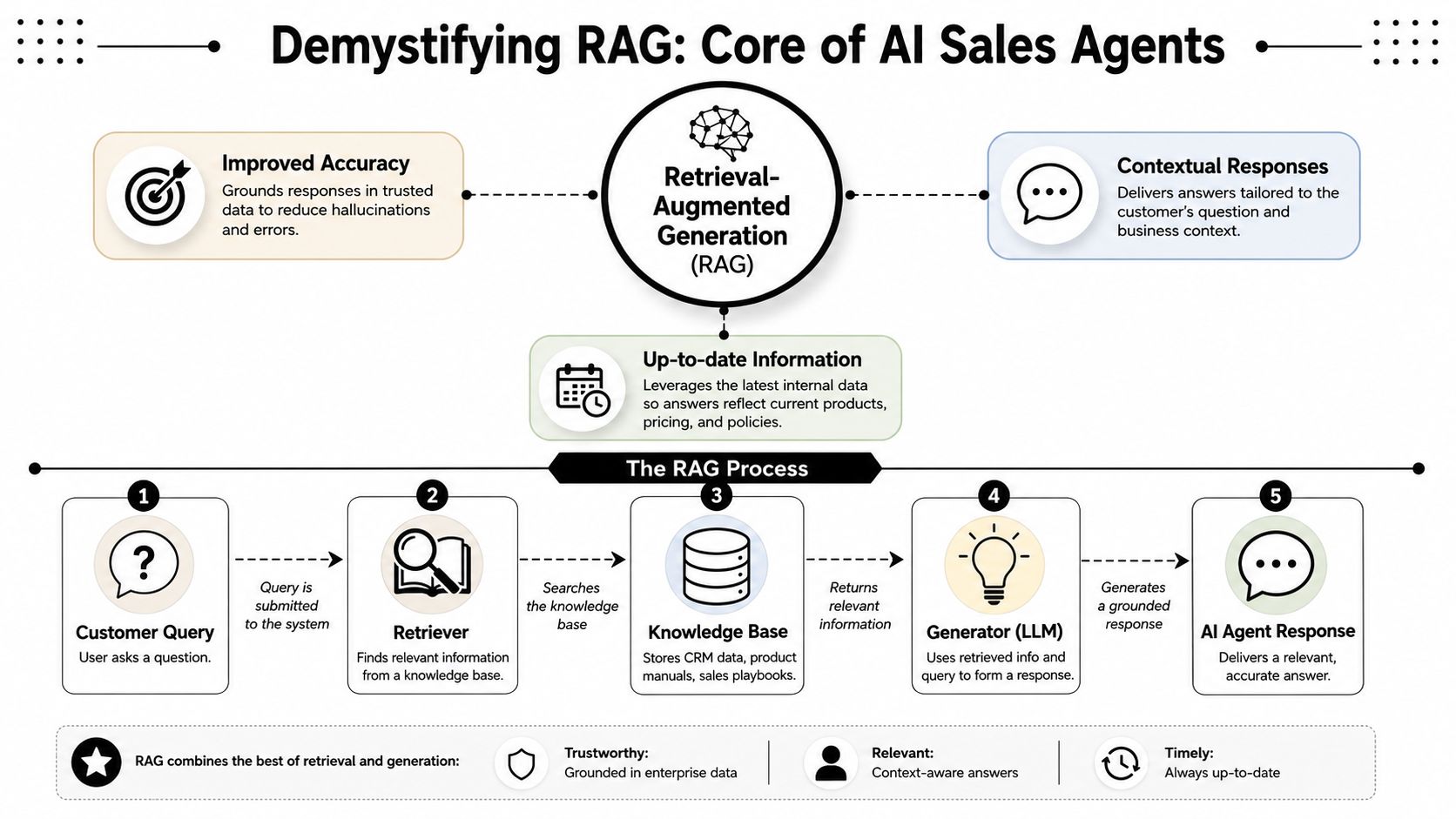
RAG gives that consultant a private library before answering. When a rep asks a question, the system first searches the company's own material, then uses the retrieved information to generate the reply. That's why a RAG-based sales agent is more grounded than a generic chatbot.
The two-part loop
RAG has two jobs.
-
Retrieval
The system searches a knowledge base for the most relevant pieces of information. In sales, that usually means CRM records, product docs, sales playbooks, email threads, call summaries, pricing notes, and internal guidance. -
Generation
The language model uses the retrieved material plus the user's request to produce the answer, draft, summary, or recommendation.
That sounds simple, but the quality difference is huge. Without retrieval, the model guesses from general patterns. With retrieval, it works from your actual records.
Why this matters in sales
Sales work is unusually sensitive to missing context. A weak answer isn't just inconvenient. It can send the wrong pricing, ignore a compliance concern, or repeat information the buyer already rejected.
Practical rule: if an agent needs to answer with company-specific detail, it should retrieve before it writes.
The best way to think about RAG is not as an optional enhancement. It's the control layer that makes a sales agent usable in real workflows.
For teams that want a more technical walkthrough of sourcing and structuring external information, how to build RAG with web data is a useful companion read. For the internal side of the same problem, this guide on document indexing is relevant because indexing quality usually determines retrieval quality.
The Building Blocks of a Sales AI Agent
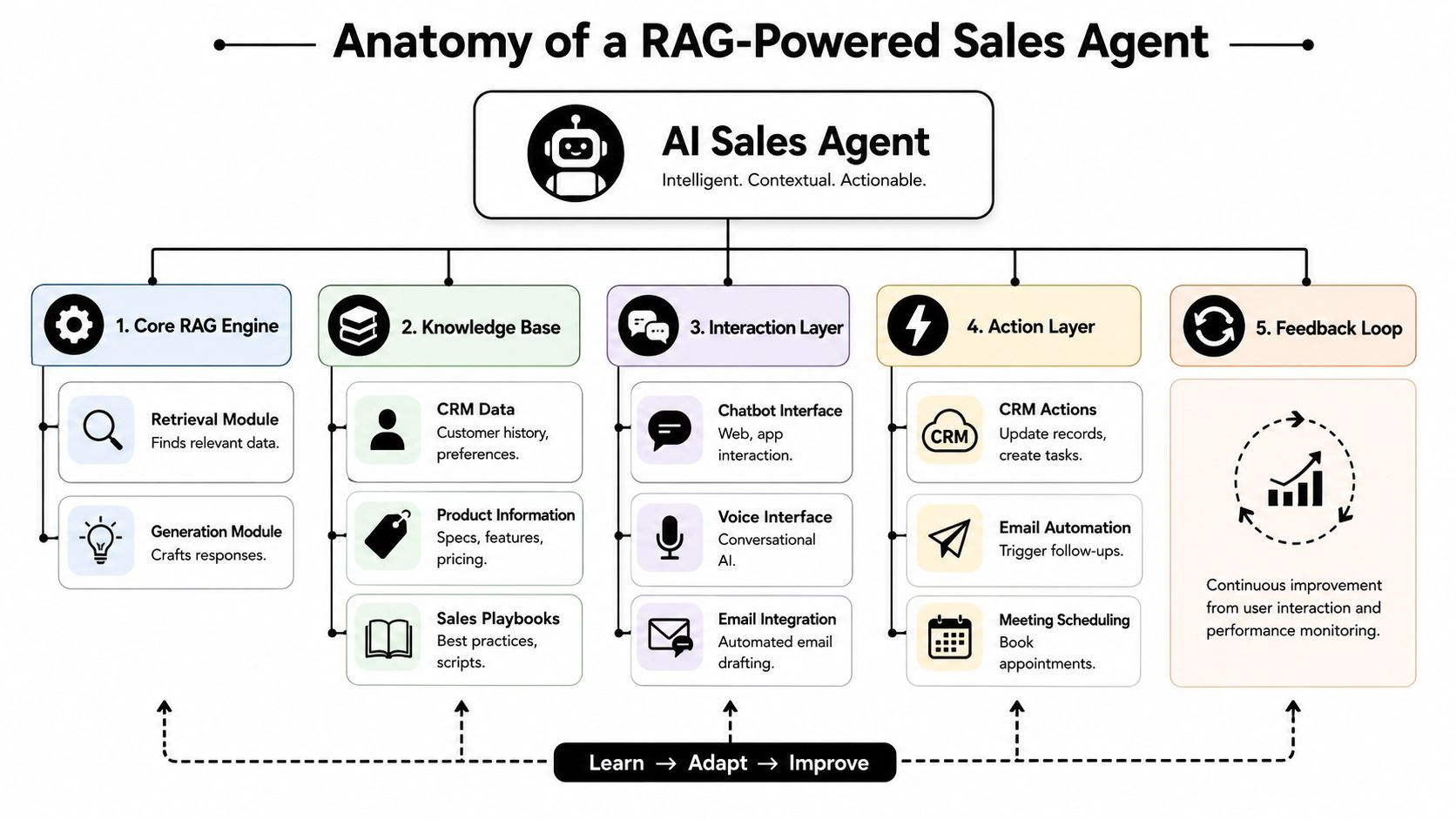
Once RAG is clear, the architecture becomes easier to reason about. A sales agent is not one model with magic behaviour. It's a small system made of parts, and each part has a job.
The knowledge layer
The first ingredient is the data the agent can access. In practice, that usually includes:
- CRM records such as account history, deal stage, contacts, and logged activities
- Email and messaging history from tools like Gmail and Slack
- Documents including proposals, pricing sheets, product notes, security answers, and call transcripts
- Playbooks that define tone, process, qualification logic, and escalation rules
Often, teams make a bad decision. They dump everything into the system and hope the model sorts it out. That usually hurts quality. Sales agents work better when the accessible knowledge is deliberate, current, and permission-aware.
Indexing and searchability
Raw data isn't enough. The agent needs that data prepared so it can be found when needed. That preparation step is indexing.
Indexing breaks documents and records into searchable units, attaches metadata, and stores them in a way that makes retrieval fast and relevant. If indexing is poor, the rest of the stack won't save you. The model can only use what the retriever can find.
A strong indexing setup usually decides:
| Component | What it does | Why it matters |
|---|---|---|
| Chunking | Splits large files into smaller sections | Keeps retrieved context focused |
| Metadata | Adds labels like account, date, owner, source | Filters results more accurately |
| Permissions | Preserves who should see what | Prevents accidental exposure |
| Refresh logic | Updates the index as source data changes | Reduces stale output |
The retrieval layer
The retriever is the librarian. It receives a request such as “summarise the latest interaction with Acme and draft a follow-up” and finds the most relevant account notes, prior emails, transcript excerpts, and CRM entries.
In many builds, this sits on top of a vector database or similar retrieval system. You can think of it as a specialised catalogue for meaning-based search, not just keyword matching. That matters because sales questions are often phrased differently from the exact text in the source material.
The generation layer
The large language model does the writing and reasoning. It turns retrieved context into something useful: an email draft, a meeting summary, a next-step recommendation, or a CRM note.
But the model needs boundaries. Good agents use prompt templates and instruction layers that define:
- the role of the agent
- the allowed actions
- the preferred tone
- what to do when information is missing
- how to cite or reference internal material
- when to stop and ask for human approval
A sales agent should be opinionated about process and cautious about facts.
The action layer
A sales agent becomes operational when it can do more than answer. It needs tools that let it act inside approved systems.
That can include:
- CRM actions such as creating tasks or updating records in HubSpot
- Email actions such as drafting or sending follow-ups
- Calendar actions such as scheduling meetings
- Reporting actions such as producing weekly pipeline summaries
Without this layer, you have a helpful assistant. With it, you have an agent that can move work forward.
Designing Your Sales Agent's Workflow
A working sales agent needs a clean path from request to action. If that path is vague, the agent becomes inconsistent. If it's too rigid, it becomes brittle. Good workflow design sits in the middle. It's structured enough to be reliable and flexible enough to handle real sales conversations.
A practical flow that works
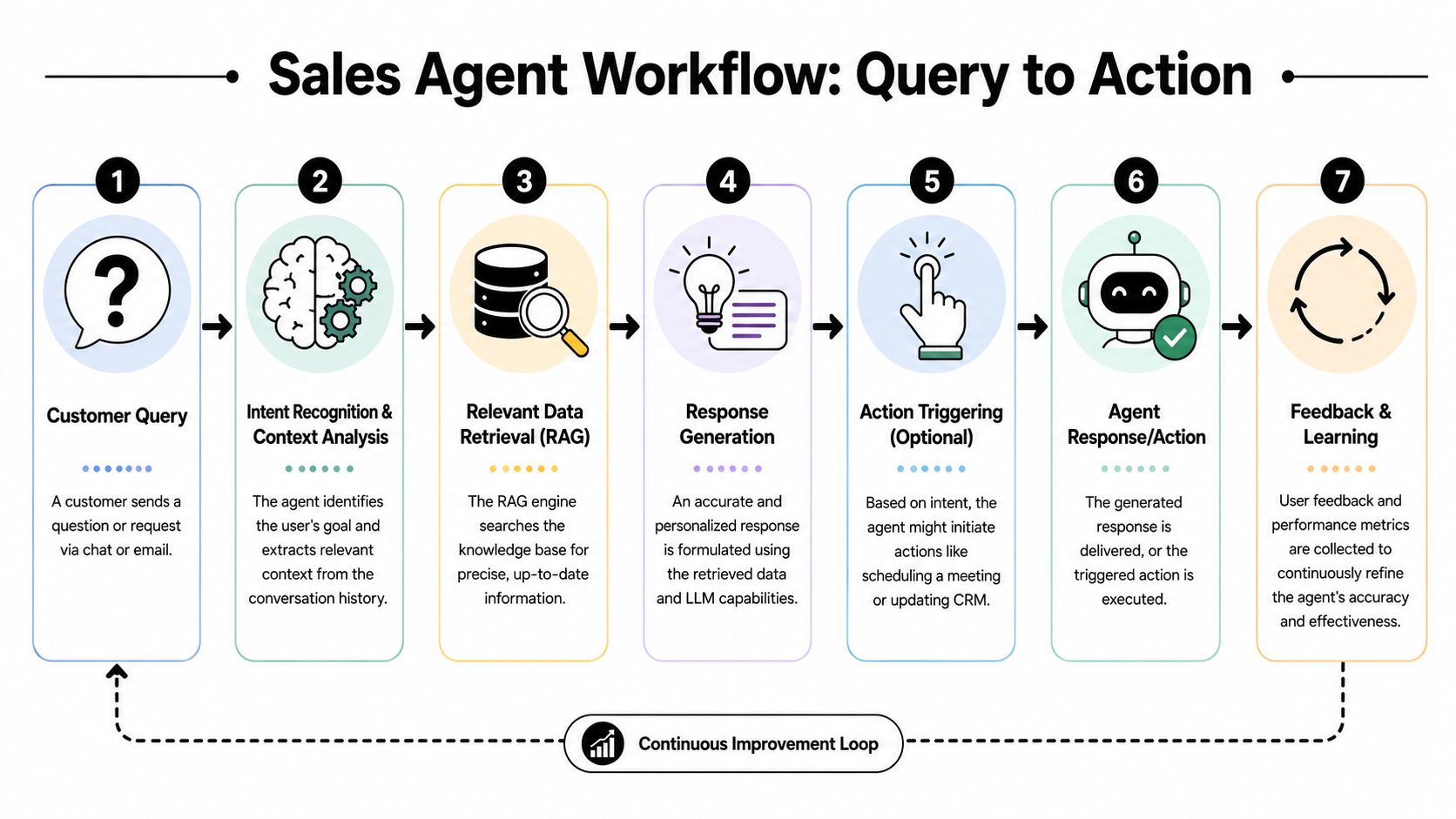
Take a common request: “Summarise the latest interaction with Client X and draft a follow-up.”
A well-designed workflow usually runs like this:
-
Capture the request
The system receives the prompt from chat, email, or an internal workspace. -
Identify the target entity
It resolves “Client X” to the right company, contact, or deal record. -
Retrieve relevant context
It pulls recent emails, call notes, CRM activity, and any related product or pricing material. -
Assemble a prompt
It packages the retrieved context with instructions such as tone, output format, and any approval rules. -
Generate the response
The model creates the summary and draft. -
Trigger actions if allowed
It may save a note, update the CRM, or queue the draft for review. -
Log the outcome
The system records what happened for auditability and future evaluation.
Where teams usually go wrong
Most weak workflows fail in one of three places:
- Bad entity resolution when the system can't reliably map a request to the right account
- Loose retrieval when irrelevant context gets mixed in with the useful material
- Unsafe action logic when the agent can write or update before a human has approved the output
The safest pattern is staged autonomy. Let the agent draft broadly. Let it write back to systems only where the risk is low and the rules are explicit.
A simple Python sketch
This isn't production code, but it shows the shape of the pipeline.
# Simplified example of a RAG-based sales agent workflow

from my_retriever import search_knowledge_base
from my_llm import generate_text
from my_crm import create_note

def sales_agent(account_name, user_request):
    # 1. Retrieve relevant context for the account
    context = search_knowledge_base(
        query=f"{account_name} recent emails, call notes, CRM updates"
    )

    # 2. Build a constrained prompt
    prompt = f"""
    You are a sales assistant.
    Use only the context below.
    If key information is missing, say so clearly.

    Account: {account_name}
    User request: {user_request}

    Context:
    {context}

    Output:
    - Brief summary
    - Suggested follow-up email
    """

    # 3. Generate the result
    response = generate_text(prompt)

    # 4. Optionally log a note in the CRM
    create_note(account_name, "AI-generated draft prepared for rep review")

    return response
This example hides the hard parts on purpose. Production systems need permissions, monitoring, retries, fallback behaviour, action approval, and better evaluation. But the pattern holds. Retrieve, constrain, generate, then act carefully.
Workflow design decisions that matter
| Decision | Better default | Why |
|---|---|---|
| Write access | Human review first | Reduces risk |
| Data scope | Account-specific retrieval | Improves relevance |
| Prompt style | Explicit output structure | Makes results more consistent |
| Logging | Full action log | Helps with debugging and compliance |
The best workflow is usually boring. It's predictable, easy to inspect, and hard to misuse.
From Knowledge Base to Autonomous Action
The jump from “helpful answer” to “useful agent” happens when the system starts doing work that sales reps would otherwise do manually.

Follow-up drafting after meetings
A rep finishes a discovery call. Normally, they'd listen back to notes, check the account history, and spend time writing a follow-up that references the buyer's priorities.
A good agent can pull the transcript, recent email thread, and CRM context, then draft the follow-up while the conversation is still fresh. The rep reviews it, adjusts the tone if needed, and sends it. That's one of the clearest ways agents give time back to the team.
According to UK sales AI adoption data from DataGrid, teams using AI agents save 2 to 5 hours per week, achieve up to 44% more productivity, and report revenue increases between 7% and 25%. Follow-up automation is one of the main reasons those gains show up quickly.
CRM updates that actually happen
Sales leaders often want perfect CRM hygiene, but reps are measured on momentum with buyers, not on form completion. So the CRM falls behind.
An agent is well suited to the work humans avoid. It can turn call notes into structured updates, add next steps, log objections, and create tasks. That doesn't mean every field should be auto-written without oversight. It means the first pass is automated, and the rep only needs to verify the result.
The best automation targets work people routinely postpone, not work they already enjoy doing.
Weekly reporting without the Friday scramble
Reporting is another strong use case because it combines multiple tools and repetitive synthesis. An agent can collect activity from email, CRM changes, meeting notes, and pipeline movement, then prepare a digest for the rep or manager.
If you're thinking about operationalising those multi-step flows, this guide on deploying agentic AI solutions is relevant because the value comes from connecting retrieval to controlled action, not from summarisation alone.
A short demo is useful here because these workflows are easier to grasp when you see them in motion.
What works and what doesn't
What works:
- Narrow, repetitive tasks with clear inputs and outputs
- Reviewable drafts before external sending
- System actions with guardrails such as CRM updates and task creation
What doesn't work well:
- Unbounded autonomy across too many tools on day one
- Vague prompts like “handle this lead”
- Messy source data with no clear account structure
The practical path is to start with one or two actions that remove obvious drag, then expand once the retrieval and approval logic are stable.
Build vs Buy The Smart Path to Deployment
Teams asking how to build an AI agent for sales are generally deciding between two paths. Build a custom system from scratch, or use a platform that already handles the infrastructure, integrations, and security controls.
The custom path is appealing because it promises maximum flexibility. In practice, it also creates the longest dependency chain. You need indexing, retrieval, orchestration, prompt management, model routing, action controls, monitoring, permissions, audit logs, and secure integration into systems like Gmail, Drive, and HubSpot.
The custom build reality
The biggest issue is time. Building a custom AI sales agent typically takes 12 to 18 months from scoping to production according to Outreach guidance on building AI agents. For most solo professionals, small teams, and even many mid-sized companies, that timeline is too long to justify.
There's a second problem. UK teams don't just need something functional. They need something that respects GDPR, handles data sovereignty, and fits enterprise security expectations such as SOC 2. That work is usually underestimated in early architecture plans.
What the platform path changes
A platform approach compresses the hard parts into reusable infrastructure:
| Area | Custom build | Platform approach |
|---|---|---|
| Deployment speed | Long engineering cycle | Faster operational start |
| Integrations | Built one by one | Native connectors and APIs |
| Security controls | Team must implement | Usually built in |
| Compliance posture | Must be designed and validated | Often available by default |
| Maintenance | Ongoing engineering burden | Shared platform responsibility |
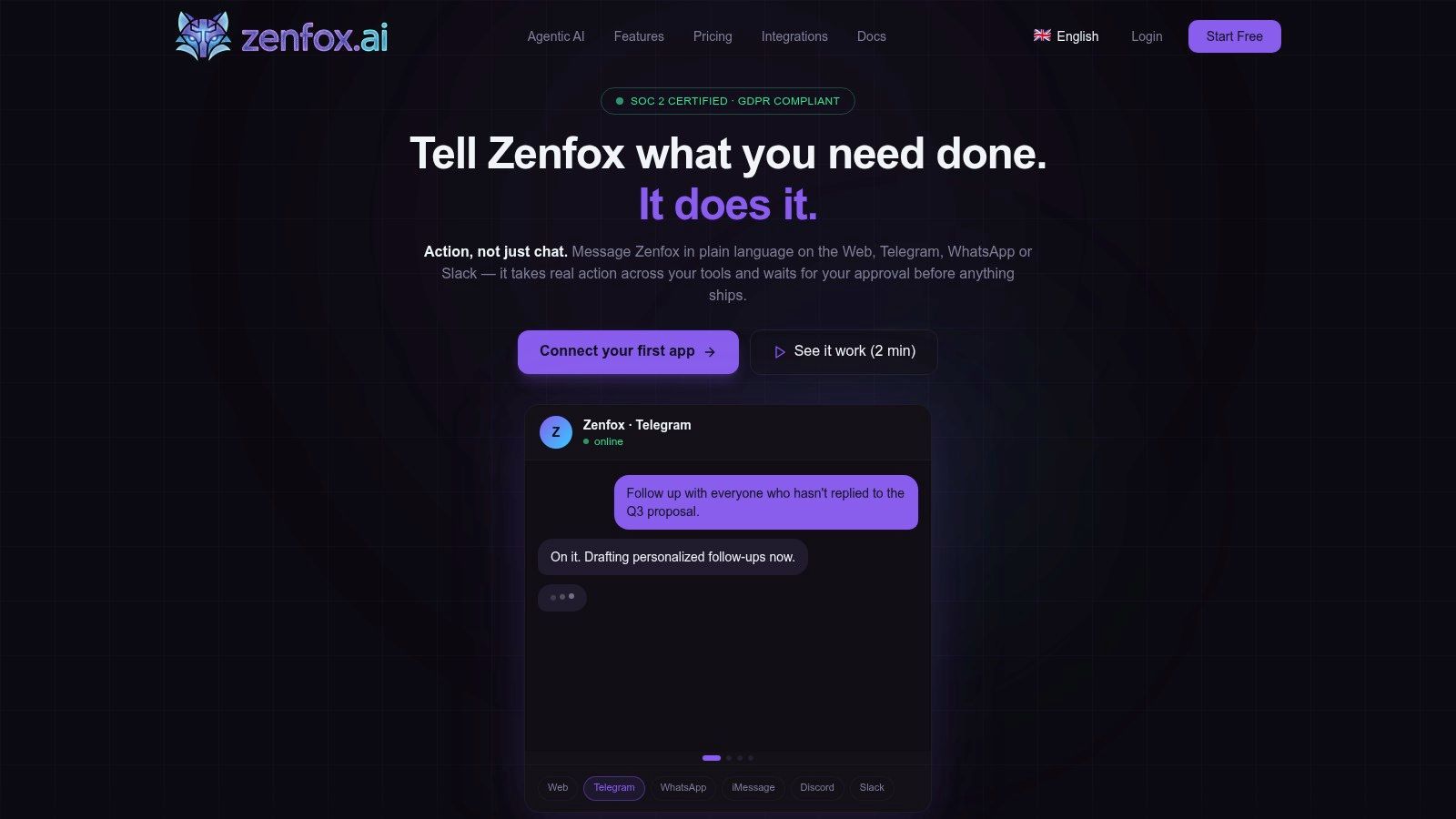
For non-technical teams, this difference is decisive. Native API connections, AES-256 encryption, and options such as data enclaves matter because they reduce the gap between a useful demo and a system that can be used with customer data in production. General build guides often skip those details, which is why this AI agent builder perspective is relevant when evaluating deployment options.
The trade-off most teams should accept
If you are a company whose product is the agent itself, custom development may be justified. If you are a sales team trying to automate follow-ups, reporting, and CRM updates, custom development is often the wrong optimisation target.
Buy the plumbing unless the plumbing is your business.
The smarter path is usually to reserve custom engineering for the parts that create competitive difference, such as your workflow logic, approval model, and internal process design. Let the underlying platform handle the repetitive infrastructure work that every team would otherwise have to rebuild.
Your First Steps to Building a Sales Agent
Start with one workflow, not a grand vision. Pick a task that is repetitive, painful, and easy to evaluate. Follow-up drafting after calls, CRM note creation, or weekly sales summaries are good starting points because the value is obvious and the output can be reviewed quickly.
If you have a technical team and a strong reason to build, define the scope tightly. Decide what data the agent can access, how retrieval will work, which actions require approval, and how you'll enforce auditability and permissions from day one.
If you don't have engineering capacity, don't force a custom route. For non-technical UK teams, the hurdle is connecting AI to GDPR-compliant systems like HubSpot while respecting data sovereignty. Secure platforms with native API connections, AES-256 encryption, and data enclave options provide the zero-code path that generic how-to articles often miss, as outlined in Salesforce guidance on building compliant AI agents.
The practical test is simple. Can the agent retrieve the right context, produce a reliable draft, and take a low-risk action inside your existing stack without creating a compliance headache? If yes, you're on the right path.
If you want a faster, lower-risk way to put this into practice, Zenfox.ai gives sales teams a way to build secure, zero-code AI agents across tools like Gmail, HubSpot, Slack, and Drive without waiting through a long custom build cycle. It handles the hard parts that usually slow projects down, including indexing, workflow automation, and enterprise-grade security, so you can test a real sales agent in minutes and prove value before committing to a larger rollout.