Choosing the Best AI Agent Builder for Your Business
Learn how an AI agent builder works and discover the key criteria for choosing the right one. Explore top capabilities and enterprise use cases for 2026.

Your team probably already has the raw ingredients for an AI agent. The inbox is full, Slack never stops, the CRM is half updated, and someone still spends Friday afternoon stitching together status notes from five tools. None of that work is difficult. It's just repetitive, easy to delay, and expensive to leave undone.
That's why the conversation around an ai agent builder has changed so quickly. This isn't about a clever chatbot sitting on a website. It's about software that can read context, decide the next step, and then do something useful inside the systems your team already uses. In the UK, 79% of companies report that AI agents are already being adopted in their organisations, and among adopters, 66% say the technology is increasing productivity through routine workflow automation such as email, CRM updates, and reporting, according to PwC's AI agent survey.
For non-technical teams, that matters because the biggest win usually isn't a dramatic reinvention of the business. It's getting the obvious work done consistently. A sales lead gets followed up. A report gets sent on time. A customer note lands in the CRM without someone having to remember.
If you're already looking at ways of streamlining content processes with AI, the next step is broader operational automation. The useful question isn't whether agents are coming. It's which builder can turn them into something secure, auditable, and practical for everyday work.
Table of Contents
- The Dawn of the Autonomous Workforce
- What is an AI Agent Builder Beyond the Hype
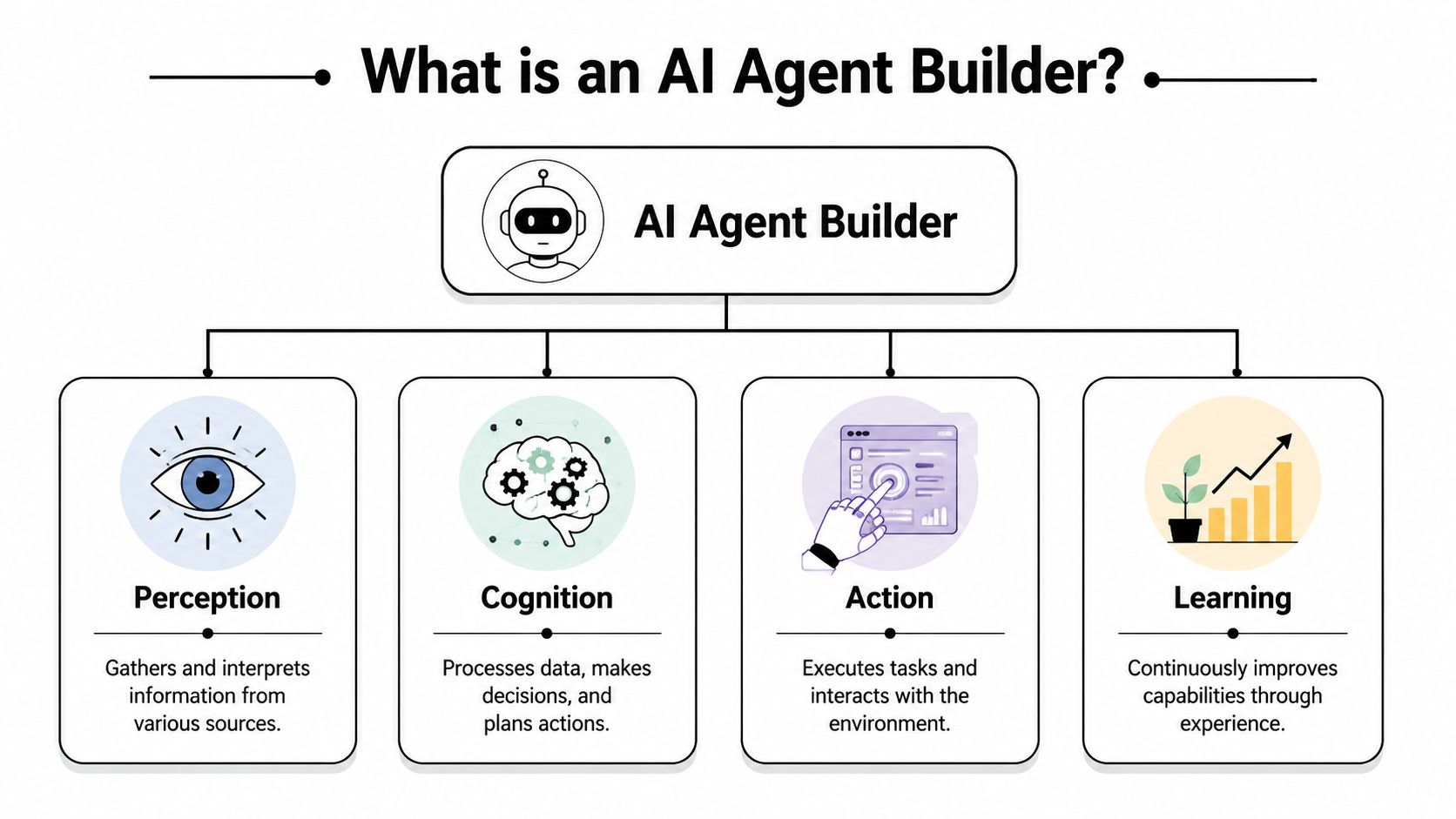
- The Four Core Capabilities of Modern AI Agents
- How AI Agents Drive Real-World Results
- How to Choose the Right AI Agent Builder
- Putting Agents to Work with Zenfox.ai
- Your Checklist for Adopting AI Agents in 2026
The Dawn of the Autonomous Workforce
A marketing manager launches a campaign at 9 a.m. By 4 p.m., the bottleneck becomes evident. Leads need tagging, sales needs context, the CRM is missing updates, and follow-ups are still sitting in drafts because no one has stitched the workflow together.
That is where an autonomous workforce starts to matter in practice. The value is not in giving software a job title. The value is in assigning software a bounded task with clear inputs, approved actions, and an audit trail.
For business teams, that changes the conversation. An agent can monitor a form submission, pull account history from HubSpot, draft a reply, post a summary to Slack, and pass the final send decision to a human. The useful part is not the draft itself. It is the fact that the handoff is faster, the process is documented, and the team can see what happened if something goes wrong.
Everyday work is already being delegated
Across operations, marketing, support, and revenue teams, the first agent use cases are usually small and repetitive. Lead routing. Inbox triage. CRM hygiene. Internal reporting. Document retrieval. Teams also use agents for streamlining content processes with AI, especially where work moves between briefs, approvals, publishing tools, and reporting systems.
The practical shift is simple. Businesses are no longer asking whether software can generate output. They are asking whether it can complete a controlled piece of work without creating new risk.
That distinction matters. An agent that saves ten minutes but leaves no record, ignores permissions, or invents a customer update is not ready for production. A business-ready agent needs clear rules, approval points where needed, and logs that let an operator trace each action. If you want a clearer definition of that boundary, this guide to an autonomous AI agent in business operations is a useful reference.
Why this feels different from past automation waves
Older automation tools followed fixed rules well, but they struggled as soon as inputs became messy. A customer email might mention a billing issue, a contract renewal, and a product complaint in one thread. Traditional workflow tools often break on that kind of ambiguity or send the item into a generic queue for someone to sort out later.
AI agents can classify that request, pull the relevant account context, and choose the next approved step. That makes them more useful for operational work that lives between systems and rarely arrives in a perfect format.
The trade-off is governance. Greater flexibility means more attention to permissions, testing, failure handling, and review. The organisations getting value from agents are treating them as operational tools with controls, not as clever demos for the innovation team.
What is an AI Agent Builder Beyond the Hype
An ai agent builder is easiest to understand if you think of it as a digital general contractor. A raw model gives you intelligence in the abstract. A builder gives you the structure to turn that intelligence into a working system that can access tools, remember context, and complete a job.
Without that layer, most businesses end up with impressive demos and weak operations. The model can answer questions, but it can't safely interact with your stack in a repeatable way. The builder is what turns “write me a follow-up” into “check the CRM, review the last email, draft the message, wait for approval, then send it and log the result”.
A digital general contractor for workflows
If you've looked at personalized business automation tools, you've probably noticed the same pattern. The useful platforms don't just expose a model. They package instructions, integrations, memory, and permissions into something a business user can deploy.
A good builder also reduces the gap between idea and launch. Instead of writing code to connect every service, define every edge case, and manage every prompt, the team can configure a workflow in plain language and then refine it with rules, approvals, and triggers.
For a more detailed look at the concept itself, this explanation of an autonomous AI agent is a helpful companion.
The four parts that matter
When I evaluate these platforms, I ignore most of the branding and focus on four architectural pieces:
- The brain. This is the model reasoning layer. It interprets requests, plans steps, and handles ambiguity.
- The toolbox. These are the integrations and actions. Gmail, Slack, HubSpot, Drive, internal databases, and APIs all belong here.
- The memory layer. This stores context across steps so the agent doesn't start from scratch every time.
- The executor. This is the part that performs the action, such as sending an email, updating a CRM record, or creating a report.
Practical rule: if a platform can only generate text but can't reliably use tools, retain state, and show its work, it isn't an agent builder in any meaningful business sense.
The hype usually lives at the model layer. The hard work sits in the other three. Businesses don't struggle because the model can't write a sentence. They struggle because the workflow touches customer data, crosses multiple systems, and needs a clean audit trail when something goes wrong.
That's why buyers should treat agent builders as operational infrastructure, not creative software. The core question is simple. Can this system perform a specific job inside our environment, safely and repeatedly?
The Four Core Capabilities of Modern AI Agents
The difference between a toy agent and a useful one usually comes down to four capabilities. If any of these are weak, the workflow breaks in production.

Autonomy that stays on task
Autonomy sounds grand, but in practice it means the agent can pursue a defined goal without asking for help at every step. A sales assistant agent, for example, can identify new inbound leads, gather company details, draft an initial email, and prepare a CRM entry before a human reviews the final output.
The key trade-off is control. Too little autonomy and the team still does manual orchestration. Too much autonomy and the system becomes difficult to predict. The better builders let you define where the agent can improvise and where it must stop for approval.
Integrations that do more than sync
A shallow integration looks good in a product demo. It can read data or trigger a simple event. A deep integration lets the agent take meaningful action with the right context.
That distinction matters. Reading a HubSpot contact is useful. Reading the contact, checking the latest email thread in Gmail, posting a summary to Slack, and then updating the opportunity stage is operationally valuable. Modern agents earn their place when they connect systems that people currently bridge by hand.
Memory grounded in your data
Memory is where serious workflows start to work properly. Effective AI agents rely on durable memory and structured retrieval, not just a long prompt. Advanced builders incorporate Retrieval-Augmented Generation and state management, allowing the agent to fetch exact source records from enterprise data, compare them against instructions, and then execute a bounded, auditable action, as outlined in Writer's overview of agent builder architecture.
That matters because business work isn't generic. A useful agent needs to know which customer is involved, what happened last time, which internal policy applies, and which documents are authoritative.
- Without retrieval, the model guesses from whatever is in the prompt.
- With structured retrieval, it can pull the right contract, thread, note, or record at the point of action.
- With state management, it can continue a workflow across multiple steps without losing context.
Execution with boundaries
Execution is the final test. Can the agent do the thing, not just describe it?
A real business agent sends the email, updates the CRM, files the note, creates the task, or posts the report. But bounded execution matters just as much as raw action. The system should only use the tools it has permission to access, and only inside the conditions you've defined.
An agent that can act without boundaries becomes a risk faster than it becomes a productivity tool.
That's why the strongest setups treat execution as a controlled permissioned layer. The model decides. The retrieval layer grounds. The tool layer acts. The platform records what happened.
How AI Agents Drive Real-World Results
The business case becomes obvious when you stop thinking in categories and start thinking in days. Where does time disappear? Usually in follow-ups, updates, handoffs, and recurring summaries.

Three operational stories
A freelancer finishes a client call and promises to send a recap, a proposal revision, and an invoice reminder later in the week. Later never arrives because new work shows up first. An agent can watch the calendar, pull the notes, draft the recap, schedule the reminder, and keep the admin side moving while the freelancer focuses on billable work.
A startup ops lead has a different problem. New customers arrive through forms, email introductions, and partner referrals. The onboarding process is always the same in theory, but in reality someone forgets to create the internal Slack thread, someone else forgets to log the contact, and the welcome email goes out late. An agent can capture the lead, create the record, post the internal summary, and prepare the next tasks in sequence.
A sales and marketing team often needs weekly market intelligence, but nobody wants to assemble it manually. An agent can monitor defined topics, gather the relevant updates, organise them into a readable summary, and post the output into the right Slack channel for discussion.
The earliest wins usually come from workflows with clear triggers, predictable outputs, and too many handoffs.
That's also why these systems work well for internal reporting. Leadership teams don't need another dashboard as much as they need a dependable process that collects the right signals and delivers a concise update at the right time.
A short product walkthrough helps make that operational model more concrete:
Where the value shows up first
The practical gains tend to appear in a few places:
- Consistency. Follow-ups happen when they should.
- Context retention. The agent remembers what the customer, lead, or project is about.
- Reduced switching. Staff stop bouncing between inboxes, CRMs, docs, and chat tools for basic coordination.
- Cleaner execution. Repetitive tasks are completed in the same way each time.
What doesn't work well is giving an agent a vague brief and broad access on day one. “Handle our operations” is not a workflow. “After a discovery call, draft a recap, update HubSpot, and post a summary to Slack for approval” is.
How to Choose the Right AI Agent Builder
Most buyers compare AI agent builders by features first. That's backwards. Start with risk, operating model, and who will use the system.
Start with risk, not features
For UK businesses, GDPR compliance is a critical factor. An AI agent builder should support explicit purpose limitation, auditable action traces, and configurable approval gates for high-impact actions such as updating CRM records or sending emails, in line with guidance reflected in this enterprise agent builder overview. If a platform can connect to customer communications and business systems but can't show what happened and why, it's not ready for serious deployment.
That leads to a simple buyer mindset. Don't ask only whether the tool is powerful. Ask whether it is governable.
If an agent can read personal data, draft customer communications, and update systems of record, your legal, security, and operations teams need visibility before they need more autonomy.
Evaluation checklist
| Criterion | What to Look For |
|---|---|
| Security and compliance | Clear permissions, approval gates, action logs, data controls, and support for oversight on high-impact actions |
| Integration depth | Real two-way actions across tools like Gmail, Slack, HubSpot, Drive, and internal systems |
| No-code accessibility | Business users can configure workflows without engineering support for every change |
| Observability | Step-by-step traces, readable logs, and the ability to review outputs before or after execution |
| Pricing model | Charges that map to how you plan to use agents, with enough clarity to avoid surprises as usage expands |
What good looks like in practice
Security comes first because it's hard to retrofit. A builder should let you limit tool access by role, separate environments, and keep a reliable history of actions. If an agent updates a CRM field or sends an email, someone should be able to see the trigger, the context used, and the exact action taken.
Integration depth is next. Some vendors advertise dozens of connectors, but the useful test is whether the agent can complete a multi-step workflow inside those tools. Surface access isn't enough if the agent still needs a person to finish the job.
No-code accessibility matters more than many technical buyers expect. In many firms, the people who understand the workflow best sit in operations, sales, marketing, or client service. If every change requires a developer, the programme slows down.
Observability is often overlooked until the first error. You need to see why the agent made a decision, not just the final output. That's especially important if you want to compare platforms with different model choices and deployment options. This piece on model provider platform independence is useful if you're thinking about how much flexibility and control you want over the underlying stack.
Pricing should come last. Cheap software that creates governance problems becomes expensive quickly. Expensive software that removes routine work cleanly can still be a sensible operational buy. The right comparison is total effort, not sticker price.
Putting Agents to Work with Zenfox.ai
The biggest gap in this market isn't model capability. It's implementation. In the UK, only 17% of businesses were using AI in 2024, which points to a large distance between interest and practical rollout, according to the cited note on AI adoption and implementation readiness. For most smaller firms, the bottleneck isn't access to technology. It's getting a secure, no-code system into production without building an internal AI team.

Why implementation matters more than hype
That's where platforms such as Zenfox.ai fit. The practical appeal is straightforward. It connects tools like Gmail, Slack, HubSpot, and document systems, lets users describe workflows in plain English, and keeps an activity log so teams can review what happened. That makes it easier to treat agents as operational tools for non-technical teams rather than as developer experiments.
The value of that approach is less about novelty and more about reducing deployment friction. A sales manager doesn't need a framework for agent orchestration. They need a working follow-up process that respects permissions, uses the right customer context, and leaves a trace.
Two practical playbooks
The autonomous sales assistant
A useful first rollout is lead follow-up. The workflow can start when a form is submitted or a prospect replies by email. The agent checks the contact record, looks at recent communication, drafts a relevant response, updates the CRM, and alerts the account owner in Slack if approval is needed.
What works here is the bounded scope. The trigger is clear. The systems involved are known. The human review point is easy to define. This is the sort of use case where business teams realise the value quickly because missed follow-ups are visible.
The startup operations engine
Another strong deployment is internal reporting and coordination. The agent gathers updates from Slack threads, calendars, and CRM or pipeline tools, then prepares a digest for founders or team leads. It can also create follow-up tasks or flag missing information.
This works well because reporting tends to be repetitive, cross-functional, and easy to standardise. It also gives teams a safer first experience with agents. The system is doing meaningful work, but the blast radius is lower than in customer-facing communication.
Start with a workflow that already exists, already matters, and already annoys people.
That's usually the right test for any ai agent builder. If the platform can't make one existing process smoother, it won't become a credible layer for wider automation.
Your Checklist for Adopting AI Agents in 2026
Start small and stay concrete. The best AI agent rollouts don't begin with a broad transformation plan. They begin with one workflow that people already understand and already want fixed.
Use this checklist:
- Pick one repetitive workflow that crosses tools and regularly gets delayed.
- Define the trigger and outcome so the agent has a clear job.
- Check permissions and oversight before connecting email, CRM, or document systems.
- Choose a builder with logs and approvals so you can review every important action.
- Run a supervised pilot with a narrow scope and a real owner inside the business.
- Measure operational improvement qualitatively by looking at consistency, turnaround, and reduced manual effort.
- Expand gradually once the first workflow runs reliably.
An ai agent builder is most useful when it stops being an innovation project and starts becoming part of daily operations.
If you want to put that into practice, Zenfox.ai is designed for teams that need AI agents to do real operational work across tools like Gmail, Slack, HubSpot, and document systems, with no-code setup and auditable workflows.