Master Document Indexing for Business Insights
Harness effective document indexing to unlock powerful insights. Fuel automation, ensure compliance, and drive business intelligence for 2026.
Most advice about document indexing starts in the wrong place. It tells you to tag files better, clean up folders, and improve search. That sounds sensible, but it misses the underlying problem. Businesses rarely fail because a PDF is hard to find. They fail because useful context is trapped inside disconnected systems, so people and software can't act on it.
A contract sits in Drive. Renewal terms live in email. Meeting notes are buried in Slack. A support promise is logged in HubSpot. Traditional search treats those as separate retrieval problems. Modern operations treat them as one context problem. If your index only helps someone locate a file, you've built a filing cabinet. If your index helps software understand relationships between records, permissions, versions, and intent, you've built an operational layer.
That distinction matters more now because teams expect systems to do more than return results. They want assistants that can draft follow-ups, update records, compile reports, and trigger workflows using the right source material. That only works when document indexing is designed as infrastructure for action, not as a passive search feature.
Table of Contents
- Why Finding Files Is the Wrong Goal
- How Document Indexing Actually Works
- Indexing as the Engine of Account Management Software
- The Real-World Benefits for Your Team
- Beyond Basic Search with AI-Powered Intelligence
- How to Choose and Implement an Indexing Solution
- Your Checklist for Future-Proof Document Management
Why Finding Files Is the Wrong Goal
Search is a symptom. Coordination is the disease.
Many organizations think document indexing exists to shorten the time between typing a query and opening a file. That is too narrow. Its primary function is to make business records usable across people, apps, and processes. A document isn't valuable because you can open it. It's valuable because the right system can connect it to a customer, decision, deadline, or obligation.
That matters in everyday work. An account manager doesn't need a proposal in isolation. They need the proposal, the latest pricing email, the signed contract version, the support history, and the open tasks around that customer. If each system returns its own result list, the human still has to stitch the story together. That's slow, fragile, and hard to delegate to software.
A strong index becomes the working memory of the business. It maps names, dates, owners, document types, permissions, and relationships. That's why the role often overlaps with what people expect from a knowledge manager. The difference is that indexing isn't just curation. It's the structure that lets machines retrieve the right evidence and act on it safely.
The old mental model breaks fast
Traditional advice usually says:
- Use better folder structures: Helpful for browsing, poor for cross-functional retrieval.
- Add more tags: Useful until each team invents its own labels.
- Rely on keyword search: Fine for clean digital text, unreliable for scans, duplicates, and inconsistent naming.
None of those methods solves the central issue. Work now spans Gmail, Slack, Drive, CRMs, support tools, and PDFs exported from other systems. The same customer can appear under different names, versions, and identifiers. Search alone doesn't reconcile that.
Practical rule: If your system can find a document but can't tell what it's for, who owns it, and what should happen next, your indexing model is incomplete.
The best document indexing schemes don't stop at retrieval. They create enough structure for workflows, analytics, and AI agents to operate with confidence.
How Document Indexing Actually Works
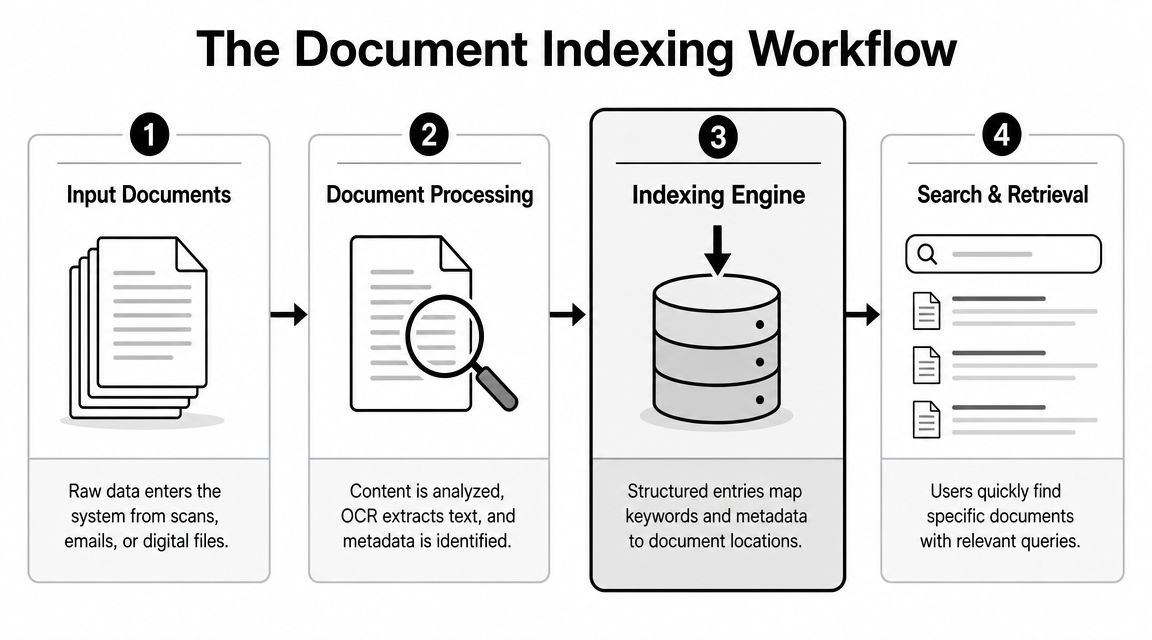
At a technical level, document indexing is just the process of turning messy files into structured retrieval paths. The simple version is a library catalogue. The modern version is a catalogue, a scanner, a translator, and a context engine working together.
Metadata is the first layer
Metadata indexing is the foundation. Instead of searching only by filename, the system stores structured fields such as document type, creator, date, customer, matter, and access status. In UK records practice, that structure matters because retrieval, appraisal, and governance depend on normalised metadata rather than free text alone, as described in this explanation of document indexing and metadata design.
Think of metadata as the labels on warehouse shelves. Without them, you can still walk around and inspect boxes one by one. With them, you can ask precise questions. Show me all supplier agreements for this client signed this quarter and still under retention hold.
This is why weak indexing creates hidden costs. Teams often say search is poor when the deeper issue is that the system was never taught which attributes matter.
Full text and OCR widen the net
Metadata alone won't solve scanned documents, image-based PDFs, or long reports. That's where full-text indexing and OCR come in. OCR turns images of text into machine-readable text. Full-text indexing then maps words and phrases to their locations.
Historical archives use a similar principle at scale. The FamilySearch indexing workflow describes turning records into searchable entries by transcribing names, dates, and places, with AI accelerating the process and humans reviewing for accuracy in its indexing programme. That same model applies in business systems. Extract first, verify where needed, then use the extracted structure to support search and downstream tasks.
A practical example is invoice handling. If you're reviewing invoice data extraction workflows, the difference between a useful index and a weak one is whether the system captures supplier name, invoice number, due date, line-item context, and approval state, not just the raw text inside a PDF.
AI native indexing adds meaning
Keyword matching answers, "Where does this word appear?" Semantic indexing aims at a different question. "Which records are about the same thing, even if they use different language?"
That matters when one person writes "MSA", another writes "master services agreement", and a third refers to "customer contract". A basic search engine may treat those as unrelated. A stronger system links them through context, entity extraction, and relationship mapping.
Good knowledge systems already depend on this logic. If you're building an effective KMS for customer support, your index has to understand articles, tickets, macros, and product references as connected assets rather than isolated documents.
A modern index shouldn't just point to a file. It should describe enough about that file for software to decide whether to summarise it, route it, protect it, or ignore it.
That's the leap from document indexing as filing to document indexing as operating system.
Indexing as the Engine of Account Management Software
Account management software only looks intelligent when its index is doing heavy lifting in the background. Without that layer, the platform is a collection of tabs. With it, the platform can present a coherent account picture.
Account context depends on linkage
An account team rarely works from one source. Customer details may live in HubSpot. Contracts may sit in Google Drive. Commercial questions arrive by email. Meeting notes end up in Slack or a shared doc. Renewal history may exist in finance exports. None of that becomes account intelligence by default.
Document indexing is what links those fragments. It creates a retrievable map across client name variants, deal identifiers, owners, dates, document classes, and access rules. When that map is weak, teams compensate manually. They paste links into CRM notes, maintain shadow spreadsheets, and ask colleagues where the latest version lives.
That creates a familiar failure pattern. A client asks for the agreed service scope. One person finds an early proposal. Another finds the signed contract. A third remembers a concession made by email. The software didn't fail to store data. It failed to index the account as a unified object.
What good account software indexes
The strongest account systems index records across several dimensions at once:
| Indexed dimension | Why it matters in account work |
|---|---|
| Client identity | Matches records even when names vary across tools |
| Document type | Separates contracts, proposals, QBR decks, and support notes |
| Ownership | Shows who is responsible for the latest action |
| Date and version | Prevents teams using stale material |
| Permissions | Stops commercial or legal records surfacing to the wrong people |
| Lifecycle state | Distinguishes draft, signed, active, archived, or on hold |
That structure directly supports selling motions such as target account selling, where the value comes from understanding the full account picture rather than one contact or one open opportunity.
What doesn't work is a flat search box on top of messy storage. That gives you retrieval without confidence. In account management, confidence is the point. Teams need to know the surfaced document is current, relevant, and connected to the right customer record.
Operational test: If your account manager still has to open five systems to answer a customer question, the software isn't account-aware. It's just searchable.
Once the index is built properly, reporting improves too. Pipeline reviews, renewal preparation, and handovers become easier because the system can aggregate by account rather than by application.
The Real-World Benefits for Your Team
The value of document indexing shows up differently depending on who is doing the work. The underlying gain is the same. Less time reconstructing context, more time deciding and acting.
For solo operators
A freelancer often runs sales, delivery, billing, and admin alone. That makes context switching expensive. One missed proposal version or buried approval email can delay payment or create rework.
With a good index, a solo consultant can pull together contracts, project notes, invoices, and client correspondence from one search layer. They stop relying on memory as the system of record. The immediate benefit isn't abstract productivity. It's cleaner handoffs, faster responses, and fewer avoidable mistakes.
For small teams
Small teams usually don't suffer from a lack of tools. They suffer from a lack of shared structure.
One person saves files by client. Another saves by project. A third uses inbox folders and never updates the CRM. Search returns something, but nobody trusts whether it's complete. New hires then learn tribal shortcuts instead of learning a reliable system.
A central indexed repository changes that dynamic:
- Onboarding improves: New staff can retrieve by customer, project, or document type without knowing the team's private filing habits.
- Duplicate work drops: People can check whether a proposal, brief, or answer already exists before recreating it.
- Collaboration gets cleaner: Teams spend less time asking for links and more time reviewing the actual work.
For revenue teams
Sales and marketing teams need retrieval under pressure. A rep wants the latest case study before a call. A marketer wants approved positioning for a campaign. A customer success lead wants the current scope before discussing expansion.
Those moments don't need "search" in the generic sense. They need trusted context assembled quickly. A strong index can connect collateral, account history, product notes, and prior commitments into one view.
Here is the before-and-after pattern commonly recognised:
- Before: Search returns a list of documents. The rep guesses which one is current.
- After: The system returns the current proposal, linked account history, and adjacent material that fits the same customer context.
Good indexing removes scavenger hunts. Great indexing removes the need to ask what should be looked for in the first place.
That difference becomes more visible as teams grow. The more apps you add, the more dangerous ad hoc retrieval becomes.
Beyond Basic Search with AI-Powered Intelligence
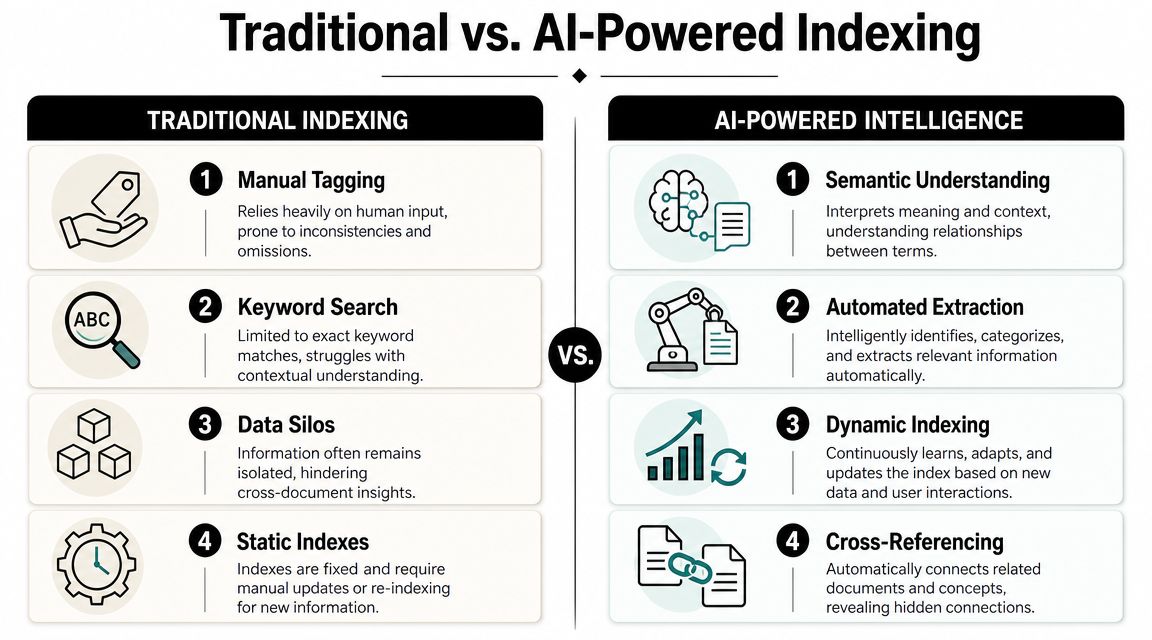
Traditional indexing was built for people typing queries into one repository. Modern work isn't like that. Teams need systems that can retrieve across apps, respect permissions, and feed trustworthy context into automation and AI.
Why static indexes break down
A static index assumes the job ends once the document is searchable. But current workflows ask more of the index. The same document may need to be found by a human, used in an automated task, and safely supplied to an AI assistant for a summary or recommendation.
That pressure is increasing. The Office for National Statistics reported that 13% of UK businesses with 10+ employees were using at least one AI technology in 2025, up from 5% in 2023, as cited in this discussion of document indexing and searchability. The important part isn't just the growth figure. It's what that growth implies. Indexes now have to support mixed use cases across search, automation, and AI-mediated work.
A weak index struggles here for four reasons:
- It treats systems separately. Gmail, Drive, CRM, and chat remain siloed.
- It lacks provenance. Users can't tell where a surfaced answer came from.
- It ignores freshness. Old versions keep appearing beside current ones.
- It stops at retrieval. Nothing happens after the result is returned.
This short demo helps make the shift concrete.
What AI native systems change
AI native indexing treats the index as an action layer. Documents are still searchable, but they are also machine-usable. The system can identify entities, infer relationships, preserve permissions, and pass the right context into a workflow.
That changes the shape of work. Instead of searching for a signed contract, opening it, checking the renewal clause, then drafting a follow-up, a well-designed system can retrieve the relevant material and trigger the next step based on approved rules.
Used carefully, tools such as Zenfox.ai fit this model. The platform connects apps like Gmail, Slack, HubSpot, and Drive, indexes documents and records across them, and uses that context to support plain-English workflows and autonomous actions. The practical distinction is important. The index isn't there just to answer "Where is the file?" It's there to answer "What does this record mean, what is it connected to, and what can the system safely do next?"
Here is the strategic edge:
- Cross-app retrieval: Teams query across operational systems without switching tabs.
- Context-aware automation: Workflows can use indexed content to update records, draft responses, or generate summaries.
- Permission-aware AI use: Sensitive records can be filtered before they are surfaced or reused.
- Continuous utility: New documents don't just enter storage. They become available for future tasks.
The old model helps staff find things faster. The newer model helps software participate in work.
How to Choose and Implement an Indexing Solution
The wrong buying process focuses on search features first. The better one starts with governance, integration, and actionability. A fast demo search doesn't tell you whether the system will hold up under retention rules, rights requests, or cross-app workflows.
What to evaluate before you buy
Search quality often fails because governance is weak, not because the search engine is weak. The UK ICO expects organisations to be able to find and delete personal data efficiently for UK GDPR compliance, which makes index design part of compliance operations, as noted in this overview of document indexing methods.
When comparing platforms, check these areas carefully:
- Metadata model: Can you enforce required fields, controlled values, unique IDs, and lifecycle states?
- Permissions: Does the index respect role-based access, or does search expose too much context?
- Cross-app coverage: Can it index the systems your team uses, not just a document repository?
- Auditability: Can you show what was indexed, when it changed, and who accessed it?
- Automation readiness: Can indexed records feed workflows, case actions, or AI assistants safely?
- Deployment fit: Does it support the security posture your organisation needs, such as GDPR alignment, encryption, or stricter enterprise storage options?
A lot of tools look similar until you ask what happens during a subject access request, legal hold, or deletion run. That's when weak index design becomes visible.
How to implement without creating chaos
Implementation usually goes wrong when teams start with mass ingestion and skip field design. They ingest everything, index whatever the connector exposes, and only later realise the records aren't usable for policy or automation.
A more reliable rollout looks like this:
- Audit existing document flows. Identify where contracts, invoices, support records, and account materials reside.
- Define retrieval-critical fields. Choose the attributes your team repeatedly needs, such as customer, owner, date, type, status, and sensitivity.
- Separate sensitive from general metadata. Keep high-risk content protected and queryable through access-aware controls.
- Pilot with one workflow. Use a concrete process such as renewal prep, invoice approval, or support escalation.
- Train for consistency. Even smart extraction benefits from agreed naming, ownership, and review habits.
- Review retrieval outcomes. Check whether the system returns the right version, to the right user, for the right task.
Buy for lifecycle control, not demo speed. A search result is easy. A governed, permission-aware, automation-ready result is harder and far more valuable.
The best implementation feels boring after launch. People stop hunting for files because the system unobtrusively provides context where they work.
Your Checklist for Future-Proof Document Management
Teams typically don't need another repository. They need a document layer that supports retrieval, governance, and action in the same design.
Use this checklist when assessing your current setup or a replacement. If several answers are no, the issue probably isn't user behaviour. It's the indexing model.
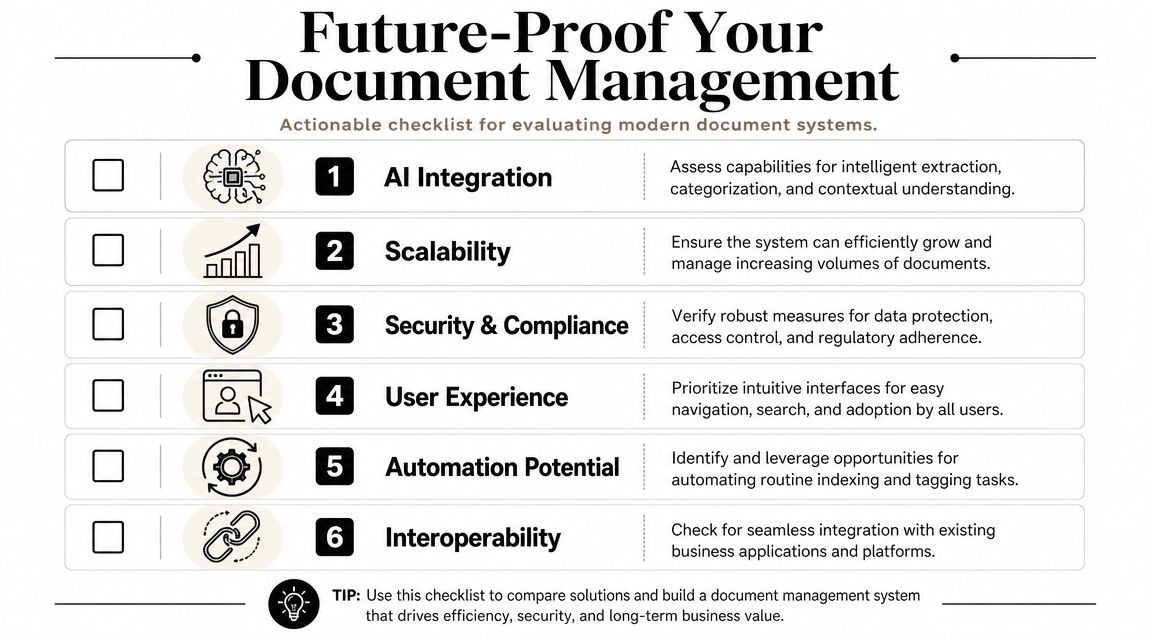
- Does it search across the tools people already use? An index limited to one repository won't support modern workflows.
- Does it preserve context, not just content? The system should understand owners, versions, permissions, and business relationships.
- Can it support automation safely? A document should be usable in follow-ups, reports, and workflow triggers without exposing the wrong data.
- Is governance built into the model? Retention, deletion, legal hold, and auditability should be part of the design.
- Can non-technical staff use it confidently? Good indexing disappears into the workflow rather than demanding constant manual cleanup.
- Will it still work when AI use expands? Documents increasingly feed assistants, summaries, and cross-app actions.
Teams also benefit from broader knowledge habits around capture and reuse. This guide to building a smarter team is useful if you're trying to improve the people side alongside the technical stack.
The simplest test is this. If your current setup helps people find files but doesn't help systems understand and act on them, it isn't future-proof.
If you want an indexing layer that can search across tools and turn that context into real work, take a look at Zenfox.ai. It's built for teams that need more than retrieval, including cross-app context, automation, and permission-aware AI workflows.