How to Build an AI Agent for CRM Automation (Step-by-Step)
Learn how to build an AI agent for CRM automation step-by-step. Our guide covers planning, zero-code building with Zenfox.ai, and real-world UK use cases.
Your CRM is probably full of half-finished work. Leads sit without follow-up, meeting notes stay trapped in inboxes, and sales reps update records at the end of the week from memory instead of in the moment. The core problem often isn't software. It's an execution problem across too many tools.
That's why interest in CRM agents has shifted from curiosity to implementation. In the UK, 78% of businesses were using some form of AI in 2024, up from 15% in 2020, which tells you the underlying ingredients for agentic CRM work are already common in business operations, from data capture to connected systems and automation layers (Office for National Statistics summary via DataGrid). The practical question isn't whether an AI agent belongs in CRM. It's which task you should hand over first, and how to do it without creating compliance risk.
If your work touches support queues as well as sales pipelines, it also helps to look at adjacent operational patterns. This breakdown of AI in customer care service is useful because it shows where autonomous systems help most when speed, context, and repeatable actions matter.
Table of Contents
- Beyond Automation The Rise of the CRM AI Agent
- What Exactly Is an AI Agent for CRM?
- The Three Core Components of a CRM Agent
- Planning Your Agent A Blueprint for Success
- How to Build Your Agent with Zero Code
- Real-World Examples of CRM Agents in Action
- Start Your First CRM Agent Project Today
Beyond Automation The Rise of the CRM AI Agent
Traditional CRM automation has always had a hard limit. It works well when every condition is known in advance. “If a form is submitted, create a contact.” “If a deal moves stage, notify sales.” Useful, but brittle.
A CRM AI agent changes the shape of the problem. Instead of only reacting to a single trigger, it can work across context. It can read an inbound email, recognise that the sender is an existing account, check the CRM, decide that the opportunity needs a follow-up task, draft a response, and prepare an update for approval. That's a different category of system.
Why this matters now
Most CRM teams already have the stack an agent needs. Email. A CRM. Team chat. Documents. Shared history. Connected apps. What's been missing is orchestration. The agent becomes the layer that links those systems into a sequence of useful actions.
The teams that get value first don't start with “replace the rep”. They start with “remove the admin that slows the rep down”.
That's why this is now practical for business users, not only developers. Zero-code platforms have made it possible to define goals in plain English, assign the tools an agent can use, and review actions before anything sensitive is pushed live. The actual work isn't writing code. It's designing the job properly.
Where teams get it wrong
Most failed CRM agent projects begin too broadly. People try to automate judgement-heavy work before they've proved reliability on narrow, repetitive tasks. The better starting point is usually one of these:
- Follow-up drafting after a customer interaction
- Lead enrichment before assignment
- Call note summarisation into the correct CRM fields
- Record updates based on clear triggers and permissions
Those workflows are frequent, structured enough to govern, and painful enough that people feel the benefit quickly.
What Exactly Is an AI Agent for CRM?
An AI agent for CRM is not a chatbot with CRM access. It's not a simple workflow builder with nicer prompts either. IBM's definition is the useful one here: a true AI agent is a workflow-orchestrating system that can plan steps, call tools, and execute actions autonomously, which is what separates it from simpler automation or conversational interfaces (IBM on AI agents).
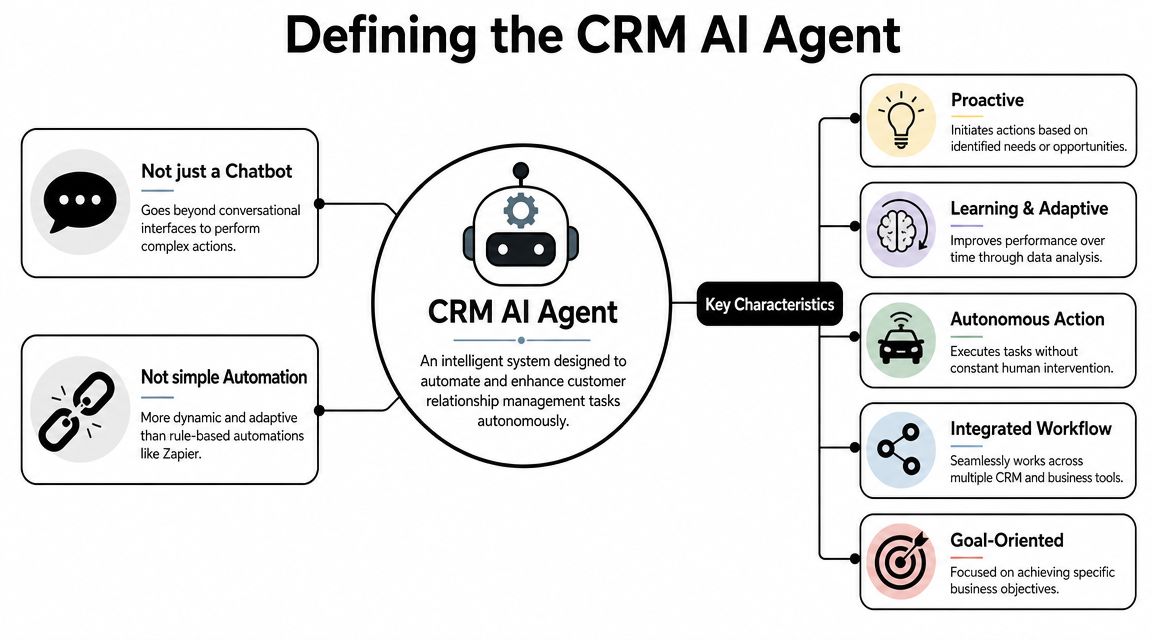
A chatbot talks. An agent acts
The simplest way to explain the difference is this. A chatbot answers questions. An agent takes responsibility for a bounded job.
If you ask a chatbot, “What happened with Acme this week?”, it may summarise recent activity. If you ask an agent to manage stale opportunities, it can inspect the CRM, identify the deals that need attention, gather context from email threads, draft follow-ups, notify the owner in Slack, and update the record once approved. The output isn't just text. It's completed work.
Here's the practical comparison:
| System | What it mainly does | Where it breaks |
|---|---|---|
| Chatbot | Answers questions in conversation | Stops at advice |
| Rule-based automation | Follows fixed if/then logic | Breaks on messy inputs or changing context |
| CRM AI agent | Evaluates context, uses tools, performs multi-step work | Needs careful boundaries, logging, and approvals |
What that looks like in daily CRM work
A reliable agent usually handles a chain like this:
- Observe an event such as a new lead, customer email, or recorded call.
- Reason about what matters in context.
- Use tools like Gmail, HubSpot, Slack, or document search.
- Take action within the permissions you've granted.
- Escalate if the task crosses a sensitivity threshold.
Practical rule: If your “agent” can't use tools and complete a workflow, it isn't an agent yet. It's an assistant layer on top of manual work.
That distinction matters because many teams buy a conversational interface and assume they've automated the process. They haven't. They've improved access to information, which is useful, but not the same as reducing operational drag.
The Three Core Components of a CRM Agent
Once you strip away the buzzwords, a CRM agent is a simple system made of three parts. If one part is weak, the agent becomes unreliable.
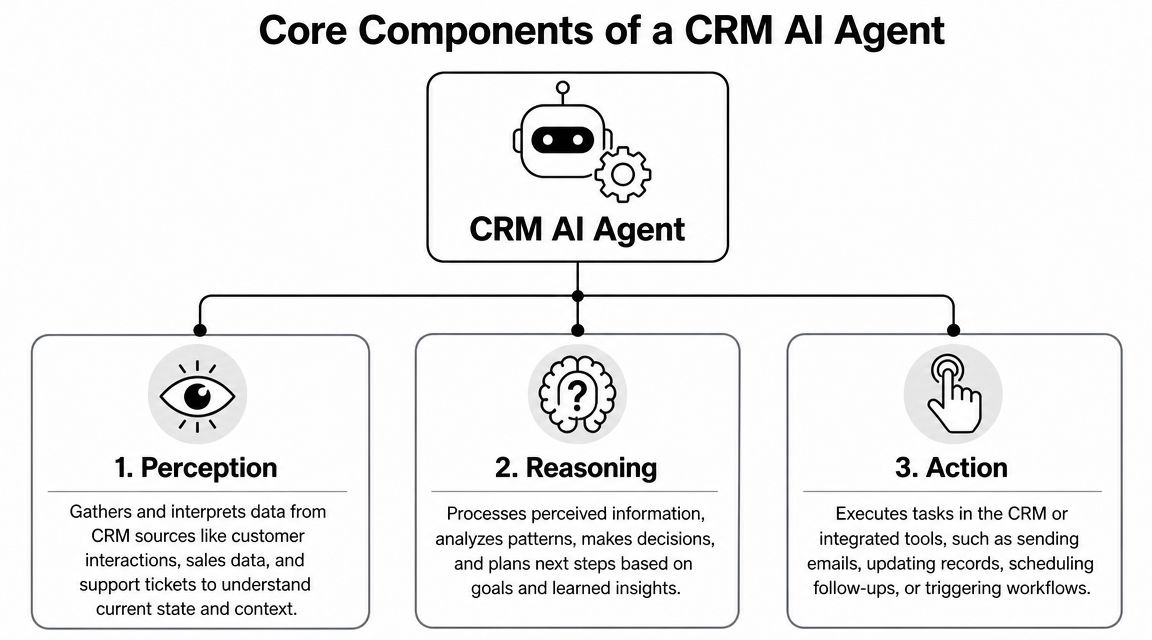
The brain decides
The first component is the reasoning layer. That's the model or decision engine that interprets the task, plans the next steps, and decides which tool to use. In this layer, the agent determines whether an email is a support issue, a sales opportunity, or something that needs a human.
The brain should not have unlimited freedom. Good builds give it a specific objective, narrow instructions, and a short list of allowed actions. That's how you reduce odd behaviour and keep outputs inspectable.
The senses provide context
The second component is perception. The agent needs access to signals such as CRM records, inbox threads, calendar events, Slack messages, forms, and internal documents. If the context is thin, the reasoning will be thin as well.
Document quality becomes a critical factor. If your workflows depend on proposals, onboarding files, contracts, or support notes, structured ingestion helps a lot. A practical guide on how teams parse documents for AI workflows is useful here because document chaos is a common reason agents make poor decisions.
When the agent also needs app connectivity, API design becomes part of the build. This overview of API integration basics is a good reference if you need to understand how tools exchange data in a multi-app workflow.
The hands do the work
The third component is action. These are the connectors, APIs, and permissions that let the agent send an email, create a task, update a contact, post to Slack, or log a note in the CRM.
Without this layer, the agent becomes an analyst instead of an operator. That's why the “hands” need the most scrutiny.
- Email actions should be permissioned by role, mailbox, and use case.
- CRM updates should be limited to defined objects and fields.
- Team notifications should go to known channels, not arbitrary destinations.
- Document access should follow the same access model your staff already use.
A strong agent is not a black box. It's a system with a brain, senses, and hands, each constrained on purpose.
Planning Your Agent A Blueprint for Success
The planning stage is where most of the actual work happens. Teams that skip it usually end up rebuilding the entire thing after the first compliance review or the first confusing output.

Choose the first workflow carefully
The first CRM agent should do one bounded job that occurs often and has a clear business owner. It should also have a visible pain point. If nobody cares whether the workflow improves, the project will stall even if the build works.
Good first candidates usually share the same traits:
- High frequency so the team sees value quickly
- Low ambiguity so the agent isn't forced into complex judgement
- Clear inputs such as inbound forms, emails, or call transcripts
- Clear outputs such as a task, draft, summary, or record update
A poor first project is usually something vague like “manage the pipeline” or “handle all customer communication”. That's not a workflow. That's an operating model.
Build governance into the design
For UK teams, governance isn't a legal clean-up step after deployment. It belongs in the blueprint. CRM agents process personal data, customer histories, and message content. If the design is loose at the start, the controls are hard to bolt on later.
For UK deployment, CRM agents must be engineered around data privacy and access control because UK GDPR requires processing to be lawful and secure, with practical controls such as scoped access, audit logs, and human-in-the-loop approvals for sensitive CRM updates (MarketsandMarkets summary).
That turns into concrete planning questions:
| Planning question | What a good answer looks like |
|---|---|
| What data does the agent need? | Only the fields and systems required for the task |
| Why is it processing that data? | A defined purpose tied to a specific workflow |
| What can it update? | A short list of approved objects and fields |
| When does a human approve? | Before sensitive emails, record changes, or high-risk actions |
| How is activity reviewed? | Action logs, audit trails, and exception monitoring |
A CRM agent with broad data access and no audit trail is not “agile”. It's ungoverned.
Planning also means deciding what the agent must never do. Don't let the model infer this. Write it down. No sending to external recipients without approval. No editing account ownership. No deleting records. No changing lifecycle stage unless a defined rule is met.
The blueprint doesn't slow you down. It's what stops your first pilot from becoming a support incident.
How to Build Your Agent with Zero Code
A workable zero-code CRM agent starts with orchestration. The platform has to coordinate systems, permissions, approvals, and fallback paths in the right order. If that order is loose, the agent looks clever in a demo and causes avoidable problems in production.
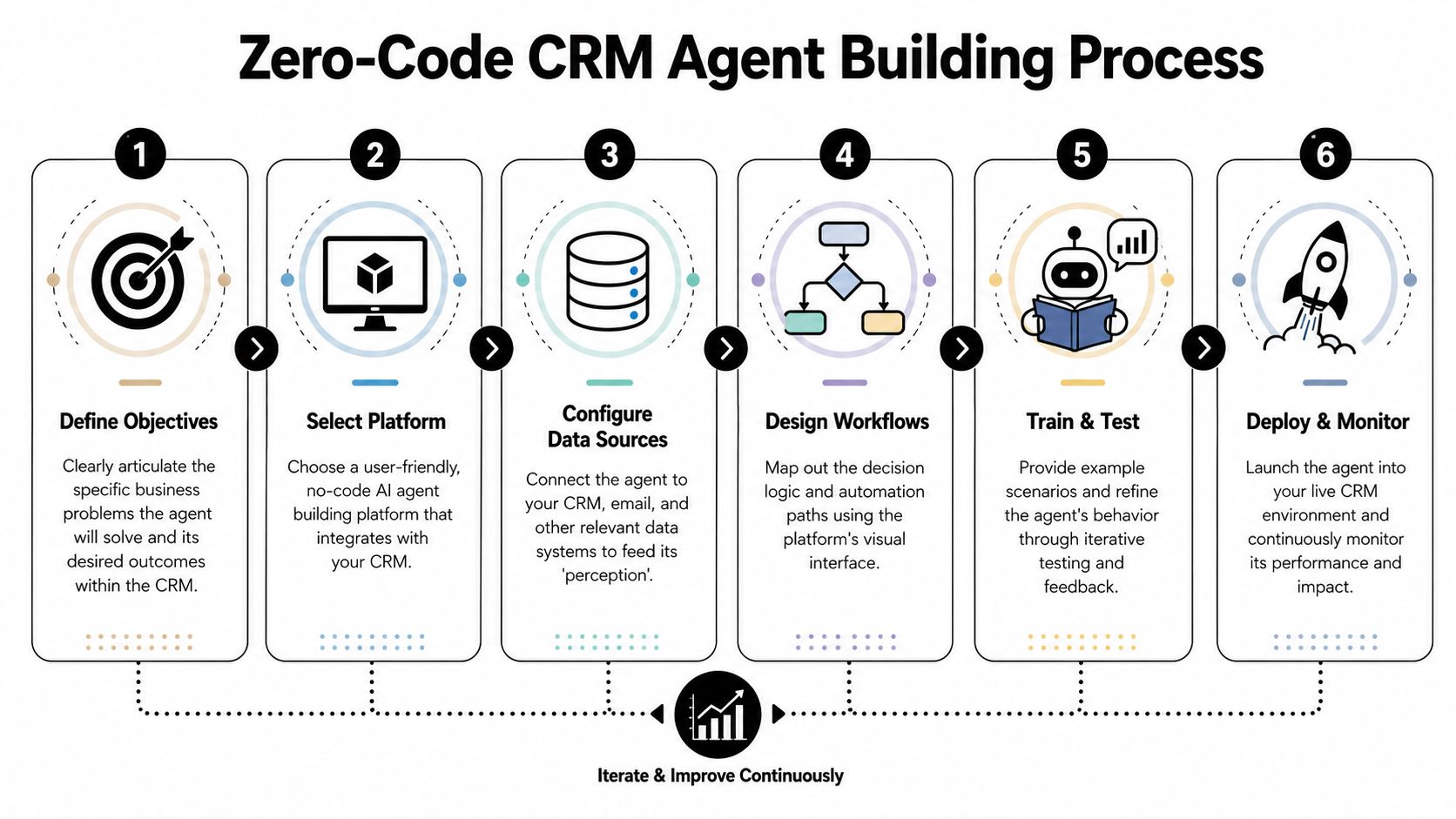
Start with one live workflow
Pick a task your team already performs by hand and can judge quickly. In practice, inbound enquiry handling is a good first build because the steps are clear, the business value is obvious, and the risk is manageable if you keep sending behind approval.
Connect only the systems required for that workflow. For many teams that means a CRM such as HubSpot, a mailbox in Gmail or Outlook, and a team channel in Slack. Keep permissions tight from day one. Broad connector access creates cleanup work later and makes GDPR controls harder to prove.
Then write the agent brief in plain English, as if you were assigning the job to an operations manager who knows the process but still needs boundaries.
A useful brief looks like this:
- Trigger when a new enquiry lands in a shared inbox
- Check whether the sender already exists in HubSpot
- Summarise the request and classify the enquiry
- Draft a reply and send it for approval
- Create or update the CRM record
- Notify the account owner in Slack if the account already exists
That structure gives you something you can test. “Handle inbound messages automatically” does not.
Limit what the agent can do
Zero-code builds usually fail: the workflow gets connected quickly, but nobody narrows the tool access or defines approval points. For CRM work in the UK, that is a governance mistake, not just a technical one.
Start with narrow permissions:
- Read-only CRM access during early testing
- Draft only for outbound email
- Notes and tasks first before record changes
- One approved Slack channel instead of workspace-wide posting
Keep the first version boring. Boring is easier to audit.
UK data governance belongs in the build, not in a legal review after launch. The ICO's 2024 guidance says organisations using AI need a lawful basis and may need a DPIA for high-risk processing, a requirement with direct implications for CRM agents that analyse customer histories, emails, and call notes (ICO guidance summary via Faye Digital).
If the agent also needs a simple approval screen or internal review interface, this guide on how to build an instant app for workflow approvals is a practical extension.
Use this checkpoint before launch:
- Lawful basis mapped to each processing step
- Approval gates set for sensitive updates and outbound messages
- Connector access scoped by role
- Logs turned on for every tool action
- Failure handling defined for unclear inputs or API errors
Before moving to production, watch a live walkthrough of a no-code agent workflow to spot the difference between a polished demo and a governed build:
Test on messy inputs, not ideal ones
Run the first version in a narrow lane. Use a limited contact set, a safe queue, or a sandbox if your CRM supports it. The goal is to observe judgement, not to save the most time on day one.
Good testing looks deliberately inconvenient. Feed the agent duplicate contacts, partial records, vague email requests, and account matches that could route to the wrong owner. Include messages that should trigger escalation because they contain sensitive content or unclear intent.
If the agent works only on clean records and obvious requests, it is still a prototype.
The strongest early deployments keep autonomy low. Let the agent recommend, draft, classify, and prepare updates first. Expand from there only after the logs show that the workflow is consistent, reviewable, and safe to trust.
Real-World Examples of CRM Agents in Action
The easiest way to judge whether your build is realistic is to look at workflows real teams already struggle with. Good CRM agents don't start with grand strategy. They remove operational friction.
A solo operator chasing unpaid invoices
A freelancer or consultant often loses time switching between email, spreadsheets, and a CRM just to follow up on overdue invoices. A small agent can check for unpaid records, identify which clients haven't replied, draft a polite follow-up based on the latest thread, and queue it for approval.
The useful part isn't the draft alone. It's the sequence. The same workflow can create a reminder task, update the client record, and keep a searchable log of every follow-up attempt.
A small team routing and enriching leads
A startup gets web enquiries through forms, shared inboxes, and direct outreach. Someone on the team has to identify whether the company already exists in the CRM, clean the name, add basic enrichment, create or update the record, and alert the right person.
That's a strong zero-code use case because the workflow is procedural but still context-heavy. The agent can gather the lead details, check duplicates, prepare the CRM entry, and hand the result to sales in Slack with enough context to act. If the team later wants broader orchestration, a guide to deploying agentic AI solutions is a practical next step because deployment discipline matters once more than one workflow is live.
A sales team turning call recordings into action
After discovery calls, reps often leave useful information trapped in recordings and rough notes. An agent can process an approved transcript, extract buying signals, objections, next steps, and timeline details, then prepare a CRM update and follow-up task list.
This use case works well when the approval rule is strict. Let the agent propose the summary and field updates. Let the rep approve before anything sensitive changes. That keeps the CRM cleaner without pretending the model should own deal judgement.
The best CRM agents don't replace relationship work. They clear the admin that blocks relationship work.
Start Your First CRM Agent Project Today
The critical shift when building an AI agent for CRM automation is this: define one business job the agent can complete safely, then design the controls around it. Start with a workflow that already burns time every week, such as drafting follow-ups, summarising call notes, or preparing a CRM record update for approval.
Keep the first project narrow. Give the agent access only to the systems it needs, limit the fields it can read or write, and set clear approval points before any customer-facing message is sent or any sensitive record is changed. That is what makes an agent usable in a live CRM environment rather than just impressive in a demo.
For UK teams, planning has to include data governance from day one. Lawful basis, data minimisation, retention rules, role-based access, and audit logs should be defined before the workflow goes live. ICO expectations and GDPR obligations are not side tasks for legal to review later. They shape what the agent is allowed to do, which tools it can touch, and how you test it against real customer data.
There is also a commercial reason to stay disciplined. A tightly scoped agent that saves reps time on one repeatable task usually gets adopted faster than a broad agent that tries to handle everything and creates mistrust. If you want a broader view of that operating model, this guide on AI agent strategies for B2B growth connects workflow design to revenue operations without overselling what agents can do.
Start with one workflow. Prove accuracy, approval handling, and auditability. Then expand.
Zenfox.ai fits this build pattern well for teams that want a zero-code route. You connect the CRM and the tools already in use, define the workflow in plain English, and orchestrate actions with approvals and logs in place. That makes it a practical choice for solo operators, sales teams, and UK businesses that need CRM automation to be accessible, controlled, and ready for real governance review.