What Is API Integration: Automate Workflows in 2026
What is API integration? Discover how it works, its benefits for small teams, & how to automate workflows without code in 2026.
API integration is the process that allows different software applications to talk to each other and share information automatically, based on a set of rules. In practice, traditional API integration takes an average of 4 weeks to complete, and only 2% of organisations have integrated more than half of their applications, which is why it matters so much when you get it right.
If you're running a small business or working solo, you probably already feel the problem before you know the term. A lead fills out a form. You copy their details into your CRM. You send a welcome email. You drop a note into Slack. You create a task in your project tool. Then you update a spreadsheet because that's still where the team checks pipeline status.
None of that work is difficult. It's just repetitive, easy to get wrong, and expensive in a way that doesn't show up neatly on an invoice.
That's where API integration stops being a technical concept and starts becoming an operational advantage. It's the layer that turns disconnected apps into a working system. And in 2026, that system isn't just about syncing data. It's what allows software, and increasingly AI agents, to carry out multi-step work on your behalf across tools like Gmail, HubSpot, Slack, Drive, and finance platforms.
Table of Contents
- The End of Manual Copy and Paste
- How API Integration Works A Simple Analogy
- The Main Types of API Integration Explained
- Benefits and Challenges for Small Businesses
- Real-World Automation Examples You Can Use
- Security and Compliance Essentials
- The Future is Autonomous How Zenfox.ai Uses APIs
The End of Manual Copy and Paste
A freelance consultant closes a deal through a website form. Then the manual administrative work begins. They paste contact details into HubSpot, create a client folder in Drive, send a contract from an e-signature app, add a card in Trello, and schedule a follow-up email in Gmail. By the time the work is organised, momentum is gone.
That pattern shows up everywhere in small teams. A marketing agency moves lead data from Typeform to a CRM. A property adviser copies enquiries into a spreadsheet for reporting. An accountant exports client details from one tool and re-uploads them into another because the systems don't share context.
API integration is the software layer that lets two systems exchange data through structured requests and responses. The work behind it usually includes connector selection, authentication, data mapping, business logic, and monitoring, and in real projects the hardest part is often authentication and schema mismatch rather than the basic HTTP call, as explained in this guide to understanding API integration and the underlying technical overview from Tray.ai on how API integrations actually work.
The business problem is rarely “we need an API”
Business owners almost never wake up wanting an API. They want fewer dropped leads, faster response times, cleaner records, and less context switching.
That's why the better question isn't “what is API integration” in abstract terms. It's “which repeated handoff in my business should happen automatically instead of manually?”
Practical rule: If a person keeps moving the same information between apps, that process is a candidate for API integration.
For many small operators, this starts with getting clearer about the workflow itself before automating it. A simple primer on what a workflow management system actually does can help you spot where process design ends and integration begins.
Where the aha moment happens
The shift is simple. You stop treating apps as separate tools and start treating them as parts of one operating system for the business.
Once that clicks, API integration stops sounding technical. It becomes the practical answer to a common problem. You don't need more software. You need the software you already pay for to work together.
How API Integration Works A Simple Analogy
The easiest way to understand API integration is to borrow a restaurant model.
The restaurant version
You sit at a table and place an order. You don't walk into the kitchen, explain cooking instructions to the chef, and plate the meal yourself. You tell the waiter what you want, using the options available on the menu.
The waiter takes that request to the kitchen. The kitchen prepares the dish. Then the waiter brings back the result.
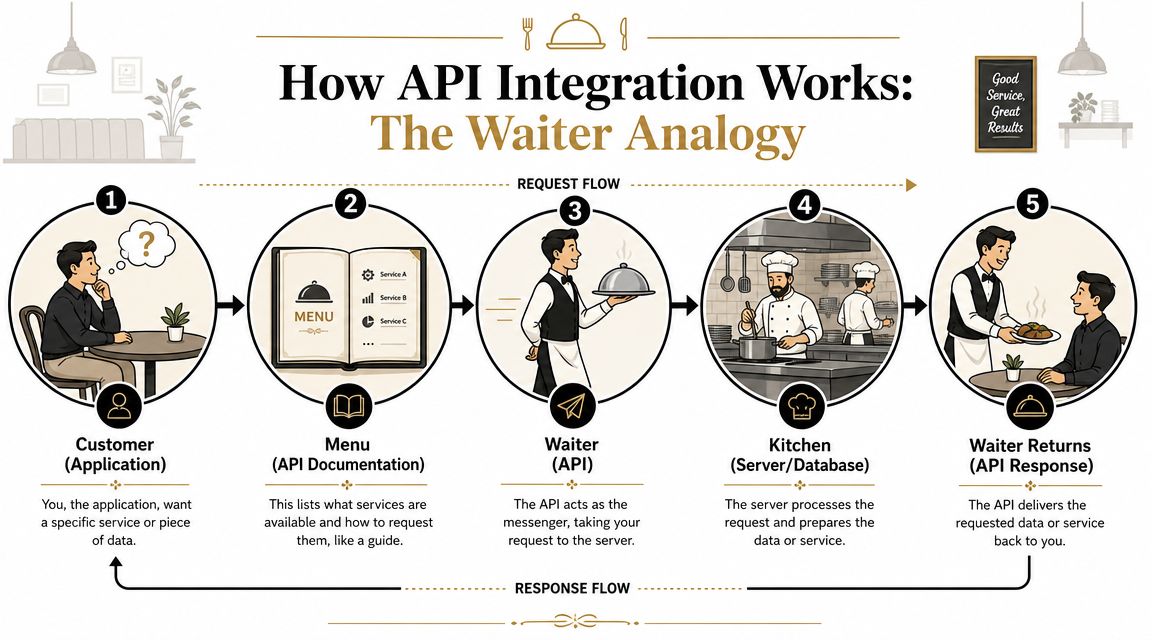
In API terms:
- Customer: Your app or system asking for something
- Menu: The API documentation that lists what's available
- Waiter: The API itself, carrying requests and responses
- Kitchen: The server or database doing the work
- Meal served back: The response, usually data or confirmation
That's why an API is often described as an interface. It gives you an approved way to ask for something without touching the internal machinery directly.
A more practical view is available if you're comparing tools that already support this model through API connections for business workflows.
The business version
Say your CRM wants to pull campaign engagement from your email platform. The CRM sends a request to a specific endpoint, which is just a defined location where that service can be reached. The request includes a payload, meaning the details of what it wants, such as a contact ID or date range.
The email platform checks whether the request is valid. If the authentication is correct and the requested data exists, it returns a response. That response might include opens, clicks, or subscription status for a specific contact.
Here's the same flow in plain English:
-
One app asks for something
“Give me campaign activity for this contact.” -
It uses the approved format
The API expects specific fields, permissions, and credentials. -
The other app processes the request
It looks up the data or performs an action. -
It sends something back
That might be data, success confirmation, or an error message.
Later in the workflow, the same pattern can trigger a follow-up action, not just data retrieval.
When people struggle with API integration, the problem usually isn't the concept. It's that the “menu” is strict. If the app expects the wrong field, wrong token, or wrong format, the request fails.
That's why good integrations depend on clear mapping and dependable error handling, not just connectivity.
The Main Types of API Integration Explained
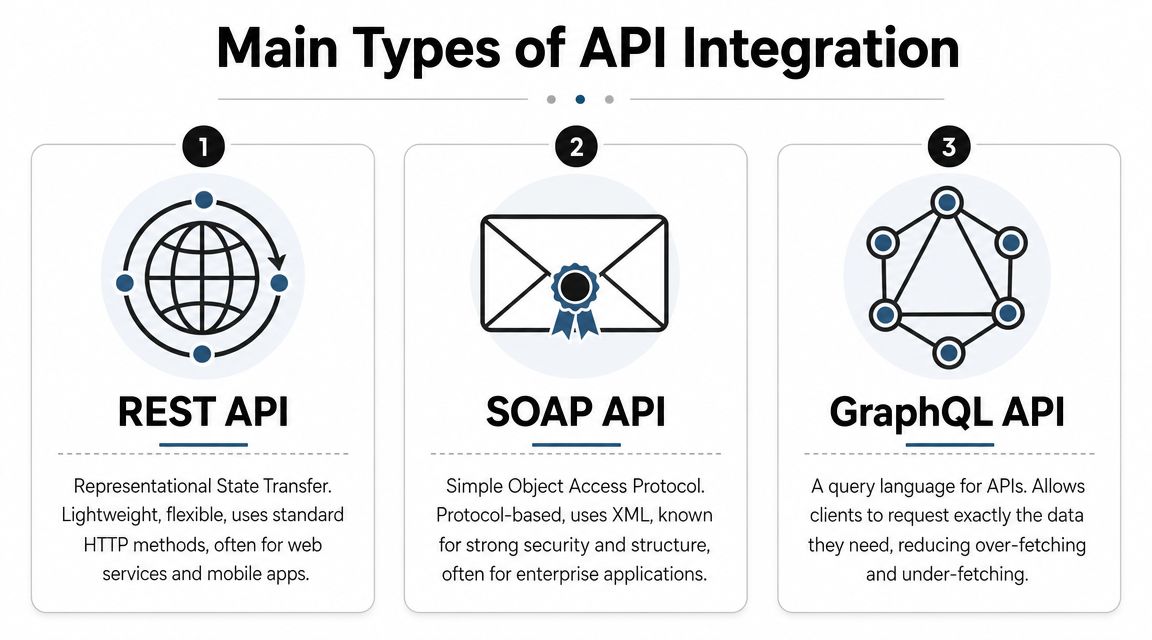
Not all API integrations work the same way. Small teams usually encounter a few common patterns, and each one has a different job.
REST and SOAP in plain English
REST is the format commonly encountered today. It's flexible, web-friendly, and common in SaaS products. If you're connecting tools like HubSpot, Notion, Stripe, Airtable, or Slack, there's a good chance you're dealing with REST.
SOAP is older and more rigid. It often appears in large enterprise systems, older finance platforms, or regulated environments where strict structure matters. It's less friendly for lightweight automation, but it still exists in serious business infrastructure.
A business owner doesn't need to memorise protocol details. The practical difference is this: REST usually feels easier to work with, while SOAP often comes with more formal rules and heavier setup.
Webhooks and SDKs where speed matters
A webhook is different from repeatedly asking an app whether something changed. It lets the app notify you when an event happens.
That makes webhooks useful for time-sensitive workflows:
- New lead submitted: Your team gets alerted immediately
- Invoice paid: The finance workflow updates without waiting
- Contract signed: Project setup starts at once
Think of a webhook as an app tapping you on the shoulder instead of waiting for you to keep checking the corridor.
An SDK is a toolkit provided by a software company to make integration easier for developers. Rather than building everything from scratch, they use pre-built methods and libraries. Small businesses don't usually buy an SDK directly as a business solution, but the software vendors and platforms they rely on often use SDKs behind the scenes to speed up connection work.
Common API Integration Types at a Glance
| Type | Best For | Analogy |
|---|---|---|
| REST | SaaS apps, web tools, flexible workflows | Ordering from a modern digital menu |
| SOAP | Older enterprise systems, formal process rules | Filing a structured paper form through official channels |
| Webhook | Event-based updates and alerts | A tap on the shoulder when something happens |
| SDK | Faster developer implementation | Using a toolkit instead of machining every part by hand |
There's one more distinction that matters in practice. API integration is not the same as data integration. API integration connects live applications so they can communicate directly. Data integration usually moves or transforms data into a warehouse, reporting layer, or analytics stack through patterns such as ETL, ELT, CDC, or reverse ETL, as outlined in this guide on API integration versus data integration.
If you need live actions, API integration is usually the right pattern. If you need central reporting, historical analysis, or governance over large datasets, a data pipeline may be the better fit.
Benefits and Challenges for Small Businesses
Small businesses usually feel the upside of API integration quickly. They also feel the downside quickly when it's designed badly.
What works well
The immediate gain is operational consistency. The form submission reaches the CRM. The CRM updates the sales board. The sales board triggers the right message. Nobody forgets the handoff because the handoff is built into the process.
That reduces manual entry and keeps records aligned across tools. It also makes the business easier to manage because staff stop debating which system has the latest answer.
A good integration doesn't just save time. It removes small decisions that drain attention all day.
There's also a strategic benefit. When your tools share context, you can build workflows instead of isolated tasks. That's a major shift for solo professionals who need systems to carry work forward even when they're focused elsewhere.
Where projects usually go wrong
Historically, the hard part has been the cost and lead time. A widely cited benchmark says traditional API integration takes an average of 4 weeks to complete, and only 2% of organisations have successfully integrated more than half of their applications, which helps explain why many teams still treat integration as a bottleneck rather than normal operations, according to this integration benchmark analysis.
For a smaller business, that usually translates into three problems:
-
Custom work is slow
Requirements, mapping, testing, and deployment can stretch out far beyond the original estimate. -
Maintenance never really ends
APIs change. Field names move. Tokens expire. One app updates unannounced, and the workflow breaks. -
The hidden issues are operational
Duplicate records, partial syncs, unclear ownership, and silent failures cause more trouble than the original build.
The real trade-off
The wrong way to think about integration is “connect everything to everything.” That creates brittle systems and unnecessary risk.
The better approach is to connect the few workflows that carry the most business value:
- Revenue handoffs
- Client onboarding
- Follow-up and communication
- Reporting that people use
Teams that start there usually get cleaner results. They're not chasing technical completeness. They're improving the moments where delay, error, or inconsistency costs real money.
Real-World Automation Examples You Can Use
For solo operators and small teams, the best integrations are rarely glamorous. They just remove friction from work you already do every week.
Research reports that 83% of businesses use APIs to maximise ROI on digital assets, and API-led connectivity can deliver 53% faster integration time than traditional methods. The same reporting says low-code and visual integration tools can cut development costs by 53% to 70%, which is why these workflows are no longer reserved for large engineering teams, according to this review of API-led integration and low-code adoption.
A signed proposal becomes a live project
A strong first workflow is client onboarding.
Trigger: A proposal is signed in your e-signature tool.
Actions: Create a new project in Asana or ClickUp, generate a Drive folder, notify the team in Slack, and prepare a welcome email draft in Gmail.
Business value: The client moves from sale to delivery without waiting for someone to assemble the basics manually.
This works well because the trigger is clear and the actions are predictable. It's one of the safest places to automate.
A high-value lead gets immediate follow-up
Lead response speed often drops because people are busy, not because they're careless.
Try this pattern:
- Trigger: A website form marks a lead as high intent
- First action: Post an alert to a dedicated Slack channel
- Second action: Draft a personalised Gmail follow-up
- Third action: Create or update the contact in HubSpot
- Fourth action: Assign the lead owner based on region or service line
If you're building lightweight tools around these kinds of flows, this guide on how to build an instant app for an internal workflow is a useful next step.
Sales data feeds a live dashboard
This is less exciting day to day, but often more valuable over a quarter.
Trigger: New deal activity appears in the CRM.
Actions: Push selected fields into Google Sheets or a BI layer, update stage totals, and refresh a simple management view.
Business value: The team stops relying on stale exports and can spot pipeline movement earlier.
Working rule: Automate workflows that affect response time, delivery speed, or reporting visibility first. Leave edge cases for later.
One practical option in this category is Zenfox.ai, which connects APIs across business tools, handles authentication such as OAuth or API keys, and maps endpoints so teams can describe a workflow in plain English instead of stitching every step together manually.
Security and Compliance Essentials
The moment an integration touches customer or employee data, convenience stops being the only concern. Access, control, and accountability matter just as much.
Authentication is not admin clutter
An API key is like handing over a specific key for one door. OAuth is closer to granting scoped permission without giving away the whole keyring. Both exist to make sure one system can prove who it is before it reads data or performs actions.
For UK-facing implementation, APIs that move personal or customer data should be designed with secure authentication, access logging, and strong permissions. Planning also needs to account for PII handling, auditability, retries, monitoring, branching logic, idempotency, and webhook-based updates so you avoid duplicate actions and excessive polling, as explained in this practical guide to secure and reliable API implementation.
That sounds technical, but the business meaning is simple. You should know who can trigger an action, what data they can access, and what record exists after the fact.
Reliability matters as much as access
A connected workflow that fails undetected is dangerous. It creates the illusion of order while dropping real work.
Use this checklist when reviewing any integration:
- Scoped permissions: Give each connection only the access it needs
- Audit trail: Keep logs of actions and changes
- Retries and duplicate protection: Prevent repeated invoices, repeated emails, or repeated record creation
- Monitoring: Make failures visible before customers notice them
If part of your workflow includes scheduled publishing, customer messaging, or regulated brand communications, this overview of letmepost social media regulations info is a useful companion read because compliance often extends beyond the API call itself into the content and approval process around it.
Secure integration is a professional standard. It's not an optional extra for larger companies.
The Future is Autonomous How Zenfox.ai Uses APIs
The first wave of API integration connected one app to another. A form sent a lead to a CRM. A payment triggered a receipt. Useful, but narrow.
The next wave is more capable. AI systems can use APIs not only to move data, but to interpret context, choose the next step, and complete multi-step work across several tools.

That shift changes the answer to “what is API integration”. It's no longer just a syncing mechanism. It's the execution layer that lets an autonomous assistant operate safely across your stack. Instead of defining every trigger and every branch by hand, you give the system a goal and access to the right tools.
That only works if credentials, tokens, and permissions are managed carefully. For teams tightening operational security around these connections, this critical guide for development teams is worth reading because secrets management is what keeps useful automation from becoming a security liability.
If you want to move from scattered app connections to AI-driven workflow execution, Zenfox.ai gives you a practical place to start. It connects business tools, works with APIs, and lets you describe the outcome you want in plain English so routine follow-ups, updates, and cross-tool tasks don't keep landing back on your desk.