
AI for Sales and Marketing: Workflows, Metrics and Trust
AI for sales and marketing explained: five workflows, a rollout plan, revenue metrics and UK privacy rules, with templates you can adapt today.
84% of UK marketers used AI tools at work in 2025, according to Digiday's coverage of the State of AI in Marketing study. That makes access to AI a poor differentiator. The useful question is whether your team can turn it into better commercial decisions, measurable revenue and customer interactions people welcome.
For UK teams, AI for sales and marketing needs an operating model, not just a collection of prompts. Someone must own the inputs, approve consequential actions and decide whether the results justify the cost.
Table of Contents
- What AI Does for Sales and Marketing Teams
- Five AI Workflows and What Each One Produces
- Protecting Customer Trust With Consent and Human Review
- How to Roll Out One AI Workflow Step by Step
- Prompt Templates and an Example Automation to Adapt
- How to Measure Revenue Impact, Not Just Time Saved
- Pilot One Workflow This Month Before You Scale
What AI Does for Sales and Marketing Teams
AI in sales and marketing is software that reads customer and campaign data, predicts likely outcomes, drafts content and, when permitted, takes action in the tools teams already use.
Think of it as a tireless junior analyst preparing work overnight. It can assemble an account brief, suggest which enquiries deserve attention and draft replies, but someone still needs to decide whether its interpretation is right.
The distinction is suggesting versus acting. A suggested lead score doesn't change a customer relationship; an automated email does. Updating a HubSpot field, changing a campaign audience or sending a Gmail follow-up therefore needs tighter permissions than preparing a private draft.
The useful working relationship is preparation by AI, judgement by people.

Start with the hand-off
Say a prospect requests a demonstration. An assistant reads the submission, checks the existing CRM record and prepares an account summary using approved information. The salesperson receives the enquiry alongside relevant context, rather than having to reconstruct it from separate tabs.
That workflow becomes risky when the assistant guesses company details, treats old correspondence as current intent or promises something the business hasn't approved. The answer isn't necessarily a more elaborate prompt. It's a clearer boundary between what the assistant may infer, what it must retrieve and what a person must confirm.
Practical rule: Give AI responsibility for preparing a decision before giving it authority to execute that decision.
Adoption isn't evidence of revenue
The UK Government's AI Adoption Survey 2025 findings put adoption at approximately 16% of UK businesses, while 77% of AI adopters reported no change in revenue. These findings don't prove that AI failed, but they do rule out treating installation as proof of commercial value.
Marketing and sales are prominent application areas because their work includes text, customer records and repeatable decisions. Yet generating more material doesn't establish that buyers found it useful.
A worthwhile workflow has a recognisable output, a named recipient and a measurable consequence. An account brief should improve meeting preparation; a follow-up draft should help a rep progress an actual conversation. Without that connection, teams can become busier without becoming more effective.
Five AI Workflows and What Each One Produces
| Workflow | What AI does | Data it needs | Typical output |
|---|---|---|---|
| Lead scoring | Ranks new leads by fit and recent intent | CRM fields, permitted web activity, firmographics | Score with reasons for each lead |
| Outreach automation | Drafts first-touch and follow-up messages | Contact history, approved templates | Draft emails queued for approval |
| Content personalisation | Adapts a campaign into segment versions | Segment definitions, approved claims | Variant copy per audience |
| CRM automation | Fills fields, summarises calls, logs activity | Call notes, email threads, deal stages | Updated records and stale-deal flags |
| Competitive intelligence | Tracks competitor pages and announcements | Competitor URLs, news sources | Weekly change summary with links |
Start with the workflow containing the most repeated tasks and the cleanest data, usually CRM automation or lead scoring. Personalisation needs an approved claim library before it runs at volume, otherwise you're scaling inconsistencies alongside the copy.
Choose by operational fit
The right choice isn't the most impressive demonstration. It's the task whose inputs you can access reliably and whose output a colleague can verify without repeating the whole job.
CRM automation suits a team whose reps already capture useful call notes but struggle to keep records current. It won't fix a sales process where nobody agrees what the deal stages mean. Define those stages before asking an assistant to assign them.
Lead scoring needs a similar distinction between fit and intent. A business may match your target industry perfectly while showing no buying interest. Keep those explanations separate so a rep can understand why an account was prioritised, rather than accepting an unexplained ranking.
For outreach, the limiting factor is often usable conversation history. A message based on a prospect's stated concern is different from one built around an inferred personal characteristic. Prefer explicit business context over speculative familiarity.
Match the output to the decision
Content personalisation works best when teams change the framing while holding the underlying offer steady. An operations audience might need implementation detail; a finance audience might need cost assumptions. Neither version should introduce a new guarantee.
Competitive intelligence requires source discipline rather than confident interpretation. A changed pricing page is observable; a claim that a competitor is abandoning a market needs stronger evidence. Ask for the change, its source and its possible implication as separate fields.
A useful output should make the next decision easier, not create another document someone has to investigate.
Don't automate every available step because the tools connect. If a deterministic CRM rule can copy a known field correctly, use that rule. Reserve AI for interpreting messy notes, reconciling context or drafting language where fixed logic isn't enough.
Protecting Customer Trust With Consent and Human Review
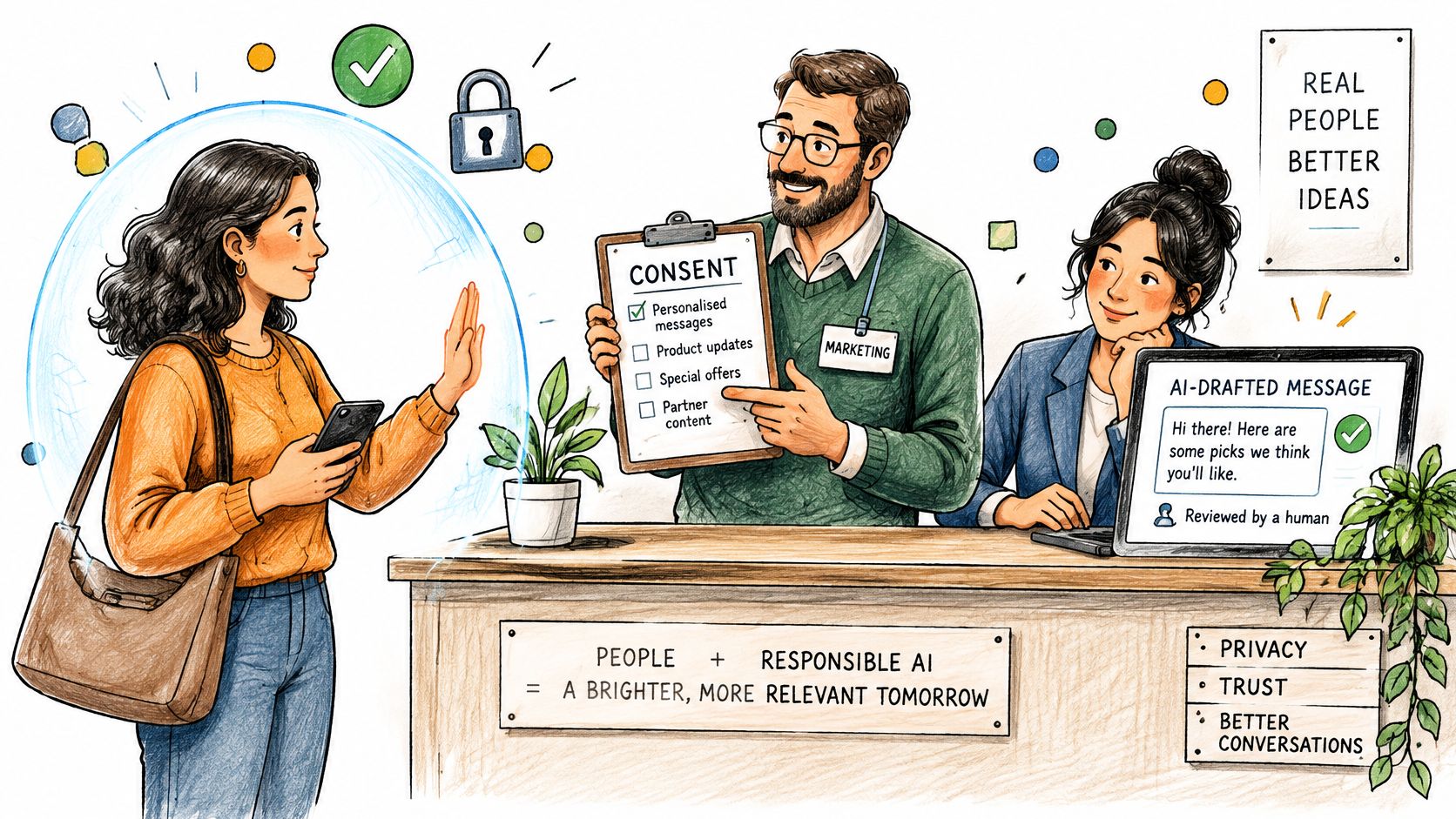
A faster reply is not a better reply if the customer never agreed to it. For UK sales and marketing teams, consent and human review decide whether AI output can be sent, stored, or used again. Lose that trust and open rates, meetings and repeat purchases fall with it, however full the activity log looks.
In UK consumer research reported by The Retail Bulletin, 57% had little or no trust in brands using AI responsibly. Permission should be understandable to the customer, not only visible to an administrator.
Make the boundaries explicit
Apply these operating rules across CRM, email, support and advertising:
- Explain meaningful AI use. Tell recipients when they are dealing with an automated assistant, and explain personalisation where it would otherwise be surprising.
- Record permission and provenance. Keep the date, source and scope of consent where relevant. A webinar invitation does not cover unrelated profiling or model training.
- Restrict sensitive information. Exclude health details, financial circumstances and unrelated private correspondence unless the approved task requires them.
- Synchronise objections. Make suppression records available to every sending workflow so an opt-out is not lost between systems.
- Keep escalation human. Route complaints, refund requests and legal questions to a person rather than letting an assistant improvise a resolution.
Use our guide to GDPR compliance to organise the privacy questions you need to resolve. Have a qualified adviser check how UK GDPR and PECR apply to your personal-data processing and electronic marketing. A generic checklist is not permission to send.
Verify before relying on the output
Human review means checking facts, not only polishing tone. Confirm product capabilities, recipient details and supporting sources before anything goes out.
AI-generated outputs may contain inaccuracies. Zenfox.ai does not fact-check or guarantee the accuracy of AI-generated content, so verify material before relying on it for professional, legal, medical, financial or regulatory decisions.
Treat complaints, opt-outs and requests for a human as operating signals. More replies bought by making customers uncomfortable is not a commercial gain.
How to Roll Out One AI Workflow Step by Step
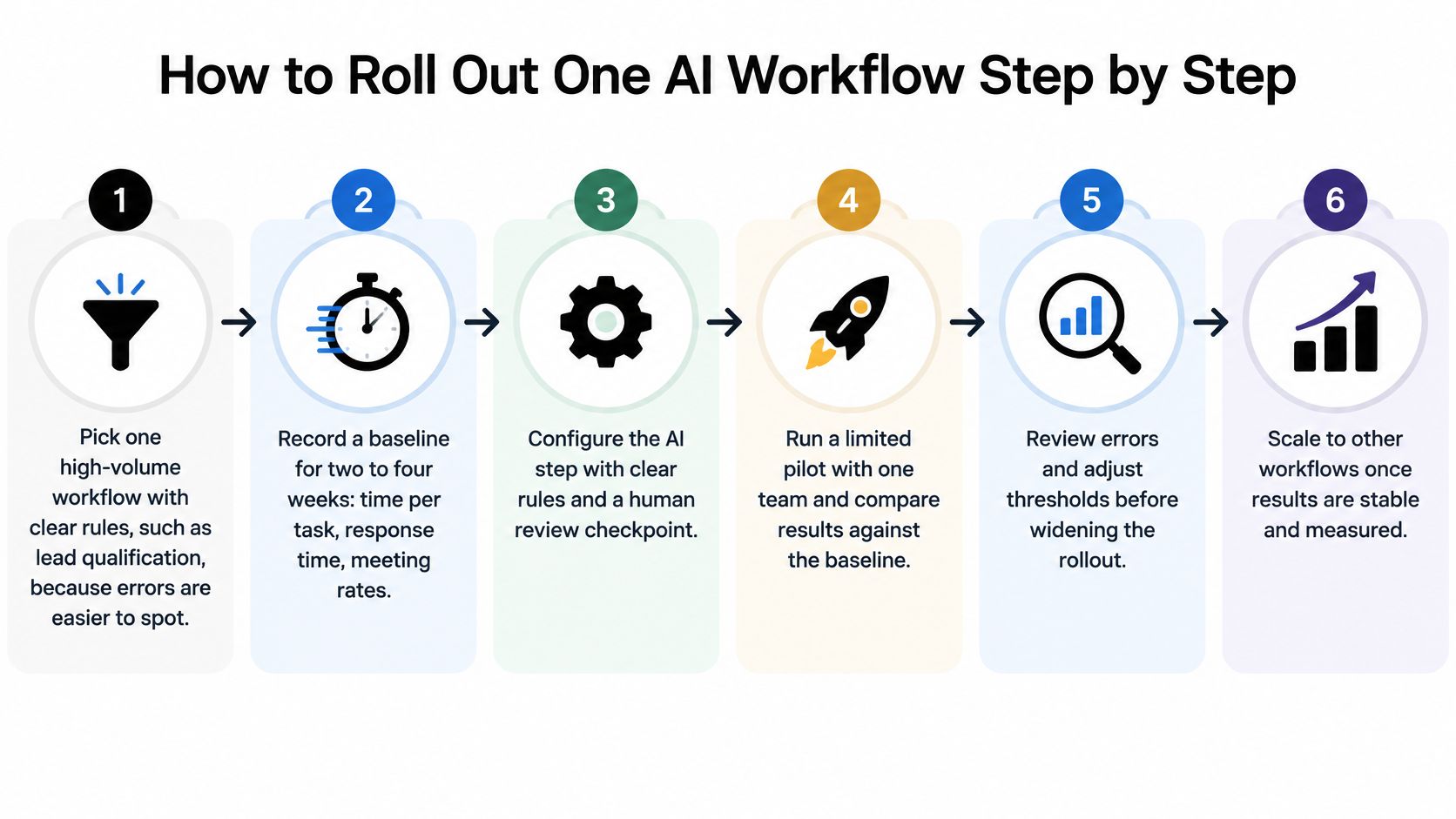
Improving efficiency and productivity was the primary adoption driver for 71% of respondents in the UK Government's AI Adoption Survey 2026. To test that objective, choose work with observable inputs, explicit rules and a checkable result.
The rollout should move from selection and configuration to a limited pilot, review and controlled expansion.
Define the task before connecting the tools
-
Pick a bounded workflow. Lead qualification is a sensible candidate when the team already has written acceptance criteria. Define the trigger, the expected result and the conditions that require a person, rather than asking an agent to improve sales generally.
-
Record the existing process before changing it. Capture handling time, response time, meeting conversion and errors across representative work, including awkward cases and busy periods. Keep measuring until the baseline reflects normal operations rather than an unusually quiet spell.
-
Connect only necessary information. Give the workflow approved CRM fields, relevant company documents and current templates, not unrestricted access to every mailbox and folder. Retrieve supporting material from those sources and preserve its origin so reviewers can inspect it.
-
Specify a fixed output structure. For qualification, require separate fields for fit, intent, supporting evidence, missing information and recommended action. Mark unknown values explicitly instead of encouraging the assistant to complete every field with a plausible guess.
Earn execution rights through testing
-
Begin with read-only access. Let the assistant propose record changes without committing them, then compare those proposals with human decisions. Once performance is acceptable, grant narrowly scoped write permissions, such as adding a note rather than changing a deal's value.
-
Set exception rules before release. Route conflicting records, missing evidence and uncertain classifications to a named reviewer, and test those routes deliberately. Don't treat a model's self-reported confidence as a calibrated probability unless you've validated it against labelled examples.
-
Pilot against a comparable control group. Keep the existing process running for similar work, and log inputs, retrieved sources, proposed actions, approvals and failures. Review exceptions regularly, change the weakest part of the workflow and expand only when the results remain dependable.
For candidate tasks, our AI automation workflow examples can help you identify suitable hand-offs. Choose based on your records and operating constraints, not a headline savings estimate.
Deployment test: If you can't explain how to stop the workflow, reverse its changes and identify affected records, it isn't ready for unattended execution.
Give each run a unique identifier and check whether an action has already completed before retrying it. This matters when a connection fails after updating the CRM but before confirming success, because a blind retry can create duplicate notes or messages.
Keep a named owner for broken connections and changed field definitions. A pilot can pass its initial checks and still fail later when someone renames a CRM property or replaces an approved template.
Prompt Templates and an Example Automation to Adapt
A useful prompt defines the task, limits the evidence and specifies the output. It shouldn't ask the model to compensate for missing permissions or invent a business policy.
Templates with explicit boundaries
Lead scoring
Assess [lead details] against [scoring criteria]. Apply only the supplied rubric and return its score, supporting reasons, missing information and recommended review status. Separate confirmed facts from inference. If the evidence is insufficient, return needs review rather than guessing.
Use a scoring scale your team has defined in advance. The assistant's job is to apply your criteria consistently, not invent a scale that appears precise.
Follow-up email
Draft a follow-up using [prior conversation summary], in [tone], asking for [single next step]. Use only approved information from [reference material]. Don't invent prices, dates, availability or case studies. Identify any missing detail needed before sending, and return a draft rather than sending it.
Competitor brief
Compare [approved competitor sources] with the saved material from [last report date]. List confirmed changes with a source link and supporting excerpt for each. Separate observed changes from possible commercial implications. If no usable prior version exists, state that comparison isn't available.
The competitor prompt requires stored previous material. Asking an assistant to identify changes without an earlier snapshot invites it to describe the current page as if it knew what changed.
A demo request from arrival to approval
Say a demo request enters HubSpot. The automation matches the business domain to an existing account and retrieves company size and industry from approved records. The rep checks that the match is correct, especially where subsidiaries or shared domains could cause confusion.
Next, the assistant applies the qualification rubric and drafts a reply. The rep checks the evidence behind the recommendation and confirms that the proposed next step answers the prospect's actual request, rather than pushing an unrelated sales sequence.
The workflow writes a labelled AI-generated CRM note and posts the summary, evidence and draft to Slack for approval. During the initial pilot, every first message to a new prospect waits for a person, and any missing approval leaves the chain paused.
Set the automation to stop on an account mismatch, a suppression flag, missing supporting evidence or an approval rejection. A draft existing in Slack must never count as permission to send.
Keep prompts short and specific, and attach an example of an acceptable output. When results drift, inspect the source material and integration state before adding another paragraph of instructions.
How to Measure Revenue Impact, Not Just Time Saved
In Adobe's UK B2B AI and digital trends report, 42% of senior executives said scaling was stalled because they couldn't identify high-impact B2B use cases. Faster handling is not more revenue. A team can cut minutes off every reply and still book the same pipeline.
Measure the commercial consequence
Compare a baseline with a control group, and keep the same definitions on both sides.
| Metric | How to calculate | How to read it |
|---|---|---|
| Response time | Median minutes from enquiry to first reply | Falling times with steady lead quality suggest real gains |
| Meeting conversion | Booked meetings divided by qualified leads, comparing AI and control groups | Gains count only when the groups and qualification rules are comparable |
| Pipeline velocity | Number of qualified opportunities × win rate × average deal value ÷ average sales cycle length in days | Read alongside deal progression and value, because the ratio can change without faster selling |
| Retention | Share of customers renewing or buying again, tagged by AI-touched accounts | A slow signal that needs observation across renewal cycles |
| Campaign contribution | Revenue from AI-assisted campaigns, checked against a holdout group | Prefer an incremental comparison to raw last-touch attribution |
Don't let the assistant redefine a qualified lead midway through the experiment. If it drops harder prospects, the remaining leads can convert at a higher rate while the business gains no extra customers. That is a conversion trick, not revenue impact.
Protect the holdout from contamination. If reps use AI-generated account briefs for both groups, the comparison no longer tests the workflow you intended. Record exceptions. Do not move difficult cases out of the test.
Separate capacity, cash and margin
Time saved is capacity, not automatically revenue or a cash saving. Show where the hours went: more follow-up conversations, a smaller backlog, or less external support. Count extra deal margin on its own. Do not value the same freed hours again when those hours produced the deals.
A practical value calculation is:
Net value = realised labour benefit + incremental contribution margin − software, integration, review and setup costs.
Use one accounting period and show setup costs on their own line. For payback, divide the upfront investment by the recurring net benefit. Net value itself is not a payback period.
Track overrides, factual corrections and failed actions next to the commercial numbers. Customer trust sits in those counts. A wrong brief or a repaired email is a cost even when the workflow looks quick before review. A fast draft that a rep has to rebuild can cost more than the manual process it replaced.
The sales forecasting methodology guide can structure pipeline assumptions. Forecast improvements are not booked revenue. Keep observed outcomes, forecast outcomes and attribution assumptions visibly separate.
At the review, keep a workflow with dependable net value, adjust one with a specific fixable weakness, and stop one whose costs or customer consequences outweigh the benefit. If sales cycles have not matured, keep the uncertainty. Do not call an early movement a win.
Pilot One Workflow This Month Before You Scale
Commit to a bounded pilot this month, not an open-ended programme to automate the whole revenue team. Choose a task with repetitive work, accessible records and a clear recipient for the output.
Name an owner who can change the process, not just administer the software. That person needs authority to pause the workflow, resolve disputed classifications and get sales and marketing to use the same definitions.
Make adoption a team decision
Reps need a short operating briefing before the pilot begins. Explain what the assistant reads, what it produces, how to reject a recommendation and which decisions remain theirs.
- Keep consequential judgement with people. Pricing exceptions, refunds and sensitive customer commitments need an accountable decision-maker.
- Show the misses. Share examples of incorrect matches, weak drafts and useful catches alongside successful outputs.
- Assign the recovered capacity. Decide whether the team will use it for follow-up calls, account preparation or clearing unanswered enquiries.
- Protect the right to challenge. Let colleagues report a bad recommendation without having to defend why they didn't trust the automation.
Don't promise that AI will remove all administration or make every salesperson more effective. Explain the narrower change you're testing and how you'll decide whether it deserves to stay.
The strongest argument for expansion is a workflow the team can inspect, challenge and stop, with results that survive those checks.
Choose the setup route deliberately
For a solo professional or small team, a workflow platform can reduce the amount of integration work to organise. Zenfox.ai is an option among several: our AI Workers use a template selection process, we propose a work plan, and the worker starts after you approve it. Ask us at hello@zenfox.ai which templates and approval arrangements fit your intended workflow before committing.
You don't need a platform change if your existing CRM and automation tools can support the test safely. Avoid migrating records merely to demonstrate an AI feature, because that adds another source of error to the experiment.
Make the decision this month: select the workflow, name its owner and approve a written test plan with a review date. Expand only when the operating evidence supports it, not because the demonstration looked convincing.
Zenfox.ai offers AI Workers from a catalogue of 28 templates across sales, marketing and other business functions, with a proposed work plan for you to approve before work starts. Visit Zenfox.ai to assess a template for your chosen pilot, and bring your required inputs, review checkpoints and success measures to the setup conversation.