What Is GDPR Compliance? a Practical Guide for 2026
Wondering what is GDPR compliance and how it affects your SaaS tools? Our guide explains core principles, roles, and provides a checklist for small teams.

You're probably already handling more personal data than you think.
A small team signs up for HubSpot, pipes form fills into Slack, uses Gmail for outreach, adds an AI assistant to summarise calls, and stores contracts in Drive. Then someone asks a simple question: “If a customer wants all their data deleted, can we do that?” That's usually the moment GDPR stops feeling like legal background noise and starts feeling operational.
For startups and lean SaaS teams, what GDPR compliance means in practice isn't “have a privacy policy somewhere in the footer”. It means knowing where personal data goes, why it's there, who can touch it, and how you respond when something changes, breaks, or gets challenged. If your workflows rely on integrations and automation, compliance lives in your tooling choices, access settings, retention rules, and vendor contracts.
Table of Contents
- Why GDPR Compliance Matters More Than Ever
- The 7 Core Principles of GDPR Explained
- Understanding Your Role as a Controller or Processor
- The 8 Fundamental Rights of Your Data Subjects
- A Practical GDPR Compliance Checklist for Small Teams
- GDPR for Automation Integrations and AI Tools
- Conclusion Your Path to Compliant Growth
Why GDPR Compliance Matters More Than Ever
Small teams usually don't set out to build a complex data environment. It just happens. One tool solves lead capture, another handles support, a third syncs calendars, and soon customer data is moving through a stack that nobody has fully mapped.
That's why the question “what is GDPR compliance” matters more now than it did when most workflows were manual. In a modern SaaS business, every integration is a new route for personal data. If you use Slack alerts for inbound leads, HubSpot for lifecycle stages, and an AI assistant to draft follow-ups, you've created a living system of collection, sharing, storage, and decision-making.
The UK position is its own legal reality
For UK organisations, this isn't just “the EU rules but nearby”. The UK GDPR came into force on 1 January 2021 and sits alongside the Data Protection Act 2018 as the main UK data protection law. The enforcement stakes are real too. The ICO can issue fines of up to £17.5 million or 4% of annual worldwide turnover, whichever is higher according to this Thomson Reuters overview of UK GDPR compliance concerns.
That matters because founders often treat privacy as something to tidy up after product-market fit. Regulators don't see it that way. Customers don't either.
Practical rule: If your team can't explain where personal data enters your stack, where it gets copied, and who can export it, you're not dealing with a policy problem. You're dealing with an operations problem.
Trust shows up in ordinary workflows
A customer doesn't judge your privacy posture by reading legal text. They judge it when they unsubscribe and still get messages. Or when support can't find their data. Or when your team asks for information that isn't needed.
Good compliance work often looks boring from the outside. Fewer duplicated records. Cleaner permissions. Better deletion routines. Clearer notices. Vendors reviewed before they're connected.
For teams working inside Microsoft environments, this guide for IT Directors on GDPR compliance is useful because it translates legal obligations into system design choices rather than treating GDPR like a drafting exercise.
The key shift is mindset. GDPR is less like a warning label and more like quality control for data handling. Teams that get this early usually build cleaner systems and earn trust faster.
The 7 Core Principles of GDPR Explained
The easiest way to understand GDPR is to stop treating it as abstract law and treat it as handling something that belongs to someone else. Personal data isn't your asset in the same way your codebase or sales deck is. You're being trusted with it for a reason.
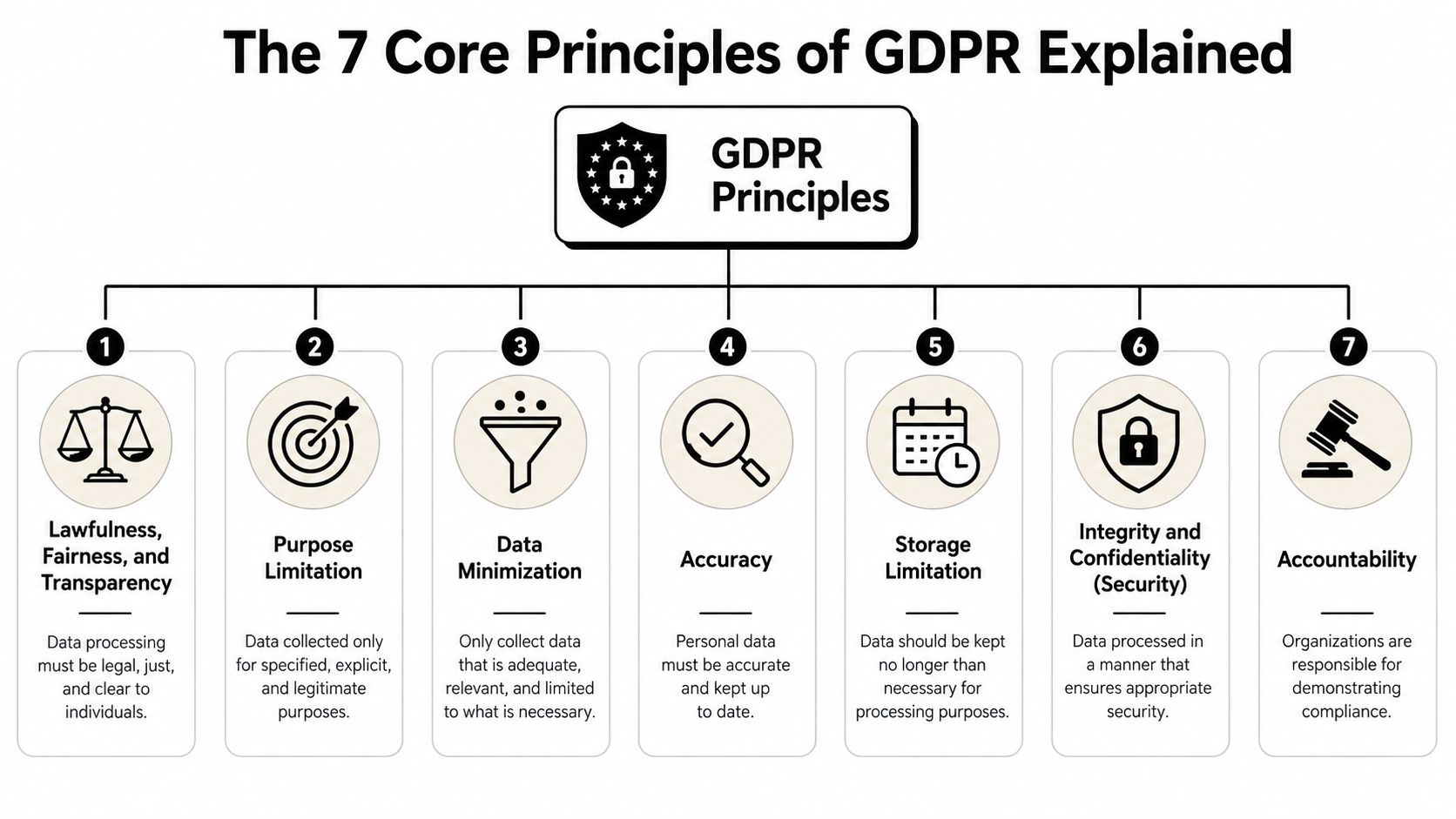
Think of GDPR as rules for handling borrowed property
Here's the practical version of the seven core principles.
- Lawfulness, fairness, and transparency. You need a valid reason to process personal data, and people shouldn't be surprised by what you do with it. If a contact downloads a guide, that doesn't automatically make every downstream use fair.
- Purpose limitation. Collect data for a specific job, not for vague future usefulness. A support inbox shouldn't inadvertently become a sales profiling tool later.
- Data minimisation. Pack for a weekend trip, not a six-month expedition. Only collect what you need.
- Accuracy. If your CRM says a person still works somewhere they left months ago, your automation is acting on bad data.
- Storage limitation. Don't keep personal data forever because storage is cheap. Cheap storage still creates risk.
- Integrity and confidentiality. Lock the doors. Restrict access. Use security controls appropriate to the risk.
- Accountability. You need to show your working. Compliance that only exists in someone's memory isn't compliance.
What these principles change in daily operations
These principles sound legal, but they shape ordinary product and ops decisions.
| Principle | What it means in a small team |
|---|---|
| Lawfulness and transparency | Write notices that match reality, not aspiration |
| Purpose limitation | Don't reuse data for unrelated campaigns without checking basis and notice |
| Data minimisation | Limit what fields get synced between tools |
| Accuracy | Give sales and support a clean way to correct records |
| Storage limitation | Set deletion and archive rules instead of keeping everything |
| Security | Control who can see, export, or forward personal data |
| Accountability | Keep records of decisions, vendors, and processing activity |
A lot of teams get stuck because they try to memorise legal terms instead of asking one practical question: “If I were the customer, would this data use feel expected and controllable?”
That question catches problems early. It also helps when reviewing third-party tools. A vendor's Matil's data protection page, for example, is the kind of document worth reading before integration because it tells you how a provider frames privacy responsibilities and handling practices.
The principles are not separate boxes. They work like guardrails around your whole data lifecycle.
Understanding Your Role as a Controller or Processor
Most startups are both. That's where confusion starts.
You might be a controller for your own customer list, employee records, and marketing database. At the same time, the tools you use to store or process that data can be processors acting on your behalf. If you also provide a SaaS platform to clients, you may become a processor for data your clients upload. Same company. Different roles. Different responsibilities depending on the context.
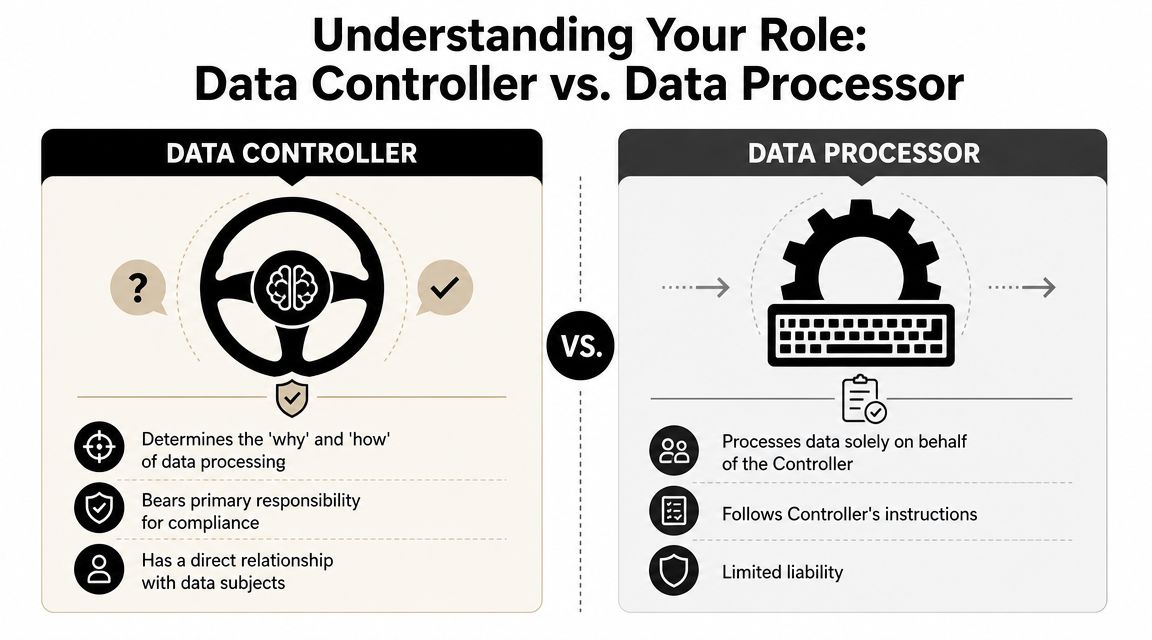
Who decides and who executes
A simple analogy helps.
The controller is the restaurant owner. They decide the menu, the prices, and how orders are handled. The processor is the delivery service. It doesn't decide what food gets made. It transports and handles orders based on instructions.
Applied to software:
- Your company decides why customer data goes into HubSpot. That points to controller responsibility.
- HubSpot processes that data in line with the service you've chosen. In that relationship, it acts as a processor for that activity.
- If an automation platform moves contact details from a form into your CRM, that platform is usually processing on your behalf.
Where small teams get this wrong
The common mistake is assuming the vendor “has GDPR covered” because they offer a compliance page. Vendors matter, but they don't replace your decisions. If your team chooses to enrich leads, sync messages into Slack channels, or retain transcripts indefinitely, those are controller choices.
That's why Data Processing Agreements matter. A DPA sets out how a processor handles personal data on your behalf. If you're reviewing what that looks like in practice, this Data Processing Addendum is a useful reference point for the kind of contractual structure teams should expect from a processor.
A quick way to test your role is to ask:
- Who chose the purpose of the processing?
- Who decided which data goes in?
- Who benefits directly from that purpose?
If the answer is your business, you're usually in controller territory for that activity.
If your vendor can only say “we process data as instructed”, that doesn't remove your responsibility. It confirms it.
The 8 Fundamental Rights of Your Data Subjects
GDPR takes on a very concrete form. People have rights over their personal data, and your systems need to support those rights without chaos.
If someone sends a request today, could your team respond without hunting through inboxes, spreadsheets, Slack threads, CRM notes, form tools, and AI transcripts? That's the true test.
What people can ask you to do
The eight rights are easiest to understand from the individual's point of view.
- Right to be informed. “Tell me what you collect, why, and what happens to it.”
- Right of access. “Show me the personal data you hold about me.”
- Right to rectification. “Fix data that's wrong or incomplete.”
- Right to erasure. “Delete my data where the law allows that.”
- Right to restrict processing. “Stop using my data in certain ways while an issue is checked.”
- Right to data portability. “Give me my data in a usable format.”
- Right to object. “Stop processing my data for certain purposes.”
- Rights around automated decision-making and profiling. “Don't make significant decisions about me through automation without proper safeguards and explanation.”
These rights create operational work. Access requests need a repeatable search process. Erasure needs deletion logic across connected systems. Rectification needs a reliable source of truth.
What this means for your systems
Most small teams fail here for one simple reason. Their stack is connected, but their records aren't governed. Data gets copied into too many places.
A workable setup usually includes:
- A master data map that shows where customer and employee data lives
- A request workflow so rights requests aren't handled ad hoc
- Ownership rules so one person coordinates legal, support, and technical actions
- Deletion and correction procedures that include synced tools, not just the core database
This is especially relevant if you record calls, generate notes, or keep searchable meeting archives. Teams using meeting automation should think carefully about retention, access, and participant notice. This related guide on recording meetings for minutes is a good example of the operational side of managing sensitive records, even outside a pure GDPR lens.
A rights request shouldn't feel like a forensic investigation. If it does, your data architecture is too messy.
A Practical GDPR Compliance Checklist for Small Teams
Many organizations don't need a giant privacy programme first. They need a short list of controls that are realistic, visible, and tied to their actual tools.
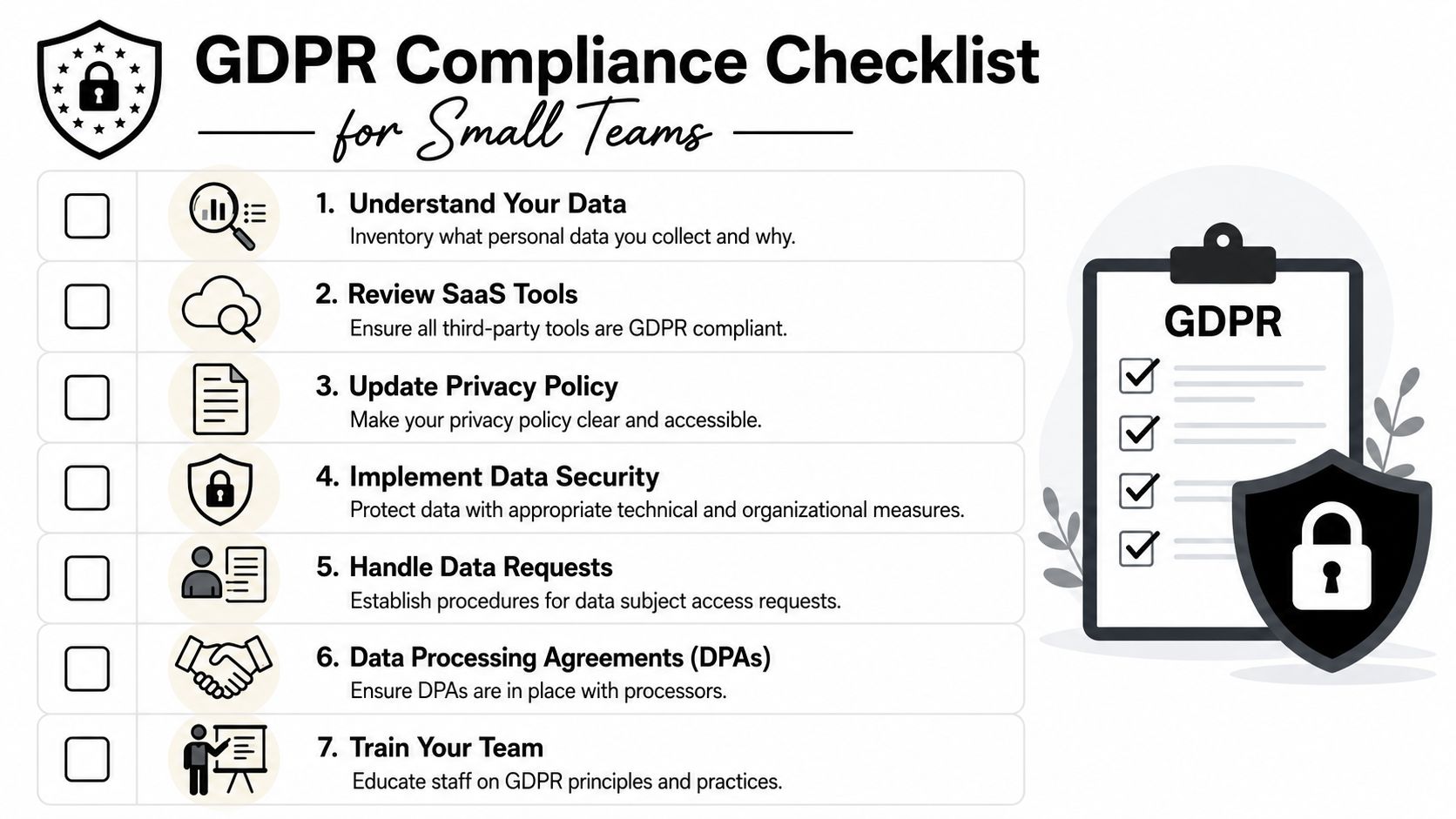
Start with visibility not paperwork
Before policies, map reality.
- List every tool that touches personal data. Include HubSpot, Slack, Gmail, support tools, forms, analytics, meeting recorders, AI assistants, and document stores.
- Mark what data enters each tool. Names, emails, call notes, invoices, CVs, support messages, behavioural signals.
- Record why each flow exists. If nobody can explain the purpose, question the flow.
- Check who has access. Pay attention to shared inboxes, broad Slack channels, and old admin accounts.
For UK organisations, those with 250+ employees or any higher-risk processing should maintain an up-to-date processing register, and a DPIA is required where processing is likely to create a high risk to individuals' rights. Qualifying breaches must also be reported to the regulator within 72 hours of detection, as outlined in the GDPR compliance checklist guidance.
That sounds enterprise-heavy, but the lesson for small teams is simple. Don't wait until you're larger to build records. Build the habit while the stack is still understandable.
Later in the workflow, training often helps more than another policy document. This video gives a practical primer your team can watch:
Build lightweight controls that your team will actually use
A good checklist for a lean SaaS team looks like this:
- Set a lawful basis per activity. Don't rely on consent by default. In many B2B SaaS flows, contract or legitimate interests may be more relevant, depending on the context.
- Review every vendor contract. Make sure processors offer appropriate terms and handling commitments.
- Trim unnecessary fields. If your lead form asks for data you never use, remove it.
- Write notices in plain English. Match them to your real workflows, including automation and profiling where relevant.
- Prepare a rights request process. One intake route. One owner. One checklist.
- Define retention rules. Decide what gets deleted, archived, or anonymised.
- Plan for incidents. The 72-hour breach window means you need logs, ownership, and a fast escalation path once a qualifying breach is detected, as practical GDPR guidance also emphasises in this risk-based security and breach response overview.
For teams in regulated or documentation-heavy sectors, the same discipline shows up in record handling. A guide on document management in medical settings is useful here because it reflects the kind of retention and access questions that many small businesses underestimate.
What doesn't work? Spreadsheet theatre. A long compliance tracker nobody updates is worse than a short register the team uses.
GDPR for Automation Integrations and AI Tools
Automation is where GDPR gets interesting. It's also where many teams accidentally create risk while trying to save time.
A single workflow can pull a lead from a form, enrich the record, notify Slack, create a deal in HubSpot, draft an email, and log a summary in a knowledge base. That's efficient. It also means personal data is moving across multiple systems in seconds.
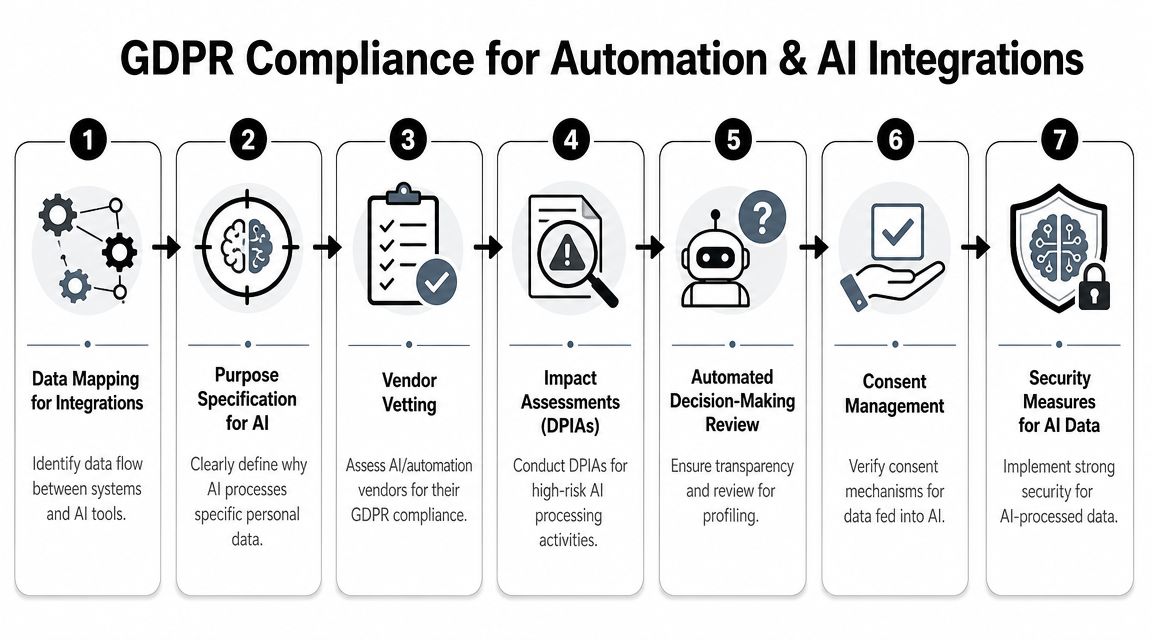
Automation multiplies both value and risk
The first compliance question for automation isn't “Can this tool connect?” It's “Should this data move at all?”
Good automation design usually follows a few rules:
- Move the minimum necessary data. If a Slack alert only needs a company name and task status, don't include full contact history.
- Avoid default full-sync behaviour. Many tools sync entire records because it's easy, not because it's necessary.
- Separate convenience from need. Just because sales wants every note in every system doesn't mean that's justified.
- Review cross-border transfers. UK-facing guidance stresses clear lawful basis, transparency, and transfer safeguards for organisations established in the UK or offering goods or services to people in the UK, while also operating alongside the Data Protection Act 2018. This becomes especially important when your stack includes global cloud vendors, as outlined in the European overview of GDPR obligations and scope.
A clean integration sends the least data required to complete a defined task. A messy integration copies data because nobody stopped it.
How to use AI tools without creating a compliance mess
AI introduces another layer. Not because AI is automatically non-compliant, but because teams often blur assistance, profiling, and automated decision-making.
The GDPR requires people to be informed about automated decision-making, including the logic involved and its consequences, which is especially relevant for UK teams using AI assistants and workflow automation, as explained in this GDPR overview covering automated decision-making transparency.
That has direct implications for tools that:
- score or rank leads
- prioritise support tickets
- assess employee activity
- summarise calls into action items that affect customer treatment
- trigger different journeys based on behavioural profiling
If the system materially shapes how someone is treated, your team needs to ask harder questions about notice, fairness, risk, and whether a DPIA is needed.
A practical review flow for AI tools looks like this:
| Question | Why it matters |
|---|---|
| What personal data enters the model or workflow? | Supports minimisation and risk review |
| What is the specific purpose? | Stops vague “for productivity” processing |
| Does the tool make or influence decisions about people? | Triggers transparency and profiling questions |
| Can users correct or challenge outcomes? | Supports fairness and rights handling |
| Where does the data go after processing? | Affects retention and transfer review |
This is also where product choice matters. Some teams use an automation layer such as HubSpot workflows or Slack apps. Others use broader orchestration tools. Platforms like Zenfox.ai fit into this category by connecting tools such as Gmail, Slack, HubSpot, and Drive to run actions across a stack, which means teams should review data flows, notices, access control, and vendor terms before enabling broad automations. If you're thinking through customer-facing automations specifically, this guide on how to automate customer service is relevant because support workflows often carry high volumes of personal data and higher expectations around transparency.
What works is intentional architecture. What fails is attaching AI to everything and hoping the privacy notice covers it.
Conclusion Your Path to Compliant Growth
GDPR compliance isn't a badge you earn once. It's a way of running systems that handle personal data with discipline.
For small teams, the advantage is that you can build this early, before your stack becomes unmanageable. If you know what data you collect, why you collect it, where it flows, and how people can exercise their rights, you're already doing the hard part. The legal language matters, but the daily habits matter more.
The strongest teams don't treat GDPR as a brake on growth. They use it as a design constraint that leads to cleaner automations, better vendor choices, tighter access control, and more trustworthy customer relationships. That's good compliance, but it's also good operations.
Choose tools that make your data flows easier to understand, not harder to trace. The less guesswork your team has to do, the easier it is to grow without creating privacy debt.
If you want to automate work across Gmail, Slack, HubSpot, Drive, and other tools without losing sight of how data moves, Zenfox.ai is worth exploring. It gives teams a way to run cross-app workflows with activity visibility, which helps when you need automation that stays usable and governable as your stack grows.