
AI Agent for Business: What It Does and How to Start
AI agent for business explained: core capabilities, real use cases, security checks, a selection checklist and a 30-day pilot plan for UK teams.
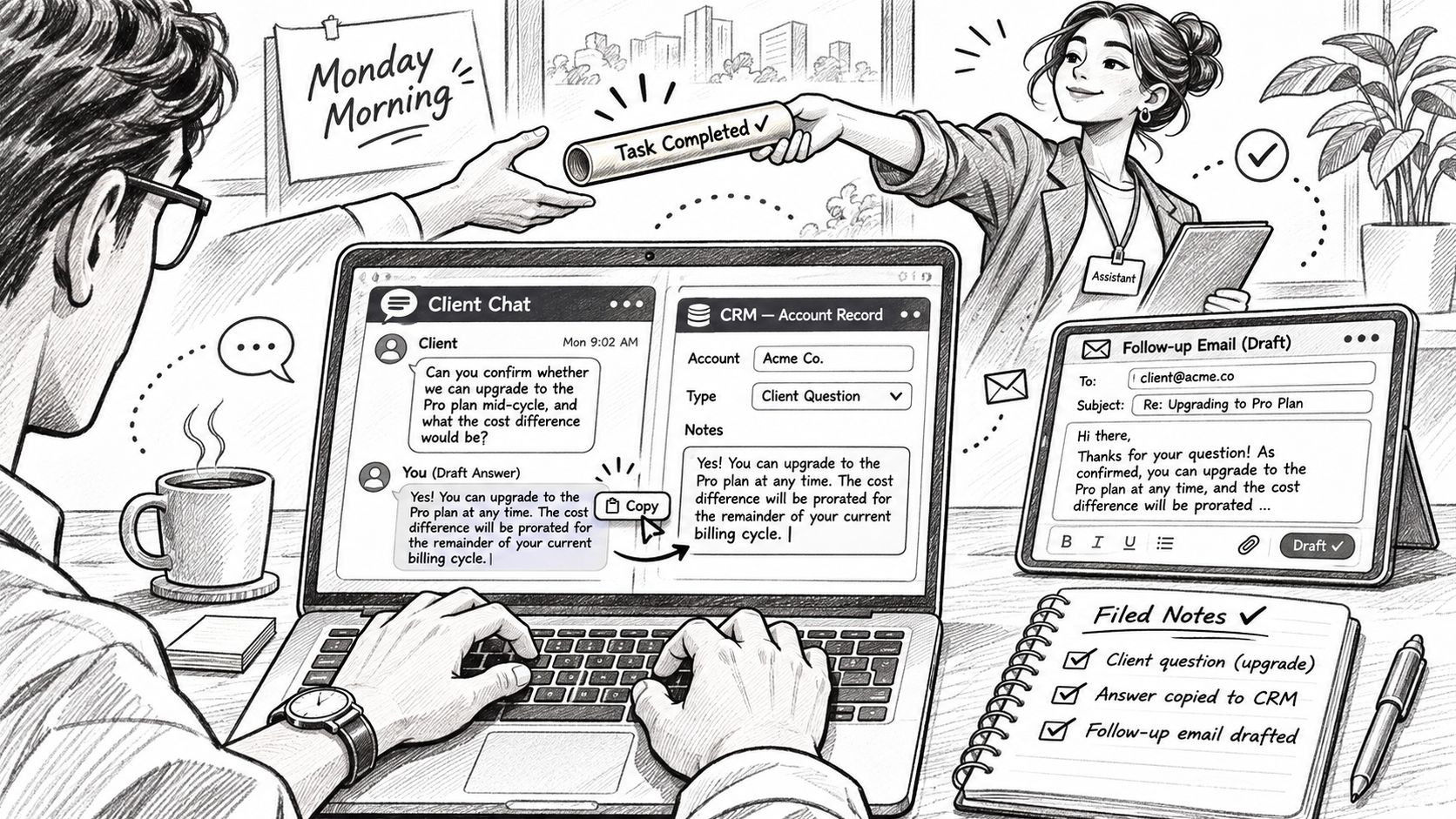
It's Monday morning. Your chatbot has answered a client's question, but someone still needs to copy the answer into HubSpot, send the follow-up email and file the notes in Drive. You've made the writing quicker, yet the administrative work is still waiting.
An AI agent for business should handle that unfinished work, not just produce better text. The buying decision is therefore an operating decision: what can it change, when must it ask, and does it save time after someone has checked its work?
Table of Contents
- What an AI Agent Does for Your Business
- Core Capabilities and Selection Checklist
- Automation, Sales, Research and Monitoring Use Cases
- Connecting Tools Safely Without Exposing Client Data
- How to Prove an Agent Pays Off With a Worked Example
- Quick-Start Plans and a 30-Day Pilot
What an AI Agent Does for Your Business
Think of an agent as a capable office worker given access to your inbox, CRM and shared drive. You give it an outcome, such as preparing the follow-up from a client call, rather than issuing separate instructions to find the notes, draft the email and update the record.
The analogy has limits. Software doesn't inherit your judgement about a difficult client or an informal promise. You must define the boundaries, including what counts as a completed task and what requires a person's decision.
An AI agent is software that pursues a goal, plans the steps, uses connected tools and checks the results within permissions set by its owner.
A basic chatbot answers inside a conversation window. An assistant may help with individual steps but wait for fresh instructions between them. An agent can carry a task across applications without asking you to coordinate every handover.
For a client follow-up, that could mean retrieving the call notes, checking the existing opportunity, preparing a message and recording the outcome. Checking its results should include confirming that the CRM update succeeded, not merely reporting that it tried.
Start with relevance, not technical ambition
The UK Government's AI adoption research found that approximately 16% of businesses used at least one AI technology, another 5% planned to adopt AI, 80% neither used it nor had active adoption plans, and 51% said AI wasn't relevant to their organisation.
Most owners are still deciding where AI fits. That makes a practical question more useful than a technical one: which piece of work regularly gets delayed because someone must move information between systems?
Perceived relevance, implementation effort and organisational readiness matter alongside model capability. A fluent demonstration won't resolve unclear ownership or inconsistent customer records.
Test whether it can finish the job
Apply this test to any proposed agent:
- Action: Can it act in connected systems without approval for every routine step?
- Accountability: Can you inspect what it did, including failed actions?
- Evidence: Can it expose the source records behind its output?
Don't confuse autonomy with unrestricted access. A useful agent can complete routine work independently while stopping before a consequential decision. Buy that combination, rather than the longest feature list.
Core Capabilities and Selection Checklist
Choose an agent by watching it perform your work. A polished demonstration using clean sample records tells you little about what happens when a contact is duplicated, a document is outdated or an integration stops responding.
Give the vendor a representative task with an awkward detail. Ask it to prepare a follow-up where the call notes and CRM disagree about the next step. You're testing whether the system notices uncertainty, not whether it writes a convincing email.
Capabilities worth testing
| Capability | What you need | A practical test |
|---|---|---|
| Tool connection | Read and write access through native connectors or an API | Inspect which Gmail, Slack, HubSpot and Drive accounts it touches |
| Context | Relevant client, project and historical records | Ask it to use the last call's commitments rather than start cold |
| Planning | A visible sequence before execution | Give it a goal and inspect the proposed steps |
| Scoped action | Changes limited to granted permissions | Try an action outside its permitted folder or CRM scope |
| Decision points | Configurable pauses for consequential steps | Switch approval on for sending, while allowing draft creation |
| Activity log | Reviewable actions linked to source records | Trace a completed task from input through final change |
| Monitoring | Watches on named topics or competitors | Check whether an alert identifies what changed and why it matters |
Context deserves particular attention. Remembering a client's name isn't enough. The system must distinguish an old proposal from the current agreement and identify where its information came from.
Planning also needs substance. A plan that says it will research, analyse and act is too vague. You should be able to identify the records it will retrieve, the changes it proposes and the conditions that will stop execution.
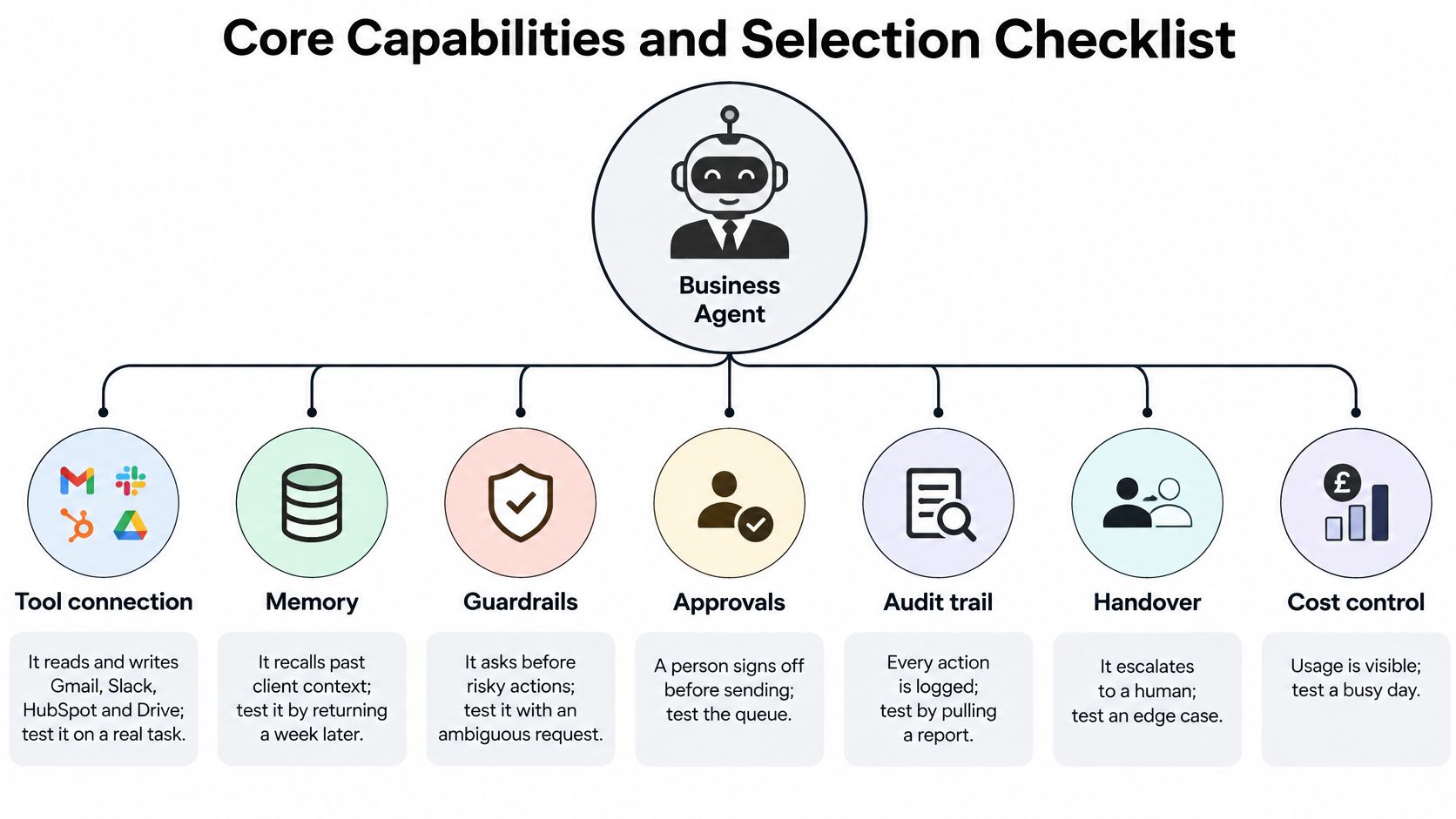
The diagram provides another way to inspect the operational controls around those capabilities.
Questions to ask during the demonstration
Don't accept screenshots of settings as proof that the workflow behaves correctly. Ask the demonstrator to change a permission, run the task and show the result.
- Connected tools: Which accounts and workspaces are active?
- Independent changes: What can it change without a person's approval?
- Real evidence: Can you inspect the log from the task it just completed?
- Approval controls: Can you configure approval separately for different action types?
- Failure handling: Does it stop, retry safely or hand over to a named person?
- Source records: Can you open the evidence behind each material output?
- Usage visibility: Can the owner see consumption and interrupt unnecessary work?
Pay special attention to retries. If an email send succeeds but the confirmation fails, the agent mustn't blindly send the message again. Ask how it detects completed actions before repeating them.
Use these questions as purchasing criteria, not optional extras after signing. Data retention, storage and contractual terms need a separate inspection before you connect client records.
Automation, Sales, Research and Monitoring Use Cases
The strongest starting use cases fall into distinct families: repetitive record handling, sales follow-up, research and synthesis, and monitoring. Reporting combines elements of these, but it deserves its own place because assembling a report and interpreting it are different responsibilities.
Choose according to the work you can define and check. Don't start with the most impressive demonstration or the department making the loudest request.
Use cases by business function
| Function | Example workflow | Tools involved | Human check |
|---|---|---|---|
| Automation | Route new inbound forms into the CRM and alert the owner | Web forms, CRM, Slack | Spot-check a sample each week |
| Sales follow-up | Draft a follow-up after each call and log the outcome | Gmail, HubSpot, Slack | Approve every message to new leads |
| Research | Compile a competitor brief from public sources and saved files | Web, Drive | Verify every figure before use |
| Monitoring | Watch chosen topics and competitor news, then alert the team | Web, Slack | Review alerts each morning |
| Reporting | Assemble a weekly pipeline summary from CRM records | CRM, Drive, Email | Confirm totals before sharing |
The human-check column is part of the workflow, not an obstacle to automation. A message to a prospective customer can create a commitment or damage a relationship. An internal monitoring digest can wait for its owner to review it.
For record handling, specify how to treat duplicates and missing fields. If the form lacks a company name, the agent should flag the gap rather than invent one to complete the CRM entry.
For research, require original pages and document references. A confident competitor brief is useless if nobody can establish whether a claim is current or whether the agent confused similarly named businesses.
Choose work with a clear finish
In IBM's survey of UK business leaders, conducted by Censuswide, 66% of UK enterprises reported significant AI-driven productivity improvements in 2025, based on responses from 500 UK business leaders. That's self-reported evidence about enterprises, not a promise about your firm's results.
Your first workflow should repeat regularly, use a small set of tools and have an observable finished state. Prefer work where an incorrect draft or internal entry can be corrected before it causes external harm.
Practical rule: Start with work that is easy to inspect and cheap to reverse, not work that requires the agent to guess what you meant.
A monitoring task finishes when a digest names the relevant changes, links the underlying pages and reaches its owner. It doesn't finish merely because the agent searched the web.
For more candidate tasks, use these AI automation workflow examples as prompts, not savings guarantees. Pick a row from the table, record how long the complete manual process takes and keep that baseline before enabling automation.
Connecting Tools Safely Without Exposing Client Data
Connecting an agent gives software a route into your business records. Treat that as an access-control change, not a convenient sign-in.
Start with the smallest useful dataset. A successful connection proves that authentication works; it doesn't prove that the agent should see the entire shared drive.
Compare the connection methods
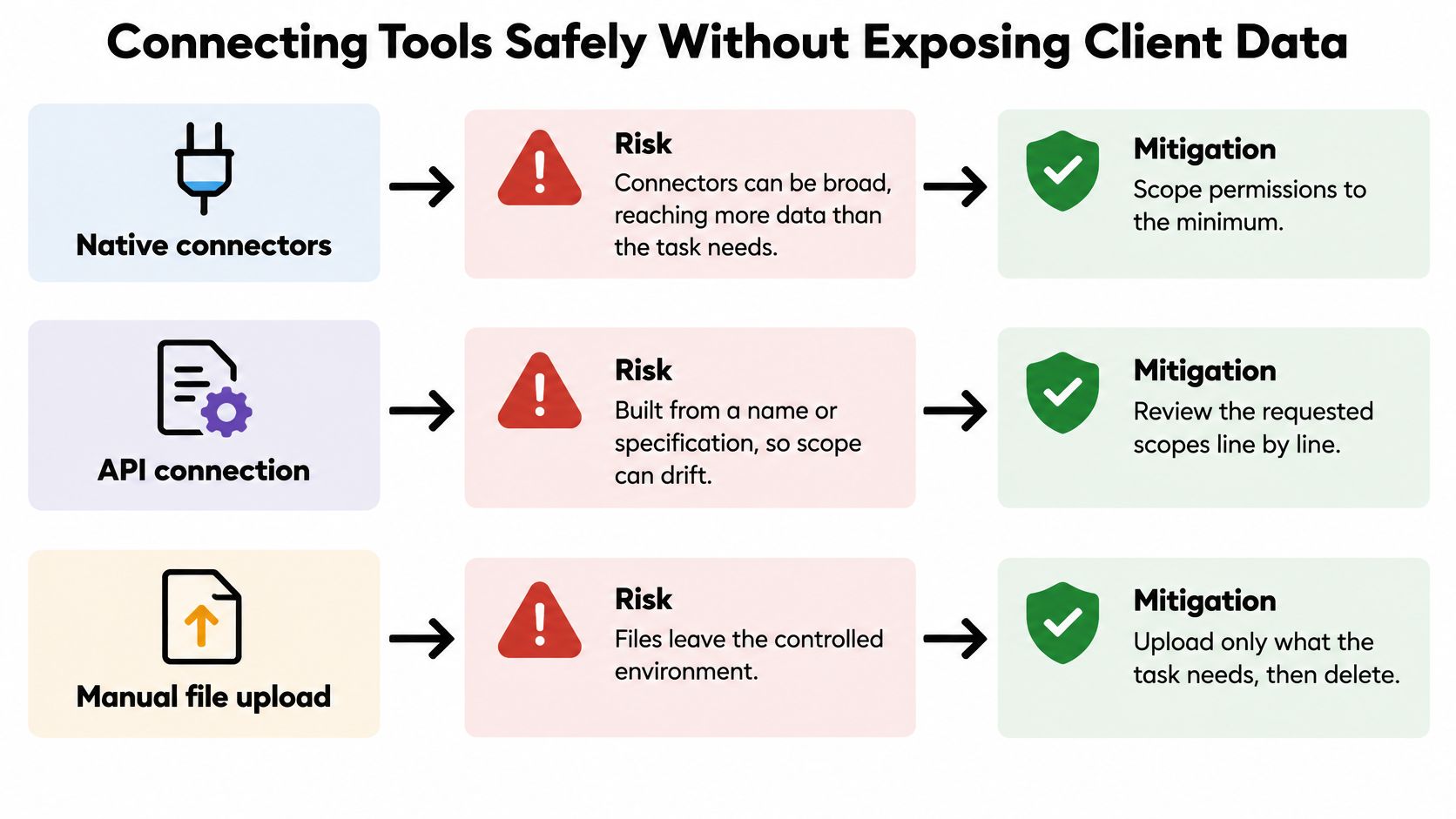
Native connectors offer a direct route into familiar applications. Their main risk is breadth: the permission request may cover more mail, files or records than the task needs.
An API connection can provide more precise operations, but a connection built from an API name or specification still needs inspection. Review the requested permissions and permitted actions rather than assuming generated integration code has chosen sensible boundaries.
Manual uploads avoid a live connection, but create additional copies. Remove unnecessary contact details before uploading and establish how uploaded files and derived content are deleted.
Use the following visual as an access review, not an installation guide.
Follow a controlled access sequence
- Connect a limited account. Start read-only where possible, using a restricted folder or workspace rather than unrestricted business access.
- Restrict scope. Grant access application by application. Separate permission to read a record from permission to edit, delete or send.
- Test with dummy records. Include missing fields, duplicate contacts and instructions embedded inside documents. Treat document text as content, not authority to change permissions.
- Set approval rules. Define which actions require sign-off and who receives the request when the usual owner is unavailable.
- Review the log weekly. Check unexpected access, failed actions and permissions that are no longer needed. Revoke access when retiring the workflow.
Least privilege means granting only the access needed for the authorised task. Widen access after a successful test, not because a broad permission request is easier to accept.
Resolve data handling before uploading
Establish ownership, retention periods, storage locations and deletion procedures. Ask how data is encrypted at rest and in transit, which sub-processors or model providers handle requests, and what evidence supports SOC 2 or GDPR-alignment claims.
Client contact details are personal data, so include UK GDPR obligations in your review. Don't treat a security badge as proof that your particular use is compliant.
Our terms state that users retain ownership of data they upload or create through the service, and automation code generated for their use case is licensed to them for business purposes. Ownership doesn't answer retention or access questions, so read the terms before loading client files.
Use this AI-agent data-security guide to organise the review. If an important answer remains unclear, keep the pilot on dummy records.
How to Prove an Agent Pays Off With a Worked Example
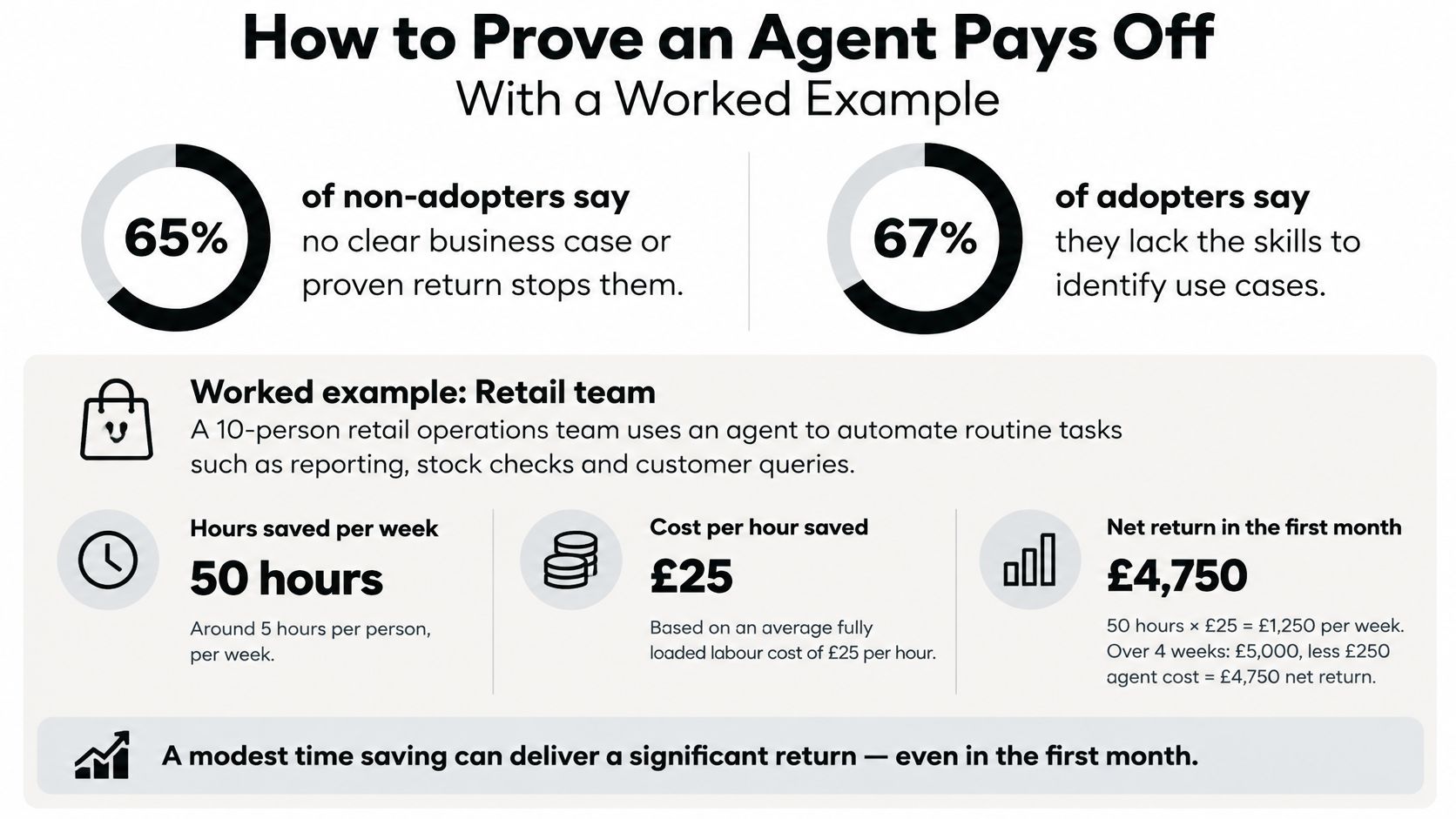
The UK Government's AI adoption survey executive summary identifies no clear business case or proven return as a barrier for 65% of non-adopters, while 67% of existing adopters report insufficient AI skills, expertise or understanding of use cases. The practical response is a baseline and a controlled trial, not another demonstration.
Measure the existing process from start to finish. Include finding records, writing, checking, sending and correcting mistakes. Otherwise, you'll compare a complete manual task with only the fastest part of the automated version.
A hypothetical freelancer calculation
Suppose a freelancer sends 20 follow-ups each week. In this illustrative example, each takes 12 minutes manually, compared with 4 minutes of preparation and record handling using an agent, before a separate approval review.
The example assumes a further 30 minutes of weekly review. Keep that separate from the per-task figure so you don't count checking time twice.
Worked ROI example for a freelancer with 20 follow-ups a week
| Measure | After agent | How to calculate |
|---|---|---|
| Minutes per follow-up | 4, compared with 12 before | Average a two-week time log, excluding the separate approval review |
| Follow-ups per week | 20 | Count sent emails |
| Minutes saved per week | 160 before separate review | (12 − 4) × 20 |
| Review time per week | 30 | Time spent checking drafts |
| Net time saved per week | 130 minutes, about 2.2 hours | 160 − 30 |
| Errors needing correction | 1 per 50 CRM updates, compared with 3 before | Count fixes in the CRM log using comparable batches |
These are hypothetical inputs, not measured results or promised savings. In a real trial, subtract correction time too if it isn't already captured in your task or review log.
The visual below frames the business-case questions; use your own measured inputs to answer them.
Measure value after the checking work
Net time saved is the time the old process required minus the time people still spend preparing, reviewing, correcting and maintaining the automated process.
Track the following throughout a 30-day pilot, using the period as a practical evaluation window rather than a guarantee of representative results:
- Time per task: Include the person's remaining involvement.
- Completed tasks: Count finished work, not generated drafts.
- Corrections: Record the type of error and time needed to fix it.
- Response speed: Measure how quickly a lead receives an approved response.
- Customer-risk incidents: Log messages that should not have been sent.
For a cash calculation, multiply net hours released by an appropriate labour cost, then subtract subscription, usage and implementation costs. Salaried time released isn't automatically cash saved. Decide what useful work the person will do instead.
Use the AI-agent pricing comparison to structure cost questions, then calculate against your actual usage.
Our AI-generated outputs may contain inaccuracies, and we don't fact-check or guarantee their accuracy. Verify material before relying on it for professional, legal, medical, financial or regulatory decisions.
Quick-Start Plans and a 30-Day Pilot
Choose a starting workflow that matches who will supervise it. A freelancer can approve their own follow-up drafts; a team needs a named reviewer and someone to cover absences.
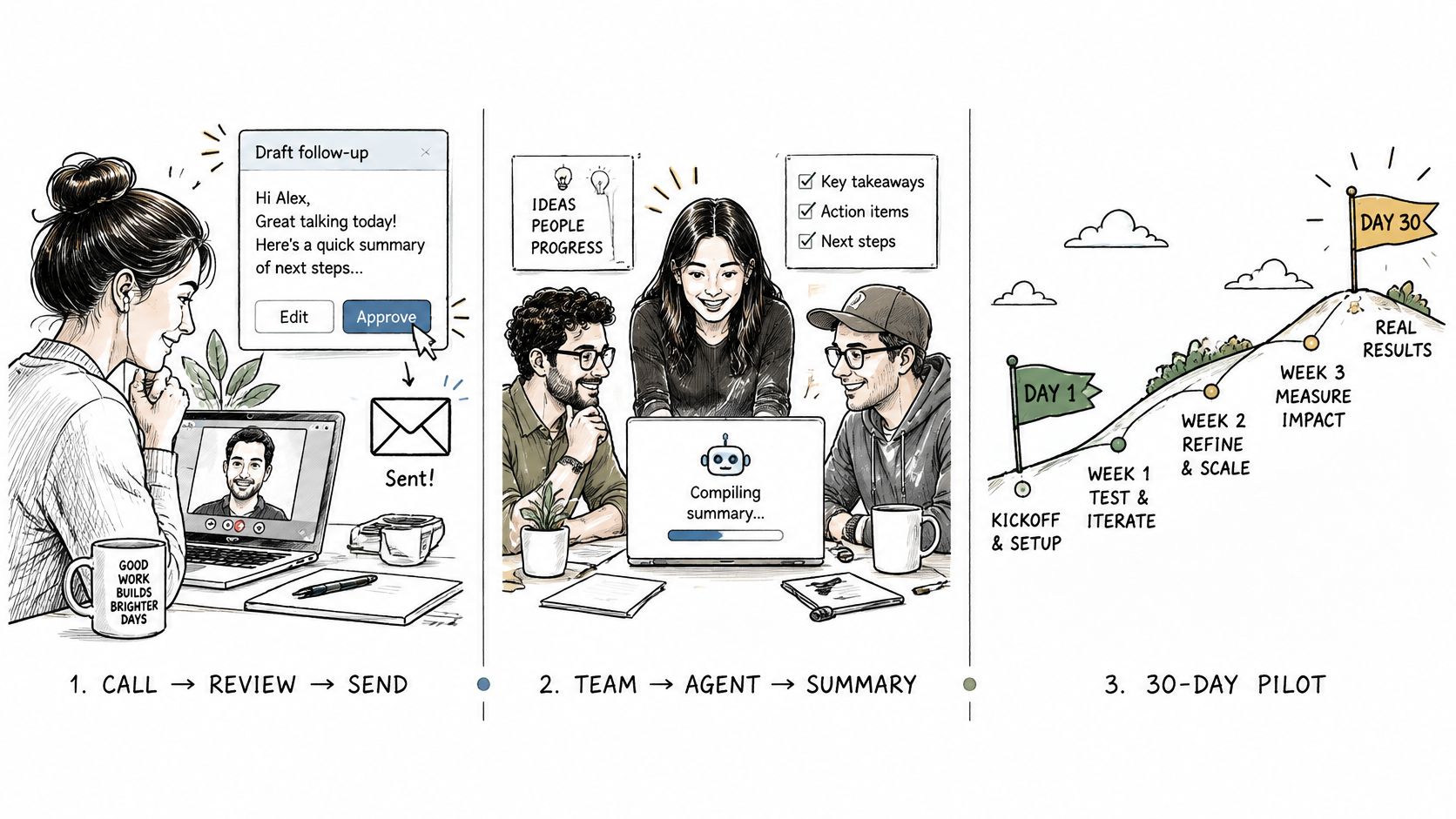
These starting patterns keep responsibility visible while giving the agent useful work to do.
Match the workflow to its owner
A solo professional can turn client-call notes into follow-up drafts, retaining control of every outgoing message. The useful outcome is less time spent preparing the correspondence, not merely more drafts.
A small startup team can have the agent assemble a Monday metrics report from CRM records and Drive documents. The team should resolve inconsistent definitions, such as what counts as an active opportunity, before judging the report.
A sales and marketing team can route inbound leads into HubSpot, post Slack alerts and prepare replies. Give each lead a named rep so an alert doesn't become another unattended notification.
Quick-start plan by audience
| Audience | First workflow | Starting approval setting | 30-day measure |
|---|---|---|---|
| Solo professional | Follow-up drafts after client calls | Approve every email | Hours spent on follow-up each week |
| Small startup team | Weekly metrics report from CRM and Drive | Agent drafts, team reviews on Monday | Report hours and corrections found |
| Sales and marketing team | Inbound lead logging with Slack alerts | Approve outreach to new leads | Response time to new leads |
Run the pilot with a decision date
- Select a bounded workflow. Pick recurring work involving a small set of applications. Write down its trigger, required inputs and finished state.
- Prepare the baseline. Use a preparation week to connect the necessary tools and log manual task time, errors and response speed.
- Assign approval responsibility. Require sign-off for anything sent to a new contact. Name a backup reviewer and decide what happens when nobody responds.
- Run supervised for 30 days. Keep the activity log and record exceptions as they occur, rather than reconstructing them at the end.
- Decide at day 30. Continue, widen scope or stop according to net time released, corrections and customer risk.
For a visual introduction to the workflow approach, watch the demonstration below.
Our AI Workers offer a template-based route into this process: you pick a template, we propose a work plan, you approve it and the worker starts. The same operating discipline applies whichever product you choose.
Pause the pilot if a wrong message reaches a client, checking consumes the time released, or nobody owns the log. Disable the affected action, preserve the records and correct the cause before restarting.
Don't widen access just because the agent has been busy. Expand only when the owner can explain what improved, what still needs checking and how to reverse an incorrect change.
Zenfox.ai offers connected automation and AI Workers for ongoing business tasks, with a proposed work plan for you to approve before work starts. Visit Zenfox.ai with a recurring workflow, a manual-time baseline and clear approval rules, then test whether it releases useful time after review and corrections.