
Parsing An Email: Automate Workflows & Save Hours
Unlock efficiency by parsing an email. Learn programmatic methods, regex vs ML, & workflow automation for CRM updates. Save time with tools like Zenfox.ai!
Your inbox probably contains work that should already be done.
A lead arrives through a website form. An order confirmation lands in Gmail. A support request includes an address change and an invoice PDF. Then someone copies the name into a CRM, pastes the order number into a spreadsheet, drops a note into Slack, and promises themselves they'll automate it later.
That “later” usually lasts until the inbox becomes an operations system by accident. At that point, parsing an email stops being a technical nice-to-have. It becomes the difference between a workflow that moves on its own and one that depends on someone remembering to copy, paste, check, and chase.
Table of Contents
- The Hidden Cost of Manual Email Processing
- Understanding the Email Parsing Lifecycle
- Choosing Your Data Extraction Method
- Handling Errors, Attachments, and Security
- Automating Follow-Ups with Zenfox.ai
- Start Automating Your Inbox Today
The Hidden Cost of Manual Email Processing
Manual email handling looks harmless because each task is small. Open message. Find the name. Copy the phone number. Paste the details into HubSpot. Forward the message to a teammate. Download the attachment. Rename it. Upload it again.
Do that across a week and the friction becomes the job.
In the UK, small and medium-sized businesses process an average of 125 emails per employee daily, and businesses that adopted automated parsing tools reported a 40% reduction in email response times and a 62% improvement in customer satisfaction scores, according to the Federation of Small Businesses. That lines up with what most operations teams already feel in practice. The inbox isn't just for communication. It's a steady stream of structured business data trapped in unstructured text.
What manual handling actually breaks
The first problem is speed. If a sales lead waits in someone's inbox until lunch, your response time is already worse than it should be.
The second problem is consistency. Humans skip fields, mistype values, and interpret emails differently. One person logs “Acme Ltd”, another writes “Acme”, and the CRM slowly fills with duplicates.
The third problem is scale. A workflow that feels manageable at five emails a day falls apart at fifty.
Practical rule: If the same email type arrives more than a few times a week, it should probably be parsed instead of handled by hand.
Common examples include:
- Lead emails: Website forms often send the same fields every time, but teams still retype them into a CRM.
- Order notifications: Order number, customer name, and delivery details are usually right there in the message.
- Support requests: Email threads often contain account IDs, urgency clues, and issue categories that can route tickets automatically.
- Invoices and receipts: Finance teams still spend too much time pulling dates, supplier names, and reference numbers from attachments.
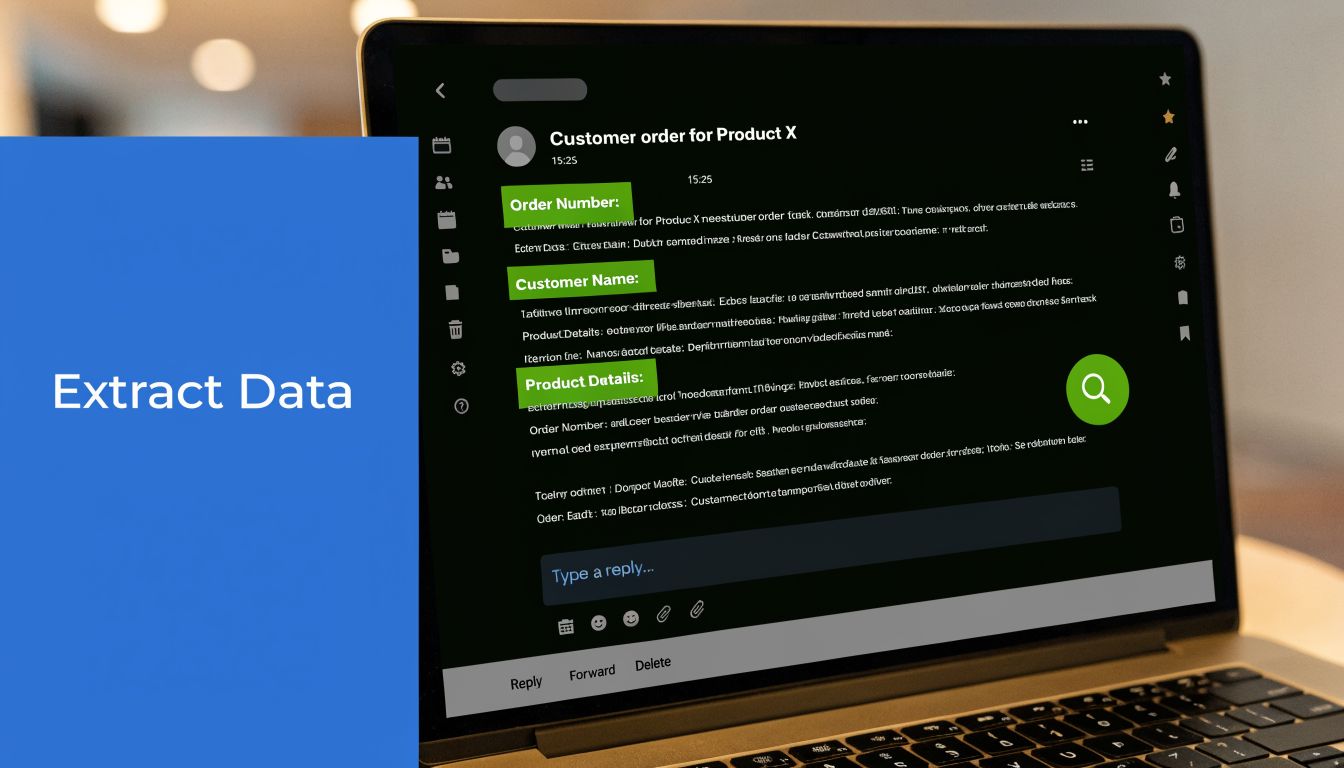
Parsing an email means turning those incoming messages into usable fields such as name, company, order ID, date, or intent. Once the data is structured, you can push it into Google Sheets, HubSpot, Slack, Drive, or a custom app without waiting for someone to act as the connector.
That's why this isn't just an admin improvement. It changes how work moves.
Understanding the Email Parsing Lifecycle
An email is often viewed as one block of text. A parser can't afford to view it that way. It has to treat the message as a package with different parts, each handled differently.
In 2022, UK businesses wasted an estimated £37 billion on manual email data entry, equal to 1.7% of GDP, and parsing tools can deliver up to 75% time savings in data extraction for high-volume sectors, according to the Office for National Statistics. To get those gains reliably, you need a clean parsing flow rather than a brittle script that only works on ideal messages.
What an email actually contains
At minimum, an email has headers and a body.
Headers hold metadata. Think sender, recipient, reply-to, subject, date, and routing information. If you're building automation, headers often drive the first decision. Which mailbox received it? Who sent it? Does the subject match the workflow you want to trigger?
The body holds the content people usually care about. That may be plain text, HTML, or both. A reliable parser checks both because many systems generate HTML-heavy emails that look clean in an inbox but become messy when stripped into raw content.
A few pieces matter more than non-developers usually expect:
- Plain text part: Easier to parse when it exists and is well formatted.
- HTML part: Often necessary for receipts, booking emails, and branded notifications.
- MIME structure: The container that tells your parser how the message is assembled.
- Attachments: Separate payloads, not just extra text at the bottom of the email.
If your extraction fails, MIME structure is often the reason. The email might contain nested parts, forwarded content, embedded signatures, or attachment references that don't appear where a simple script expects them.
How parsed data moves through a workflow
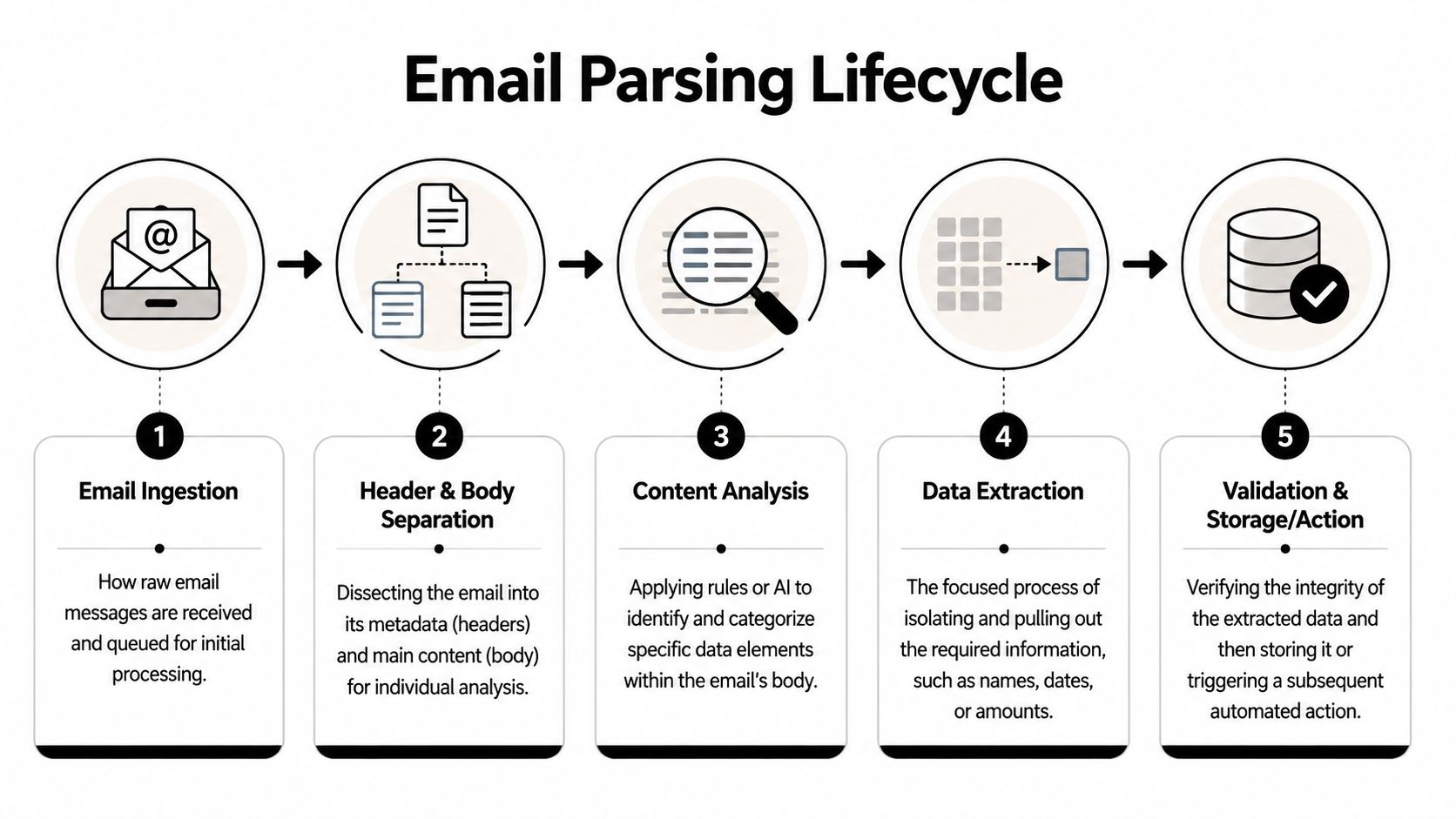
A practical parsing lifecycle usually looks like this:
- Ingest the message from Gmail, Outlook, an email forwarding address, or a mailbox API.
- Separate headers from body so routing logic doesn't interfere with content extraction.
- Normalise the content by handling encoding, removing obvious layout noise, and deciding whether plain text or HTML is the better source.
- Extract fields using rules, models, or a combination of both.
- Validate output before anything reaches your CRM, spreadsheet, or follow-up automation.
Don't trust extracted data just because the parser found something that looks plausible.
A good parser asks basic follow-up questions. Is this email address valid enough for your workflow? Is the invoice date a date? Is the “total” from the right part of the document, not a tax line or footer?
Here's the mental model I use:
| Stage | What happens | What commonly goes wrong |
|---|---|---|
| Ingestion | Email enters the workflow | Wrong mailbox, duplicate triggers |
| Separation | Headers and content are split | Important data buried in forwarded chains |
| Analysis | Parser looks for target fields | HTML noise, inconsistent layout |
| Extraction | Values are isolated | Wrong matches, partial values |
| Validation | Data is checked before use | Bad CRM records, faulty automations |
When people struggle with parsing an email, they usually focus too much on extraction and not enough on the stages before and after it.
Choosing Your Data Extraction Method
Once you have the email content, the key choice begins. Do you define strict patterns and extract against them, or do you use a model that can handle variation?
Pre-built email parsing solutions that use AI and machine learning achieve accuracy rates over 95%, while manual data entry can have an error rate as high as 20-95%, according to Parseur's overview of email parsing for lead capture. That doesn't mean machine learning should replace every rule. It means you should stop using rigid rules where the incoming format keeps changing.
When regex works well
Regex is the sharpest tool for predictable emails.
If every order confirmation says:
- Order Number: 48392
- Total: £84.00
- Delivery Date: 12/06/2026
then a rule-based parser is often enough. You look for consistent labels and capture what follows them. System-generated messages from Shopify, booking tools, internal alerts, and form notifications are good candidates because the sender controls the layout.
Regex is useful when:
- The sender format is stable: Same structure every time.
- The target field has a clear pattern: Reference numbers, dates, invoice IDs, phone numbers.
- You need precise control: Especially when one field must be captured exactly as written.
A developer might write custom extraction logic in Python. A no-code user might define the same field visually in a parser interface. The method changes. The logic doesn't.
Regex is fast and exact. It's also unforgiving. One template change can break the workflow quietly.
When machine learning is the better fit
ML parsing is better when emails vary in structure but carry the same meaning.
A customer enquiry might say, “Please call me this afternoon about our office move.” Another says, “Need a quote for relocation next month.” A third includes a forwarded thread, signature block, and a mobile number in an odd format. The parser still needs to identify person, company, intent, and contact details.
That's where ML earns its keep. It recognises patterns across varied language and layout instead of relying on exact labels in exact positions.
ML is the better choice when:
- Different senders use different wording
- Important data appears in multiple possible places
- Attachments contain key values
- You need the parser to survive template drift
This is also why many teams end up mixing methods. They use rules for obvious values like order IDs and machine learning for messier fields like enquiry intent or service category.
Build it yourself or use a parser
This is the trade-off.
If you build it yourself, you get full control. You can tune logic, handle odd edge cases, and fit the parser tightly around your stack. That's useful if your team already works with mailbox APIs, webhooks, queues, and data validation layers.
If you use a pre-built parser, you move faster. You spend less time handling MIME parts, encoding issues, and model maintenance. You also avoid rebuilding common integration plumbing with tools like Gmail, Slack, HubSpot, and storage systems. For teams that need downstream app connectivity, Zenfox API connections show the kind of integration layer that matters more than the parsing logic alone.
A simple comparison helps:
| Approach | Best for | Main downside |
|---|---|---|
| Custom code | Unique workflows, internal systems, engineering-heavy teams | Ongoing maintenance |
| Regex-first parser | Stable email templates | Breaks when format changes |
| ML-powered parser | Variable, messy, human-written emails | Needs good validation and testing |
| No-code platform | Fast deployment for business teams | Less low-level control |
What doesn't work well is pretending one method fits every inbox. It doesn't.
Handling Errors, Attachments, and Security
Most failed parsing workflows don't fail because the idea was wrong. They fail because the email was uglier than expected.

An email that looked clean in Outlook may arrive with broken HTML, odd character encoding, inline images, and an attachment that contains the only value you need. If your workflow assumes tidy input, it will break at the worst moment.
Plan for bad input
Start with the assumption that some messages will be malformed.
Character encoding issues can turn names or currency symbols into junk text. HTML parsing can pull menu links, footer text, or tracking fragments into the same content block as the actual message. Forwarded chains can produce multiple subjects, signatures, and timestamps in one body.
A resilient parser does a few basic things before extraction:
- Normalises text: Convert content into a consistent format before matching.
- Strips noise carefully: Remove boilerplate, but don't destroy useful labels.
- Logs failures: If extraction misses a field, save the raw message for review.
- Uses fallback logic: If HTML extraction fails, try plain text. If body data is weak, inspect the attachment.
If you process invoice emails, it also helps to separate email parsing from document parsing. The message might contain supplier and sender context, while the attachment holds invoice number, line items, and dates. If that's your workflow, it's worth looking at a practical guide to extracting data from invoices.
Treat attachments as separate documents
Attachments need their own handling path. Don't treat them as an afterthought.
PDFs may require OCR if the text isn't embedded cleanly. Spreadsheets may use inconsistent column names. Image attachments often need a different extraction flow altogether. Even before you parse them, you should identify file type, scan for relevance, and decide whether the attachment or the email body is the system of record.
A clean approach looks like this:
- Detect whether an attachment exists.
- Classify the attachment by type.
- Decide whether to parse body, attachment, or both.
- Validate the extracted fields against the email context.
- Send only confirmed values into downstream systems.
If the attachment is the real source of truth, don't let a guessed value from the email body overwrite it.
Security is part of the parser
Email parsing often touches names, addresses, phone numbers, and financial details. That puts compliance and security directly inside the workflow, not somewhere off to the side.
According to the ICO annual report, 83% of small businesses experienced a data breach in 2025, often from mishandled personal data in emails. Compliant parsing requires adherence to UK GDPR Article 6 for lawful processing.
That has direct implications for how you build automations:
- Know your lawful basis: Don't extract personal data just because the tool makes it easy.
- Limit field collection: Only pull what the workflow needs.
- Control access: Sales data, invoice data, and support data shouldn't all flow to the same people.
- Keep audit logs: You need a record of what was extracted, where it went, and who can see it.
- Review automated actions: A bad parse that sends the wrong follow-up is both an operational issue and a trust issue.
For freelancers and small teams, no-code convenience can become dangerous if nobody defines the rules. Fast setup is useful. Blind setup is not.
Automating Follow-Ups with Zenfox.ai
A good parsing workflow shouldn't stop at extraction. The useful part happens after the email has been understood.

Organisations that integrate email parsing directly into their workflows report productivity increases of up to 40%, particularly in lead generation, and for autonomous agents the 95%+ accuracy of pre-built solutions is critical for reliable CRM updates and follow-ups, according to CTK Email Parser's comparison of parsing and manual entry.
A practical lead workflow
Take a common setup. Your website contact form sends each enquiry to Gmail. The subject line stays consistent, but the body varies because people write differently. You want every valid lead to create a CRM contact, alert the team, and prepare a follow-up without anyone touching the inbox.
That flow works well in a no-code environment because the steps are easy to describe:
-
Trigger on a matching email Watch for new messages in Gmail with a known subject pattern or sender route.
-
Extract the lead data Pull out fields such as name, company, email address, and enquiry text. If the format is messy, use AI-assisted extraction instead of brittle text markers.
-
Validate before action Check that the email address exists, the name field isn't empty, and the message isn't obvious spam or an auto-reply.
-
Push to downstream tools Create or update the contact in HubSpot. Send a summary to Slack. Store the original message or attachment in Drive if needed.
-
Queue the next step Prepare a follow-up email or handoff task based on the extracted intent.
The value isn't just speed. It's consistency. Every lead follows the same route, every record lands in the same structure, and every teammate sees the same context.
Where no-code helps most
No-code tools are strongest when the business logic matters more than the transport layer.
Debugging MIME boundaries, retry logic, or parser edge cases is a task typically undesired. Instead, the focus is on enabling the contact form email to produce a clean CRM record and notify the right person. That's where a platform such as Zenfox.ai can fit. It connects tools like Gmail, HubSpot, Slack, and Drive, then uses AI-powered workflow logic to extract fields and trigger actions without writing custom parsing code.
Here's a simple decision view:
| Need | Code-first approach | No-code approach |
|---|---|---|
| Fully custom extraction logic | Strong fit | Sometimes limited |
| Quick deployment for non-developers | Slower | Strong fit |
| Tight integration with existing apps | Possible, but manual | Usually faster |
| Ongoing maintenance burden | Higher | Lower for common workflows |
After the parser is working, teams usually want to see the workflow in action. This walkthrough format is useful for that:
The important part is that parsing an email should lead somewhere concrete. A parsed field with no next step is just cleaner text.
Start Automating Your Inbox Today
If you're still copying details from emails into other tools, the inbox is doing more orchestration work than it should.
Programmatic parsing makes sense when you need full control, custom rules, or tight engineering ownership. For many freelancers, startups, and small teams, that isn't their primary goal. They want the lead captured, the invoice logged, the Slack alert sent, and the follow-up queued without building infrastructure first.
What matters is choosing a method that matches the messiness of your emails and the risk of your workflow. Predictable templates can use strict rules. Messier messages need adaptive parsing and strong validation. Sensitive data needs lawful handling and clear access controls.
If you want a practical next step beyond manual work, it helps to see how no-code systems assemble usable workflows quickly. This guide to build an instant app is a good example of that mindset.
The first win is rarely glamorous. It's usually one repeated inbox task that stops depending on copy and paste. That's enough to start.
If you want to turn incoming emails into structured actions across Gmail, HubSpot, Slack, Drive, and the rest of your stack, take a look at Zenfox.ai.