Knowledge Management Meaning: Core Processes & AI
Grasp the knowledge management meaning. Explore core processes, benefits, and how AI tools empower freelancers & small teams to act on info in 2026.
Knowledge management means systematically capturing, sharing, organising, and using what your team knows so people can make better decisions and avoid repeated work. In the UK, that meaning was formalised as far back as 2003, when the Cabinet Office published a Knowledge Management Framework that treated KM as a management discipline, not just file storage.
If you run a freelance business or a small team, you already know the feeling. The client brief is in Gmail. The latest proposal is somewhere in Drive. Feedback sits in Slack. One contractor knows why a process changed, but nobody wrote it down. A new hire asks the same question three times because the answer lives in three places and none of them is clearly right.
That's why people search for the knowledge management meaning. They're not looking for a textbook definition. They're trying to stop losing time, context, and momentum.
For small businesses, KM isn't corporate overhead. It's a way to stop your business from depending on memory, inbox archaeology, and one “indispensable” person who carries too much of the operating context in their head. And now that AI tools can index, retrieve, summarise, and act on that knowledge, the payoff is no longer limited to big enterprises with dedicated ops teams.
Table of Contents
- Your Team Has a Knowledge Problem You Can't Ignore
- What Knowledge Management Really Means in 2026
- The Four Core Processes of a Healthy Knowledge System
- The Business Case for Knowledge Management
- Knowledge Management Examples for Freelancers and Small Teams
- How to Implement a Knowledge Management System
- The Future of KM Is AI-Powered Automation
Your Team Has a Knowledge Problem You Can't Ignore
A small agency lands a new client. The kickoff goes well. Everyone feels aligned. Two weeks later, the cracks show.
The strategist can't find the approved messaging doc. The account manager has the latest version, but only in email. The freelancer who built the first reporting template is off the project. The client asks why a decision changed, and nobody can find the original reasoning without digging through Slack threads and call notes.
This is what poor knowledge management looks like in practice. Not some abstract “information issue”. Daily friction.
The symptoms are easy to recognise
- You search before you work: People spend the first part of a task trying to locate the right file, message, or answer.
- You repeat solved conversations: Team members answer the same questions because earlier answers weren't captured properly.
- You rely on memory: Important context sits in someone's head instead of in a shared system.
- You lose continuity during handovers: A freelancer leaves, a teammate changes roles, or a client account moves hands, and the new owner starts half-blind.
Poor knowledge management rarely feels dramatic. It feels like small delays, repeated questions, and decisions made without full context.
For freelancers, the cost shows up as dropped details, slower delivery, and the stress of keeping everything mentally loaded. For small teams, it shows up as inconsistent work. Two people do the same task differently. Client service varies by who happens to be online. Onboarding feels longer than it should because “how we do things here” isn't written down in one reliable place.
Why this gets worse as you grow
A team of one can improvise. A team of three can still get away with it. After that, the lack of structure starts charging interest.
Every new client, tool, contractor, and workflow creates more knowledge. If that knowledge stays scattered across Gmail, Slack, Google Drive, HubSpot, Notion, and people's heads, your business gets busier without getting smarter. You keep moving, but you don't compound what you learn.
That's the problem KM solves. It turns isolated know-how into reusable operating knowledge.
What Knowledge Management Really Means in 2026
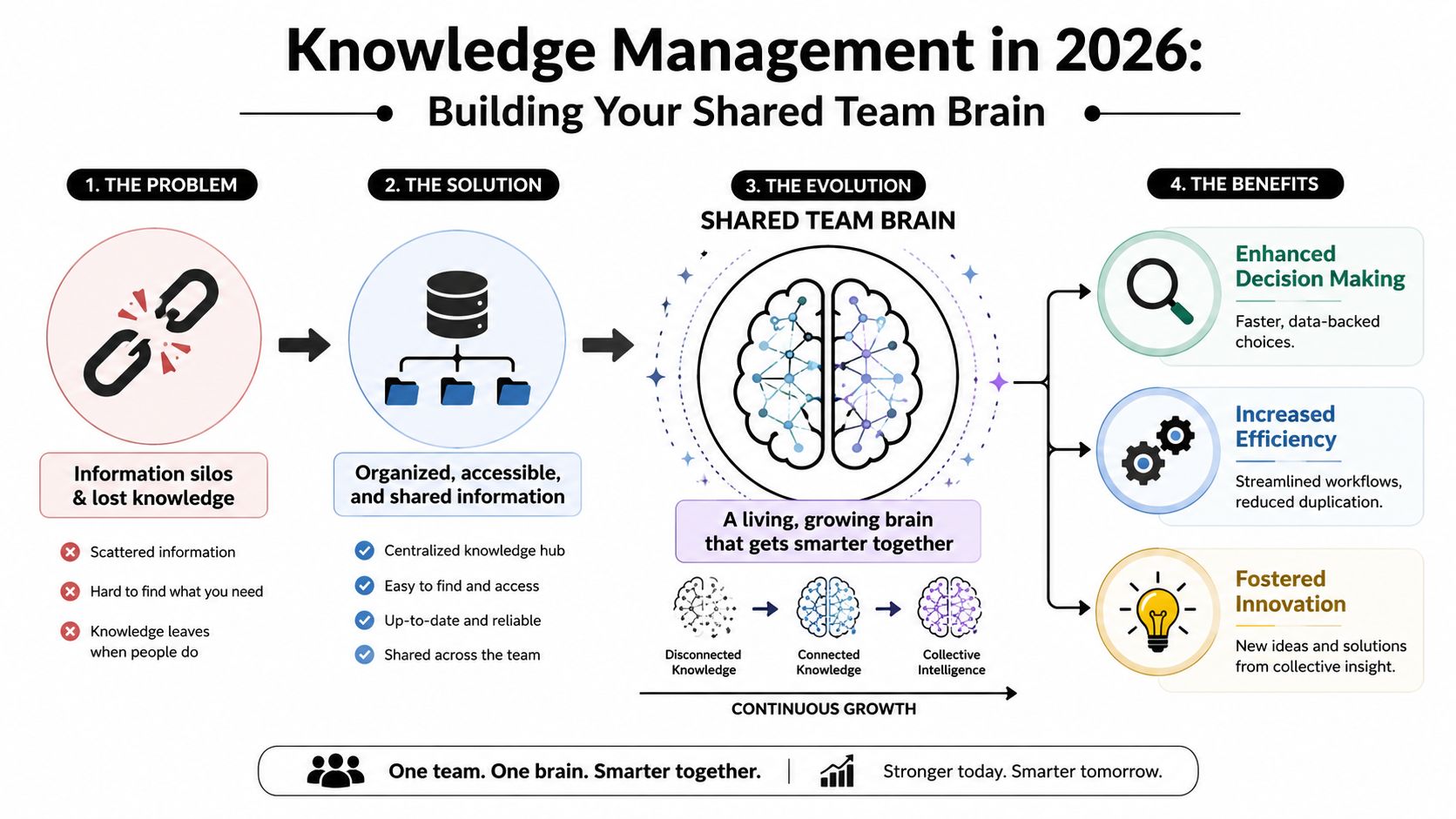
Knowledge management means building a shared team brain. Not a perfect database. Not an academic taxonomy project. A practical system that helps the right person find the right context fast enough to do useful work.
It is not a filing cabinet
Many people think the knowledge management meaning is just “store documents neatly.” That's too narrow.
In the UK, the concept has long been treated as more than storage. A useful historical marker came in 2003, when the Cabinet Office published its Knowledge Management Framework and framed KM as a way to help public bodies capture, share, and use knowledge across teams and departments. That matters because it shows KM was already being treated as an organisational capability tied to service delivery and decision-making, not just an IT archive, as discussed in this UK knowledge management background summary.
A messy shared drive stores files. A knowledge system helps people reuse judgment, process, and lessons.
Practical rule: If your team can save information but still can't find the answer, you don't have knowledge management. You have storage.
That difference matters even more now. AI search can retrieve content quickly, but if the content is outdated, duplicated, or stripped of context, the answer it returns may still be wrong or incomplete.
For teams that want a clearer view of ownership and governance, this guide on what a knowledge manager does is useful because it connects the concept to real responsibilities rather than buzzwords.
The four parts of a shared team brain
A healthy KM setup usually rests on four parts.
People
People decide whether knowledge gets shared at all. If your team treats documentation as “extra work”, your system will go stale fast. Good KM depends on habits like documenting decisions, writing useful handover notes, and capturing what changed after a project.
Process
Process determines how knowledge moves. What gets documented? Where does it live? Who updates it? What counts as final? Small teams need light rules, not bureaucracy. A simple naming convention and a standard debrief template can outperform a fancy platform with no discipline behind it.
Content
Content is the knowledge itself. SOPs, client preferences, project retrospectives, proposal templates, troubleshooting notes, onboarding guides, and decision logs all count. The mistake is assuming only polished documents matter. Often the most valuable knowledge is operational context.
Technology
Technology should reduce effort, not create more of it. The right stack might include Google Drive, Notion, Confluence, Slack, HubSpot, or a document search layer on top. The point isn't to buy “a KM tool”. The point is to make knowledge easy to capture, find, trust, and reuse.
When people ask about the knowledge management meaning, this is the practical answer. It's the discipline of making what your business knows available beyond the moment, beyond the channel, and beyond the individual.
The Four Core Processes of a Healthy Knowledge System
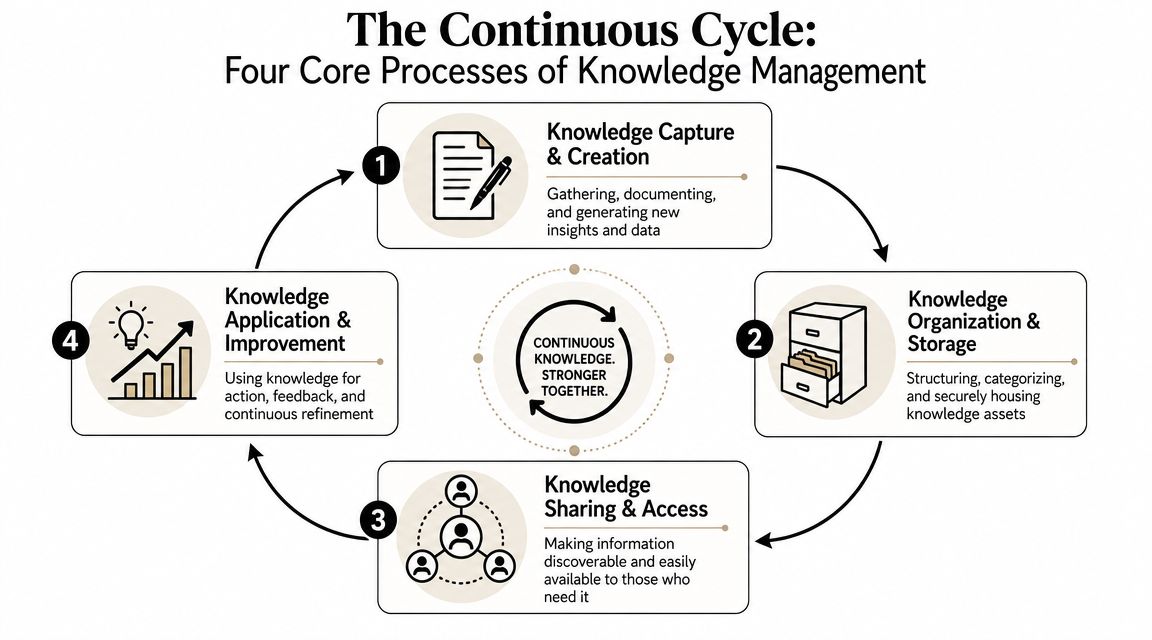
Knowledge management works as a cycle. If one part breaks, the whole thing weakens. Most small teams don't fail because they lack information. They fail because information never completes the loop.
Follow one client insight through the cycle
Take a common example. A client says during a review call that they hate long decks and only want summary slides with clear next steps. That comment matters. Here's how good KM handles it.
-
Capture and create
Someone records the insight in meeting notes, or an AI note tool drafts the summary. The team also adds a short rule: “This client prefers concise reporting with actions first.” -
Organise and store The insight goes into the client record, project hub, or account playbook. It's tagged clearly, named consistently, and stored where account managers and delivery staff will look. Structured systems and strong document indexing make a notable difference. Retrieval depends on how well the content is organised.
-
Share and access
The next person touching the account sees that preference before building the monthly report. The insight is no longer trapped in one call or one person's memory.
A short explainer can help here if your team learns better visually.
- Apply and improve
The team uses the insight in the next deliverable. If the client responds well, that preference becomes part of the standard account knowledge. If it changes later, the record gets updated.
That's the loop. Capture. Organise. Share. Reuse.
Why most systems break
The failure points are usually boring. That's why they're dangerous.
- Capture is inconsistent: People think, “I'll remember that,” and they won't.
- Storage is messy: Files exist, but nobody knows which version matters.
- Sharing is passive: Knowledge sits in a folder and nobody is alerted to it.
- Reuse never happens: Teams document lessons after a project, then never consult them again.
The best KM systems don't ask people to remember more. They ask the system to remember for them.
The strongest setups make each step easy. Meeting notes flow into a client workspace. Templates prompt teams to record decisions. Search pulls results from multiple tools. Review habits keep knowledge current. Once that loop becomes routine, your business starts learning cumulatively instead of episodically.
The Business Case for Knowledge Management
Small businesses don't need a philosophical argument for KM. They need a commercial one.
The clearest case is resilience. A UK government evidence review on civil service knowledge management noted that KM is about capturing, sharing and reusing what people know, not just storing files, and that poor knowledge transfer is especially costly when staff leave or move roles. That's why the practical meaning of KM increasingly shifts toward preserving know-how and reducing dependency on individuals, as outlined in IBM's discussion of knowledge transfer and reuse.
What small teams actually gain
When a team manages knowledge well, a few things happen quickly.
- Onboarding gets cleaner: New people stop learning by interruption alone. They can read process notes, client history, and examples before asking basic questions.
- Client delivery gets more consistent: Preferences, past decisions, and approved messaging don't vanish between meetings.
- Rework drops: Teams stop recreating templates, rewriting answers, and solving the same operational problem from scratch.
- Key-person risk shrinks: If one contractor leaves, the business still retains account context, process knowledge, and rationale.
These are practical advantages, not theory. A freelancer can feel them in smoother handovers and fewer late-night searches. A small agency can feel them when one account manager goes on leave and client work doesn't wobble.
Simple KPIs that prove it is working
You don't need a giant analytics stack to measure progress. Start with observable signals.
| KPI | What It Measures | How to Track It (Simple Method) |
|---|---|---|
| Time to find information | How quickly someone can locate the right answer, file, or process | Ask team members to log a few routine searches each week and note whether they found the answer quickly |
| Onboarding readiness | How usable your documentation is for new people | Give a new joiner a standard task and record where they got blocked |
| Repeat questions | Whether knowledge is being reused or re-asked | Track recurring Slack or email questions in a shared list |
| Handover quality | Whether client and process context survives role changes | Review what a replacement needs to ask during a project transition |
| Content freshness | Whether your knowledge base stays trustworthy | Add review dates to key docs and check which ones have gone stale |
| Reuse of templates and playbooks | Whether documented assets are actually used | Note which proposals, SOPs, and briefs are copied from approved versions |
A useful KM system should lower friction in those areas over time. If people still ask the same questions, still hunt for the same files, and still depend on the same individual, the system isn't working yet.
Knowledge Management Examples for Freelancers and Small Teams
Theory sticks when you can see it in a real working day. Two simple examples show how KM helps without requiring a corporate intranet project.
A freelance designer
A freelance brand designer often works across multiple clients at once. Each client has different logo rules, approval preferences, file formats, and revision habits. Without a knowledge system, every project starts to blur into the next.
A practical setup might look like this:
- A client workspace in Notion: One page per client with brand notes, stakeholders, revision preferences, and links to current assets.
- A file naming convention in Google Drive: Clear version labels so final files don't get confused with drafts.
- A project debrief template: After delivery, the designer writes what the client loved, what slowed the project, and what to change next time.
- A saved response library in Gmail: Reusable answers for proposals, scope clarifications, and feedback handling.
The result isn't just tidiness. The designer becomes faster and more consistent. They can reopen an old client account months later and still know how that client likes to work.
A solo operator needs knowledge management as much as a team does. The system just lives closer to the person.
A small marketing agency
Now take a five-person digital marketing agency. The team runs paid campaigns, writes email copy, and sends monthly reports. Problems appear when campaign logic sits in one strategist's head, reporting language lives in old decks, and client objections are buried in Slack.
A better setup uses a shared hub.
What goes into the hub
- Campaign playbooks: Repeatable approaches for launches, lead generation, and retargeting
- Client profiles: Positioning, audience notes, approved claims, and communication preferences
- Retrospectives: Lessons from what worked and what didn't
- SOPs: How to launch campaigns, QA assets, and report performance consistently
What changes once it exists
The team stops reinventing routine work. A new account manager can pick up an active client with less confusion. Copywriters can reference previous messaging choices instead of guessing. Reporting becomes more consistent because the agency has one documented way to explain results and next steps.
That's the point of KM for small teams. It gives you continuity without adding much ceremony.
How to Implement a Knowledge Management System
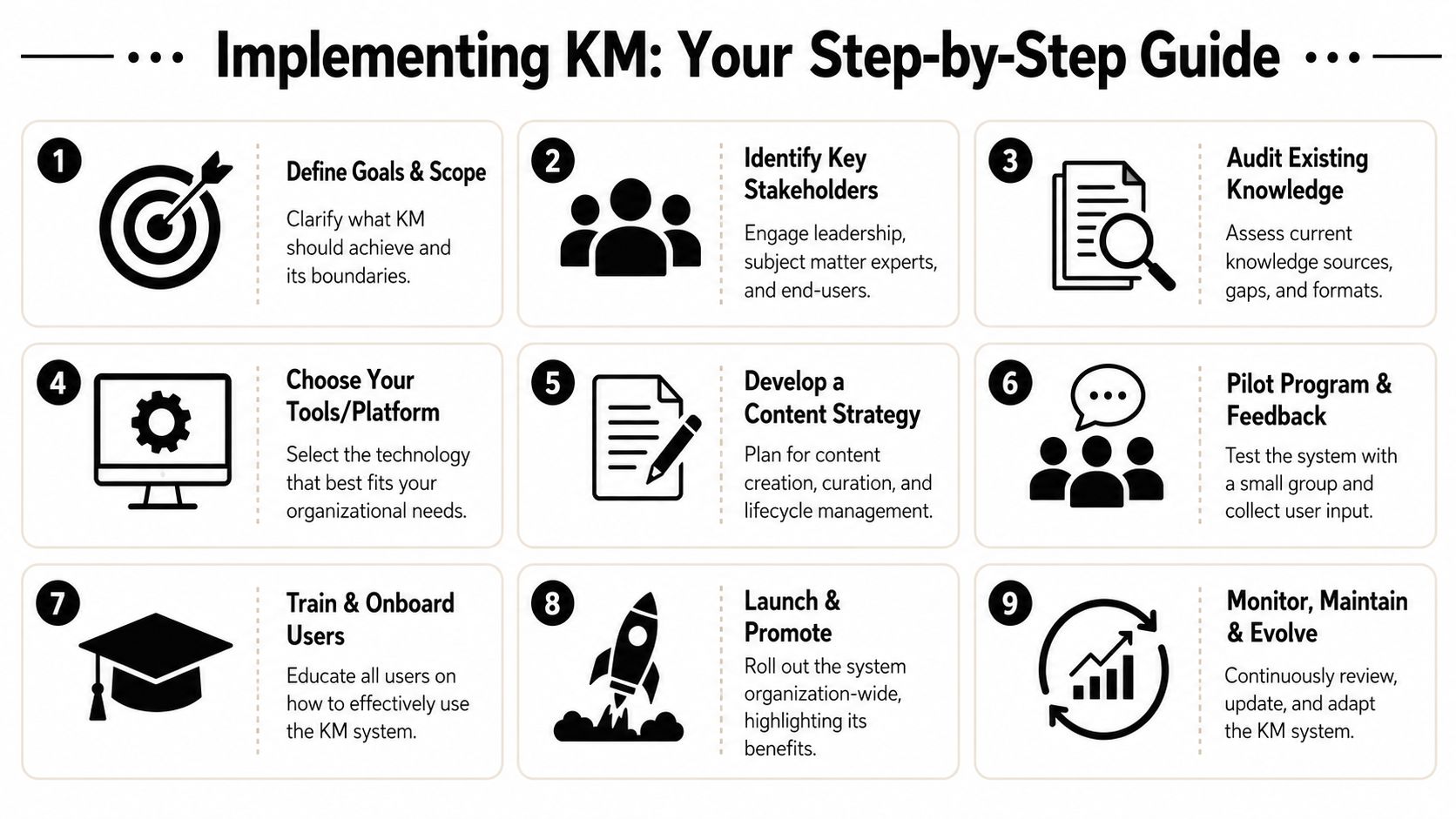
Most small businesses stall because they assume KM requires a big rollout. It doesn't. It needs a narrow start, clear ownership, and a few habits that stick.
Start narrow and useful
Begin with the pain that wastes the most time right now. Don't start by documenting everything. Start where confusion is expensive.
For example, that might be:
- Client handovers if work gets messy when someone is unavailable
- Proposal writing if you keep rebuilding the same material
- Onboarding if new hires interrupt the team constantly for basic context
- Support answers if customers or staff ask the same operational questions repeatedly
Then do a lightweight audit.
Ask three plain questions
-
What knowledge do we rely on most?
Think processes, client context, templates, decision history, common answers. -
Where does it live now?
Gmail, Slack, Drive, HubSpot, Notion, people's heads. -
Who needs it and when?
Sales before calls, delivery before execution, contractors during onboarding, founders during reviews.
This alone usually exposes the underlying issue. Not lack of information. Lack of structure.
Build habits before you buy complexity
Once the audit is clear, choose tools that fit your current workflow. For many small teams, a simple combination works well: Google Drive for source files, Notion or Confluence for documented process, Slack for discussion, and a search layer that can pull context across systems.
The common mistake is overbuilding too early. Teams create complicated taxonomies, dozens of top-level folders, and approval processes nobody follows. That's why pilots work better.
A sensible rollout
- Pick one workflow: For example, client onboarding or weekly reporting
- Create one canonical home: Decide where final knowledge lives
- Use a template: Debriefs, handovers, SOPs, and client pages should follow a repeatable structure
- Assign ownership: Someone must review and update critical pages
- Test with a small group: Get feedback before expanding
Systems fail when everyone is vaguely responsible. They work when specific people own specific knowledge.
If your work spans many apps, one practical option is Zenfox.ai, which can index documents, emails, and databases for cross-source retrieval and help reduce the manual effort of finding context across tools. That matters when knowledge isn't born in one platform and won't stay in one.
The final step is behavioural. Leaders and freelancers alike need to model the rule: if a question repeats, document the answer. If a decision matters, record the reason. If a process changes, update the source of truth.
That is how KM becomes operational instead of aspirational.
The Future of KM Is AI-Powered Automation
The old barrier to good KM was never understanding the idea. It was the labour.
Capturing meeting notes takes time. Organising files takes discipline. Updating documentation gets postponed. Searching across disconnected systems is frustrating. AI changes that. Not by replacing knowledge management, but by removing some of the manual drag that made it hard to maintain.
AI needs managed knowledge
There's also a governance point that many teams miss. The UK Information Commissioner's Office has warned that organisations using AI still need strong governance and data quality. In practice, that means KM becomes the foundation that makes AI usable and safe, because AI amplifies whatever knowledge is already captured, structured, and current, as explained in Bloomfire's overview of AI and knowledge management governance.
If your knowledge is messy, AI scales the mess. If your knowledge is current and well organised, AI makes it easier to retrieve, summarise, and act on.
What modern tools change
Modern AI tools can now do work that used to make KM feel unrealistic for small teams.
- They index across systems: Emails, docs, chats, and CRM notes become searchable together.
- They surface context at the moment of work: Instead of hunting manually, users get relevant knowledge when drafting a reply, preparing a call, or handling a support request.
- They summarise and structure inputs: Long threads can become clean briefs, handover notes, or action lists.
- They trigger workflows from knowledge: A documented process can move from static reference to automated execution.
If you want a practical view of how this plays out in customer operations, this piece on streamlining support with AI is worth reading because it shows how managed knowledge becomes more useful when automation sits on top of it.
The next step goes beyond search. AI agents can act on what they know. That's why the shift toward tools such as autonomous AI agents matters. The value isn't only retrieving a policy or a client note. It's using that context to update a CRM, draft a follow-up, prepare a briefing, or route work without starting from zero each time.
Knowledge management still means capturing, organising, sharing, and reusing what your business knows. AI just makes that system faster, easier to maintain, and far more usable in the flow of work.
If your knowledge is spread across email, chat, docs, and CRM tools, Zenfox.ai can help turn that scattered context into something searchable and actionable. It indexes information across your stack, supports retrieval across sources, and helps automate follow-ups, reporting, and other workflows that depend on accurate shared knowledge.