
Chatbot for Human Resources: A Practical 2026 Guide
Discover how a chatbot for human resources can automate recruiting, onboarding, and employee service. Our 2026 guide covers implementation, security, and tools.
Monday starts with good intentions. By 9:15, your HR lead is already buried in Slack messages about holiday balances, a manager wants an update on a starter’s laptop, payroll has a question about missing bank details, and two candidates are chasing interview times. None of this work is trivial, but very little of it needs a skilled HR professional to repeat the same answer for the tenth time this week.
That’s where a chatbot for human resources stops being a novelty and starts becoming operational infrastructure. For UK small and mid-sized businesses, the opportunity isn’t to copy a huge enterprise HR stack. It’s to remove friction from the everyday work that slows hiring, onboarding, employee support, and compliance.
Most advice on HR chatbots assumes you already have a pristine HRIS, a dedicated IT team, and budget to spare. Most growing businesses don’t. They have Gmail, Slack or Teams, a payroll platform, shared folders, spreadsheets, and a lot of tribal knowledge. That’s enough to get real value, if you design the chatbot around the way your team already works.
Table of Contents
- Your HR Team Is Drowning in Repetitive Tasks
- What Is an HR Chatbot Really
- Key Use Cases That Transform HR Operations
- Essential Security and Integration Considerations
- Your Roadmap to Implementing an HR Chatbot
- Putting It Into Practice with an AI Assistant
- The Future of HR Is Autonomous Not Just Automated
Your HR Team Is Drowning in Repetitive Tasks
Monday, 9:07am. One employee wants to check annual leave. Another cannot find a payslip. A line manager asks which probation wording applies. A new starter needs the handbook again. None of these questions is difficult. In a small or mid-sized UK business, they still pull the People team away from recruitment, employee relations, and manager support before the week has properly started.

The pattern is familiar in companies running on a mix of tools rather than a single HR platform. Leave policies sit in Google Drive or SharePoint. Payslips live in a payroll portal. onboarding tasks are tracked in email, spreadsheets, or a project board. Questions arrive in Slack, Teams, inboxes, and hallway conversations. HR becomes the manual link between systems that were never set up to work together.
That is the main bottleneck.
The cost is not only time spent answering repeat questions. It is the stop-start nature of the work. Every interruption forces someone in HR to switch context, check the latest policy wording, confirm which system holds the answer, then reply in a way that will not create confusion later. Over a month, that friction slows down work that requires human judgement, such as handling sensitive cases, improving onboarding, or supporting managers through performance issues.
For smaller businesses, the problem is often sharper because the team is lean and the stack is messy. Advice in enterprise tech publications often assumes a unified HRIS, dedicated IT support, and budget for custom integrations. Many UK SMEs are operating with separate payroll, document, recruitment, and collaboration tools, plus one or two legacy processes nobody has had time to replace.
What the bottleneck looks like in practice
- Policy questions come through every channel: Annual leave, sickness, parental leave, expenses, and probation queries arrive wherever the employee happens to be working.
- Onboarding depends on manual follow-up: HR checks forms, sends reminders, confirms access, and answers the same first-week questions for each joiner.
- Managers give uneven answers: Guidance varies when people rely on memory, old files, or a policy PDF saved six months ago.
- Audit trails are weak: A reply sent in chat or email may solve the immediate problem but leave no clear record of what guidance was given.
Practical rule: If your HR team is copying, pasting, and rewording the same answer every week, the issue is process design, not effort.
A good HR chatbot handles the repetitive front line. It gives employees one place to ask routine questions, pulls from approved sources, and passes exceptions to a person when judgement is required. That matters for smaller organisations because the first win is rarely flashy AI. It is getting consistent answers, fewer interruptions, and a People team that can spend more time on work only humans should do.
What Is an HR Chatbot Really
An HR chatbot is often described as a conversational tool for employee questions. That’s technically true, but it misses the useful definition. In practice, a modern chatbot for human resources works more like a 24/7 junior HR coordinator that never forgets policy wording, never loses a link, and can respond inside the tools employees already use.
It’s not the same as an FAQ page with a chat bubble on top. An FAQ waits for employees to guess the right page, title, or keyword. A real HR chatbot accepts messy language and still gets to the right answer.
It behaves like a coordinator, not a search box
Employees don’t ask perfect questions. They type things like “how many days do I have left”, “can I take leave next Friday”, or “where’s that maternity policy”. A dated rules-based bot struggles because it expects exact wording. A modern system is designed to understand what the person means.
That difference matters because employees don’t care how your documents are organised. They care whether they can get a useful answer quickly, without raising a ticket and waiting.
What modern NLP changes in practice
Modern HR chatbots use natural language processing, or NLP, to interpret employee requests without requiring precise terminology or scripted formats. They analyse phrasings, identify intent, and route different variations of the same question to a unified answer, as described in this explanation of HR chatbot NLP and intent recognition.
In practical terms, that means the chatbot can recognise that these are all related:
- “How much annual leave do I have?”
- “What’s my holiday balance?”
- “Can I still book next week off?”
- “Where do I request time off?”
A useful system then does one of three things:
- Answers directly from an approved policy source.
- Completes an action such as starting a leave request or locating a form.
- Escalates intelligently when the issue is sensitive, ambiguous, or requires discretion.
The best HR chatbot is boring in the right way. Employees get a fast, accurate answer, and HR doesn’t have to intervene unless there’s a real exception.
That’s also why implementation quality matters more than flashy AI language. If the bot isn’t grounded in current policies, role-based access, and the right systems, it becomes another unreliable layer. When it is grounded properly, it becomes the front door to HR service delivery.
Key Use Cases That Transform HR Operations
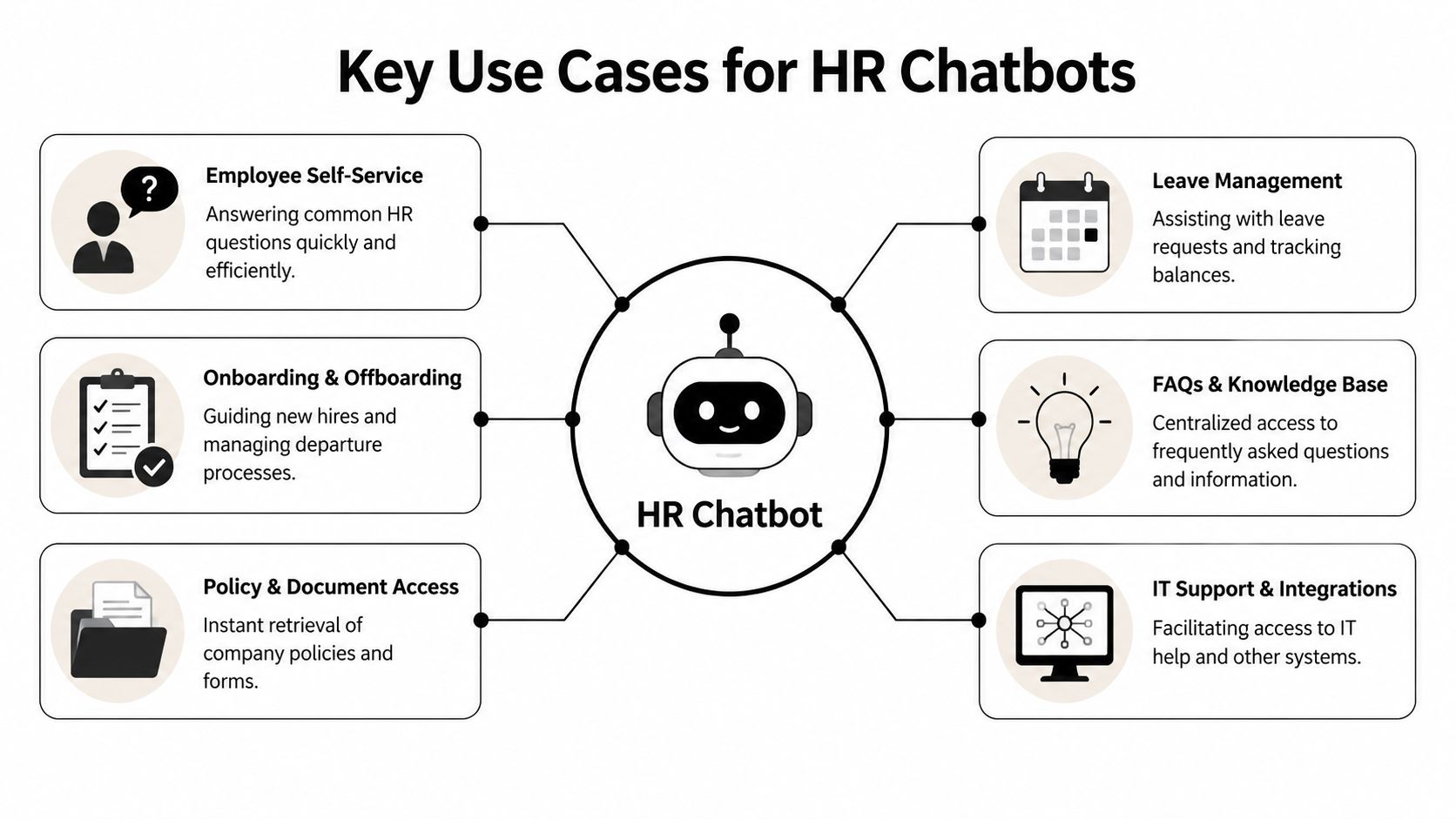
Monday, 8:45am. A new starter cannot find the right-to-work form, a manager is asking where to log sickness, payroll has two messages about payslips, and a candidate wants to know whether the role is hybrid. In a smaller HR team, those requests often hit the same two people.
That is where a good HR chatbot earns its place. It takes repeatable work out of email, Slack, Teams, and shared drives, then routes people to the right answer or next step. For UK businesses with a patchwork of tools rather than one clean HRIS, the value comes from reducing delay and inconsistency first. Full automation can come later.
Recruiting and candidate engagement
Recruiting is one of the fastest places to see a return, especially if your team cannot respond to every applicant quickly. Candidates usually want straightforward answers. Is the role remote, hybrid, or office-based? What does the interview process look like? Has the application been received? A chatbot can cover those questions immediately and collect basic screening details in a consistent format.
For an SME, that matters because delay kills interest. The goal is not to replace recruiters. It is to stop losing good candidates while recruiters are tied up elsewhere. If you already use an ATS but it does not expose candidate updates cleanly, the chatbot can still handle FAQs and scheduling prompts while a human owns selection decisions.
The trade-off is simple. Keep the bot away from anything that looks like assessment, ranking, or rejection logic unless you have a very clear legal and process basis for it.
Onboarding and offboarding
Onboarding tends to expose process gaps faster than any policy question. The offer letter sits in one inbox, starter forms are in Microsoft 365, IT setup is tracked elsewhere, and nobody is fully sure which version of the handbook is current.
A chatbot helps by turning that mess into a sequence people can follow.
- Before day one: send forms, confirm practical details, answer common questions, and point the new hire to the right documents
- During week one: surface training, policy acknowledgements, payroll information, and role-specific next steps
- During probation: remind managers about check-ins and flag missing tasks
- At departure: guide offboarding steps, prompt for access removal, and record what has been completed
This is one of the best use cases for smaller businesses because it does not require a major systems project. You can connect the tools you already have and automate handoffs between them using HR chatbot integrations across your existing systems.
Offboarding deserves the same attention. In practice, many SMEs handle exits through email and memory. That creates risk around access removal, final documentation, and inconsistent treatment.
Employee service and policy access
This is usually the starting point, and for good reason. Repetitive HR queries consume time, break concentration, and produce inconsistent answers when different people respond from memory.
A chatbot is well suited to questions about annual leave, sickness reporting, parental leave policies, payroll contacts, expenses, and document access. It can also direct employees to the right form or trigger the first step in a workflow. That is already a meaningful improvement for a team buried in small requests.
The useful design rule is to separate fixed guidance from judgement calls. If the answer should be the same every time, the chatbot should handle it. If context, discretion, or employee relations risk is involved, route it to HR.
| HR Task | Manual Process (Without Chatbot) | Automated Process (With Chatbot) |
|---|---|---|
| Holiday policy query | Employee messages HR, waits for a reply, may receive different wording depending on who answers | Employee asks in chat and receives a consistent policy-based answer instantly |
| Payslip access help | HR explains the payroll portal steps repeatedly | Chatbot provides the right instructions and link based on the employee’s need |
| New starter documents | HR emails files one by one and follows up manually | Chatbot shares the correct documents and tracks whether the employee accessed them |
| Interview scheduling | Recruiter coordinates times across email threads | Chatbot collects availability and helps route scheduling actions |
| Leave request initiation | Employee asks manager informally, HR later reconciles records | Chatbot starts the workflow and records the action in the right system |
If a process depends on someone remembering which folder contains the latest policy, it will fail under pressure.
Compliance and audit readiness
For UK employers, this use case is often underestimated. A chatbot can improve compliance by standardising how policy information is delivered, capturing acknowledgements, logging routine requests, and creating a record of what happened and when.
That does not mean the bot should answer every sensitive question. It should not handle disciplinary judgments, complex leave edge cases, grievances, or investigation-related conversations without human review. Those are people decisions, not automation tasks.
Used properly, the chatbot supports consistency. It gives staff one place to get approved guidance, reduces informal advice in private messages, and makes it easier to show that the business followed a defined process. For smaller organisations without a dedicated HR operations team, that is often the difference between workable control and constant firefighting.
Essential Security and Integration Considerations
Most objections to HR chatbots sound like security concerns. In reality, the bigger implementation risk is usually bad integration. If the chatbot can’t reach the right source documents, payroll system, or messaging platform, it won’t deliver trustworthy answers. People stop using it quickly.
Security still matters, of course. HR data includes salary details, personal information, absence records, and sometimes health-related context. You can’t be casual with that. But secure deployment is achievable for smaller teams if you keep the scope tight and define access properly.
Security controls that matter in HR
Start with the controls that directly affect employee trust and regulatory exposure.
- Role-based access: The chatbot shouldn’t expose manager-only or HR-only information to everyone.
- Approved knowledge sources: Answers should come from validated policies, handbooks, and system data, not random file sprawl.
- Audit trails: You need a record of what was asked, what was answered, and what action was triggered.
- Encryption and retention discipline: Sensitive data should be protected in transit and at rest, with clear rules for how long logs are kept.
- Human escalation paths: The system must know when not to answer and when to hand the issue to HR.
For UK employers, GDPR is the immediate baseline. If you’re processing employee data through a chatbot, document the purpose, limit the scope, and avoid feeding unnecessary sensitive material into the system. If a vendor claims the tool can do everything, ask the harder question: what data does it need access to for the use case you’re approving?
Integration is the real make-or-break issue
Many UK SMEs don’t have a single HR platform. They have Slack, Gmail, Google Drive, perhaps a payroll app, maybe an ATS, and a handful of manual trackers. That sounds messy, but it doesn’t rule out automation. It changes the architecture.
The practical pattern is to use the chatbot as an integration bridge across the tools you already rely on. That means it can pull the right policy from Drive, trigger a message in Slack, read an incoming email, and log a task or handoff elsewhere. For small teams, this is often more realistic than buying a full enterprise HR suite.
A useful example comes from this overview of cross-tool HR workflow automation, which describes HR automation linking Gmail, Slack, HubSpot, and Drive to execute coordinated workflows autonomously and create activity logs for compliance. The lesson isn’t that every business needs that exact stack. It’s that orchestration matters more than perfect system consolidation.
If you’re evaluating setup options, focus on whether the platform supports practical connectors and flexible workflows through API connections for existing business tools.
A chatbot with weak integrations gives polished but shallow answers. A chatbot with strong integrations becomes an operational layer.
What doesn’t work is trying to automate everything from day one while your documents are inconsistent and your systems disagree. Clean the critical knowledge first. Then connect only the workflows that are stable enough to automate safely.
Your Roadmap to Implementing an HR Chatbot
Most HR chatbot projects fail for a simple reason. The team starts too broad. They try to solve recruiting, onboarding, employee support, and policy management at once, then end up with a brittle rollout nobody trusts.
A better approach is narrow, operational, and measurable. Pick one workflow that is repetitive, low risk, and clearly painful. Good starting points include holiday requests, onboarding questions, policy lookup, or candidate scheduling.
Start with one high-friction workflow
Choose a workflow with volume and predictable rules. If your team answers the same annual leave question every week, that’s a strong candidate. If managers repeatedly miss onboarding steps, that’s another.
When companies use AI chatbots in support environments, they report 33-45% reductions in average handle times and up to 30% improvement in first-contact resolution rates, and interactions cost approximately $0.50-$0.70 each compared with $6-$15 for human agents, according to support efficiency data for AI chatbots. Those figures come from broader support operations, but the implementation lesson carries over cleanly to HR. Start where repetitive handling time is obvious.
For teams building inside Slack, it helps to review practical examples of how to create a bot for Slack workflows before you commit to a broader rollout.
Pilot before you expand
Don’t launch company-wide on day one. Use a pilot group that will give honest feedback. A department with active managers and a mix of straightforward requests is ideal.
During the pilot, test for:
- Answer quality: Is the response correct, current, and easy to understand?
- Failure handling: Does the bot escalate cleanly when it’s unsure?
- Channel fit: Are employees more likely to use Slack, Teams, email, or a portal?
- Operational ownership: Who updates policy content when rules change?
Once you see where the bot succeeds and where it needs tighter guardrails, you can expand with confidence.
A quick visual walkthrough can help teams understand what a staged rollout looks like in practice:
Choose tools that fit your current stack
Don’t buy for the imaginary future state. Buy for your current operating reality. If your business runs on Gmail, Slack, Drive, and a lightweight payroll platform, choose a system that works well there. If you already rely on Teams and Microsoft documents, optimise for that.
What usually works:
- A narrow first use case
- A small set of trusted content sources
- Clear escalation rules
- One owner inside HR
- Iterative expansion based on actual usage
What usually fails is a big-bang project with unclear ownership, weak content governance, and no agreement on when a human should step in.
Putting It Into Practice with an AI Assistant
The most convincing test of a chatbot for human resources is whether it can coordinate a real workflow across the tools your team already uses. Not a demo script. A real sequence with handoffs, documents, and timing dependencies.
A realistic onboarding workflow
Say a candidate accepts an offer by email. That message lands in Gmail. From there, an AI assistant can trigger a chain of operational steps without anyone manually copying information from one system to another.
A practical flow might look like this:
- Offer acceptance detected: The assistant identifies the relevant acceptance email and extracts the starter’s details.
- Welcome materials sent: It pulls the correct handbook, policy set, and first-week guidance from Drive.
- Team communication triggered: It posts a welcome note or manager prompt in Slack.
- Tasks created: It notifies the hiring manager to complete role-specific setup steps.
- Status logged: It records what was sent and when, so HR can confirm progress without checking multiple tools.
That’s not a futuristic HR operating model. It’s a tidy version of work many smaller businesses already do manually.
Why this approach works for smaller teams
Small teams don’t need more dashboards. They need fewer moving parts and less silent failure between systems. An AI assistant is useful when it acts across apps, carries context from one step to the next, and leaves a clear activity log.
The operational advantage is that HR doesn’t have to become a middleware layer. The assistant handles the coordination work, while HR reviews exceptions and higher judgement tasks.
If you want to see how this kind of cross-app orchestration is framed in practice, this overview of AI assistant apps for workflow execution is a useful reference point.
Good HR automation doesn’t feel like automation to the employee. It feels like the company is organised.
That’s the standard worth aiming for. Not novelty. Reliability.
The Future of HR Is Autonomous Not Just Automated
A manager messages HR at 7:12am asking whether a new starter can access the right policy pack, whether probation dates have been logged, and whether payroll has the correct bank details. In many small and mid-sized businesses, the answer still depends on who saw which email, which spreadsheet was updated, and whether someone remembered to chase the next step.
Autonomous HR changes that operating model. The assistant does more than reply with information. It identifies the request, checks the right systems, completes the approved action, records what happened, and sends HR the exceptions that need judgement.
That matters most in businesses with a fragmented stack. A lot of UK teams do not have one clean HRIS covering recruitment, onboarding, policy management, payroll, and internal support. They have a mix of inboxes, shared drives, Slack, payroll software, e-signature tools, and line managers filling gaps manually. In that setup, the next gain does not come from another FAQ bot. It comes from an assistant that can work across those tools reliably and within policy.
The strategic value is straightforward. HR gets fewer handoffs, fewer missed steps, and a clearer audit trail. Heads of People get a service model that scales without adding the same admin headcount every time the business grows. Employees and managers get faster resolution because the assistant can handle routine requests end to end, then escalate the cases that involve risk, context, or discretion.
This is still HR-led work.
Someone has to define approval rules, set confidence thresholds, decide which actions need a human review, and check that employment law, GDPR, and internal policy are being followed. Small teams do not need six-figure transformation programmes to do that. They need a narrow set of high-volume workflows, clean source documents, clear permissions, and tooling that logs every action.
The strongest HR teams will treat autonomy as a service design decision, not a feature list. Start with processes where delay and inconsistency create avoidable friction. Put controls around them. Then let the assistant handle the routine path while HR focuses on employee relations, manager support, performance issues, and organisational change.
That is where a chatbot for human resources starts to earn its place. It helps HR run with more consistency, better records, and more time for work that still depends on human judgement.
If you want to turn fragmented HR admin into reliable, cross-app workflows, Zenfox.ai is built for exactly that. It connects tools like Gmail, Slack, HubSpot, and Drive, then takes real actions across them with full activity logs and strong security controls. For small teams that don’t have a full enterprise HR stack, it offers a practical way to automate onboarding, policy delivery, internal requests, and follow-up work without heavy implementation.