
AI Assistant App: Automate Your Business in 2026
Automate your business with an AI assistant app. Explore key features, use cases, & choose the best solution for your team in 2026.
Your day probably starts in one app and fragments immediately. A client reply lands in Gmail, a teammate asks for context in Slack, a lead sits untouched in HubSpot, and a follow-up you meant to send yesterday is still sitting in drafts. By lunch, you've done plenty of work but finished very little that moves the business forward.
That’s the gap the modern ai assistant app is trying to close. Not another inbox, not another chatbot tab, and not another dashboard you have to babysit. The useful version is operational. It notices what matters, pulls context from the tools you already use, and completes the admin that keeps stealing attention from billable work, sales activity, and customer delivery.
That’s why these tools have moved from curiosity to competitive advantage. In the UK, business adoption of AI reached 18.2% by late 2025, and 40% of UK firms were piloting AI automations to gain an edge, according to UK AI assistant app market data. For freelancers and small firms, that matters because the competitive gap rarely appears in strategy first. It shows up in response speed, consistency, follow-through, and whether your systems get updated.
Table of Contents
- The End of Digital Chaos
- What Exactly Is an AI Assistant App?
- The Four Pillars of an Autonomous AI Assistant
- How UK Businesses Win with AI Assistants
- Choosing a Secure and Compliant AI Assistant
- Your Five-Step Plan to Get Started
The End of Digital Chaos
Most small businesses don’t have a workload problem. They have a coordination problem.
A consultant finishes a client call, then manually writes notes into a CRM. A freelancer promises a proposal update, then forgets because the reminder lives in Slack while the draft lives in Google Drive. A startup founder copies action items from one thread into another system, then still needs to chase the team for status before Friday’s investor update. None of this is hard work. It’s just constant work.
That’s why digital chaos feels expensive even when each task only takes a minute or two. The hidden cost is context switching. Every time you bounce between Gmail, Slack, HubSpot, Drive, and your calendar, you stop acting like an owner and start acting like a human integration layer.
Practical rule: If a task happens repeatedly and follows the same rough pattern, a person shouldn’t be the one stitching the apps together.
An effective ai assistant app changes that by handling workflows, not just giving suggestions. It can watch for a client email, pull the relevant project context, prepare a reply, update the CRM, and prompt the next step without waiting for you to orchestrate every click. That’s a different category of software from a simple prompt box.
For UK firms, the timing matters. Adoption is already moving. Businesses that automate routine follow-ups, reporting, and internal handoffs tend to create a quieter operation. They miss fewer tasks, respond faster, and keep cleaner records. Businesses that delay usually don’t lose because the technology is flashy. They lose because a competitor becomes easier to work with.
A good assistant app doesn’t replace judgement. It removes the low-value motions wrapped around judgement so you can apply your judgement where it matters.
What Exactly Is an AI Assistant App?
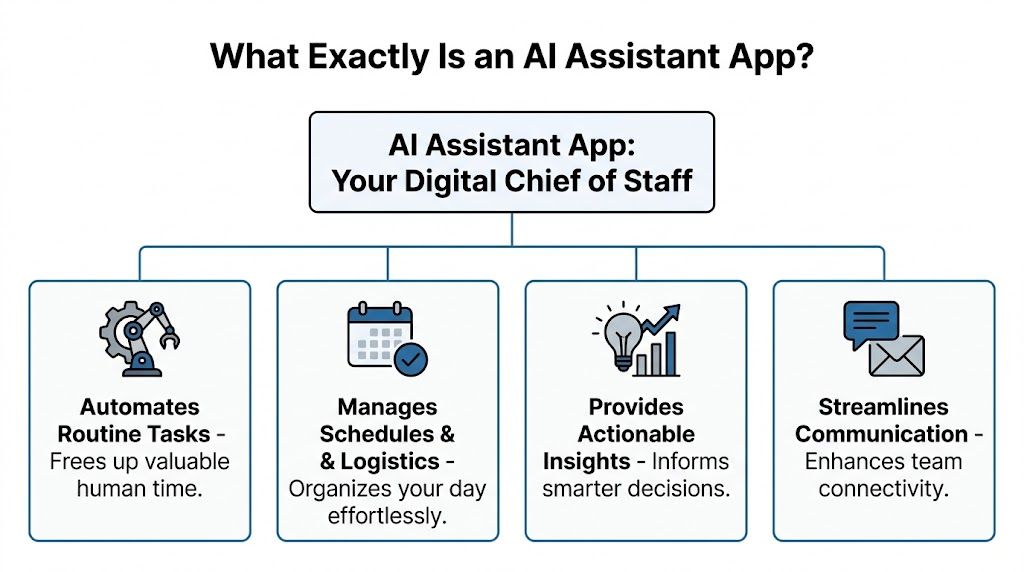
The simplest way to understand an ai assistant app is this. It’s a digital chief of staff for your software stack.
A normal chatbot answers questions. A voice assistant sets a timer or tells you the weather. A true assistant app does something more useful for business. It keeps track of context across tools, understands recurring work, and takes action inside the systems where your business already runs.
It acts instead of only answering
Think about the difference between asking ChatGPT, “Draft a follow-up email,” and telling an assistant app, “When a prospect goes quiet for three days, send a polite follow-up, log it in HubSpot, and alert me in Slack if there’s still no reply.”
The first tool gives you words. The second participates in the workflow.
That distinction matters because most business bottlenecks aren’t caused by lack of information. They’re caused by incomplete execution. Someone forgets the follow-up. Someone doesn’t update the CRM. Someone misses a deadline because the signal was buried in a thread.
It works across your actual tool stack
A useful assistant app connects to the systems you already rely on. For many UK freelancers and small teams, that means combinations like Gmail, Slack, HubSpot, Google Drive, Calendar, and project tools. Instead of forcing you into a new operating system, it becomes a layer across the existing one.
That’s what makes it feel less like software and more like operational support. It sees the incoming message, the prior conversation, the attached file, and the customer record. Then it uses that context to help decide the next action.
An ai assistant app is most valuable when it reduces the number of times you have to re-explain the same situation to your own tools.
It learns the pattern of your work
Over time, strong assistant apps become more useful because they pick up how your business runs. They learn which clients need nudging, what a weekly report should include, how sales notes are usually structured, and which internal messages deserve escalation.
That doesn’t mean they should run wild. Autonomy needs boundaries. But when configured properly, the app stops being a novelty and becomes part of daily operations. The result is less manual glue work and more reliable execution.
The Four Pillars of an Autonomous AI Assistant
The difference between a gimmick and a working system usually comes down to four capabilities. If one is weak, the whole setup feels fragile.

HubSpot’s 2025 UK Sales Report indicates AI saves small teams 1.8 hours per day, but many freelancers still struggle to see the return because they automate the wrong things. The value tends to appear when you target repetitive work like follow-ups and client reporting.
Autonomous actions
This is the core capability. An assistant app should be able to do the task, not just recommend it.
In practice, that means it can draft and send an email after a defined trigger, create or update a CRM record, compile notes from a thread, or route a task to the right person. The best way to think about this is delegation with guardrails. You still decide the rules, tone, approvals, and exceptions. The assistant handles the repetitive execution.
What doesn’t work is pseudo-autonomy. If the app constantly asks for confirmation on every minor action, it becomes another inbox to manage. If it acts without clear limits, it creates risk. The sweet spot is selective independence.
Universal integrations
No small business runs on one tool. Most run on a patchwork.
If the assistant can’t connect to the systems that matter, it can’t see enough context to be trusted. Gmail without CRM access is only half useful. Slack without documents is only half informed. A workflow assistant needs broad integrations because real work crosses system boundaries.
For a deeper look at how action-taking systems differ from ordinary AI chat tools, this overview of autonomous AI agents is a useful reference.
A simple test helps here:
- Message access: Can it read relevant communications where work begins?
- System write-back: Can it update records where accountability lives?
- Cross-app memory: Can it carry context from one platform into another without you copying it manually?
Deep document indexing
Most businesses already have the answers they need. They just can’t find them fast enough.
Deep indexing means the assistant can search across proposals, contracts, emails, notes, and internal docs with context intact. Instead of opening five folders to find the right clause or last approved scope, you ask a question and get the relevant answer tied to source material.
This becomes especially useful for freelancers and agencies handling multiple clients. Every client has a history. When the assistant can retrieve that history quickly, follow-ups get sharper and mistakes drop.
The real productivity gain often comes from reducing search time, not generating more text.
Zero-code workflow automation
A lot of AI products fail at the handoff between idea and implementation. The concept sounds easy. The setup becomes a mini IT project.
Zero-code automation matters because small teams don’t have time to map every API call or build custom logic from scratch. You should be able to describe a business process in plain English, connect the relevant tools, and refine from there.
That’s the practical appeal of platforms such as Zapier, Make, and newer action-oriented assistants. Zenfox.ai is one example built around connecting tools like Gmail, Slack, HubSpot, and Drive, then creating action-taking workflows in plain English with activity logs and document indexing.
The trade-off is control versus simplicity. More flexibility can create more setup work. More simplicity can limit edge cases. Most small firms are better served by a tool that handles the common path cleanly before they chase advanced complexity.
How UK Businesses Win with AI Assistants
The strongest use cases aren’t abstract. They show up in the small operational moments that either keep revenue moving or subtly stall it.

Freelancers
A freelance designer doesn’t need an enterprise AI programme. They need admin to stop eating evenings.
A good assistant setup can watch for signed-off work in email, prepare the next client check-in, chase missing feedback, and organise project notes from scattered messages. That’s where the benefit lands. Not in sounding futuristic, but in protecting billable time and reducing dropped threads.
Many freelancers struggle with return on investment because they start too broadly. They ask the assistant to “help with the business” instead of giving it one lane, such as invoice reminders, proposal follow-ups, or weekly reporting.
Small teams
Small teams usually suffer from reporting drag. Everyone is busy, but no one has a clear view of what changed this week without asking five people in three different apps.
An assistant can gather updates from Slack, summarise project movement, pull in blockers, and produce a readable weekly digest. That doesn’t replace management. It gives managers a current picture without forcing the team into extra status admin.
For companies reviewing options, this guide to business automation software is useful because it frames automation as operating discipline, not just tooling.
Here’s where teams often get it wrong:
- They automate low-value tasks first: Start with activities that happen often and touch revenue, delivery, or client communication.
- They skip exception rules: Every workflow needs boundaries for unusual cases.
- They ignore write-back quality: If the assistant doesn’t update the source of truth properly, the process breaks downstream.
A short demo helps make that concrete.
Sales and marketing
Assistant apps often earn trust fastest because the tasks are frequent, repeatable, and measurable.
According to a 2025 HubSpot UK user study, sales teams using integrated AI assistants increased follow-up task automation rates by 47% and reduced manual CRM data entry by 60%, according to UK AI assistant software market reporting. That matters because sales teams rarely lose momentum for strategic reasons alone. They lose it when leads sit untouched, notes stay incomplete, or handovers break.
Marketing teams benefit in a similar way. An assistant can monitor topic trends, prepare competitor digests, surface unanswered enquiries, and turn scattered campaign signals into a concise brief. The common thread is consistency. AI helps most when it makes routine execution harder to neglect.
Choosing a Secure and Compliant AI Assistant
For UK businesses, security isn’t a feature comparison box. It’s the line between useful automation and a tool you can’t responsibly deploy.
A lot of AI products look impressive in a demo because demos avoid awkward realities like customer data, retention policies, cross-app permissions, and where information is processed. Those details become unavoidable the moment an assistant touches sales records, contracts, financial discussions, or client emails.
Security is a buying requirement
The main blocker is clear. A 2025 DSIT report found that 68% of UK SMEs cite data privacy as their top barrier to AI adoption, and recent ICO audits found 37% of AI sales tools failed UK GDPR standards for cross-app data flows. Those aren’t edge concerns. They’re market-level warnings about what happens when businesses connect sensitive systems without checking how the data moves.
If an ai assistant app is going to read Gmail, update HubSpot, or monitor Slack, you need to know what protects that data. The basics aren’t optional:
- GDPR alignment: The provider should explain how data is handled, stored, and processed for UK and European compliance needs.
- AES-256 encryption: In plain English, this means the data is strongly encrypted so it isn’t exposed in a readable form if intercepted or mishandled.
- SOC 2 certification: This signals that the company has gone through an external review of security controls and operational safeguards.
- Access controls and logs: You need to know who can access what, and you need a record of what the assistant did.
Buy the assistant the same way you’d hire a staff member with access to your inbox and CRM. Trust matters, but controls matter more.
What good compliance looks like in practice
Good compliance is boring by design. It means the tool makes sensible choices before you even think to ask.
It should separate permissions clearly, avoid unnecessary data exposure, and give you visibility into actions taken. For some businesses, especially those handling regulated client work, enterprise options like on-prem storage or data enclaves may matter. For others, the key issue is whether cross-app automations stay within acceptable handling rules.
Plain-language questions cut through marketing quickly:
- Where is the data processed and stored?
- What happens to my data after a workflow runs?
- Can I limit what the assistant can read or write?
- Is there an audit trail for every autonomous action?
- Can I revoke access cleanly if I stop using the tool?
AI Assistant App Evaluation Checklist
| Evaluation Criterion | What to Look For | Why It Matters |
|---|---|---|
| Data protection | Clear GDPR position, strong encryption, transparent data handling | Reduces the risk of exposing client or internal information |
| Security assurance | SOC 2 or equivalent security controls, documented access management | Shows the vendor treats operational security as a system, not a promise |
| Permissions model | Granular control over which apps, folders, channels, or records the assistant can access | Prevents the tool from seeing or changing more than it should |
| Auditability | Action logs, workflow histories, and readable records of what the assistant changed | Makes errors easier to spot and supports accountability |
| Human oversight | Approval rules for sensitive actions such as sending external emails or editing important records | Keeps autonomy useful without giving up control |
| Integration fit | Native support for the tools your business actually uses | Better context, fewer workarounds, cleaner workflows |
| Setup burden | Straightforward onboarding and manageable workflow creation | If setup is too heavy, the team won’t sustain it |
| Exit path | Easy revocation, export options, and clean disconnect procedures | Reduces lock-in and lowers operational risk |
The best assistant app for a UK business is rarely the one with the longest feature list. It’s the one your team can use confidently without creating a compliance problem you discover too late.
Your Five-Step Plan to Get Started
The safest rollout is narrow, practical, and measurable. Don’t begin with a grand automation strategy. Begin with one recurring problem that wastes time every week.
1. Define one core problem
Pick a task that happens often and has a clear cost when missed. Follow-up emails, lead logging, weekly updates, and client status summaries are strong starting points. If the task is rare or vaguely defined, you won’t know whether the assistant is helping.
2. Audit your current tools
List the apps involved in that workflow. Usually it’s some mix of Gmail, Slack, HubSpot, Calendar, Drive, or a project tool. The point isn’t to document everything. It’s to identify where the work begins, where context lives, and where the final record should be written back.
3. Start with a low-risk plan
Use a free or entry-level plan where possible. Early testing should prove fit, not force commitment. Keep the first workflow lightweight enough that if it misfires, the damage is small and easy to correct.
Start with internal or low-risk external workflows first. You want confidence before you give any system more autonomy.
4. Connect the primary app first
Choose the one tool that sits at the centre of the problem. For many solo operators, that’s Gmail. For internal coordination, it might be Slack. Once the first connection works, add the second system that closes the loop, such as HubSpot or Drive.
If you want to move from simple prompts to custom workflow tools quickly, this guide on how to build an instant app is a practical next step.
5. Build one workflow and monitor it closely
Keep the first automation plain. Example: when a client email includes a specific project label, generate a summary, draft the next-step response, and create a task for follow-up. Review the activity log, check the quality of write-backs, and tighten the rules before adding more scope.
What works is repetition with supervision. What doesn’t work is connecting everything at once and hoping the assistant behaves like a trained operator from day one.
If you want an action-oriented assistant rather than another chatbot, Zenfox.ai is one option to evaluate. It connects tools like Gmail, Slack, HubSpot, and Drive, supports zero-code workflow creation in plain English, and includes security features such as GDPR alignment, SOC 2 certification, AES-256 encryption, and audit logs.