Zenfox vs Lindy vs Tasklet: Which AI Agent Is Best in 2026?
Get the definitive answer to Zenfox vs Lindy vs Tasklet : Which AI Agent Is Best in 2026? Compare security, automation, and real-world performance to choose
Most AI agent comparisons still focus on the wrong thing. They ask which tool sounds smartest in a demo, when the real buying question is which one can be trusted to handle live business work without creating security, compliance, or process headaches.
That matters even more in the UK. The practical shape of the market is not enterprise AI labs with spare engineering teams. It is a business base made up of about 5.5 million private-sector businesses, with 99.9% classified as SMEs according to the UK government's 2025 business population estimates, as cited in this UK SME market context for Lindy vs Tasklet. For most of those firms, the winner in Zenfox vs Lindy vs Tasklet is the product that can automate Gmail, Slack, CRM, and document workflows with minimal setup.
That shifts the whole frame of Zenfox vs Lindy vs Tasklet: Which AI Agent Is Best in 2026? The best tool isn't the one with the flashiest model language. It's the one that can run production workflows reliably, stay governable, and fit the way real teams already work.
Table of Contents
- Choosing an AI Agent in 2026 Is Not About the AI
- What Are AI Agents and Why They Matter for UK Businesses
- Introducing the 2026 AI Agent Contenders
- Head-to-Head Comparison Zenfox vs Lindy vs Tasklet
- Anatomy of an Autonomous Sales Workflow
- How to Choose the Right AI Agent for Your Team
- The Verdict Your Best AI Agent for 2026
Choosing an AI Agent in 2026 Is Not About the AI

Most buyers still overvalue intelligence and undervalue execution. In practice, businesses don't lose time because a model failed to sound clever. They lose time because an agent missed a handoff, wrote to the wrong system, duplicated CRM records, exposed sensitive data, or needed constant babysitting.
That's why a serious evaluation of Zenfox, Lindy, and Tasklet has to start with agentic outcomes. Can the tool complete useful multi-step work across your existing stack? Can someone audit what happened? Can the team define what success and failure look like before a workflow goes live?
What actually matters in production
A good AI agent for business work should be judged on a short list of practical concerns:
- Workflow reliability: Can it complete repeatable tasks without drifting off process?
- Security posture: Can you control access, data exposure, and action permissions?
- Integration depth: Does it work where your team already works, rather than in a demo sandbox?
- Operational overhead: Will a small team manage it, or will it turn into another half-built internal project?
Zenfox, Lindy, and Tasklet each come at this from a different angle. One leans toward structured business automation, one is closer to a personal AI assistant model, and one suits users who want more control and custom assembly.
Practical rule: If an agent looks brilliant in a prompt box but weak in logs, permissions, and exception handling, it isn't ready for business-critical work.
Why UK firms need a different buying lens
For UK companies, especially smaller firms, there's a straightforward reason this matters. Many organizations don't have internal AI engineers. They need automation that can be configured quickly, connected to common tools, and maintained by operations, sales, or leadership staff without turning every change into a technical project.
That's the core mistake in many tool comparisons. They treat AI agents like model wrappers. Buyers should treat them like operational systems. Once you do that, Zenfox vs Lindy vs Tasklet becomes less about novelty and more about whether the tool can carry routine work safely and consistently.
What Are AI Agents and Why They Matter for UK Businesses
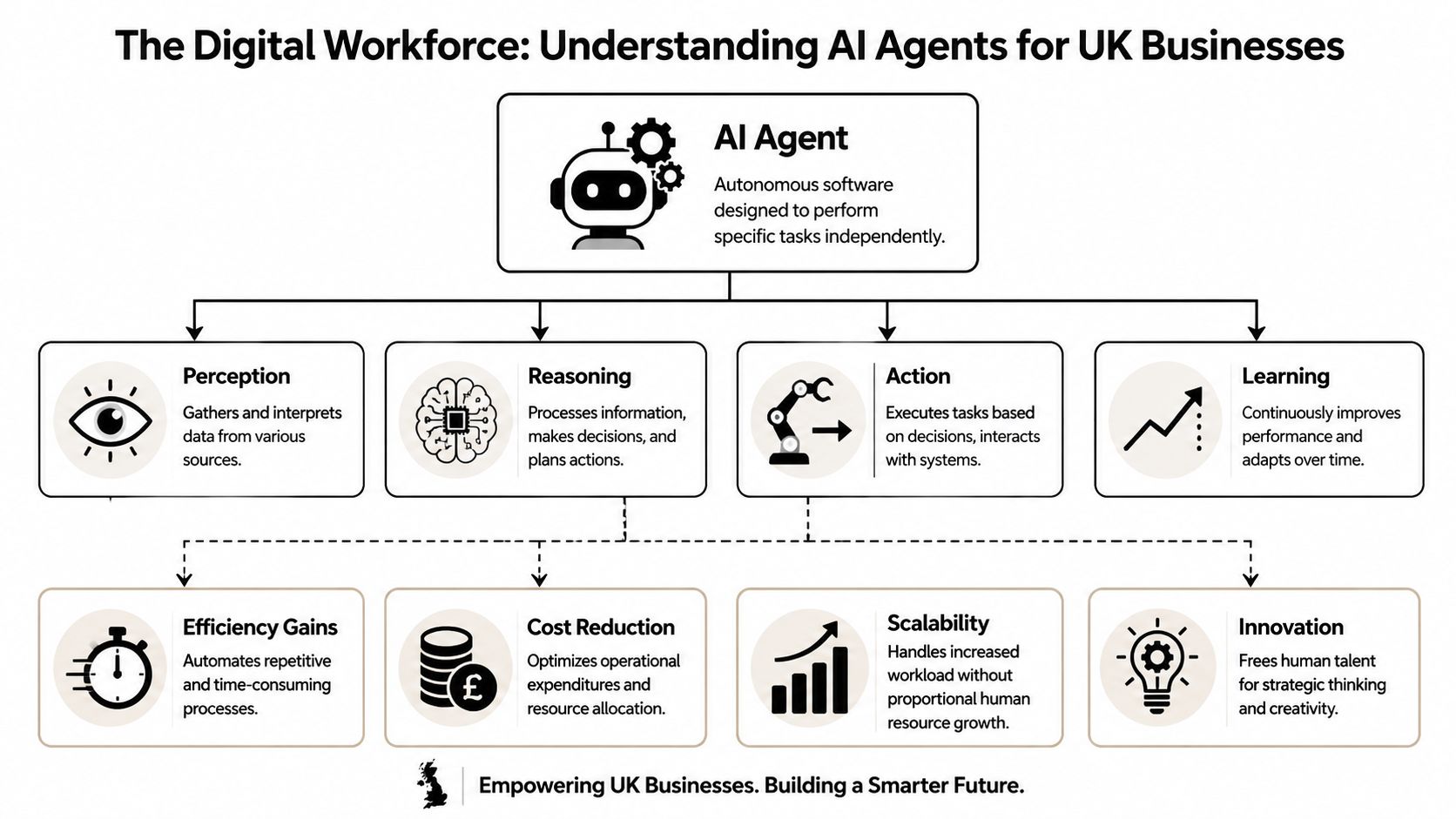
An AI agent is best understood as a digital team member with permissions. It doesn't just answer questions. It can observe an event, decide what to do next, use connected tools, and take action across systems.
That's a different category from a chatbot. A chatbot gives you text. An agent can read an inbound email, check a CRM, draft a reply, create a task, update a document, and notify the right person in Slack. The business value comes from that chain of actions, not from the sentence quality alone.
What an agent actually does
In plain terms, an agent usually combines four capabilities:
- Perception: reading emails, forms, messages, records, and documents
- Reasoning: deciding which rule, instruction, or next step applies
- Action: updating software, sending messages, creating records, or triggering workflows
- Learning: improving through revisions, feedback, and tighter operating instructions
That's why these tools matter now. The UK labour market already contains a large amount of work that fits this pattern. The Office for National Statistics reported that 11.3 million UK jobs were in occupations with a relatively high potential for automation, equal to about 39% of all jobs, based on task composition, as discussed in this 2026 AI agent platform analysis for UK buyers. The same analysis notes that higher-automation-potential roles are concentrated in administrative, process, and service functions, which is exactly where AI workflow agents are most useful.
Where businesses get value first
The earliest wins usually come from repetitive operational work, not ambitious moonshots. Teams tend to see the most value when they start with tasks such as:
- Inbox handling: triage, routing, follow-up drafting, escalation
- CRM hygiene: record updates, note capture, lead assignment
- Internal reporting: recurring summaries from scattered sources
- Scheduling and coordination: turning requests into next actions
If your documentation is messy, though, even a capable agent will struggle. Teams that want cleaner outcomes should also think about structure and retrieval. This guide to AI-ready documentation is useful because it focuses on making internal knowledge easier for agents to discover and use correctly.
For readers sorting out the terminology, this explanation of agentic AI vs AI agents is also worth reviewing. The distinction matters because some products behave like assistants with triggers, while others are designed to run broader operational workflows.
The strongest deployments don't start with “what can AI do?”. They start with “which recurring decisions and actions already follow a pattern?”.
Introducing the 2026 AI Agent Contenders
Zenfox, Lindy, and Tasklet all sit under the AI agent label, but they are not trying to solve the same problem in the same way. That's where many evaluations go off track. A useful comparison starts by identifying the operating model each tool appears to favour.
Zenfox
Zenfox is built around autonomous workflow execution across a company's existing software stack. The core idea is not just assistance but action across tools such as email, messaging, CRM, and documents, with a focus on operational use cases that businesses want to delegate.
For a buyer, that usually means thinking in terms of end-to-end process ownership. If a team wants an agent to receive context, make a bounded decision, and then carry out multiple software actions, this category of tool tends to fit better than an assistant-first product. A broader roundup of best AI agents is helpful here because it shows how differently vendors define the term.
Lindy
Lindy is easiest to understand as an AI assistant platform aimed at personal productivity and lightweight business workflows. It often appeals to founders, operators, and individual knowledge workers who want help with coordination, scheduling, simple follow-ups, and assistant-style task handling.
That doesn't make it weak. It makes it better suited to a different centre of gravity. Lindy tends to make more sense when the buyer wants convenience and quick setup for user-level tasks, rather than deep process ownership across a larger operating environment.
Tasklet
Tasklet fits the profile of a more configurable tool for users who want to shape custom agent behaviour with tighter control. That often attracts technically confident operators, builders, or teams who don't mind spending more time assembling workflows and refining logic.
The trade-off is familiar. More flexibility can produce stronger fit for unusual processes, but it can also shift more burden onto the customer. If the workflow needs ongoing maintenance, testing discipline, and careful exception design, the total effort rises quickly.
A simple way to frame the field
The three products can be thought about like this:
| Tool | Core identity | Best fit |
|---|---|---|
| Zenfox | Business workflow agent | Teams automating cross-app operational work |
| Lindy | Assistant-style automation | Individuals and small teams handling personal productivity tasks |
| Tasklet | Configurable custom agent tool | Power users and technically capable teams |
None of these categories is superior. The right choice depends on whether you need dependable operations automation, lightweight assistance, or a more build-it-yourself environment.
Head-to-Head Comparison Zenfox vs Lindy vs Tasklet
The most useful way to compare these tools in 2026 is to ignore polished demos for a moment and ask a harsher question. What happens when the workflow becomes messy? Real businesses don't run on clean prompts. They run on partial data, inconsistent records, permission boundaries, and exceptions.
Why benchmarks don't settle this
For UK buyers, the technical issue isn't whether an agent can complete a happy-path workflow once. It's whether the platform can be judged on agentic outcomes across different task classes. Current benchmark practice now looks at multi-step tool use, cross-server coordination, GUI automation, and related forms of execution because no single model dominates every dimension. The cited 2026 benchmark analysis notes top scores ranging from 69.2% on an overall model leaderboard to 98.7% on TAU2-Bench, and also reports a 37% gap between lab benchmark scores and real-world deployment performance, with repeated-run consistency falling from 60% on a single run to 25% across eight runs in this 2026 AI agent benchmark review.
That's the key warning. Benchmark strength doesn't automatically translate into dependable business automation. Buyers need tracing, logging, and clear pass-fail criteria for the exact workflow they care about.
Buying advice: Choose the platform you can inspect, constrain, and test. Don't choose the one that gave the smoothest demo.
A related example appears in this 2026 AI receptionist report, which is worth reading not for overlap in product type, but because it shows how operational evaluation changes once responsiveness, handoffs, and business fit matter more than feature checklists.
Workflow automation and integration depth
Here the separation becomes clearer.
Zenfox is better aligned with workflows that cross multiple systems and need a single operating thread. If a process starts in Gmail, pulls context from documents, updates a CRM, and posts an internal summary, this style of platform fits that pattern.
Lindy tends to feel more natural for assistant-like tasks initiated by a user or tied to lighter coordination work. It can be useful, but businesses with denser process requirements may hit limits sooner.
Tasklet is attractive when the workflow is unusual enough that teams want more custom composition. The benefit is control. The cost is that someone usually has to own that complexity.
Security and data handling
Security is where many AI purchases become slower and more political inside a business. Leaders don't just need useful outputs. They need confidence about who can access what, where actions are logged, and how sensitive information moves between systems.
A practical buyer should ask:
- Permission scope: Can the agent be restricted to specific actions and data domains?
- Auditability: Is there a clear activity trail for actions taken?
- Operational governance: Can teams review and refine behaviour without guessing what happened?
In this category, tools built for business operations usually have an advantage because they're designed around system access and repeatable controls, not just user convenience.
Ease of use and true cost of ownership
The cheapest-looking tool at signup often becomes the most expensive tool in maintenance. This happens when the platform needs constant prompt tuning, custom patching, or a technically confident owner to keep it useful.
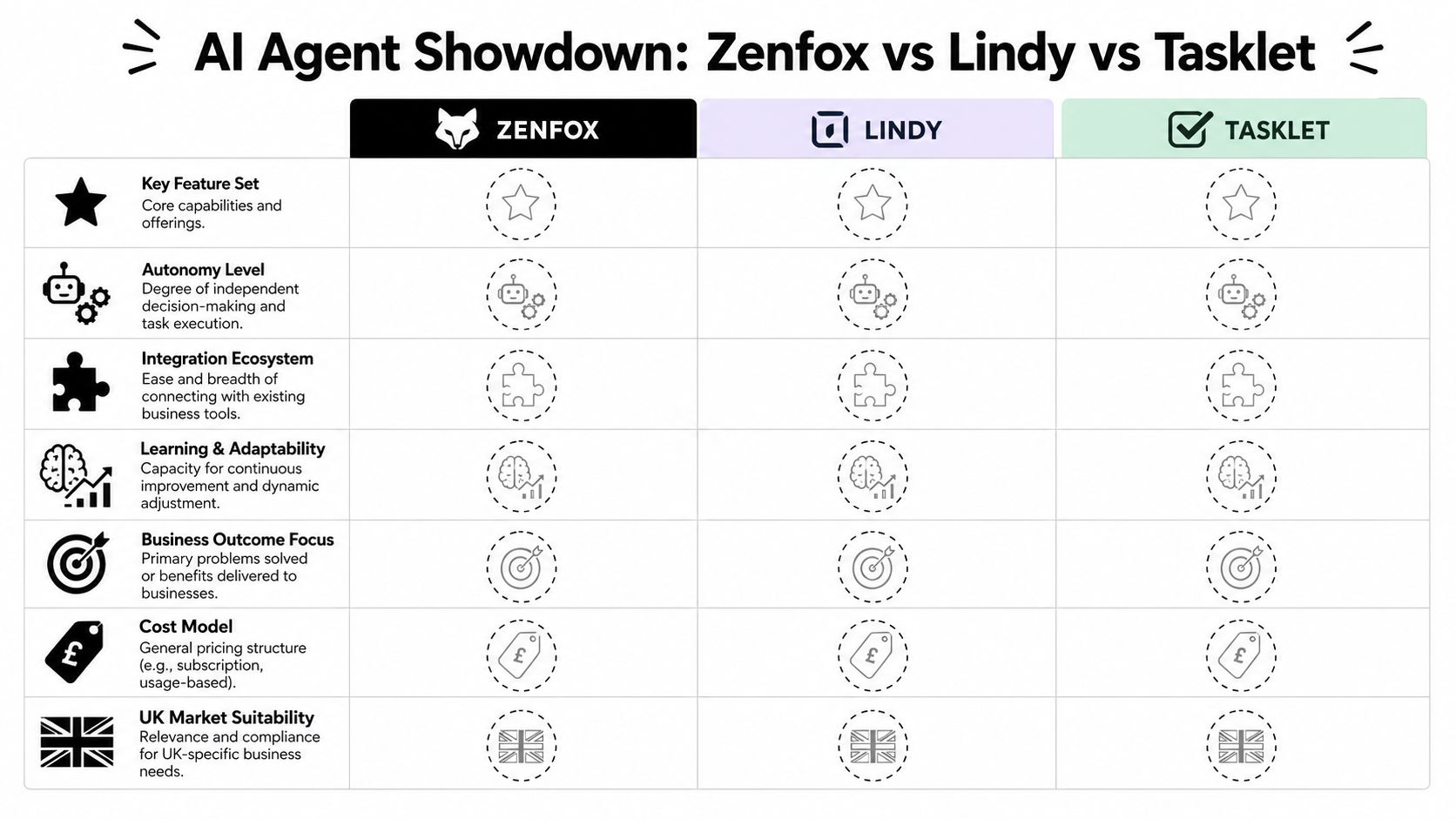
A more realistic comparison looks like this:
| Criterion | Zenfox | Lindy | Tasklet |
|---|---|---|---|
| Setup style | Workflow-oriented | Assistant-oriented | Configuration-oriented |
| Best starting point | Team processes | Personal productivity | Custom builds |
| Maintenance burden | Lower when process is standardised | Lower for light tasks | Higher when workflows are bespoke |
| Buyer risk | Process fit and governance review | Scope limitations on deeper operations | Build overhead and ongoing upkeep |
Here's a useful product heuristic. If your process already exists, choose the platform that can model and run it. If your process is still being invented, expect more setup and more revision, whichever tool you choose.
A quick product walkthrough can help anchor the discussion:
Anatomy of an Autonomous Sales Workflow
A good comparison gets clearer when tied to one concrete workflow. Sales operations is a strong example because it involves timing, context, data entry, internal communication, and follow-up discipline. If the agent fails in any one of those steps, the workflow breaks.
How the workflow should run
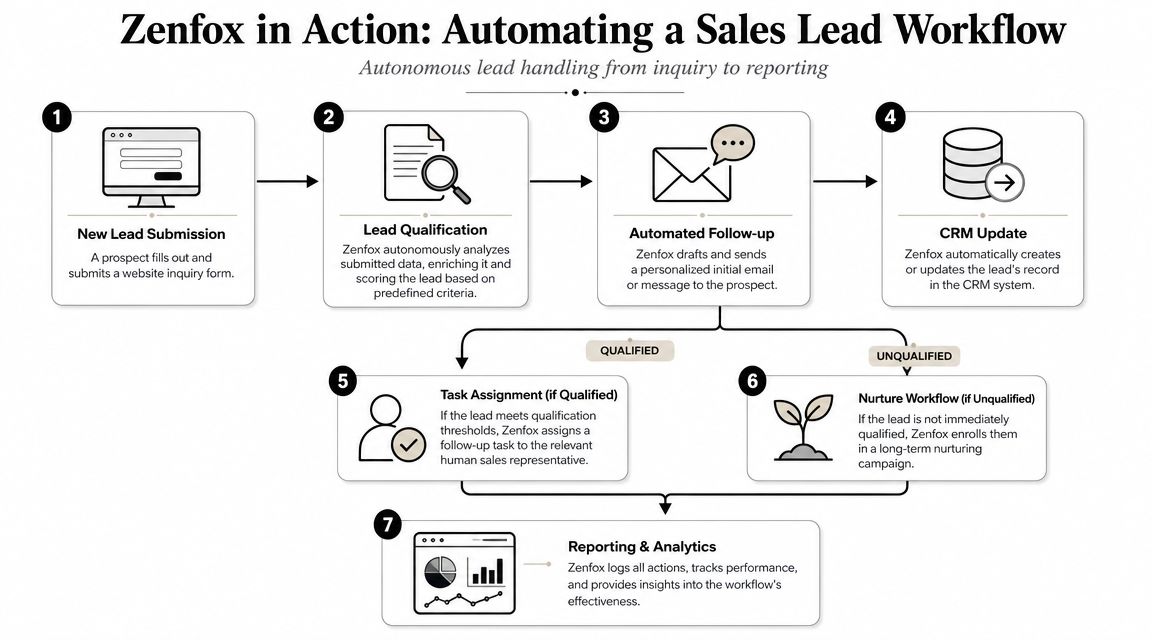
Start with a common event. A new lead submits a form on the website. The submission triggers an email, or lands in a monitored inbox or system queue.
A business-ready agent should then move through a sequence like this:
- Read the submission and classify intent. It identifies whether the enquiry is sales, support, partnership, or noise.
- Pull context from connected systems. It checks whether the contact already exists in the CRM, whether there's prior email history, and whether relevant notes or documents exist.
- Create or update the CRM record. Duplicate handling matters here. So does field hygiene.
- Draft the follow-up based on context. A serious workflow uses account details, product interest, territory, or lifecycle stage, not just a generic template.
- Notify the team. A Slack summary gives visibility, especially if the lead is high priority.
- Assign or route next action. Qualified leads go to a salesperson. Lower-fit leads move into a nurture flow or queue.
That sequence is where structured workflow agents earn their keep. They don't just respond. They orchestrate.
Where the tools diverge
If a team uses a platform designed for operational automation, this process can run as a coherent chain with logging and clear handoffs. Zenfox.ai fits that category. It connects tools such as Gmail, Slack, HubSpot, and document systems, then runs zero-code workflows that can take actions across those systems based on business context.
Lindy can help with parts of this. It may work well for message drafting, reminders, or certain assistant-style steps. But once the process needs stronger cross-system control and consistent state management, teams often want a more workflow-native structure.
Tasklet can likely be shaped into a capable version of the same process, especially for users comfortable defining behaviour in more detail. The trade-off is that the buyer may need to invest more time in setup, revision, and exception handling to get a polished result.
When a sales workflow fails, the problem usually isn't the first step. It's the fourth or fifth step, where context, timing, and system state need to stay aligned.
For teams planning broader rollout, this guide on how to deploy agentic AI solutions is useful because deployment discipline matters as much as tool choice. The practical work is in defining permissions, escalation rules, and failure handling before the automation touches revenue workflows.
What works and what doesn't
The workflows that work well share a few traits:
- Clear inputs: form submissions, tagged emails, known CRM objects
- Bounded decisions: qualify, route, reply, enrich, update
- Visible outputs: messages sent, records updated, team alerts posted
The workflows that fail tend to have vague goals, weak ownership, or no exception path. If a lead comes in with incomplete data, conflicting account details, or an unusual request, the agent needs rules for what to do next. Without that, even a clever system becomes inconsistent.
How to Choose the Right AI Agent for Your Team
The right choice depends less on company size than on workflow shape, risk tolerance, and internal ownership. Most buying mistakes happen when teams choose based on branding or demos instead of asking who will manage the system and what business process it must own.
If you're a solo professional
A solo consultant, founder, or freelancer usually needs speed and low maintenance. The best fit is often the tool that can handle inbox work, reminders, follow-ups, and lightweight coordination without demanding much setup discipline.
Lindy may suit this profile if the work is mainly personal productivity and assistant-style support. Tasklet only makes sense here if the user enjoys building systems. Otherwise it can become another project.
If you run a small team or startup operation
Small teams need automation that reduces operational drag without creating new technical debt. That usually means standard workflows, shared visibility, and easy handoffs across tools.
Use this decision path:
- Choose Zenfox if the main goal is to automate recurring cross-app workflows such as lead handling, reporting, CRM updates, and internal coordination.
- Choose Lindy if the biggest pain is individual admin load rather than structured team operations.
- Choose Tasklet if your process is unusual enough that flexibility matters more than quick rollout.
If you lead sales or marketing
Sales and marketing teams should buy more cautiously than anyone else. Their workflows touch leads, response times, CRM integrity, and outbound communication. Mistakes show up quickly.
A sensible shortlist should favour:
- Deep CRM and inbox fit: the agent must work inside the tools the team already uses
- Traceability: someone needs to know what was sent, changed, or assigned
- Controlled autonomy: the workflow should be allowed to act, but only inside clear boundaries
A practical shortlist test
Before choosing any platform, ask vendors or internal evaluators to prove five things:
| Question | Why it matters |
|---|---|
| Can it run the exact workflow, not a simplified version? | Demos often skip messy handoffs |
| Can we inspect each step after execution? | Reliability requires visibility |
| Can we limit permissions cleanly? | Risk grows with broad access |
| Can non-developers maintain the workflow? | Ownership shouldn't bottleneck in one person |
| Can it fail safely? | Every production workflow needs an exception path |
If a platform can't answer those questions cleanly, it's not ready for important business work.
The Verdict Your Best AI Agent for 2026
For most UK businesses, the winner in Zenfox vs Lindy vs Tasklet won't be decided by model hype. It will be decided by whether the product can automate real workflows with enough control, auditability, and consistency to be trusted in production.
Lindy makes sense for assistant-style productivity. Tasklet makes sense for teams that want more custom assembly and can carry that burden. Zenfox is the stronger fit for businesses that need structured cross-app automation, especially across sales, operations, and internal coordination.
That's the practical lens buyers should keep in 2026. Don't ask which tool sounds smartest. Ask which one your team can operate safely every day. If you're comparing broader categories before buying, this roundup of top AI tools for business growth is a useful companion read because it helps place agents in the wider operating stack.
If you're evaluating automation for sales, operations, or client work, start with one live workflow and test it inside Zenfox.ai. The fastest way to judge an AI agent isn't a demo. It's seeing whether it can handle your actual tools, your actual process, and your actual standards for reliability.