Boost ROI: Automated Marketing for Small Business in 2026
Unlock growth for your UK small business. Our 2026 guide to automated marketing for small business covers strategy, workflows, and tools to save time and boost
Your day probably ends the same way more often than you'd like. A lead came in at lunch. You meant to reply straight away. Then a client call ran over, an invoice needed chasing, someone asked for a quote revision, and now it's late evening and you're copying details from a website form into a spreadsheet while trying to remember who still needs a follow-up.
That isn't a personal productivity problem. It's an operating model problem. Small businesses often run marketing through memory, inbox flags, sticky notes, and good intentions. That works until it doesn't. One missed reply becomes a lost sale. One messy contact list becomes poor targeting. One rushed campaign creates compliance risk.
This is exactly why automated marketing for small business matters so much in the UK. Small firms dominate the economy. In 2023, 99.9% of the UK's 5.5 million private sector businesses were small businesses, and 53% of firms with 10+ employees were already using online marketing, according to UK small business marketing statistics. Digital outreach is already normal. The key question is whether your follow-up, segmentation, and reporting still depend on manual effort.
Automation isn't magic. It's a dependable system for doing the repetitive work on time, every time. If social scheduling is one part of your mix, this guide to social media automation is a useful companion. If you're looking at broader workflow support across your stack, this overview of AI automation services is also relevant.
Table of Contents
- Stop Juggling and Start Automating Your Marketing
- What Automated Marketing Really Is (Not Just Emails)
- Why Automation Is a Game-Changer for Small Firms
- Your Four-Stage Roadmap to Implementation
- Three High-Impact Automations to Build Today
- Automating Safely with Security and UK Compliance
- Your Automated Marketing Questions Answered
Stop Juggling and Start Automating Your Marketing
A freelance designer gets an enquiry through their site at 10:14. They see it on their phone and plan to answer after a meeting. At 15:30 they're still in back-to-back calls. By the time they send a reply, the prospect has already spoken to someone else.
A local service business does something similar, just at larger volume. Enquiries arrive from a contact form, social DMs, and referral emails. Someone on the team copies details into a spreadsheet, sends a template reply, sets a reminder to follow up, then forgets because the reminder sits in the same inbox as everything else. Nothing is broken in isolation. The process is broken as a whole.
That's where automated marketing for small business becomes practical rather than theoretical. It gives you a digital operating layer for repeatable work. New lead comes in. Acknowledgement goes out. CRM record is updated. Owner gets notified. Follow-up happens on schedule. If the lead clicks but doesn't book, the system nudges again.
Practical rule: If a task happens often, follows the same path, and affects revenue when delayed, automate it.
For UK firms, this matters because most businesses are small and stretched. You don't need a full marketing department to act like one. You need fewer moving parts, cleaner handoffs, and less dependence on memory. The businesses that get the most value aren't always the most advanced. They're often the ones that stop trying to remember everything manually.
What doesn't work is automating everything at once. That usually creates noise, duplicate records, and brittle workflows. What does work is choosing the first bottleneck that costs you time or sales every week, then fixing that one properly.
What Automated Marketing Really Is (Not Just Emails)
Automated marketing is a system of rules. When something happens, something else happens next. That's the core idea.
A person fills in a form. The system sends a confirmation email, creates or updates a CRM record, tags the lead source, and alerts the right person. A customer buys once but hasn't engaged for a while. The system waits, checks inactivity, and sends a reactivation sequence. It isn't just scheduled messaging. It's event-driven work.
The basic model is trigger then action
The easiest way to think about it is digital if-then logic.
- Trigger: A form is submitted, an email is clicked, a deal stage changes, or a customer goes inactive.
- Rule: If that event matches your condition, the workflow continues.
- Action: Send an email, assign a task, update a field, add a tag, notify sales, or stop future messages.
That's why good automation feels less like broadcasting and more like orchestration. Each step responds to behaviour, not guesswork.

If you want a broader explanation of how automation supports pipeline growth, Orbit AI's piece on unlocking B2B growth with AI is worth reading alongside a practical setup guide for email automation workflows.
What it includes beyond email
Email is only one channel. Useful automated marketing for small business usually covers a wider set of operations:
- Lead capture and routing: Website forms, paid ads, and chat enquiries moving into one record.
- Segmentation: Contacts grouped by source, service interest, lifecycle stage, or engagement.
- Personalisation: Messages changing based on what the contact did, asked for, or bought.
- Internal coordination: Alerts, task creation, and notes for whoever needs to act next.
- Reporting loops: Campaign activity tied back to enquiries, meetings, or pipeline movement.
The difference matters. Scheduling a newsletter for Friday is not the same as building a workflow that reacts to a prospect's behaviour over time.
Automation works best when each workflow has one clear job. Confirm. Qualify. Remind. Reactivate. Escalate.
Small businesses usually struggle when they buy a tool expecting instant results without defining the logic first. The software isn't the strategy. The rule set is.
Why Automation Is a Game-Changer for Small Firms
Monday starts with three new enquiries, two missed calls, a quote request sitting unanswered since Friday, and a customer asking for an update you were sure someone already sent. That is where many small firms lose revenue. Not because demand is weak, but because follow-up depends on memory, inbox triage, and whoever has five spare minutes.
Automation earns its keep by reducing that leakage. It gives each enquiry a defined next step, cuts avoidable delays, and keeps routine follow-up moving when the team is busy serving paying customers.
Revenue improves when response happens fast
The first wins usually come from simple workflows tied to buying intent. A form submission creates a contact record, sends a confirmation, alerts the right person, and schedules the next action. No drama. No cleverness. Just fewer leads going cold because nobody replied in time.
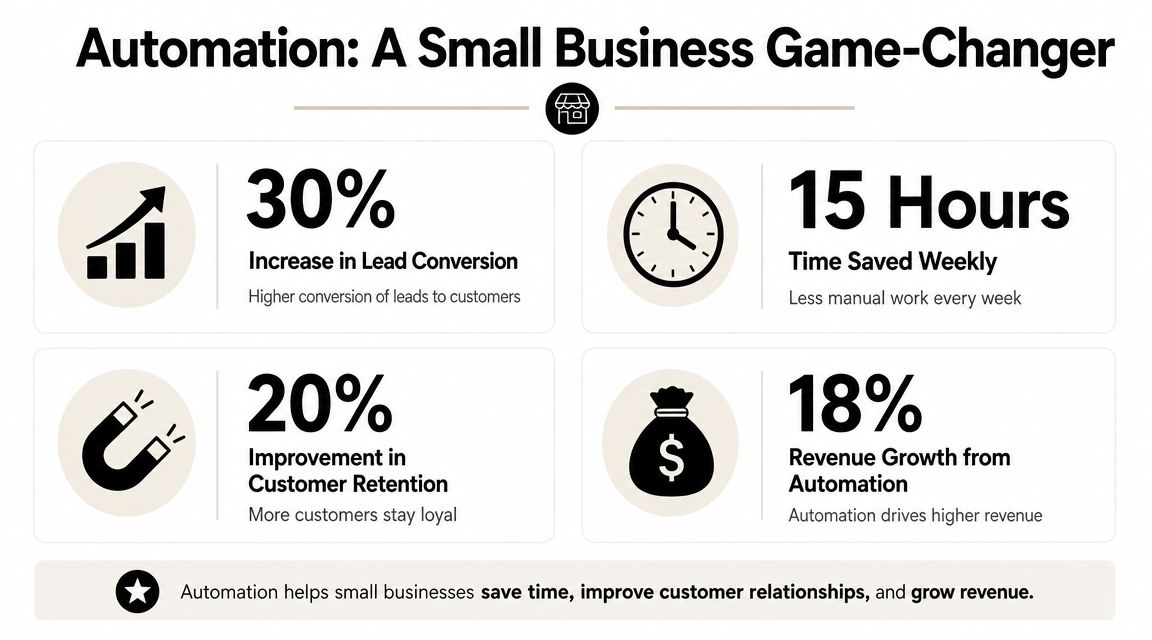
Email still matters here because it is cheap to run and easy to measure. UK Data & Marketing Association research cited in this summary of marketing automation for small business reports an average return of £42 for every £1 spent on email marketing. For a small business, that return is far easier to capture when welcome sequences, quote follow-ups, and reactivation messages run automatically instead of relying on manual chasing.
A good rule is simple. Automate the steps that happen every time, and leave the exceptions to a person.
Customer experience gets more consistent
Buyers notice operational signals before they commit. They see whether an enquiry is acknowledged promptly, whether the follow-up matches what they asked for, and whether the business remembers where the conversation left off. Those details shape trust long before a contract is signed.
That is where automation helps a small team look reliable without pretending to be larger than it is. A confirmation email arrives straight away. A reminder goes out before an appointment. A sales rep gets notified when a prospect revisits a pricing page. The experience feels organised because the underlying process is organised.
There is a trade-off, though. Automating too much creates stiff, tone-deaf communication, especially in complaints, pricing disputes, or unusual service requests. The right approach is to automate the repeatable steps and define clear handoff points. A workflow management system for small business operations helps map those handoffs so contacts do not get stuck between marketing, sales, and service.
Small teams get more output from the same headcount
For a one or two-person team, the primary constraint is not ambition. It is capacity. Every hour spent copying form data into a spreadsheet, sending the same reminder manually, or checking who still needs a reply is an hour not spent closing work or delivering it.
That is why the highest-ROI automations usually sit close to revenue. Lead capture, quote follow-up, appointment reminders, and reactivation tend to beat top-of-funnel content workflows early on. They are easier to test, easier to trust, and easier to tie back to booked work. The measurement side matters too, which is why the Statspresso guide to data is a useful reference once you need to decide which workflow is producing results.
The first automation should remove friction from a revenue path, not add another publishing task to your calendar.
For small firms, that is the primary value. Automation gives the team a more dependable operating system, one that protects response speed, reduces avoidable errors, and supports growth without adding admin faster than revenue.
Your Four-Stage Roadmap to Implementation
Most automation projects fail before the software is even opened. The business buys a tool, tries a few templates, connects too many apps, and ends up with half-built workflows nobody trusts. A better approach is narrower and more boring. That's why it works.
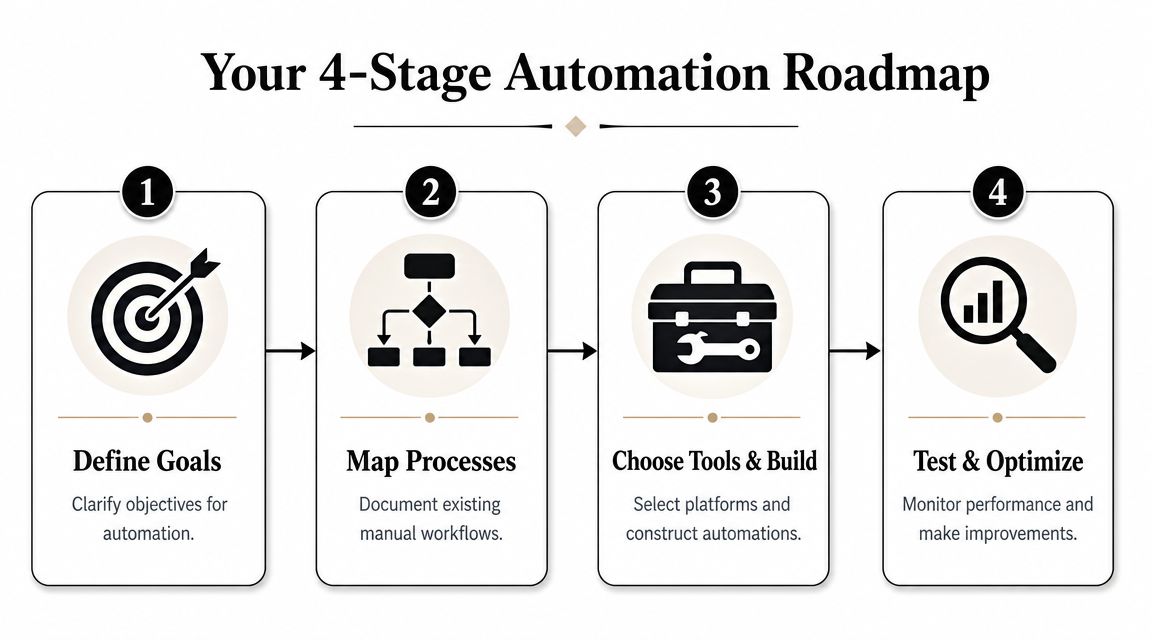
Stage one pick one bottleneck
Start with the task that repeatedly slows down revenue. For many UK SMEs, labour shortages and rising staff costs make this choice easier. The highest-ROI automations are often the repetitive jobs that block sales, such as lead follow-up and quote chasing, as discussed in this UK small business digital marketing automation article.
Don't start with "improve marketing". That's too broad. Pick one operational outcome instead.
Examples:
- Lead response: Every new enquiry gets an acknowledgement and owner notification immediately.
- Quote follow-up: Every sent quote triggers reminders until the contact replies or the status changes.
- Reactivation: Old leads re-enter a nurture sequence after a defined period of inactivity.
Write the goal in plain language. If your team can't tell whether the workflow worked, the goal isn't clear enough.
Stage two map the current process
Before you automate anything, write out what happens now. Include every step, every handoff, every delay, and every decision point. Most owners identify the underlying issue here. It's often not "we need AI". It's "our lead source isn't tagged", "two people update the same record", or "nobody knows when a quote should be chased".
A simple process map should show:
- Entry point: Where the lead or customer action starts.
- Data captured: Name, email, service interest, consent status, source.
- Decision points: New lead or existing contact. High intent or low intent. Customer or prospect.
- Outputs: Email sent, task created, CRM updated, reminder scheduled.
If you can't draw the workflow on one page, don't automate it yet.
This is also the point where a workflow management overview can help. If you need a practical framing for how tasks move between people and systems, this guide to what a workflow management system is is useful.
A short explainer can help visualise what a finished process should feel like:
Stage three connect your tools carefully
Now choose the minimum stack needed to make the workflow run. In most small businesses, that means only three layers:
- Input layer: Website form, ad form, chat widget, or booking tool.
- System of record: CRM or customer database.
- Action layer: Email platform, task system, internal notifications.
Teams often overbuild. They connect five apps when two would do. Keep your first automation narrow. One trigger. One main path. One fallback.
Tool choice should depend on three practical questions:
| Decision area | What to check | Why it matters |
|---|---|---|
| Data flow | Can the tool pass fields cleanly into your CRM? | Bad field mapping creates duplicates and poor segmentation |
| Trigger logic | Can workflows fire from behaviour, not just dates? | Event-based automation is more relevant than batch sending |
| Reporting | Can you see what happened after the message sent? | Otherwise you can't improve the workflow |
If you're using an automation assistant rather than stitching together separate tools, Zenfox.ai can connect services like Gmail, Slack, HubSpot, and Drive, then run zero-code workflows in plain English with an activity log. That's useful when you need automations that span outreach, CRM updates, and recurring reporting without custom development.
Stage four launch test and tighten
Your first version should be small enough to inspect manually. Test with internal emails first. Check field mapping. Check timing. Check suppression and consent logic. Check what happens if a lead replies after the first message, or if the record already exists.
Then review three things after launch:
- Workflow completion: Did the right actions happen every time?
- Lead quality: Are the automations reaching the right people at the right stage?
- Human handoff: Does someone know when to step in?
The businesses that get value fastest don't create the fanciest flows. They launch a simple one, watch it closely, fix edge cases, and only then add complexity.
Three High-Impact Automations to Build Today
A small business rarely needs more automation. It needs the right automation in the right order.
Start with workflows that protect revenue, recover missed demand, and give a lean team visibility without adding admin. For many UK small businesses, these three deliver the fastest return because they solve common operational gaps and can be reviewed for consent, suppression, and handoff rules without a large build.
Instant lead response and welcome flow
A consultant gets most enquiries through their website. They read new leads on their phone between meetings, but proper replies wait until later. By then, the prospect may have contacted two competitors.
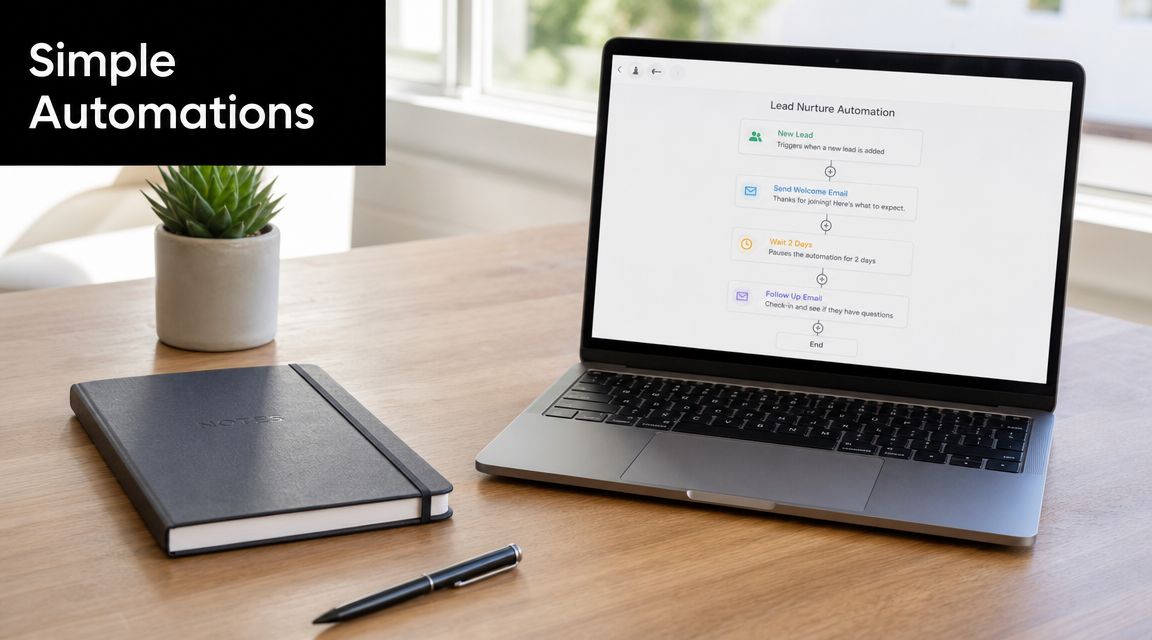
This is usually the first workflow I recommend because the payoff is clear. A fast acknowledgement protects intent at the point where interest is highest. It also reduces the risk of leads sitting in an inbox, getting missed, or entering the CRM late with poor data.
The build is straightforward. A form is submitted. The system creates or updates the contact, sends an immediate confirmation, alerts the owner, and schedules a follow-up if there is no reply or booking within a set window.
Fast acknowledgement buys you time. It does not replace a useful human reply.
The trade-off is simple. If the message feels too generic or the follow-up timing is too aggressive, it can make a small business look automated in the wrong way. Keep the copy short, specific, and tied to what happens next.
Silent prospect reactivation
A local agency has months of old enquiries sitting in the CRM. Some asked for pricing, some downloaded a guide, some opened earlier emails, and then the trail went cold. No one wants to manually chase a list that large, so it stays untouched.
A reactivation flow gives those contacts one structured second chance. After a defined period of inactivity, the system sends a short check-in tied to the original interest. If the contact clicks, replies, or returns to a key page, the workflow creates a task or moves them back into an active sequence. If they do nothing, the automation stops.
Restraint matters here. One useful message often outperforms a long sequence that assumes every old lead is still shopping.
This workflow also needs tighter controls than many teams expect. Old records often have messy consent history, stale owners, or incomplete tags. Before switching it on, make sure the segment is clean and the exclusion rules are clear. Otherwise you risk chasing the wrong people and wasting sending volume.
Weekly performance reporting
A founder checks campaign results by logging into several platforms every Friday. They look at form fills, email activity, maybe pipeline movement, then try to piece together what changed. When the week gets busy, reporting slips and small problems stay hidden.
A reporting workflow fixes that by pulling agreed metrics from your marketing and sales tools into one summary sent by email or Slack. The value is not prettier reporting. The value is knowing whether the system is working while there is still time to fix it.
The best version is narrow. Track the numbers that tell you whether automation is creating pipeline or just activity. For a small team, that usually means new leads, response speed, follow-up completion, reactivation engagement, and basic pipeline movement.
Here are three workflows worth prioritising first:
| Workflow Name | Trigger | Key Actions | Goal |
|---|---|---|---|
| Instant Lead Response | Website form submission | Create or update contact, send acknowledgement, notify owner, schedule follow-up | Stop leads going cold before a human reply |
| Silent Prospect Reactivation | Defined period of inactivity | Send check-in email, watch engagement, create task if re-engaged, suppress if inactive | Recover value from old leads without manual chasing |
| Weekly Performance Report | Scheduled weekly run | Pull campaign and pipeline data, summarise activity, send internal report | Keep visibility high without manual reporting effort |
Each workflow has one job. That is why these are good first builds for a small business with limited time, limited budget, and little margin for compliance mistakes.
Automating Safely with Security and UK Compliance
Automation creates speed, but it also creates responsibility. The moment your forms, CRM, email platform, and internal tools start sharing data automatically, governance stops being optional.
That matters in the UK because security and compliance risk are not abstract concerns. The UK Government's Cyber Security Breaches Survey, cited in this discussion of marketing automation risk for small firms, found that 50% of UK businesses reported a cyber security breach or attack in the previous 12 months. Add ICO enforcement of UK GDPR and marketing automation becomes a control problem as much as a growth problem.
Treat consent and auditability as product requirements
A safe setup should do more than send messages. It should prove why a contact is in your system, what they consented to, and what happened next.
Focus on these basics:
- Consent capture: Store permission and preference information at the point of form submission.
- Suppression handling: Make sure opt-outs and exclusions flow through every connected campaign.
- Activity logs: Keep a record of sends, updates, and workflow actions.
- Access control: Limit who can see and export contact data.
The wrong automation doesn't just waste budget. It can create a messy trail you can't defend later.
Choose tools that reduce risk not add to it
Small businesses often choose platforms based only on templates and ease of use. That isn't enough. You also need to know whether the tool helps you control retention, permissions, and traceability.
When you're evaluating options, ask practical questions. Can it store consent fields. Can it stop messages when status changes. Can it show a full activity history. Can it support secure data handling across the apps you already use.
Security-first features matter here. SOC 2 certification, AES-256 encryption, GDPR alignment, and detailed activity logging aren't decorative enterprise extras. They help a small business automate with fewer blind spots and less operational risk.
Your Automated Marketing Questions Answered
How much should a small business budget
Start smaller than you think. Most firms don't need a large software stack on day one. Budget for the core workflow, not for every possible channel. That usually means one CRM, one email or outreach layer, and one automation layer if your existing tools don't connect cleanly.
The expensive mistake isn't paying for software. It's paying for tools you haven't operationalised. A lean setup that runs one strong workflow is better than a broad setup nobody maintains.
How long until automation starts paying back
The first wins usually show up when a workflow replaces a recurring manual task or stops leads from being missed. That can happen quickly if the use case is clear. The bigger payback takes longer because you need enough live activity to spot weak points, improve messaging, and clean your data.
A sensible expectation is this: the first phase proves reliability, the next phase improves conversion, and only after that should you expand to more complex journeys. Businesses get frustrated when they expect instant transformation from a messy starting point.
Do you need technical skills to set this up
No, but you do need process discipline. Modern tools are much easier to configure than they used to be, especially no-code platforms and AI-based assistants that can interpret plain-language instructions. The hard part isn't writing code. It's defining the trigger, the action, the exceptions, and the owner.
If you can describe your current process clearly, you can usually automate a meaningful part of it without being a developer. Where technical help still matters is data structure, integrations, and compliance review. Those are worth getting right early.
Automated marketing for small business works when it removes friction from the way you already sell. Start with one recurring bottleneck, build one dependable workflow, and make sure the system is safe before you make it clever.
If you're ready to put that into practice, Zenfox.ai is one option for turning plain-English instructions into working automations across tools like Gmail, Slack, HubSpot, and Drive. It suits small teams that want to automate follow-ups, CRM updates, and reporting without building everything from scratch.