Top App Development Platforms for 2026 Revealed
Explore the best app development platforms for 2026. This guide explains native, hybrid, low-code, & AI options to help you choose the right tool.

You probably have the same brief sitting in a note, Slack message, or voice memo right now. A client portal. A booking app. An internal approvals tool. A mobile dashboard for field staff. The idea is clear enough to describe in two sentences, but the path from idea to working software feels messy fast. Hiring a full development team is expensive, agency timelines can drag, and many off-the-shelf tools almost fit but not quite.
That's why app development platforms matter so much now. They've shifted software creation from a specialist craft done only by engineers into a practical business capability. The market itself reflects that change. The global application development software market was valued at USD 257.94 billion in 2024 and is projected to reach USD 862.67 billion by 2030, growing at a 22.8% CAGR, according to Statista's application development software market outlook. That isn't the profile of a fringe workaround. It's a mainstream software category.
For a small business, the primary challenge isn't finding a platform with flashy templates. It's choosing the right way to solve the problem in front of you. In some cases, that means building an app. In others, it means avoiding a new app entirely and using automation or an AI assistant to do the work inside tools you already use.
Table of Contents
- From Idea to App Without Writing Code
- The Five Main Platform Categories Explained
- How to Choose the Right Platform for Your Project
- Navigating Security and Compliance Requirements
- Beyond Building Accelerate with AI Automation
- Real-World Use Cases and Your Next Steps
- Frequently Asked Questions
- What's the difference between an app development platform and a framework
- Are no-code platforms only for simple apps
- How should I think about vendor lock-in
- Is cross-platform always better for small businesses
- When should I use an AI assistant instead of building an app
- What should I ask a vendor in the first meeting
From Idea to App Without Writing Code
A familiar pattern shows up in small businesses. Someone spots a recurring operational headache. Staff copy the same data between email and CRM. Customers ask for status updates that could live in a portal. Managers want approvals tracked somewhere better than a spreadsheet. The need is obvious, but the organisation doesn't have spare developers, a large budget, or patience for a six-month build.
That's where app development platforms changed the game. Instead of starting with infrastructure, frontend code, backend code, authentication, hosting, and testing pipelines, a team can begin with components, workflows, and integrations. The question becomes less “can we build software?” and more “which parts do we need to customise?”
For many businesses, that shift is the difference between doing nothing and shipping something useful.
A founder can create a lead capture tool. A consultancy can stand up a client dashboard. An operations manager can replace a brittle spreadsheet workflow with a form-based internal system. If you want a simple example of that mindset in action, this guide on building an instant app shows how quickly a lightweight internal tool can move from concept to usable interface.
Why this is no longer a niche decision
The old objection was that platforms were toys. That view is outdated. Buyers now treat app development platforms as part of normal software procurement, not an odd shortcut. The underlying reason is simple. Businesses need software delivered faster, and they can't rely on specialist engineering time for every internal request.
Practical rule: If the app's purpose is operational clarity rather than technical novelty, a platform approach usually deserves the first look.
What these platforms actually changed
The biggest change wasn't just speed. It was access. A product manager, operations lead, or technically confident founder can now shape working software directly instead of writing a long brief and waiting for a developer queue.
That doesn't mean every app should be built without code. It means the starting point has changed.
- More business-led builds: Teams can prototype the workflow themselves.
- Less wasted specification work: People can test the actual process, not just discuss it.
- Faster validation: Bad ideas fail earlier, before a full engineering commitment.
- Better fit for internal tools: Many business apps don't need custom architecture from day one.
The practical lesson is straightforward. If your problem is mostly workflow, data entry, approvals, reporting, or portal access, app development platforms can be a very efficient way to move.
The Five Main Platform Categories Explained
Category labels get messy fast because many vendors sell overlap. One tool claims to be low-code, AI-assisted, cross-platform, and enterprise-ready at the same time. Small businesses need a simpler filter. Judge each category by five things: delivery speed, ongoing cost, control, security exposure, and how hard it will be to change course later.
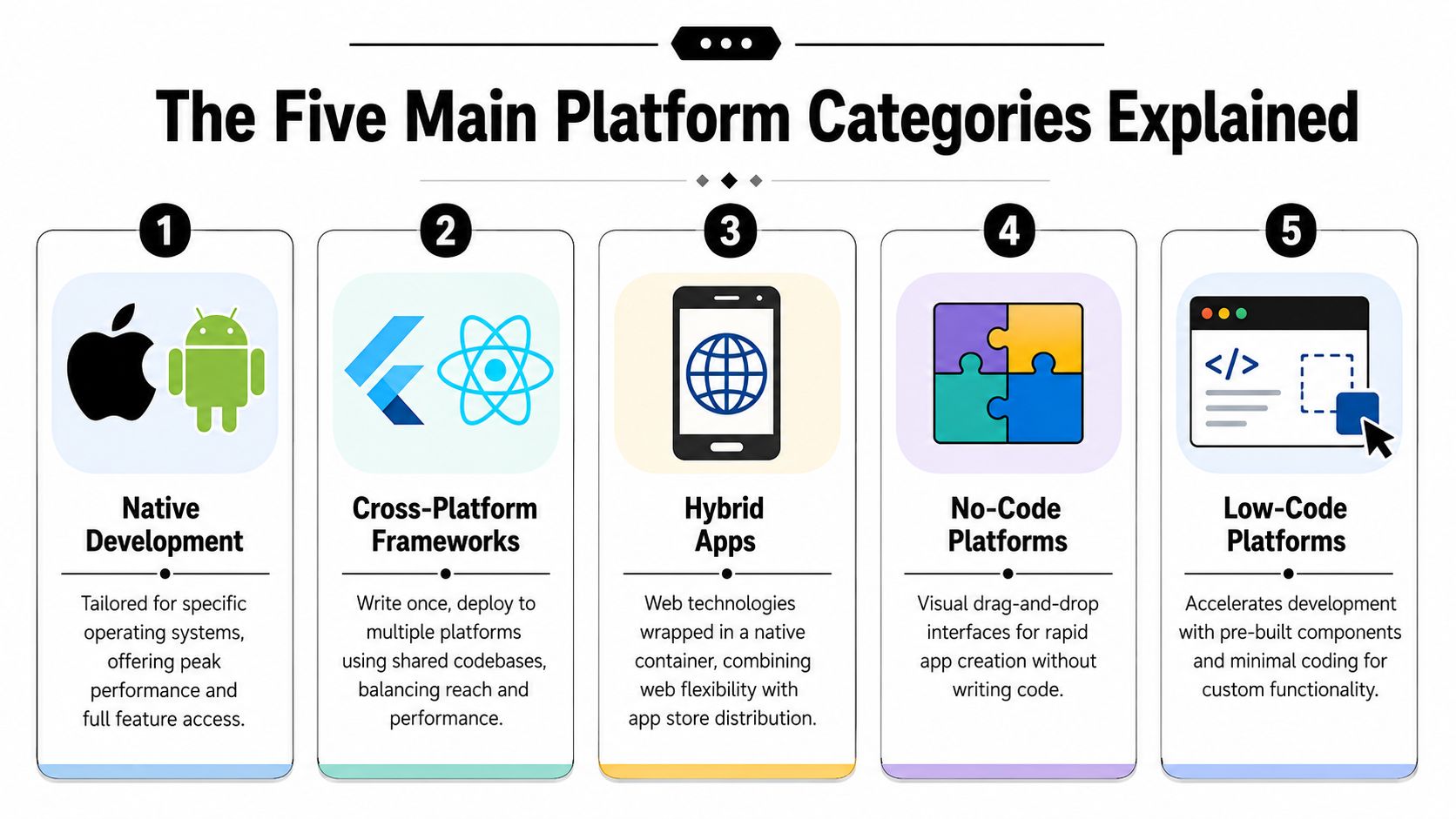
One technical trade-off shows up again and again. Native stacks such as Swift for iOS and Kotlin for Android give the strongest performance and the deepest access to device features. Cross-platform frameworks like React Native and Flutter often reduce build time for standard business apps because one team can share much of the codebase, as noted in Pixelfield's overview of mobile app tech stack trade-offs.
The more important strategic question is broader than category choice. Some teams should not build a new app at all. If the actual need is answering customer questions, routing requests, collecting structured inputs, or triggering back-office actions, an AI assistant or automation layer may solve the problem faster than a fresh mobile build. That option belongs in the shortlist before anyone commits to a platform.
Native platforms
Native development fits products where the mobile experience is part of the product value, not just the delivery channel. That usually means demanding interaction design, heavy use of phone hardware, strict responsiveness requirements, or platform-specific behavior that cannot feel compromised.
Examples include financial apps with advanced biometric flows, field service tools that depend on camera and sensor reliability, and consumer apps where performance issues hurt retention. The trade-off is straightforward. You are usually funding two codebases, two release cycles, and a hiring plan that is harder to maintain.
For a small business, native makes sense when mobile quality is tied directly to revenue, trust, or risk.
Cross-platform frameworks
Cross-platform frameworks are often the practical middle ground. They work well for customer apps and internal tools that need iOS and Android coverage without doubling delivery effort.
This category is usually a strong fit for:
- Booking and scheduling apps
- Client portals
- Membership or account dashboards
- Sales and field team workflows
- Apps driven by APIs, forms, and notifications
The compromise is real. Shared code gets you speed and lower cost, but edge cases still appear around platform-specific UI behavior, advanced device features, and long-term maintenance if the framework or plugin ecosystem shifts. Teams that want a clearer view of service options can compare app builder companies for different project types before choosing a stack.
Hybrid apps
Hybrid apps package web technology inside a native container. That can be enough for simple use cases where app store presence matters more than top-tier mobile interaction.
Used carefully, hybrid can be a cost-conscious option for catalog apps, basic customer accounts, event guides, or lightweight internal tools. Used carelessly, it creates a product that feels slow, awkward, or inconsistent on modern phones.
The problem is usually fit, not the category itself. Hybrid starts to struggle when the app needs polished motion, complex offline behavior, or reliable access to deeper device functions.
Progressive Web Apps
A PWA is often the fastest way to test whether users even want an app-like experience. It runs through the browser, can support install-style behavior on some devices, and avoids much of the app store approval process.
That matters more than many founders expect. If customer adoption is uncertain, sending people to a URL is easier than asking them to download an app, create an account, and enable permissions on day one.
PWAs are especially useful for:
- Self-service customer portals
- Appointment booking
- Order tracking
- Internal dashboards
- Temporary campaign or event experiences
They are less suitable when your roadmap depends on deep operating system integration or highly polished native interactions.
Low-code and no-code platforms
Low-code and no-code platforms are strongest when the business problem is process-heavy and the value comes from getting a usable system live quickly. Approval flows, data capture, service requests, case management, reporting dashboards, and partner portals all fit well here.
This is also the category where AI has changed the conversation. Many platforms now generate forms, workflows, data models, and basic logic from plain-language prompts. That speeds up delivery, but it does not remove the need for architecture decisions, access controls, audit trails, or integration planning. Someone still needs to own the operating model.
The main risk is constraint over time. A platform that feels fast in month one can become expensive or limiting when you need custom roles, unusual business rules, clean data portability, or tighter infrastructure control. Teams that expect serverless extensions or custom backend logic sometimes pair a low-code front end with targeted services such as deploy Passflow on AWS Lambda.
A practical comparison
| Category | Best fit | Watch out for |
|---|---|---|
| Native | Premium mobile products, deep device access, strict performance requirements | Higher build and maintenance cost, separate platform work |
| Cross-platform | Business apps that need iOS and Android quickly | Platform quirks, plugin dependency, some limits at the edges |
| Hybrid | Simple app-store presence for lightweight use cases | Weaker UX, performance issues if scope grows |
| PWA | Fast distribution, browser-first access, low-friction testing | Limited fit for deeper mobile features |
| Low-code or no-code | Internal tools, portals, workflow systems, rapid process digitization | Vendor lock-in, customization limits, governance gaps |
The right category depends on what the business is trying to change. In many cases, the best answer is not a bigger build. It is the smallest system that handles the job safely, at a cost the business can live with six months from now.
How to Choose the Right Platform for Your Project
A small business owner usually reaches this stage after a familiar sequence. A spreadsheet is breaking down, staff are chasing updates across email and WhatsApp, and someone says, “we need an app.” Sometimes that is correct. Sometimes the faster and cheaper answer is an AI assistant or workflow layer that handles the job without adding another product to maintain.
The first decision is strategic, not technical. Are you creating a persistent interface that people need to return to, or are you trying to remove manual work behind the scenes? That distinction rules out a lot of bad platform choices early.
Start with the business job
Write the requirement in plain language before comparing vendors or frameworks.
- customers need to book and reschedule appointments
- staff need to submit requests and get approvals
- sales needs a cleaner way to update deal records from email activity
- clients need to see project status without asking by email
That level of clarity changes the platform shortlist fast.
Build a new app when users need a place to log in, review status, complete repeat tasks, or work through a structured process. If the primary need is background task execution, system updates, inbox triage, or answering common requests, an automation tool or AI assistant may deliver the outcome with less cost and less operational overhead.
This is the question many teams skip. They compare Flutter, Bubble, Power Apps, and custom stacks before defining the job. That usually leads to overbuilding.
Match the platform to the way your team operates
Platform choice is really an operating model decision. The right option depends on who will own changes, how often the process will evolve, and whether the business can tolerate dependence on one technical person.
A no-code builder often fits a solo founder or very small team because it keeps maintenance simple. A low-code platform can work well for a small business with one capable technical lead who can manage integrations, permissions, and data structure. A stronger product or agency team can justify cross-platform frameworks, or a mixed model where the front end moves quickly but the backend logic stays under tighter engineering control.
I usually pressure-test this with one practical scenario. Six months after launch, who makes the change when pricing rules shift, a form needs approval logic, or a customer portal needs a new role? If every update becomes a developer ticket, the business has bought future delay along with the app.
Infrastructure fit matters too. If your process needs event-driven backend logic without a heavy server footprint, it helps to review options such as how to deploy Passflow on AWS Lambda and decide whether that logic belongs inside the app platform or outside it.
Check total cost after launch
Demos sell speed. Real cost shows up later in edits, integrations, user management, and support.
Before committing, ask:
- Who can maintain it day to day? A platform that only one specialist can edit creates risk.
- How much integration work is required? CRM, payments, email, storage, and support systems usually matter more than the template gallery.
- What happens if the process gets more complex? Custom roles, approval chains, data rules, and reporting often expose platform limits.
- Can you move your data and logic later? Export options, API access, and architectural openness affect your exit cost.
- How does pricing scale? Seat-based, usage-based, and active-user pricing can look cheap early and painful later.
For a more structured vendor review, this guide on how to evaluate app builder companies is useful because it focuses on selection criteria rather than product screenshots.
One more check is worth making before any build starts. Ask whether the business goal requires a new app at all. Internal request handling, knowledge retrieval, lead qualification, appointment coordination, and routine customer support can sometimes be handled faster with AI automation connected to the systems you already use. In those cases, the best platform decision may be to build less.
A short visual primer can also help when you're weighing these trade-offs in a team discussion:
Navigating Security and Compliance Requirements
A fast build that creates a compliance problem isn't a win. It's deferred risk.
This matters even more in the UK, where cloud software sits at the centre of operations. The UK government's spending on cloud services reached £1.8 billion in 2023/24, and the Data (Use and Access) Act 2025 is reshaping how organisations need to think about data handling, retention, and exportability, as noted in WeWeb's discussion of no-code app builder compliance issues.
The questions that matter before procurement
Small businesses often ask whether a platform is “secure”. That's too vague to be useful. Ask narrower questions that reveal how the vendor operates.
- Where does data live? Data residency affects contracts, customer expectations, and internal governance.
- How is access controlled? Role-based permissions, SSO, and audit logs matter more than polished dashboards.
- What happens if you leave? Exportability and migration paths reduce long-term dependency.
- How are backups and retention handled? You need to know what's stored, for how long, and how deletion requests are managed.
- Can the platform support your compliance workflow? Consent handling, auditability, and access reviews should not be improvised later.
What small teams often miss
The biggest mistake isn't choosing a platform with weak security branding. It's choosing one that makes governance awkward in day-to-day use.
A platform can have acceptable security controls on paper and still be a poor fit if:
- staff share logins because permissions are clumsy
- audit trails are hard to access
- exports are messy
- environment separation is weak
- vendor support can't answer basic data-processing questions clearly
For mobile projects, it helps to review a practical checklist rather than relying on abstract assurances. The Spaceport iOS security checklist is a useful example of the sort of concrete review points teams should bring into procurement conversations.
Security review should start before build selection, not after the pilot is already live.
For regulated or client-sensitive workflows, I'd treat compliance fit as a first-round filter. If a platform can't explain data processing, retention controls, and migration options clearly, it shouldn't make the shortlist.
Beyond Building Accelerate with AI Automation
Some business problems look like app problems when they're really coordination problems.
A sales manager says they need an app to chase leads. An operations lead asks for a dashboard to move tasks between teams. A founder wants a custom portal just to collect updates from several tools in one place. In many of these cases, the actual need isn't another interface. It's reliable action across existing systems.

The strategic context has shifted. The Office for National Statistics reported that 30% of UK businesses were using some form of AI in 2024, and that changes the question buyers should ask. Instead of only asking which platform can build an app, teams should ask whether an AI agent can execute the workflow without the overhead of building and maintaining a new app, as discussed in Ideaproof's note on no-code ideas and AI adoption.
When a new app is the wrong answer
If users don't need a destination screen, a new app can be unnecessary baggage.
A few examples:
- lead qualification can happen from inbound email plus CRM rules
- weekly status reporting can pull from docs, tickets, and chat automatically
- follow-up sequences can run from customer activity without a separate dashboard
- account updates can sync between tools without asking staff to log into another system
These are operational workflows. They need orchestration, context, and actions. They don't always need a standalone product.
Where AI assistants fit
AI automation assistants come into play. Instead of asking people to open a custom app and perform routine updates, the assistant connects tools that already hold the work. Email, Slack, CRM, cloud storage, support systems, and documents become the operating surface.
The useful distinction is simple:
| Need | Better fit |
|---|---|
| Persistent customer or staff interface | App development platform |
| Repeated actions across existing tools | Automation or AI assistant |
| Structured portal with forms and permissions | Builder or low-code platform |
| Context-driven task execution behind the scenes | AI agent |
One option in this category is Zenfox API connections, which supports linking named tools and external APIs so workflows can act across systems rather than creating another isolated interface. That approach is often more practical for internal operations than launching a separate app no one wants to maintain.
If you're evaluating agent-based workflows, testing becomes a separate discipline. The Monito AI testing documentation is useful for thinking through reliability, monitoring, and edge cases before you let an agent touch production processes.
A new interface creates work. Good automation removes it.
The main decision point is whether your team needs software people interact with, or software that operates in the background. That sounds obvious, but it's the difference between a platform project and an automation strategy.
Real-World Use Cases and Your Next Steps
Abstraction makes software buying harder than it needs to be. Concrete scenarios make the trade-offs clearer.
Five common scenarios
A local service business needs customers to book appointments, upload details, and check status. That points toward a lightweight customer-facing web app or PWA. The key requirement is simple access, not deep mobile hardware integration.
A growing startup wants one mobile app for staff across iPhone and Android. The workflows are mostly forms, internal updates, and notifications. Cross-platform development usually fits this shape well because the business gains speed and a single delivery track.
A consultancy needs an internal approvals system for project spend, leave requests, and handoffs. A low-code platform often works well because non-engineers can help maintain the workflows after launch.
A product company wants a premium consumer mobile experience with tight animation, device-specific behaviour, and very polished interaction design. That's where native development earns its cost.
A sales and operations team thinks it needs an “internal app”, but the underlying pain is scattered action across Gmail, Slack, HubSpot, docs, and reporting. That's often a sign to use automation or an AI assistant rather than building another interface.
A sensible next move
The safest way to choose is to start smaller than your ambition.
- Pick one workflow: Not the whole business.
- Define one user group: Customers, staff, managers, or partners.
- Measure operational usefulness qualitatively: Does it remove confusion, manual copying, or bottlenecks?
- Plan for migration early: Know how data, logic, and integrations could move later if needed.
A good pilot is narrow, visible, and mildly annoying if it fails, not catastrophic. That gives you room to learn where complexity sits. In my experience, teams make better platform choices once they've tested one live workflow than after weeks of feature comparison spreadsheets.
Frequently Asked Questions
What's the difference between an app development platform and a framework
A framework is usually a developer toolset for writing software. An app development platform typically includes more of the delivery stack, such as visual building, data connections, authentication, deployment support, and workflow logic.
Are no-code platforms only for simple apps
No. They're often strong for internal tools, portals, dashboards, and process-based applications. The fundamental limit isn't whether the app is “serious”. It's whether the platform's abstraction fits the level of custom behaviour you need.
How should I think about vendor lock-in
Treat lock-in as a practical risk, not a reason to reject every platform. Check export options, API coverage, custom code support, deployment flexibility, and how easy it is to move your data and business logic later.
Is cross-platform always better for small businesses
Not always. It's often a good fit when you need iOS and Android coverage quickly, but if your app needs highly specialised performance or device behaviour, native may still be justified.
When should I use an AI assistant instead of building an app
Use an AI assistant when the goal is to execute recurring work across existing systems rather than create a new place for users to log in. If the business need is action, not interface, automation may be the cleaner answer.
What should I ask a vendor in the first meeting
Ask where data is stored, how permissions work, what export looks like, how changes are tested, and who inside your team will realistically maintain the system after launch.
If you're deciding between building a lightweight app and automating the workflow instead, Zenfox.ai is worth evaluating as part of that decision. It's an AI automation assistant that connects tools like Gmail, Slack, HubSpot, and Drive, can generate instant internal apps when needed, and can also execute work across your stack without forcing you to build and maintain a full standalone application.