AI Call Centre: A 2026 Guide for Small Teams
Discover what an AI call centre is and how to implement one. This 2026 guide covers benefits, security, and a roadmap for small UK businesses and freelancers.
You're probably dealing with some version of the same problem most small teams face. The phone rings while you're on a client call. A customer leaves a voicemail asking a question you've answered ten times this week. Someone else emails because nobody picked up. By the time you reply, the moment has passed and the customer is already annoyed.
That's where an AI call centre starts to matter. Not as a flashy replacement for people, and not as an enterprise project that takes months to launch. For a small business, freelancer, or lean support team, it's a practical way to stop losing time to repetitive calls, missed context, and manual admin. Done well, it handles the obvious questions, routes the messy ones properly, and keeps records organised without needing a full IT department.
Table of Contents
- What Is an AI Call Centre and Why Should You Care
- The Core Capabilities of Modern AI Call Centres
- Understanding the Technical Architecture
- Business Benefits and Key Performance Indicators
- An AI Call Centre Roadmap for Small Teams
- Navigating Security and UK Compliance
- Your Vendor and Implementation Checklist
What Is an AI Call Centre and Why Should You Care
A traditional small-business phone setup usually works like this. A customer calls. They hit a generic voicemail, or they reach the wrong person, or they explain the issue twice because nobody has the previous context. The customer experiences friction. Your team experiences interruption.
An AI call centre fixes that by adding intelligence around the call, not just during it. It can answer routine questions, recognise intent, route calls based on the issue, assist the human handling the conversation, and log what happened after the call ends. For a small team, that matters because the bottleneck usually isn't call volume alone. It's the constant switching between talking, searching, typing notes, and following up later.
The market signals are clear. The UK customer service software market was valued at about US$1.1 billion in 2024 and is projected to reach US$2.4 billion by 2030, while a 2024 survey found that voice authentication and process automation were each used by 37% of respondents, and speech analytics by 36%, showing that these tools are already in real operational use rather than sitting in pilot mode, according to CMSWire's call centre statistics roundup.
That's why small teams shouldn't dismiss this as “big company tech”. The parts that matter most are often the simplest ones.
- Missed-call protection: Basic queries can be answered even when you're busy.
- Less repetition: The system can capture the customer's reason for calling before a human joins.
- Cleaner follow-up: Summaries and tags stop details getting lost.
- Better use of people: Staff spend more time on exceptions, complaints, and sales conversations.
If you're comparing approaches, it helps to look at how AI customer support agents are being used across voice and digital support. The useful pattern is consistent. Automate the repeatable work first, and keep humans on the calls where trust, judgement, or negotiation matter.
An AI call centre is most useful when it removes admin and confusion, not when it tries to sound clever.
The Core Capabilities of Modern AI Call Centres
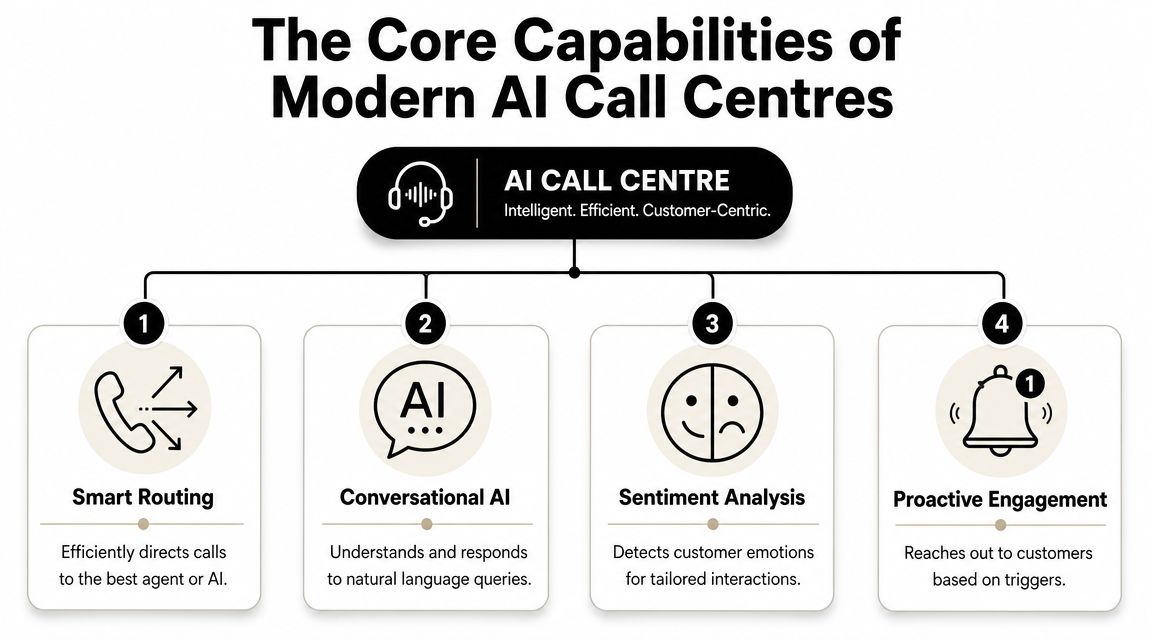
The fastest way to understand an AI call centre is to stop thinking of it as one tool. It's a stack of capabilities working together. Some face the customer directly. Others work in the background and save your team from manual cleanup.
A simple visual helps frame that stack.
Smart routing replaces rigid phone trees
Old IVRs ask callers to press numbers and hope they choose the right path. Smart routing behaves more like a receptionist who listens. It looks at what the caller wants, sometimes how urgent it sounds, and where that issue should go.
For a small business, this is often the first meaningful improvement. Instead of sending every caller into one shared inbox or one overloaded phone line, you can direct billing questions, appointment changes, urgent support issues, and sales calls to different outcomes.
A practical setup usually includes:
- Intent capture: The system asks what the customer needs in plain language.
- Priority handling: Known customers, repeat complaints, or urgent issues can be sent to the front of the queue.
- Skill matching: Calls go to the person most likely to resolve them, not just whoever is free.
Conversation handling and live support
The second capability is conversational AI. This is the part that can answer common questions, collect information, or complete simple workflows without a person stepping in. On its own, that's useful for opening hours, booking checks, basic order queries, and repeat FAQs.
The third is agent assist. This matters more than many buyers realise. Think of it as a digital supervisor feeding the agent the right details while they're still speaking to the customer. It can pull up history, suggest next steps, and reduce the need to search five different systems mid-call.
A strong speech layer is part of that. If you're evaluating vendors, it's worth reviewing examples of AI-powered CX transcription because accurate transcription is what makes summaries, searchable calls, and QA possible at scale.
Here's the operational shift that changes management, not just customer experience. AI can review 100% of call transcripts instead of the small manual samples many teams rely on, and manual QA often reviews only 2% of interactions, as described in Zendesk's overview of call centre software.
That has direct consequences:
| Capability | What it changes day to day |
|---|---|
| Smart routing | Fewer transfers and less caller repetition |
| Conversational AI | Routine calls don't consume staff time |
| Agent assist | Staff spend less time searching and typing |
| Full-call QA | Managers can spot issues across all interactions, not a tiny sample |
The customer-facing side gets most of the attention, but backend automation is often where the immediate savings are. Post-call summaries, CRM updates, task creation, and tagging remove a lot of low-value work that small teams tolerate because they assume it can't be automated.
A short demo is useful if you want to see how these pieces fit together in practice.
Practical rule: Start with summarisation, QA, and routing before you try full voice automation. Those layers improve operations quickly and create cleaner data for everything that comes next.
Understanding the Technical Architecture
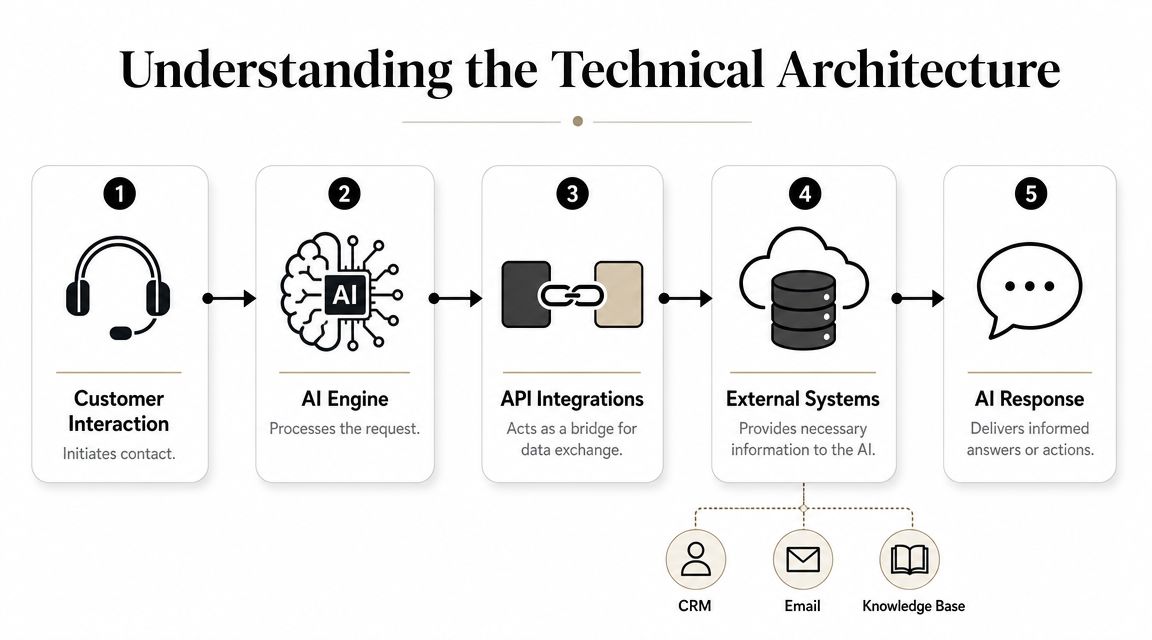
Most AI call centre failures aren't caused by the model. They happen because the system has no reliable context. If the caller's history lives in a CRM, past promises sit in email, product notes are buried in Drive, and call transcripts are stored somewhere else, the AI can't make good decisions consistently.
That's why architecture matters more than the demo.
Why integration decides whether the AI is useful
An effective AI call centre needs a unified customer data layer. NICE describes unified data as the core of an AI-based call centre, and its guidance makes the key point plainly: if customer records, transcripts, and case history are fragmented, the system can't reliably detect intent or automate workflows. That's covered in NICE's guide to revamping customer service with AI call centre design.
For a small team, that means the AI should be able to pull from:
- Your CRM, such as HubSpot, to identify the customer and account status
- Your inbox, such as Gmail, to understand recent promises or unresolved threads
- Your knowledge base, such as Google Drive or internal docs, to answer accurately
- Your ticket or task system, so follow-up actions don't vanish after the call
When those systems connect properly, the AI behaves like it has memory. When they don't, it behaves like a stranger on every call.
What the plumbing looks like in practice
The underlying mechanics are simple enough. APIs act as bridges between the phone layer and the rest of your tools. A caller speaks. The voice layer transcribes and interprets the request. The AI checks connected systems for identity, history, and next-step logic. Then it either answers, routes, or assists a human with context already assembled.
For distributed teams, the telephony side may sit on cloud infrastructure rather than old on-site hardware. If you're assessing options there, this overview of PBX hosting for virtual call centers is a useful reference point for how hosted voice systems fit into a modern setup.
A good architecture usually has these traits:
- One customer identity source so the same person isn't duplicated across tools.
- Shared interaction history across voice, email, and chat.
- Searchable transcripts and notes that can inform future routing.
- Action logging so a manager can see what the system did and why.
In healthcare-adjacent use cases, the transcription layer becomes even more sensitive because accuracy and data handling intersect. That's why design patterns from areas like medical speech recognition are useful even outside clinical settings. They force you to think about context, auditability, and error handling before you automate anything customer-facing.
A platform approach is often the practical answer for a small team. Tools such as HubSpot, Aircall, Dialpad, Intercom, and Zenfox.ai can play different roles here. Zenfox.ai is relevant when the hard part isn't just answering a call, but connecting Gmail, Slack, HubSpot, Drive, and other systems so the workflow after the call occurs without manual chasing.
If your AI can't see the same customer record your staff sees, it won't improve service. It will only automate confusion.
Business Benefits and Key Performance Indicators
A lot of AI call centre buying decisions go wrong because teams talk about features instead of outcomes. The better question is simpler. Which metrics should improve if the system is doing useful work?
The answer depends on where you start. If your team loses time on note-taking, summaries matter. If callers bounce between people, routing matters. If you have inconsistent service quality, full-call review matters.
The KPIs that actually move
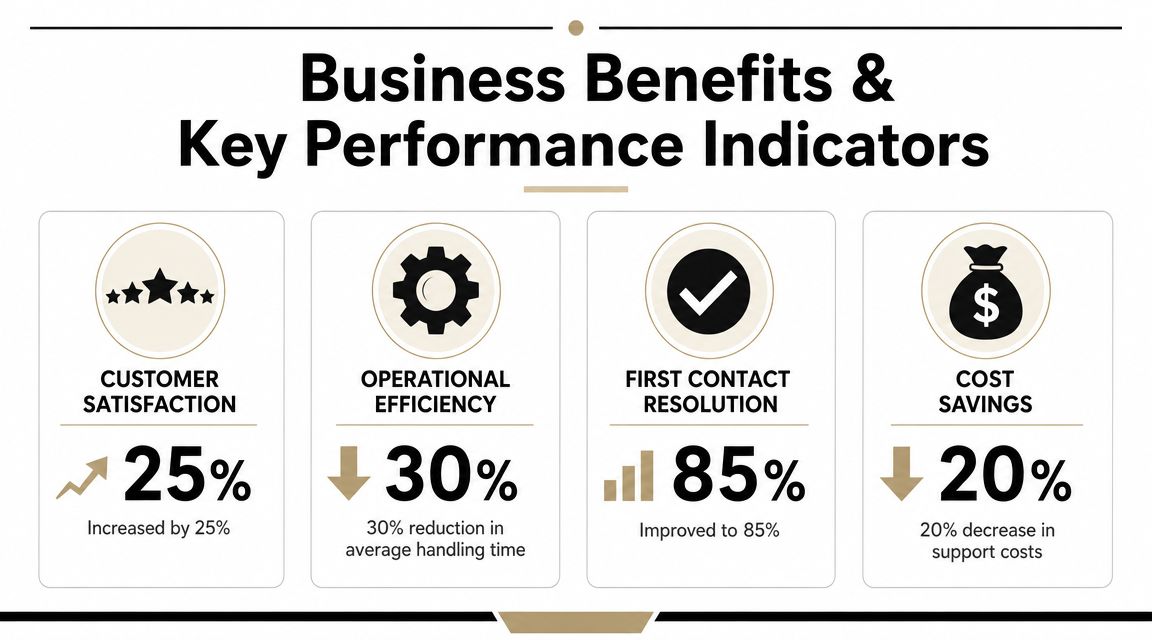
For most small teams, four indicators tell the story.
| KPI | What usually improves it | What to watch for |
|---|---|---|
| Average Handle Time | Auto-summaries, faster information retrieval | Shorter calls that still require repeat contact |
| First-Call Resolution | Better routing and richer context | Transfers caused by bad handoff logic |
| Customer Satisfaction | Faster answers for simple issues | Robotic flows that frustrate callers |
| Wrap-up workload | Automated notes and CRM updates | Inaccurate summaries that need editing |
What matters is the mechanism behind each one. If AI writes the summary and updates the record, staff finish the interaction faster and spend less time on admin. If the system routes correctly using context, the caller reaches the person who can resolve the issue sooner. If common questions are answered immediately, customers don't wait for a callback that never needed a human in the first place.
How to judge return without guessing
Don't promise sweeping transformation in month one. Measure before and after on a narrow slice of work.
A sensible scorecard for a small team includes:
- Call-handling friction: Are staff still switching between multiple apps during one interaction?
- Repeat contact patterns: Are customers calling back because the first conversation didn't solve the issue?
- After-call burden: How much manual typing happens once the customer hangs up?
- Manager visibility: Can someone spot coaching, compliance, or process problems quickly?
One practical way to think about it is through workflow removal, not just headcount reduction. A capable system should shrink the number of micro-tasks around each interaction. That means fewer notes to write, fewer fields to update, fewer follow-up reminders to set, and less detective work before the next customer call.
If you want to extend that beyond telephony, guides on AI automation services are useful because the actual return often appears when call handling is linked to email follow-up, CRM hygiene, internal alerts, and task creation rather than treated as a standalone voice project.
A small business usually feels AI value first in cleaner operations, then in faster service, and only later in labour efficiency.
An AI Call Centre Roadmap for Small Teams
Most small teams shouldn't start by giving AI full control of the phone line. That's the expensive, risky route. The better approach is phased adoption, where each step earns trust and creates better data for the next one.

Phase one starts outside the phone line
Begin with the work around customer service, not the live conversation itself. Through this approach, small teams get quick wins without changing the customer experience too abruptly.
Start with tasks like these:
- Email triage: Auto-label common requests, draft replies, and route urgent messages.
- Internal summaries: Turn customer messages or meeting notes into action lists for Slack or your task manager.
- CRM hygiene: Update records automatically after inbound enquiries.
- Knowledge retrieval: Let staff search past emails, documents, and notes from one place.
This phase matters because it exposes where your data is messy. Duplicate contacts, outdated help docs, and inconsistent case notes become obvious fast. Fixing that before voice automation saves a lot of pain later.
A practical reference for this kind of progression is how to automate customer service, especially for teams that don't have developers available to stitch tools together.
Phase two adds customer-facing automation
Once the internal workflows are working, add AI where the customer first arrives. For many teams, that's a web chatbot or messaging assistant before it's a voicebot.
This stage is good for:
- FAQs and basic account queries
- Appointment or booking changes
- Lead capture and qualification
- Out-of-hours support
Keep the scope tight. If the bot can answer accurately from your own policies and documents, let it. If it hits uncertainty, hand off quickly.
A common mistake is trying to make the system sound human before it's useful. Accuracy, escalation logic, and record-keeping matter more than personality.
Phase three brings AI into live calls
Only after the first two phases are stable should you move into phone automation. At this point, you already have cleaner data, documented intents, and a better sense of what customers ask repeatedly.
A low-risk rollout usually looks like this:
- Stage one: AI captures the reason for the call and routes it.
- Stage two: AI assists the agent during the call with context and suggested actions.
- Stage three: AI handles narrow, repeatable call types on its own.
- Stage four: Managers review transcripts, summaries, and escalations to refine the flows.
Use guardrails from the start.
| Deployment choice | Good candidate | Poor candidate |
|---|---|---|
| Full automation | Opening hours, booking status, simple policy questions | Complaints, vulnerable customers, disputed charges |
| AI assist | Sales screening, support triage, routine service interactions | Sensitive legal or medical judgement calls |
| Human-first with AI support | Renewals, complaints, account changes | Cases where the customer explicitly resists automation |
Small teams do better when they treat an AI call centre as an operational system, not a voice gimmick. Every phase should answer one practical question: did this remove real work without creating new risk?
Navigating Security and UK Compliance
In the UK, the hardest part of an AI call centre isn't getting it to answer. It's deciding where automation must stop.
That matters because voice systems sit close to sensitive data. Customers disclose names, addresses, account details, health information, payment issues, and complaints. If your design is sloppy, the phone becomes a fast way to mishandle personal data at scale.
The compliance backdrop is serious. The ICO reported 1,235 personal data breaches in Q3 2025, and sectors such as finance and health remain especially sensitive when personal data, identity checks, and call recording are involved, as highlighted in Zendesk's discussion of AI call centre compliance and productivity.
What AI should not do automatically
For small businesses, this is often the key design question. Not “what can be automated?” but “what should never be left to an unattended flow?”
Examples usually include:
- Complaint resolution: AI can log and classify a complaint, but a person should usually own the outcome.
- Vulnerability signals: If someone sounds distressed, confused, or financially exposed, escalation should be immediate.
- High-risk identity decisions: Don't let a brittle workflow make final calls on sensitive account access.
- Consent-sensitive actions: Recording, summarising, and storing calls must line up with your legal basis and notices.
In regulated work, the safest automation often does the preparation and the documentation, while a human makes the judgement call.
Controls small teams need from day one
You don't need an enterprise compliance department to behave responsibly. You do need a shortlist of controls that are absolutely essential.
- Clear consent handling: Callers should understand recording and data use where required.
- Encryption and access control: Customer data shouldn't be casually accessible across the team.
- Audit trails: You need a record of what the AI did, what data it touched, and when a person intervened.
- Escalation rules: Sensitive triggers must move the interaction to a human quickly.
- Data minimisation: Don't capture or retain more than you need.
For UK teams, GDPR alignment has to shape the workflow at design time. Retrofitting privacy later is where projects become expensive. The safer path is to choose tools that already support strong access controls, logging, encryption, and controlled integrations so customer data isn't being copied into random services without oversight.
Your Vendor and Implementation Checklist
Choosing an AI call centre vendor is less about impressive demos and more about operational fit. Small teams should buy for control, integration, and reversibility.
Use this checklist before you sign anything:
- Integration fit: Does it connect to the tools you already use, such as Gmail, Slack, HubSpot, calendars, and document storage, without custom development?
- Data model: Can it work from one reliable customer record, or will it create yet another silo?
- Escalation control: Can you define which call types must always go to a human?
- Auditability: Can you review transcripts, actions, summaries, and handoffs later?
- Security posture: Does the vendor support GDPR-aligned handling, strong encryption, access controls, and clear retention settings?
- Usability for non-technical teams: Can someone on your team adjust workflows without filing tickets to a developer?
- Phased rollout: Can you start with summaries, routing, or follow-up automation before turning on full conversational handling?
- Fallback behaviour: If the AI is uncertain, does it fail safely and hand off cleanly?
A good implementation plan is just as important as the software. Pick one workflow first. Keep the scope narrow. Review the transcripts and outputs. Fix the gaps. Then expand.
The right system for a small team usually isn't the one with the longest feature list. It's the one that fits your current stack, respects your compliance boundaries, and removes real admin without forcing you into a complex rebuild.
If you want to build an AI-driven support workflow without hiring an ops team, Zenfox.ai is worth a look. It connects tools like Gmail, Slack, HubSpot, and Drive, creates context across customer interactions, and automates follow-up work, record updates, and internal coordination with auditability and security built in.