Claude AI vs ChatGPT: The 2026 UK Pro's Guide
Claude AI vs ChatGPT: Which is better for UK pros & teams? Our 2026 guide compares performance, pricing, security, and automation with tools like HubSpot.
Your inbox is full, HubSpot is half-updated, Slack has buried the client decision you need, and Friday's pipeline report still isn't written. You already know AI can take a lot of this off your plate. The harder question is which model you should trust as the engine behind those workflows.
That's where most UK professionals get stuck. ChatGPT is the default choice because it's everywhere. Claude is the one people switch to when they hit the limits of generic outputs, messy long-document work, or compliance-sensitive tasks. If you're choosing a model for actual business operations, not just chat, the wrong decision creates friction fast. Your follow-ups drift. Your summaries flatten nuance. Your automations need babysitting.
This claude ai vs chatgpt comparison is for that decision. Not which one is more famous. Which one is better to build around if you run sales, marketing, client delivery, or solo consulting work in tools like Gmail, Slack, and HubSpot.
Table of Contents
- Choosing Your AI Copilot in 2026
- Understanding Their Core AI Philosophies
- Model Capabilities and Performance Face-Off
- Analysing Price and Value for UK Professionals
- Automation Power and API Integration
- Navigating Security and UK Data Compliance
- The Verdict Which AI for Your Workflow
Choosing Your AI Copilot in 2026
It is 8:45 on a Monday. A lead has replied after a week of silence, three client emails need a response, Slack is full of internal questions, and HubSpot still has half-complete records from Friday. In that moment, the better AI model is not the one that sounds sharper in a chat window. It is the one that can sit inside your working day, produce usable output fast, and avoid creating extra review work.
For UK freelancers, consultants, and small teams, that is the primary buying test. Can the model pull the right details from a long email thread, draft a follow-up that fits your tone, update HubSpot fields correctly, and keep enough context to avoid careless errors? If it saves 10 minutes writing a draft but adds 20 minutes of checking, it is the wrong copilot.
A common early mistake is comparing apps before comparing the model behaviour underneath them. If you're already weighing workflow design against conversational AI, this breakdown on choosing between Salesmotion and ChatGPT is useful because it separates a workflow product from a model product. That distinction matters if you plan to build automations across HubSpot, Slack, Gmail, or Notion rather than use AI as a standalone assistant.
Provider choice also has a practical effect on cost and flexibility. If you want to avoid rebuilding prompts, routing logic, and approval steps every time pricing or model quality shifts, it helps to plan for model provider platform independence before you commit your process design to one vendor.
In practice, the decision usually comes down to correction cost. Claude often suits workflows where precision, long context, and careful wording matter, such as client summaries, proposal drafting, internal research notes, and compliance-sensitive writing. ChatGPT often suits workflows where speed, breadth, and format range matter more, such as campaign drafting, brainstorming, sales enablement content, and mixed text plus image tasks.
That trade-off matters more in automation than in chat.
| Decision area | Claude | ChatGPT |
|---|---|---|
| Best fit | Deep research, long context, precise business logic | Fast drafting, broad ideation, multimodal tasks |
| Typical strength | Careful handling of nuanced instructions | Flexible output across many everyday use cases |
| Typical weakness | Can feel restrained in creative work | More likely to drift into generic or flattened output |
| Better for | Solo professionals, compliance-aware work, complex automations | Marketing throughput, quick content, broad experimentation |
| Default recommendation | Choose when accuracy matters more than speed | Choose when versatility matters more than precision |
Bottom line: if AI will sit inside your workflow, choose the model that creates the least cleanup in HubSpot, the fewest clarification loops in Slack, and the lowest compliance risk for your UK business.
Understanding Their Core AI Philosophies
The behavioural gap between Claude and ChatGPT starts before the first prompt. These systems are optimised differently, and that difference shows up in how they handle ambiguity, risk, and instruction-following.

Claude tends to act like a cautious operator
Claude is widely associated with Constitutional AI, which pushes the model toward internally guided safety and clearer behavioural boundaries. In practice, that usually means it's more careful with edge cases, less eager to overstate, and better at saying “this needs a tighter instruction” instead of bluffing through uncertainty.
That caution can be an advantage in business workflows. If you're asking a model to analyse a long client history, distinguish between speculation and fact, or preserve nuance in a compliance-sensitive draft, restraint is useful. You don't want a model that confidently smooths over missing details.
The trade-off is creative looseness. Claude often gives the impression that it wants to stay inside the rails. For consultants, analysts, and operators, that's often a positive. For campaign ideation, it can feel narrower.
ChatGPT behaves more like a helpful generalist
ChatGPT is typically associated with reinforcement learning from human feedback, where human preference signals shape what the model learns to produce. The practical effect is obvious once you use it regularly. It tends to be more engaging, more expansive, and more willing to keep the interaction moving.
That's why so many teams like it for first-draft work. It brainstorms fast, handles mixed-format requests well, and usually gives you something usable even from a rough prompt. In day-to-day marketing and general operations, that can be a big productivity win.
When a prompt is fuzzy, ChatGPT often fills in the gaps. Claude is more likely to preserve the ambiguity. That single difference explains a lot of their real-world behaviour.
Why this matters in automation
Automation punishes charming errors. A creative wrong answer inside a blog draft is annoying. A creative wrong answer inside a CRM workflow is expensive.
If you ask a model to summarise a deal thread, classify objections, and prepare the next action, the underlying philosophy matters more than the interface. Claude usually behaves like a model trying not to overreach. ChatGPT usually behaves like a model trying to be broadly useful. Neither approach is universally better. But once the output starts triggering actions in your stack, caution often ages better than flair.
Model Capabilities and Performance Face-Off
A UK sales manager building a HubSpot workflow does not need abstract claims about which model is "better". They need to know which one is less likely to misread a deal thread, miss a condition in the brief, or produce output that creates extra review work.
Reasoning and multi-step business tasks
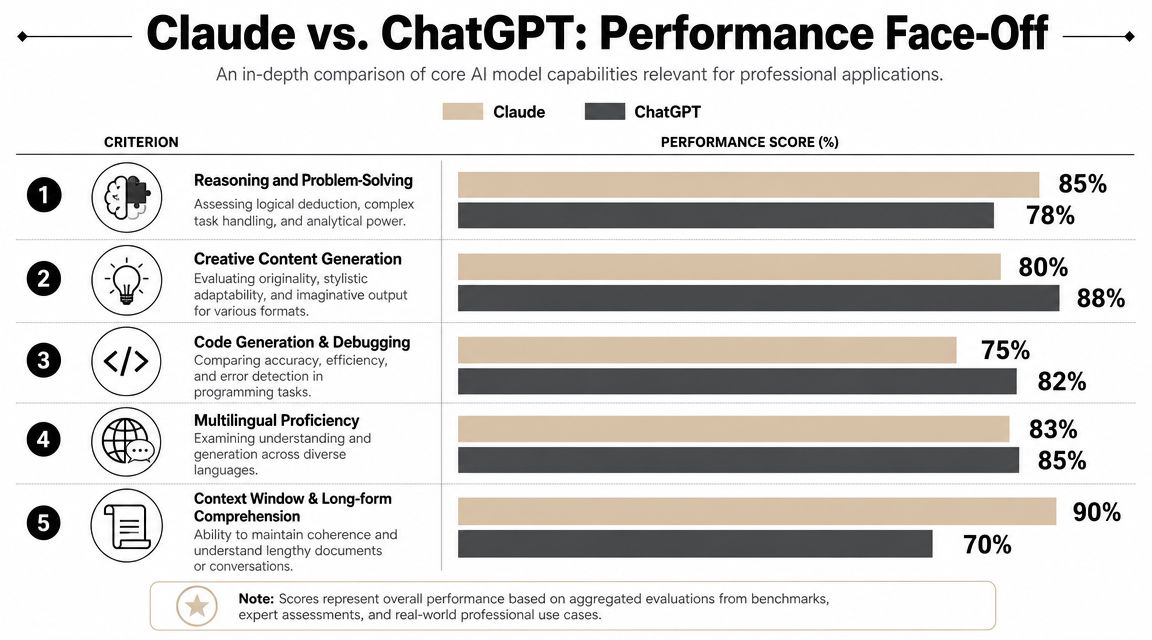
For workflows with dependencies, Claude currently looks stronger. On the OSWorld-UK benchmark, Claude 4.6 Sonnet scored 72.5% on complex automations versus 61.4% for ChatGPT GPT-5.4, an 18.2% advantage, according to Nexos.ai's benchmark analysis.
That benchmark is relevant because it maps to real work. It reflects the kind of chained tasks small UK teams run, such as pulling deal data from HubSpot, summarising the state of an opportunity, drafting the next follow-up, and logging the outcome in Slack or a project tool. In those workflows, one weak step can spoil the whole sequence.
Claude is usually the safer choice when a task has rules, exceptions, and prior context that must stay intact. That applies to sales handover notes, meeting summaries that trigger follow-up actions, and internal operations prompts where a wrong assumption creates rework.
Writing quality and content production
ChatGPT still earns its place in content teams. It is often faster at generating angles, alternate headlines, short-form campaign copy, and rough first drafts from incomplete prompts.
That makes it useful for marketers who need momentum.
Claude tends to hold structure better across denser source material. If the input includes interview transcripts, research notes, proposal history, or regulated messaging that needs a more careful tone, it usually requires less cleanup. For small agencies and solo consultants billing by the hour, that difference affects margin more than headline model quality.
If your team is building an editorial engine around pillar pages, repurposing, and topical depth, this guide on how to build AI authority with content hubs shows how model choice shapes the publishing process, not just the draft itself.
Long context and document-heavy workflows
Claude still has the clearer edge in document-heavy work, as noted earlier in the article. In practice, that shows up when the source material is a long client email chain, a month of call transcripts, onboarding notes, policy text, and account history that all need to be reconciled into one output.
For UK professionals, that is not a niche case. It is normal workflow reality.
A recruiter screening candidate conversations, a consultant reviewing discovery notes, or a small sales team preparing renewal summaries will usually get more reliable output from the model that keeps context stable over longer inputs. That is also where AI automation services for small teams start to pay off, because the savings come from reducing manual stitching and review, not just generating text faster.
Multimodal range and day-to-day speed
ChatGPT remains the broader generalist. If the work moves quickly between text generation, light spreadsheet help, image-related requests, formatting, and quick-turn answers in Slack, it often feels more flexible across the day.
That flexibility has real value for lean marketing teams.
If one person is handling campaign drafts, CRM housekeeping, sales collateral tweaks, and internal documentation, ChatGPT can cover more task types in one place. Claude can do a lot of that work too, but its strongest use case is still disciplined output over messy source material rather than breadth for breadth's sake.
A practical split works well:
- Choose Claude for long briefs, multi-step automation logic, research synthesis, policy-aware drafting, and document-heavy analysis
- Choose ChatGPT for campaign ideation, quick CRM notes, broad content generation, multimodal tasks, and fast creative iteration
- Use both if your business runs two clear lanes, deep operational workflows in HubSpot or internal knowledge work on one side, and high-volume marketing output on the other
For UK buyers, the decision should come down to review burden, GDPR sensitivity, and where errors are most expensive. If the model is feeding client-facing copy, both can work. If the model is feeding process automation, Claude usually holds up better under pressure.
Analysing Price and Value for UK Professionals
Sticker price matters less than correction cost. A cheaper subscription isn't cheaper if you spend extra time cleaning up drafts, checking CRM entries, or rewriting summaries that missed the point.
For UK buyers, the clearest published comparison in the verified data is straightforward. Claude Pro is listed at £18 per month and ChatGPT Plus at £16 per month, with Claude showing 30% higher task completion rates on long-context workflows for UK freelancers, while ChatGPT Plus offers broader multimodal capability, according to Emergent's comparison.
What that means in day-to-day work
If you're a solo consultant, researcher, recruiter, or fractional operator, that extra depth can justify the price difference quickly. Your week is usually full of tasks where the context is sprawling and messy. You aren't just generating text. You're reconciling old threads, client history, meeting notes, and commercial nuance into one output that has to be right enough to send.
If that sounds like your reality, the subscription decision is less about monthly software cost and more about whether the model reduces rework. Teams considering done-for-you setups often start by comparing AI automation services because the actual spend usually sits in workflow design and review time, not the model fee itself.
Where ChatGPT gives better value
ChatGPT often wins on value when one person wears several hats and needs one tool to do many decent jobs. A marketing lead who wants quick campaign hooks, email drafts, rough outlines, ad variants, and lightweight analysis may get more mileage from ChatGPT's versatility than from Claude's depth.
That's the important distinction. ChatGPT can be the better value without being the more precise model.
| Buyer type | Better value pick | Why |
|---|---|---|
| Freelance consultant | Claude | Better return on long-context, detail-heavy work |
| Small marketing function | ChatGPT | More flexible across varied content tasks |
| Sales operator | Depends on workflow | Claude for account context, ChatGPT for fast drafting |
| Founder doing everything | ChatGPT first, Claude later | Broader utility at the start, deeper tool when complexity grows |
A one-model stack only works if your work is consistent. The moment your week splits between deep analysis and high-volume output, value becomes workflow-specific.
My recommendation on spend
If your business depends on getting the details right across long threads and dense documents, start with Claude. If your work rewards speed, experimentation, and broad creative throughput, start with ChatGPT. If you already know you need both types of work, don't force a false binary. Pick one as the default and use the other for its lane.
Automation Power and API Integration
The fundamental divide in claude ai vs chatgpt shows up once you leave the chat box and start wiring models into systems. A model can feel excellent interactively and still become frustrating when it has to drive logic across Gmail, Slack, HubSpot, Google Drive, and custom APIs.

Claude looks stronger for self-coding and agentic workflows
For UK-localised coding tasks, the strongest verified benchmark here is from MorphLLM. Claude Opus 4.7 scored 80.8% on UK-localised SWE-bench and generated error-free code 67% more often than ChatGPT GPT-5.5, according to MorphLLM's comparison. That's directly relevant if you're using AI to create or maintain automations rather than just answer questions about them.
This kind of benchmark matters for workflows that need more than a simple prompt-response pattern. Think HubSpot field mapping, Slack alert routing, webhook handling, parsing inbound email content, or maintaining state across a longer sequence of actions. In those settings, precision compounds.
If you're building custom automations or connecting systems beyond native integrations, solid API connections matter because the model has to interpret specs correctly, not just produce plausible-looking code.
What this looks like in practice
Claude is usually the better fit when the automation has to preserve business logic over several steps. Examples include:
- Sales reporting chains where the model needs to pull CRM context, identify missing fields, draft a summary, and flag anomalies without skipping instructions.
- Client onboarding workflows that combine email parsing, document classification, and task creation in Slack or a project tool.
- Research-heavy automations where the model reads large source sets before generating a briefing or recommendation.
ChatGPT can still work well in automation. It's often easier for broad prototyping and quick-turn experiments. If the task is lighter weight, more forgiving, or mainly about drafting and transforming content, ChatGPT is often enough.
A short walkthrough helps if you're assessing how model-led automation behaves in production:
Where teams go wrong
Many teams over-focus on raw model intelligence and under-focus on failure handling. In automation, a slightly less flashy model that follows edge-case instructions well is often more valuable than a more entertaining one.
That's why Claude's coding and agentic performance matters. Fewer logic breaks means fewer manual checks. Fewer manual checks means you can trust longer workflows.
If your automation has to survive messy inputs, conflicting history, and business-specific rules, reliability beats charm every time.
Navigating Security and UK Data Compliance
For UK professionals, compliance isn't a procurement checkbox. It shapes which workflows you can automate confidently. If client emails, CRM notes, internal discussions, or deal data are involved, your model choice affects risk tolerance from day one.

Claude has the stronger safety posture for sensitive workflows
The clearest verified comparison here is about filtering and harmful output control. In the context of the UK AI Safety Bill and GDPR, Claude's conservative filtering reduced disallowed or harmful responses by 82%, compared with 40% for ChatGPT, according to Coursera's comparison article.
That doesn't mean Claude magically makes a workflow compliant. It does mean the model is more aligned with the kind of caution UK businesses usually need when personal data and regulated communication sit inside the process.
For teams automating anything tied to client records, consent-sensitive messaging, or internal knowledge bases, that conservative behaviour is useful. The biggest automation failures often come from small interpretation errors. Wrong contact. Wrong summary. Wrong assumption carried forward as fact.
ChatGPT is not unusable for compliance-heavy work
It's still workable. But you need tighter review habits, stronger prompt discipline, and clearer guardrails around what gets automated versus what gets drafted for human approval. That usually means keeping ChatGPT in assistive roles rather than fully trusted action roles when the workflow touches sensitive business data.
Consider this practical comparison:
- Low-risk drafting such as brainstorming, campaign angles, or internal note clean-up can sit comfortably with ChatGPT.
- Higher-risk operational outputs such as client-facing summaries, compliance-aware communication, or sensitive data handling are better matched to Claude's more conservative behaviour.
- Human review still matters for both. The model can reduce workload, but accountability doesn't transfer.
The UK-specific angle most buyers miss
The compliance question isn't just “is the model secure?” It's “what kind of mistakes is this model more likely to make when plugged into my actual stack?” In a UK environment, where GDPR sensitivity influences how teams treat contact data, message history, and customer records, that distinction matters.
If your automation touches Gmail, Slack, HubSpot, or shared drive content, you want a model that resists overreach. Claude has the stronger case there.
The Verdict Which AI for Your Workflow
You don't need a philosophical answer. You need a buying decision.
Solo professionals
If you're a freelancer, consultant, recruiter, analyst, or operator working across long threads and dense project history, choose Claude first. It's the better fit when your output depends on reading carefully, preserving nuance, and following instructions without inventing too much along the way.
That's especially true if you spend a lot of time summarising calls, turning notes into deliverables, or making sense of scattered client context. Claude tends to reduce the “I need to check every line” problem.
Small teams
If your team needs one broadly useful tool for mixed everyday work, start with ChatGPT. It's easier to justify when the workload includes campaign ideas, internal drafting, quick summaries, rough analysis, and a steady stream of ad hoc requests from different people.
Choose Claude instead if your team's bottleneck is operational reliability. If wrong outputs create real internal cost, the more careful model usually wins.
Sales and marketing workflows
Split the decision by workflow type.
For sales operations, account research, complex follow-up logic, and CRM-heavy tasks, Claude is usually the stronger engine. For marketing throughput, ideation, copy variants, and mixed-format creative work, ChatGPT is often the better day-to-day partner.
That's the clearest answer to claude ai vs chatgpt for most commercial teams. Claude for precision-heavy operational work. ChatGPT for versatile front-end content work.
Implementation tips
Start small and test one workflow, not ten.
- Pick a repeated task such as pipeline summaries, follow-up drafting, content briefing, or inbox triage.
- Run the same task in both models with the same source material.
- Measure correction effort rather than first-impression quality.
- Promote only the winner into a real workflow after you've seen how much review it needs.
The best model isn't the one with the louder brand. It's the one your team can trust at the moment output turns into action.
If you're ready to move from chat to execution, Zenfox.ai helps you turn AI into real workflows across Gmail, Slack, HubSpot, Drive, and more. It's built for professionals and small teams that want AI to take action, not just generate text.